Table of Contents
Introduction: RAM – The Foundation of Computing Hardware
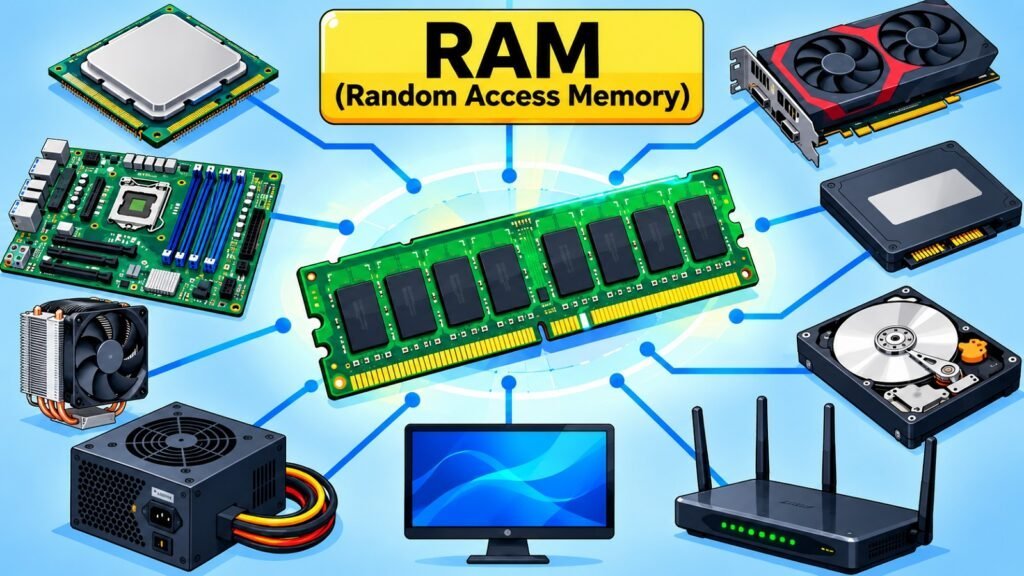
RAM, which stands for Random Access Memory, is one of the most important components of computing hardware. Every time a computer opens a program or runs an operating system process, it relies on RAM to hold that data within immediate reach of the processor. Without RAM, even the most powerful CPU would spend most of its time waiting for data from far slower storage, reducing a high-performance machine to a bottleneck.
The differentiation between RAM and long-term storage warrants early clarification. Storage devices maintain data indefinitely, regardless of power availability. RAM preserves data exclusively during system operation. This transient characteristic represents an intentional design decision that enables RAM to achieve performance velocities that persistent storage mechanisms cannot attain. The processor relies upon RAM as operational workspace where executing instructions and active data remain accessible within nanoseconds rather than milliseconds.
RAM’s importance extends well beyond personal computers. Servers handling thousands of simultaneous requests depend on large RAM allocations to maintain performance under load. Smartphones carry RAM inside system-on-chip designs, balancing capability against power constraints. Workstations used for engineering simulation, video production, and scientific computing require substantial RAM to process large data sets without repeatedly reaching slower storage. Across all these platforms, RAM plays the same fundamental role: providing working memory that keeps computing systems responsive.
Understanding RAM meaningfully requires more than knowing a capacity figure or data rate. Its fundamentals, architecture, types, generations, performance characteristics, capacity and configuration options, compatibility requirements, and applications each form a distinct layer of knowledge. Together they explain not only what RAM does but why it behaves as it does, and why evaluating RAM involves more than comparing numbers on a specification sheet. This article builds each layer progressively, combining technical principles, research-based insights, and practical reasoning to serve as a reliable reference across experience levels.
Random Access Memory: Eight Aspects Covered in This Article
| Aspect | What It Covers |
| Fundamentals | Core concepts, volatility, working memory, and Random Access Memory’s role in computing |
| Architecture | Internal organization, memory cells, addressing, banks, and channels |
| Types | Static Random Access Memory, Dynamic Random Access Memory, Synchronous Dynamic Random Access Memory, and other major memory technologies |
| Generations | Evolution from Synchronous Dynamic Random Access Memory through DDR to DDR5 and key changes at each stage |
| Performance | Data rate, bandwidth, latency, timings, and how to interpret specifications |
| Capacity & Configuration | Module options, channels, workload-based sizing, and configuration tradeoffs |
| Compatibility & Upgrades | Generation, form factor, voltage, motherboard, and CPU compatibility factors |
| Applications & Future | Random Access Memory across computing platforms and emerging memory directions |
1. RAM Fundamentals: Understanding Computer Working Memory
RAM is the component responsible for holding the data and instructions a processor is actively using. The term “random access” refers to the ability to read or write any memory location directly, without passing through all preceding locations. This contrasts with sequential storage media, where access time depends on physical position. Because RAM allows the processor to reach any location with equal speed, it functions as a fast and flexible working space.
Volatility is the defining physical characteristic of Random Access Memory. When power is removed, stored data disappears. This property follows from how Random Access Memory stores data at the circuit level, using capacitors or transistors that require continuous power to maintain their state. Volatility separates RAM from non-volatile storage, and it contributes to RAM’s speed advantage because volatile storage circuits can be designed for rapid access rather than for retention without power.
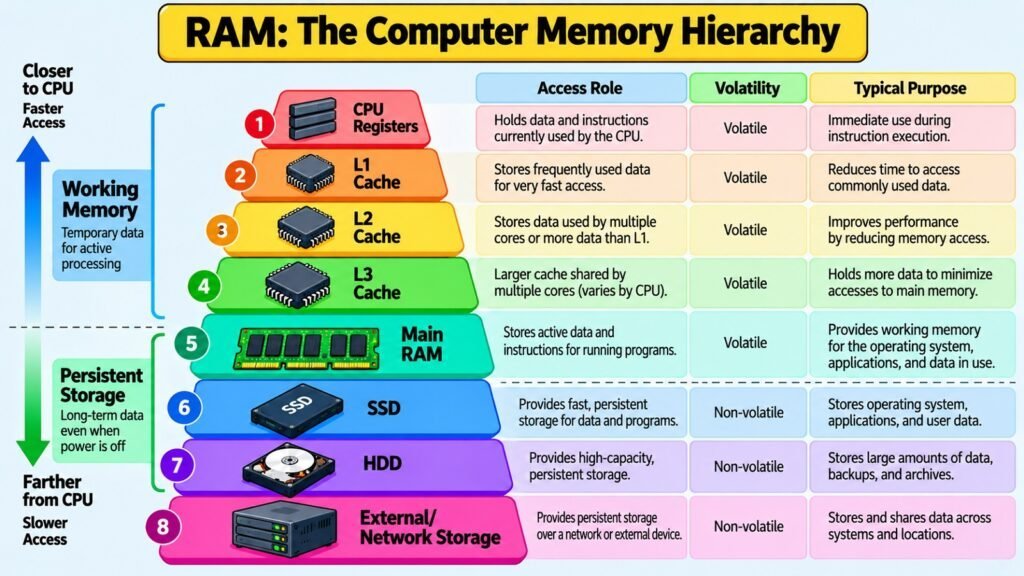
Within the memory hierarchy of modern computers, RAM sits below CPU registers and cache in speed and proximity to the processor, but well above secondary storage in both respects. CPU registers and on-chip cache operate at very high speeds but are limited in capacity. Random Access Memory provides a much larger working space at speeds that, while slower than cache, remain dramatically faster than persistent storage. This hierarchy exists because building a system entirely from the fastest memory components available would be physically and economically impractical.
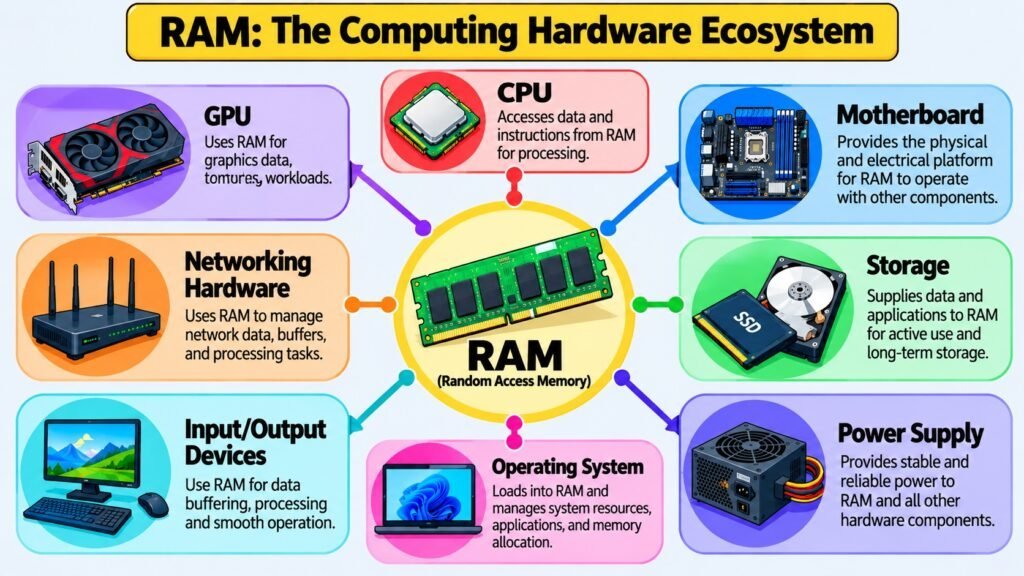
The relationship between RAM and the CPU is mediated by the memory controller, which manages transfers between the processor and the RAM modules. Modern processors integrate the memory controller on-chip, reducing latency compared to earlier chipset-based designs. When an application runs, the operating system loads relevant code and data from storage into RAM, where the processor can reach it quickly. Multitasking works by keeping multiple programs resident in RAM simultaneously, allowing fast switching without repeatedly reading from storage. When RAM is exhausted, systems begin paging to slower storage and performance drops noticeably.
Random Access Memory: Eight Fundamental Concepts and Their Significance
| Concept | Significance |
| Random Access | Any memory location can be reached directly, enabling fast and flexible data retrieval |
| Volatility | Data is lost when power is removed; enables circuit designs optimized for speed |
| Working Memory | RAM holds active data and instructions for the processor during program execution |
| Memory Hierarchy | RAM bridges fast but limited CPU cache and slower but larger persistent storage |
| CPU Interaction | Memory controller manages data transfers between the processor and RAM modules |
| Active Data | Programs and OS processes load into RAM to allow rapid processor access |
| Multitasking | Multiple programs remain in RAM simultaneously, enabling responsive task switching |
| Distinction from Storage | Storage retains data permanently; RAM provides temporary high-speed working space |
2. RAM Architecture: Exploring How Memory Is Organized
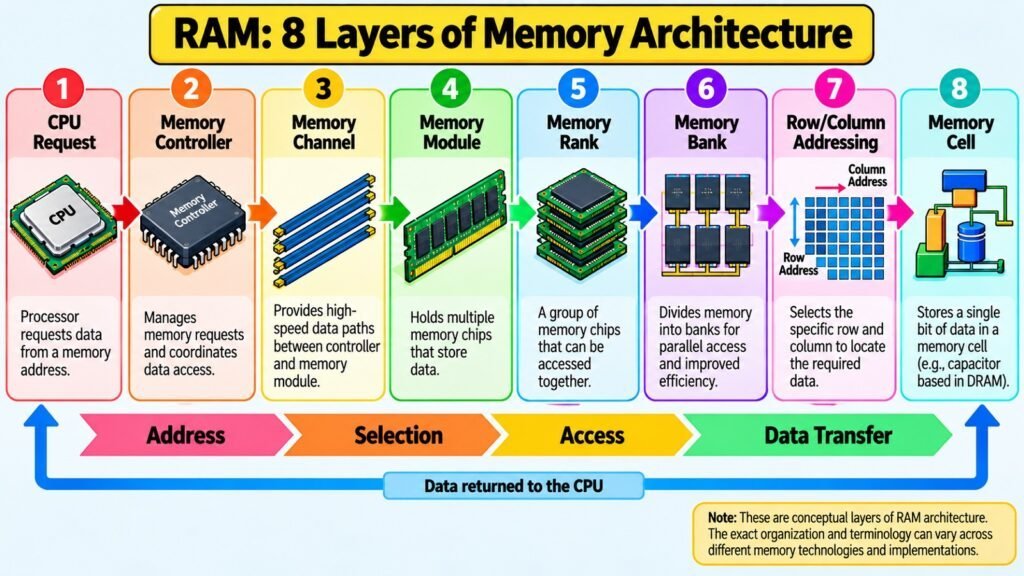
RAM stores data in a grid of memory cells, each holding a single bit. In DRAM, the dominant RAM technology in modern systems, each cell consists of a capacitor paired with a transistor. The capacitor holds charge representing a one or zero, and the transistor acts as a switch enabling the cell to be read or written. Because capacitors lose charge gradually, DRAM requires periodic refresh cycles to maintain stored data, introducing a small but measurable overhead into memory operation.
Cells are arranged in rows and columns to form a memory array. To access a specific cell, the memory controller sends a row address followed by a column address. This two-dimensional addressing scheme allows a large number of cells to be reached using relatively few address lines, making it efficient to scale capacity. When a row is activated, the entire row loads into a row buffer, and subsequent accesses within that row complete faster than accesses requiring a new row to be opened.
Memory arrays are organized into banks, which are independent sections that can be in different states simultaneously. While one bank completes a read, another can be precharging for its next access. This parallelism reduces the effective latency experienced by the memory controller by staggering operations across banks rather than waiting for each to complete sequentially.
Beyond banks, modern modules organize chips into ranks accessed together to deliver a full data word. A module may contain a single rank or multiple ranks, affecting capacity and how the controller interacts with it. Channels provide another layer of parallelism: a dual-channel configuration allows two modules to be addressed simultaneously, doubling the data path between the memory controller and Random Access Memory. This explains why identical capacity installed in the correct slot pairing can deliver measurably different bandwidth depending on whether one or two channels are active.
Random Access Memory: Eight Architectural Elements and Their Roles
| Architectural Element | Role in RAM Operation |
| Memory Cell | Stores a single bit; Dynamic Random Access Memory uses a capacitor-transistor pair to hold charge |
| Memory Array | Grid of cells addressed by row and column coordinates for efficient access |
| Row Buffer | Holds an activated row for faster repeated access to cells within that row |
| Bank | Independent memory section enabling parallel operations to reduce effective latency |
| Rank | Group of chips on a module accessed together to supply a full data word |
| Channel | Independent data path; dual-channel doubles bandwidth between controller and Random Access Memory |
| Memory Bus | Physical connection carrying addresses and data between Random Access Memory and the memory controller |
| Memory Controller | Manages timing, addressing, refresh, and data transfer for all connected RAM |
3. RAM Types: Exploring Major Memory Technologies
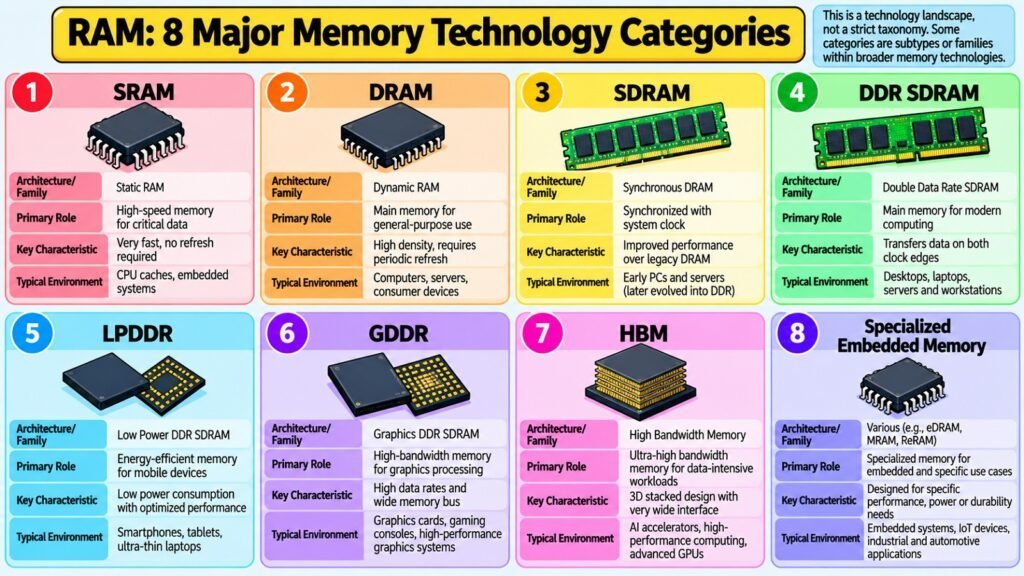
The two foundational RAM technologies are SRAM and DRAM, and the distinction between them explains why different RAM types exist within computing systems rather than a single universal design.
SRAM, or Static Random Access Memory, stores each bit in a flip-flop circuit built from multiple transistors. Because the flip-flop holds its state without requiring refresh cycles, SRAM is faster and simpler to interface with than DRAM. It also consumes more silicon area per bit and costs significantly more per unit of capacity. These characteristics make SRAM ideal where speed is critical and capacity requirements are modest, which is why processors use it for registers and on-chip cache. The cost and die area required to build gigabytes of SRAM make it impractical for main system memory.
DRAM, or Dynamic RAM, uses the capacitor-transistor cell described in the previous section. Its greater cell density and lower cost per bit make it practical for large main memory allocations. The trade-off is the refresh overhead and more complex interface required to manage access timing sequences. DRAM is the foundation of virtually all system RAM in personal computers, laptops, servers, and mobile devices.
SDRAM, or Synchronous DRAM, introduced synchronization with the system clock, allowing the memory controller and RAM to coordinate transfers more efficiently than earlier asynchronous designs. This reduced wasted cycles and enabled predictable timing that made higher transfer rates achievable. SDRAM established the synchronous interface that all subsequent mainstream RAM generations have continued to use.
Within specific domains, other technologies appear. LPDDR is engineered for mobile devices and thin laptops where power efficiency rivals performance in importance. ECC RAM adds logic to detect and correct single-bit errors, essential in servers and workstations where data integrity cannot be compromised. HBM uses stacked die architecture and wide interfaces to deliver very high bandwidth for graphics processors and high-performance computing accelerators.
Random Access Memory: Eight Types and Their Defining Characteristics
| Random Access Memory Type | Defining Characteristic or Typical Role |
| Static Random Access Memory | Flip-flop-based storage; no refresh needed; used in CPU registers and cache |
| Dynamic Random Access Memory | Capacitor-based storage; high density and low cost; foundation of all system Random Access Memory |
| Synchronous Dynamic Random Access Memory | Synchronous with system clock; enables predictable, efficient data transfers |
| Double Data Rate Synchronous Dynamic Random Access Memory | Transfers on both clock edges, doubling effective data rate over standard Synchronous Dynamic Random Access Memory |
| Low Power Double Data Rate | Low-power Dynamic Random Access Memory for mobile devices and energy-constrained systems |
| Error-Correcting Code Random Access Memory | Includes error-detection and correction logic; used in servers and workstations |
| High Bandwidth Memory | Stacked die with wide interface; delivers very high bandwidth for GPUs and HPC |
| Graphics Double Data Rate | Graphics-optimized Dynamic Random Access Memory designed for high bandwidth in discrete graphics cards |
4. RAM Generations: Tracing the Evolution of Memory Technology
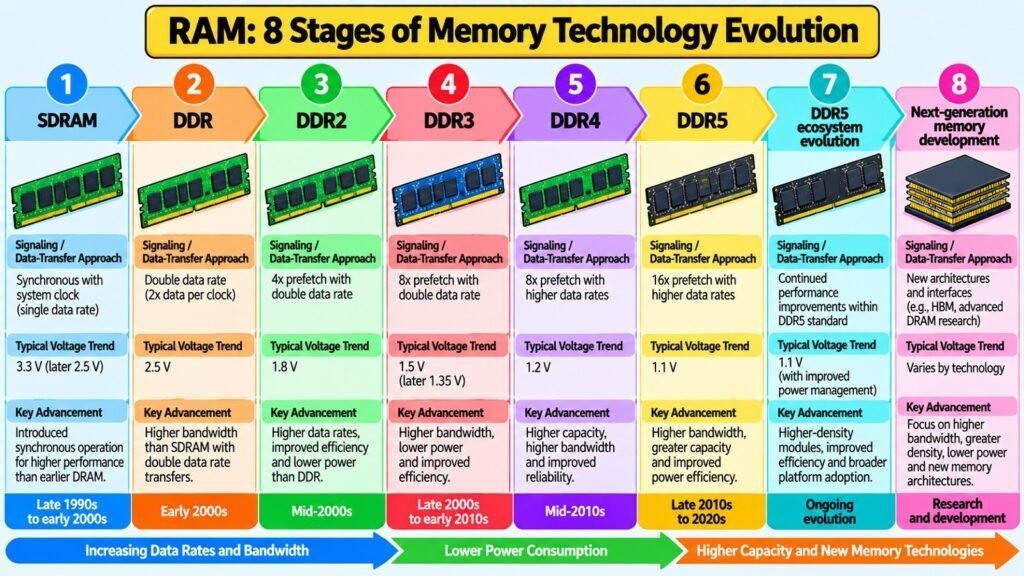
The progression of mainstream RAM generations reflects decades of engineering effort to deliver more bandwidth, lower voltage, and greater capacity as processors consistently outpaced available memory subsystems. Each generation introduced signaling and architectural changes that required new motherboard designs and made earlier modules incompatible.
SDRAM, standardized by JEDEC in the 1990s, established synchronous operation as the baseline. It transferred data once per clock cycle, setting a clear bandwidth ceiling relative to its operating frequency.
DDR SDRAM addressed that ceiling by transferring data on both the rising and falling edges of the clock signal. This doubled the effective data rate without requiring a proportional increase in clock frequency. DDR became the dominant system memory standard in the early 2000s, and the double-edge principle carried forward through every subsequent generation.
DDR2 increased the external bus speed while keeping the core clock rate proportionally lower, reducing power consumption and enabling higher data rates. DDR3 continued this approach with lower operating voltage and further improved bandwidth. DDR4 reduced voltage to 1.2V, reorganized bank architecture, and introduced per-bit DQ training to accommodate higher frequencies more reliably.
DDR5, standardized by JEDEC in 2020, represents a significant architectural revision. It moved power management circuitry onto the module itself, increased bank and sub-bank counts to support more parallel operations, doubled the burst length, and enabled substantially higher data rates and per-module capacities. Each change addressed specific bottlenecks that had become apparent as processor memory demand continued to grow.
RAM generations are not interchangeable. A DDR4 module will not fit a DDR5 slot because the key notch position differs between them. System compatibility requires that the processor, motherboard, and RAM all support the same generation, making generation awareness essential to any upgrade decision.
Random Access Memory: Eight Generations and Key Distinguishing Characteristics
| Generation or Stage | Key Distinguishing Characteristic |
| Synchronous Dynamic Random Access Memory | Introduced synchronous operation; transfers data once per clock cycle |
| DDR | Transfers on both clock edges, doubling bandwidth at the same operating frequency |
| DDR2 | Higher external bus speed and lower voltage than DDR; improved efficiency |
| DDR3 | Further reduced voltage (1.5V), higher data rates, improved power efficiency |
| DDR4 | 1.2V operation, improved bank architecture, higher density, per-bit DQ training |
| DDR5 | On-module power management, doubled burst length, higher bandwidth and density |
| LPDDR5 | Mobile-optimized DDR5 variant with aggressive power-saving states for batteries |
| HBM2/HBM3 | Stacked high-bandwidth memory with very wide interfaces for GPU and HPC use |
5. RAM Performance: Understanding Speed, Bandwidth & Latency
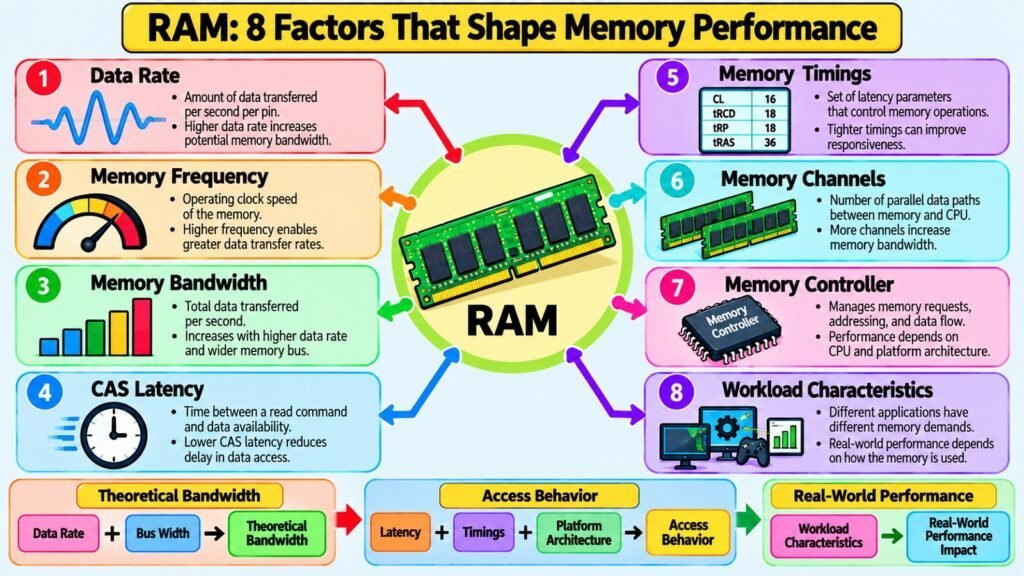
RAM performance is commonly reduced to a single data rate figure, but evaluating it properly means understanding several interrelated concepts that together determine how quickly the memory subsystem delivers data under real workloads.
Data rate describes the number of transfers per second, expressed in megatransfers per second. The number in a module designation such as DDR5-6400 refers to this figure. Frequency is related but distinct: DDR5-6400 corresponds to a clock frequency of 3200 MHz because DDR transfers on both clock edges. Confusing frequency with data rate is a common source of specification misreading.
Bandwidth is the product of data rate and interface width. A standard DDR module uses a 64-bit data bus, making the theoretical peak bandwidth of a DDR5-6400 module approximately 51.2 gigabytes per second per channel. Dual-channel configurations double this by providing two independent 64-bit paths. These theoretical figures are useful for comparison but rarely reflect bandwidth available under real conditions because cache behavior, memory controller overhead, and workload patterns all intervene.
Latency describes the delay between requesting data from Random Access Memory and receiving it. CAS latency, expressed in clock cycles, is the most cited timing figure, but it interacts with tRCD, tRP, and tRAS to determine the full access delay sequence. Higher-frequency modules often carry higher CAS latency in clock cycles, so comparing absolute latency in nanoseconds provides a more useful cross-generation view.
The significance of RAM performance varies by workload. Applications repeatedly accessing cache-resident data are largely insensitive to RAM bandwidth or latency. Large-data workloads such as video editing and scientific simulation benefit from higher bandwidth. Latency-sensitive tasks respond more visibly to lower absolute latency in nanoseconds.
Random Access Memory: Eight Performance Factors and Their Significance
| Performance Factor | What It Means or Why It Matters |
| Data Rate (MT/s) | Transfers per second; the number in a module’s designation such as DDR5-6400 |
| Operating Frequency | Clock frequency in MHz; for DDR modules, the data rate divided by two |
| Memory Bandwidth | Data rate multiplied by bus width; total data transferable per second per channel |
| CAS Latency | Clock cycles from read command to first data output; the primary timing figure cited |
| Absolute Latency (ns) | CAS latency divided by frequency; allows true time-based comparison across generations |
| Memory Timings | tRCD, tRP, tRAS; additional delays that shape the full memory access sequence |
| Dual-Channel Bandwidth | Two channels double effective bandwidth between RAM and the memory controller |
| Workload Sensitivity | Bandwidth matters for large data workloads; latency matters more for random-access tasks |
6. RAM Capacity & Configuration: Balancing Memory Needs
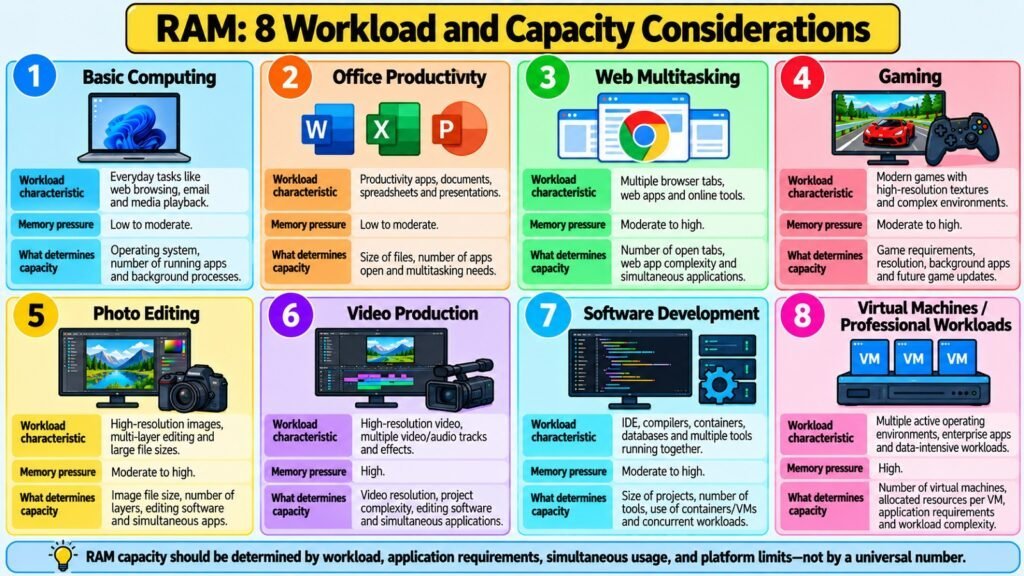
RAM capacity and configuration address different but related aspects of memory. Capacity determines how much active data a system can hold in RAM at one time. Configuration determines how that capacity is physically and logically arranged, which affects both performance and compatibility.
When a system runs out of Random Access Memory, the operating system moves the least recently used memory pages to storage in a process called paging. Accessing paged memory from storage is orders of magnitude slower than from RAM, and a system under memory pressure exhibits noticeable slowdowns even when the processor and storage are otherwise capable. The right capacity depends entirely on the workload rather than a single universal figure.
Everyday productivity tasks such as web browsing, email, and document editing function well with moderate RAM on current operating systems. Demanding workloads including video editing, software compilation, virtual machines, and large data set processing impose substantially higher requirements. Systems running multiple virtual machines simultaneously may need many additional gigabytes simply to give each environment a functional working allocation.
Memory modules are available in different form factors. Standard desktop motherboards use DIMM modules with 288 pins in DDR4 and DDR5 generations. Laptops and compact systems use SO-DIMM modules, which carry the same electrical specifications in a physically smaller package. The form factor must match the target system’s slots.
Memory channels allow two or more modules to be addressed simultaneously, increasing bandwidth by providing parallel data paths. Enabling dual-channel operation requires following the motherboard’s documented slot pairing guidelines, which vary by design. Adding a second matched module to a system running single-channel can increase bandwidth noticeably in bandwidth-sensitive workloads even when total capacity remains unchanged.
Random Access Memory: Eight Capacity and Configuration Concepts and Their Significance
| Concept | Practical Significance |
| Random Access Memory Capacity | Determines how much active data and how many applications remain in working memory |
| Paging and Swapping | OS moves Random Access Memory pages to storage when capacity is exhausted, causing major slowdowns |
| Workload-Based Sizing | Required capacity depends on workload type, not a single universal recommendation |
| DIMM Form Factor | 288-pin desktop module used in DDR4 and DDR5 full-size motherboard slots |
| SO-DIMM Form Factor | Compact laptop module; same electrical specs in a physically smaller package |
| Single-Channel Mode | One active data path between memory controller and Random Access Memory |
| Dual-Channel Mode | Two matched modules in correct slots doubles bandwidth with a parallel data path |
| Memory Density | Capacity per chip; higher density enables more Random Access Memory within the same slot count |
7. RAM Compatibility & Upgrades: Choosing and Expanding Memory
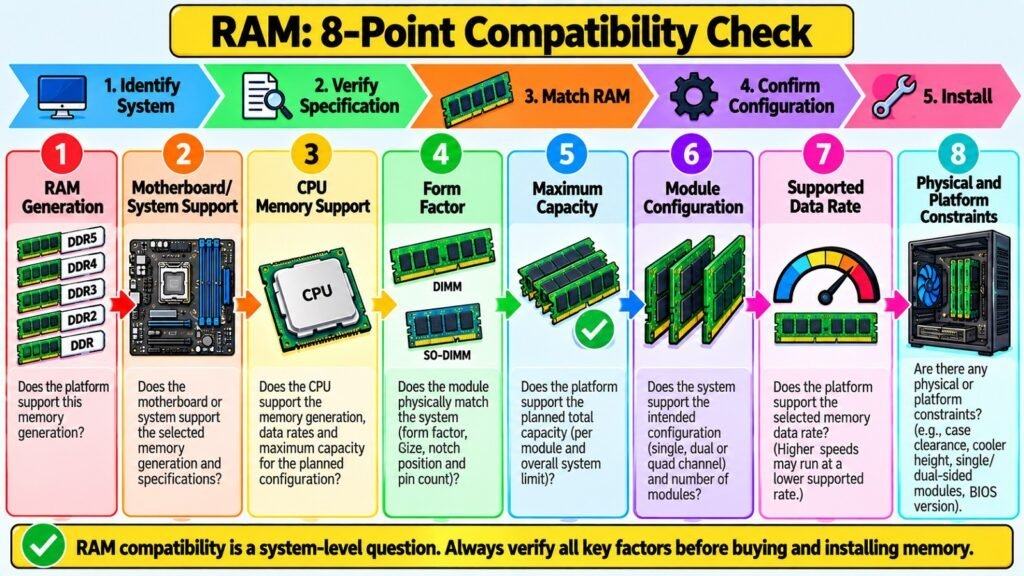
RAM compatibility is the practical gateway between understanding memory specifications and successfully upgrading a real system. A module with impressive specifications will not function correctly if it does not match the platform’s requirements. Compatibility depends on several factors that must all be satisfied simultaneously, and overlooking any one of them can prevent a system from booting or cause it to run at reduced specifications.
The RAM generation represents the most critical compatibility factor. A motherboard engineered for DDR4 cannot accommodate DDR5 modules, and conversely. Physical incompatibility is ensured through the module’s key notch positioning, which varies across generations. The generation that a system supports is determined by both the motherboard and the CPU, as the integrated memory controller designates which generation it has been validated to support.
CPU documentation specifies validated data rates for standard JEDEC operation and the maximum rates achievable through extended profiles called XMP on Intel platforms and EXPO on AMD platforms. Modules rated above native JEDEC speed require the appropriate extended profile to be enabled in system firmware. Not all processors support the same maximum data rates even within the same memory generation, so consulting CPU-specific memory support documentation is important.
Motherboard specifications define the number of slots, maximum total capacity, supported data rates, and the slot configuration required for dual-channel operation. Maximum supported capacity per slot is determined by the CPU memory controller rather than by the Random Access Memory module itself, so a high-capacity module that exceeds the per-slot limit will not be recognized as expected.
Form factor must match the slot type, since DIMM and SO-DIMM connectors differ in size and pin count. Voltage should also be verified because standard DDR4 modules require 1.2V and DDR5 modules require 1.1V, while high-performance XMP and EXPO modules may specify slightly higher voltages that must fall within the motherboard’s supported range.
Random Access Memory Compatibility Checklist: Eight Factors to Verify
| Compatibility Factor | What to Verify |
| Random Access Memory Generation | Confirm motherboard and CPU support DDR4 or DDR5; generations are not interchangeable |
| Physical Form Factor | Match DIMM for desktops or SO-DIMM for laptops; connector sizes differ |
| CPU Memory Support | Check validated data rates and maximum supported capacity per channel |
| Motherboard Specifications | Verify maximum capacity, supported data rates, slot count, and channel configuration |
| XMP / EXPO Profile Support | Confirm extended profile support if running above JEDEC speeds |
| Voltage Compatibility | Ensure module voltage requirements fall within the motherboard’s supported range |
| Slot Configuration | Follow motherboard documentation for correct slot pairing in dual-channel operation |
| Module Capacity per Slot | Verify the system supports the intended per-module capacity, not only the total |
8. RAM Applications & Future: Exploring Memory’s Next Direction
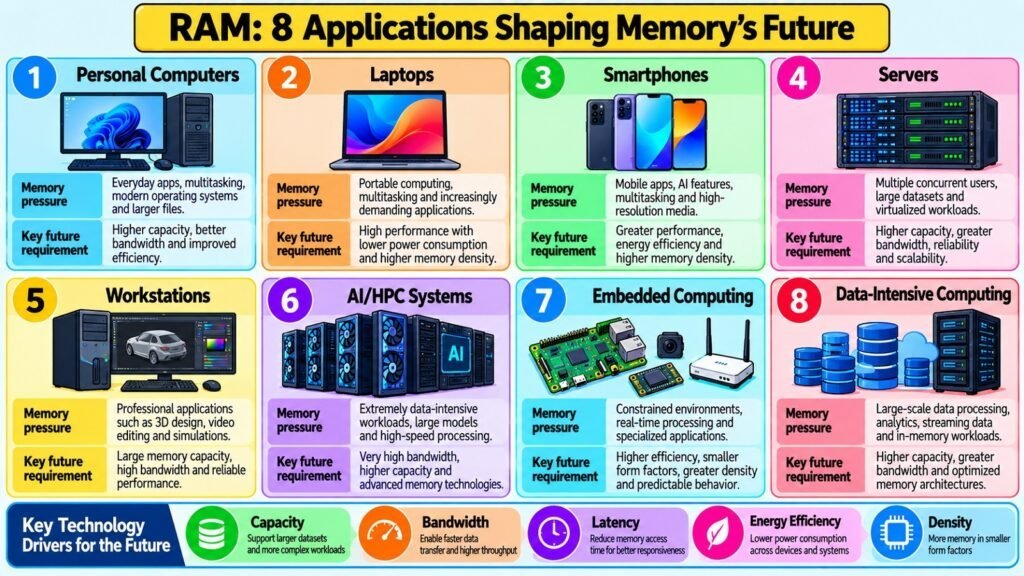
RAM serves different roles across the computing environments where it appears, shaped by each platform’s specific demands and the trade-offs between capacity, speed, power, and cost.
Desktop computers and workstations use DDR-series DIMM modules in configurations from modest everyday allocations to very large amounts for professional content creation, simulation, and software development. Servers rely on high-capacity DDR modules, typically with ECC error correction, and support many memory slots across multiple channels to supply processors handling large numbers of simultaneous workloads. Server memory is engineered for sustained bandwidth and reliability rather than single-thread peak latency.
Laptops and mobile devices use SO-DIMM modules or, increasingly, memory chips soldered directly to the system board as part of integrated designs. Smartphones and tablets use LPDDR variants inside system-on-chip packages, where low power consumption and physical compactness matter as much as performance. Embedded systems may use small quantities of Static Random Access Memory for speed and refresh-free operation, or specialized Dynamic Random Access Memory suited to specific application constraints.
High-performance computing and machine learning workloads have driven development of High Bandwidth Memory, which achieves its performance through stacked die architecture and a very wide memory interface. HBM is used in graphics processors and HPC accelerators where data throughput between compute units and memory is the primary constraint on performance.
Several technology directions are advancing in parallel. Compute Express Link is an interconnect standard that allows memory to be expanded or pooled across devices using PCIe infrastructure, enabling more flexible configurations in servers and data centers. 3D-stacked Dynamic Random Access Memory and die-stacking integration with processors reduce the physical distance data must travel, lowering latency and increasing bandwidth. Processing-in-memory designs explore moving computation closer to the data, reducing how much must travel between memory and processor. These developments reflect a consistent challenge: as workloads grow more data-intensive, the relationship between processing and memory becomes increasingly central to system capability.
Random Access Memory: Eight Application Areas and Future Directions
| Area or Direction | Why Random Access Memory Matters Here |
| Desktop Computers | General-purpose DDR RAM supports multitasking, productivity, and gaming workloads |
| Servers | High-capacity ECC DDR handles many simultaneous processes with error-corrected reliability |
| Laptops | SO-DIMM or soldered LPDDR balances performance with space and power constraints |
| Smartphones | LPDDR in system-on-chip designs delivers performance within tight power and size limits |
| HPC and AI Accelerators | HBM provides the extreme bandwidth required by massively parallel computation |
| Embedded Systems | Small Static Random Access Memory or specialized Dynamic Random Access Memory meets the constrained needs of dedicated hardware |
| CXL Memory Expansion | PCIe-based pooled memory enables flexible, scalable Random Access Memory in servers and data centers |
| 3D Stacking and PIM | Die-stacking and processing-in-memory reduce latency and data movement in future systems |
Conclusion: RAM – The Future of Computing Hardware
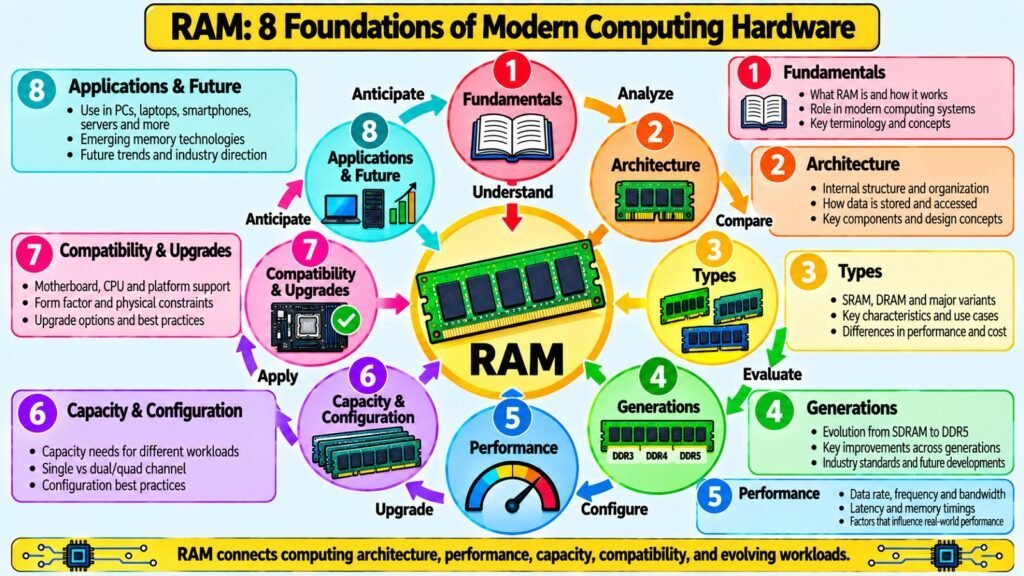
RAM is one of the most important components of computing hardware because it bridges the gap between processor speed and the demands of running real software. The eight aspects explored in this article form an interconnected framework, and understanding how they relate to one another provides a more complete picture than any single element can offer alone.
The fundamentals establish why RAM exists: as volatile working memory the processor can reach without the delays imposed by persistent storage. Architecture explains how the internal organization of cells, banks, ranks, and channels shapes how efficiently data flows between RAM and the CPU. The distinction between types clarifies why SRAM and DRAM serve different roles, and why specialized variants such as LPDDR, ECC, and HBM emerge from specific performance and reliability requirements. Understanding generations shows how memory technology has advanced in disciplined stages, each responding to demands the previous generation could no longer satisfy.
Performance analysis moves beyond single numbers to show how data rate, bandwidth, latency, and timings interact and why their relative importance varies by workload. Capacity and configuration reasoning provides a workload-oriented framework that avoids universal rules in favor of understanding actual memory pressure. Compatibility knowledge enables informed upgrade decisions by identifying the factors that must align for a module to function correctly. Applications and future direction anchor all of this in the real environments where RAM operates today and points toward where memory technology is heading.
The central insight is that effective RAM evaluation depends on reading specifications in context. A data rate figure, a capacity number, and a CAS latency value are each meaningful only when interpreted against a workload, a platform, and a system configuration. RAM will remain central to computing hardware as processors grow more powerful, workloads become more data-intensive, and new memory architectures emerge to close the gap between computation and data access.
Random Access Memory: A Final Reference Summary of Eight Aspects and Their Takeaways
| Random Access Memory Aspect | Central Takeaway |
| Fundamentals | Volatile working memory giving the CPU fast access to active data and instructions |
| Architecture | Organization of cells, banks, and channels shapes how efficiently data is delivered |
| Types | Static Random Access Memory serves as cache; Dynamic Random Access Memory and its variants serve system memory and specialized needs |
| Generations | Each generation advanced bandwidth, density, and efficiency to meet growing demands |
| Performance | Speed, bandwidth, and latency interact; workload type determines which factor matters |
| Capacity & Configuration | Right amount and arrangement of Random Access Memory depends on workload, not a universal rule |
| Compatibility & Upgrades | Generation, form factor, CPU support, and board specs must all align for Random Access Memory to work |
| Applications & Future | Random Access Memory underpins all computing platforms and continues to evolve through new architectures |