Table of Contents
Introduction: 8 Best Laptops in 2026 – Finding the Right Choice
Credit: iken3
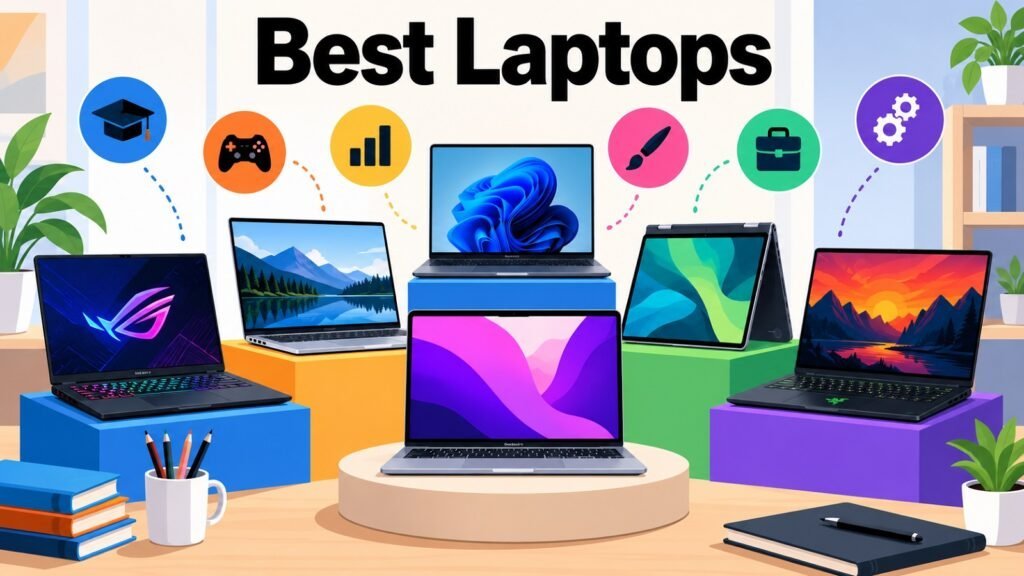
The global laptop market has never offered more variety — or made choosing harder. Today’s best laptop brands offer everything from featherweight business ultraportables to desktop-rivaling gaming machines, and the right pick depends on your budget, workflow, and how you carry your day. This guide cuts through the noise with eight carefully selected models that cover every major use case in 2026.
The Apple MacBook Air with M5 leads as Best Overall. Joining it are the Samsung Galaxy Book6 Ultra (Best Premium/Creator), Dell XPS 14 2026 (Best Premium Productivity), ASUS ROG Zephyrus G14 2026 (Best Portable Gaming), Lenovo ThinkPad X13 Gen 7 (Best Business), HP OmniBook X Flip 14 Next Gen AI PC (Best 2-in-1), Acer Swift Go 14 AI (Best Budget/Student), and Razer Blade 16 2026 (Best High-Performance Gaming). Together they span a wide range of budgets, form factors, and performance levels. Before deciding, weigh the processor, display, battery life, graphics, portability, and overall value against your own priorities. The table below offers a quick snapshot.
8 Best Laptops at a Glance
| 8 Best Laptops | Category |
| Apple MacBook Air with M5 | Best Overall |
| Samsung Galaxy Book6 Ultra | Best Premium/Creator |
| Dell XPS 14 (2026) | Best Premium Productivity |
| ASUS ROG Zephyrus G14 (2026) | Best Portable Gaming |
| Lenovo ThinkPad X13 Gen 7 | Best Business Laptop |
| HP OmniBook X Flip 14 Next Gen AI PC | Best 2-in-1 |
| Acer Swift Go 14 AI | Best Budget/Student |
| Razer Blade 16 (2026) | Best High-Performance Gaming |
1. Best Laptops: Apple MacBook Air with M5 — The Choice for Most People
Credit: iken3
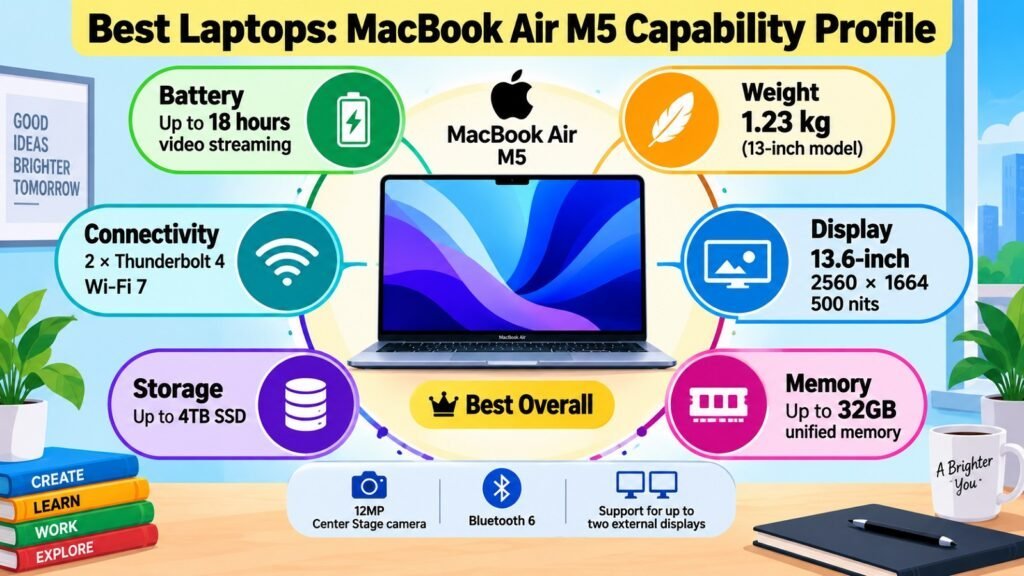
Among the best laptops in 2026, the Apple MacBook Air with M5 earns the top spot through an exceptional balance of performance, portability, and battery life. The M5 chip delivers roughly 14–22% faster CPU performance than M4, and the fanless design remains completely silent under all typical workloads. Starting at $1,099 for the 13-inch — now with 16 GB of unified memory and 512 GB storage as standard — it offers strong value in the premium segment. One key thing to know before buying: RAM and storage are soldered and cannot be upgraded later, so configure generously upfront. The 60 Hz display, while sharp and vivid, lacks ProMotion.
Best Laptops: Apple MacBook Air with M5: Major Specifications
| Specification | Details |
| 🧠 Processor (CPU) | Apple M5; 10-core CPU (4 super cores + 6 efficiency cores); 16-core Neural Engine; 153 GB/s memory bandwidth; LPDDR5X-9600 |
| 🎮 Graphics (GPU) | Apple M5 integrated GPU; 8-core (base) or 10-core (upgraded); hardware ray tracing; hardware-accelerated H.264, HEVC, ProRes, AV1 |
| 💾 RAM | 16 GB unified memory standard; configurable to 24 GB or 32 GB; soldered — not upgradeable |
| 🗄️ Storage | 512 GB SSD standard; configurable to 1 TB, 2 TB, or 4 TB; soldered — not upgradeable |
| 🖥️ Display | 13.6-inch Liquid Retina IPS; 2560×1664 at 224 ppi; 60 Hz; 500 nits; P3 wide color; True Tone; no ProMotion |
| 🔋 Battery & Charging | 53.8 Wh; up to 18 hrs video / 15 hrs web; 40W MagSafe 3 adapter included; fast-charge capable with 70W+ USB-C |
| 🌡️ Thermals & Cooling | Fully fanless; passive cooling via aluminum chassis; completely silent under all workloads |
| 🔌 Ports & Connectivity | 2× Thunderbolt 4 / USB4 (40 Gb/s); MagSafe 3; 3.5 mm jack; Wi-Fi 7; Bluetooth 6; no USB-A, HDMI, or SD slot |
| 🛡️ Build & Features | Recycled aluminum; Magic Keyboard with Touch ID; Force Touch trackpad; 12 MP Center Stage webcam; 4-speaker Spatial Audio |
| ⚖️ Weight & Dimensions | 2.7 lbs (1.23 kg); 11.97×8.46×0.44 in (30.41×21.5×1.13 cm) |
Best Laptops: Apple MacBook Air with M5 – User Type Recommendation: Who Should Buy It?
| User Type | Is This Laptop a Good Fit? Why? |
| 🎓 Students | ✅ — All-day battery, lightweight, competitive starting price, handles coursework effortlessly. |
| 💼 Business Professionals | ✅ — Silent, long battery, premium build; hub needed for USB-A or HDMI. |
| 🏠 Everyday Users | ✅ — Handles all everyday tasks with ease; battery rarely needs mid-day charging. |
| 🎨 Content Creators | ✅ — Strong for photo/video editing; 60 Hz display and no discrete GPU limit the most demanding 3D workflows. |
| 🎮 Gamers | ⚠️ — Improved M5 GPU; limited by macOS game library and no discrete GPU. |
| 👨💻 Developers & Power Users | ✅ — Fast CPU, 16 GB standard RAM, excellent keyboard; size RAM and storage at purchase. |
Best Laptops: Apple MacBook Air with M5 – Quick Pros and Cons
| Pros | Cons |
| ✅ Up to 18 hrs battery; fanless and completely silent | ❌ RAM and storage soldered — not upgradeable |
| ✅ M5 chip: 14–22% faster CPU vs M4 | ❌ Only 2 Thunderbolt ports; no USB-A, HDMI, or SD slot |
| ✅ 16 GB RAM + 512 GB SSD now standard | ❌ 60 Hz display; no ProMotion |
| ✅ Lightweight at 1.23 kg; premium recycled aluminum build | ❌ Limited macOS gaming library vs Windows |
2. Best Laptops: Samsung Galaxy Book6 Ultra — Pick for Premium Creators
Credit: iken3
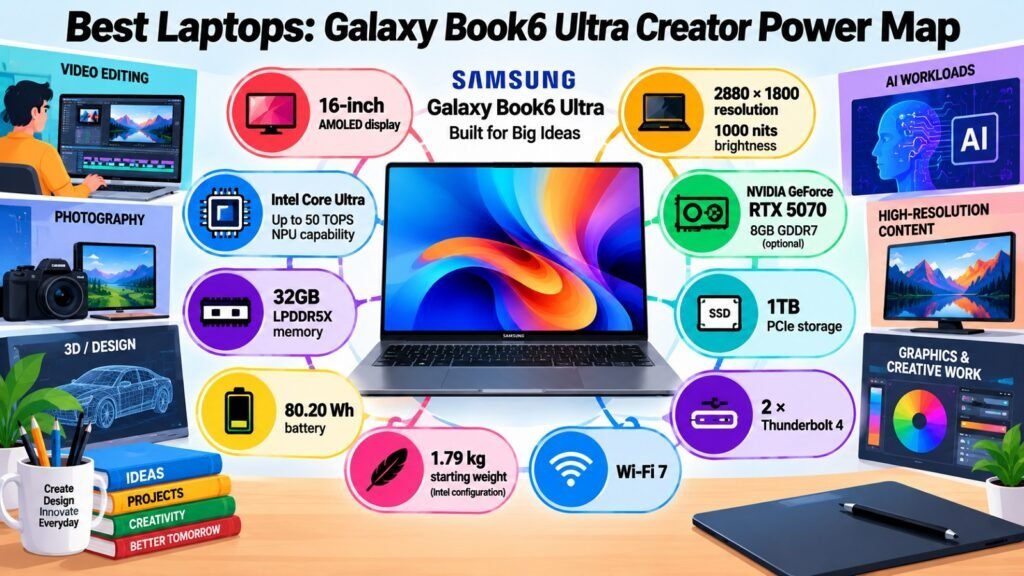
The Samsung Galaxy Book6 Ultra stands among the best laptops for creators and power users, combining Intel Core Ultra Series 3 performance, an NVIDIA RTX 50-series dedicated GPU, and a vivid 16-inch Dynamic AMOLED 2X display. It targets users who handle video editing, 3D rendering, and AI-accelerated workflows daily. Pricing starts around $2,449, climbing with higher GPU and storage options. Before buying, note that memory is soldered — the capacity chosen at purchase is permanent. Also worth knowing: the webcam does not support Windows Hello face recognition; only the fingerprint reader handles biometric login, which is a notable gap at this price.
Best Laptops: Samsung Galaxy Book6 Ultra — Major Specifications
| Specification | Details |
| 🧠 Processor (CPU) | Intel Core Ultra 7 356H (Panther Lake, Series 3); 16 cores/16 threads; up to 4.7 GHz; 50 TOPS NPU; configurable up to Core Ultra X9 |
| 🎮 Graphics (GPU) | NVIDIA GeForce RTX 5060 (8 GB GDDR7) or RTX 5070 (8 GB GDDR7); also available with Intel Arc Xe3 iGPU on select models |
| 💾 RAM | 16 GB, 32 GB, or 64 GB LPDDR5X; soldered — not upgradeable |
| 🗄️ Storage | 512 GB, 1 TB, or 2 TB PCIe NVMe SSD; empty expansion slot available |
| 🖥️ Display | 16-inch Dynamic AMOLED 2X touch; 2880×1800; 120 Hz adaptive; 1,000 nits HDR / 500 nits SDR; True Black; DCI-P3 |
| 🔋 Battery & Charging | 80.20 Wh (iGPU) / 83 Wh (Nvidia); up to 30 hrs video; 100 W charging; 63% in ~30 min |
| 🌡️ Thermals & Cooling | Upgraded vapor chamber; redesigned fans and vents; additional palm-rest heatsink; improved vs Galaxy Book4 Ultra |
| 🔌 Ports & Connectivity | 2× Thunderbolt 4 (USB-C); 1× USB-A; HDMI; built-in SD slot; 3.5 mm jack; Wi-Fi 7; Bluetooth 5.4 |
| 🛡️ Build & Features | Premium aluminum; haptic touchpad; fingerprint reader only (no IR webcam); 1080p webcam; Copilot+ PC; Galaxy AI; Windows 11 |
| ⚖️ Weight & Dimensions | 1.86 kg (4.1 lbs); 15.4×356.8×247.9 mm |
Best Laptops: Samsung Galaxy Book6 Ultra — User Type Recommendation: Who Should Buy It?
| User Type | Is This Laptop a Good Fit? Why? |
| 🎓 Students | ⚠️ — Capable but expensive and large for typical student needs; better suited to creative-programme students. |
| 💼 Business Professionals | ✅ — Strong performance, long battery, stunning display; no face recognition is a minor inconvenience. |
| 🏠 Everyday Users | ⚠️ — Excellent at everyday tasks but far more power (and cost) than most everyday users require. |
| 🎨 Content Creators | ✅ — RTX GPU, vivid AMOLED, up to 64 GB RAM — one of the best creator laptops available. |
| 🎮 Gamers | ✅ — RTX 5060/5070 handles modern titles at high settings; 120 Hz AMOLED adds to the experience. |
| 👨💻 Developers & Power Users | ✅ — High core count, up to 64 GB RAM, Thunderbolt 4, fast SSD — well-suited to demanding dev work. |
Best Laptops: Samsung Galaxy Book6 Ultra — Quick Pros and Cons
| Pros | Cons |
| ✅ 16-inch AMOLED: 120 Hz, 1,000 nit HDR, DCI-P3 | ❌ RAM soldered; capacity fixed at purchase |
| ✅ RTX 5060 or 5070 GPU for serious creative work | ❌ No Windows Hello face recognition |
| ✅ Up to 30 hrs video battery life | ❌ Starts at ~$2,449; climbs steeply with options |
| ✅ Thunderbolt 4, SD slot, and USB-A without a dongle | ❌ Heavy at 1.86 kg for a 16-inch ultraportable |
3. Best Laptops: Dell XPS 14 (2026) — Option for Premium Productivity
Credit: iken3
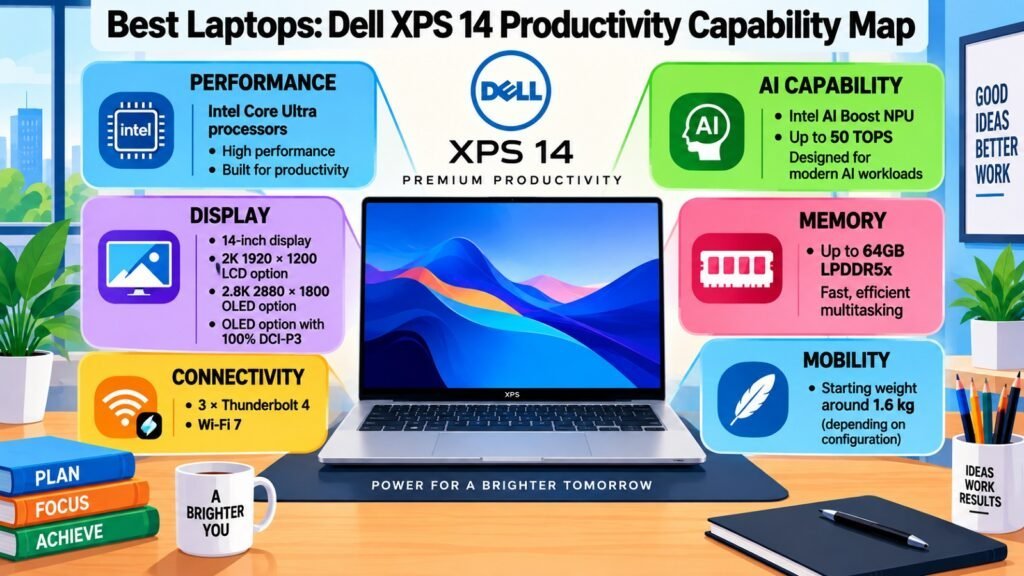
The Dell XPS 14 (2026) is a return to form for Dell’s flagship line and ranks among the best laptops for premium productivity. Intel’s Panther Lake Core Ultra platform brings a dramatic battery life improvement — over 16 hours and 45 minutes in WLAN testing, roughly 55% longer than the prior generation — paired with strong integrated Intel Arc B390 graphics and an optional Tandem OLED display. Pricing starts around $1,349. The laptop is heavily USB-C focused, with three Thunderbolt 4 ports as the only built-in connections, so regular USB-A or HDMI users will need a hub. There is no discrete GPU option.
Best Laptops: Dell XPS 14 (2026) — Major Specifications
| Specification | Details |
| 🧠 Processor (CPU) | Intel Core Ultra X7 358H (Panther Lake, Series 3); 16 cores/16 threads; P-Cores up to 4.8 GHz; 50 TOPS NPU; configurable up to Core Ultra X9 |
| 🎮 Graphics (GPU) | Intel Arc B390 integrated (Xe3); no discrete GPU option; ~RTX 4050-class per reviewer benchmarks; shared system memory |
| 💾 RAM | 16 GB DDR5-7467 base; configurable up to 64 GB LPDDR5X; soldered — not upgradeable |
| 🗄️ Storage | 512 GB or 1 TB PCIe Gen 4/5 NVMe; configurable up to 4 TB |
| 🖥️ Display | 14-inch InfinityEdge; Tandem OLED option: 2880×1800 (2.8K), 20–120 Hz; LCD option: 2560×1600, 1–120 Hz VRR; 16:10 |
| 🔋 Battery & Charging | 69.5–70 Wh; 16 hrs 45 min WLAN test (Notebookcheck); up to 31 hrs Netflix per Dell; USB-C PD via Thunderbolt 4 |
| 🌡️ Thermals & Cooling | Slim dual-fan in 14.62 mm chassis; keyboard surface ~91.5°F (33°C) under load; quiet in light use |
| 🔌 Ports & Connectivity | 3× Thunderbolt 4 / USB4 (USB-C, DisplayPort 2.1, PD); 3.5 mm jack; Wi-Fi 7; Bluetooth 6.0; no USB-A, HDMI, or SD slot built-in |
| 🛡️ Build & Features | CNC aluminum; 8 MP webcam with Intel IPU7; Windows Hello (webcam + fingerprint); backlit keyboard; MIL-STD tested; ENERGY STAR 9.0 |
| ⚖️ Weight & Dimensions | 3.00 lbs (1.36 kg) OLED model; 14.62 mm thick; 309.52×209.71 mm |
Best Laptops: Dell XPS 14 (2026) — User Type Recommendation: Who Should Buy It?
| User Type | Is This Laptop a Good Fit? Why? |
| 🎓 Students | ⚠️ — Excellent performance and battery; starting price is high for most students. |
| 💼 Business Professionals | ✅ — Long battery, lightweight, Windows Hello security; built-in port variety limited. |
| 🏠 Everyday Users | ✅ — Premium display and battery make it enjoyable; price exceeds what most everyday users need. |
| 🎨 Content Creators | ✅ — Tandem OLED is outstanding for photo/video; Arc B390 handles moderate editing but not heavy 3D. |
| 🎮 Gamers | ⚠️ — Arc B390 manages 1080p gaming at moderate settings; not a dedicated gaming machine. |
| 👨💻 Developers & Power Users | ✅ — Strong Panther Lake CPU, great battery, Thunderbolt 4 for fast external storage and displays. |
Best Laptops: Dell XPS 14 (2026) — Quick Pros and Cons
| Pros | Cons |
| ✅ 16+ hrs real-world battery — 55% improvement over prior gen | ❌ No USB-A, HDMI, or SD slot; hub required |
| ✅ Tandem OLED option with 20–120 Hz adaptive refresh | ❌ No discrete GPU — integrated Arc B390 only |
| ✅ Lightweight at 1.36 kg; refined keyboard after user feedback | ❌ Starts ~$1,349; climbs with OLED and higher CPU |
| ✅ Three Thunderbolt 4 ports with DisplayPort 2.1 | ❌ Base 16 GB RAM may feel tight for heavy multitasking |
4. Best Laptops: ASUS ROG Zephyrus G14 (2026) — Best for Portable Gaming
Credit: iken3
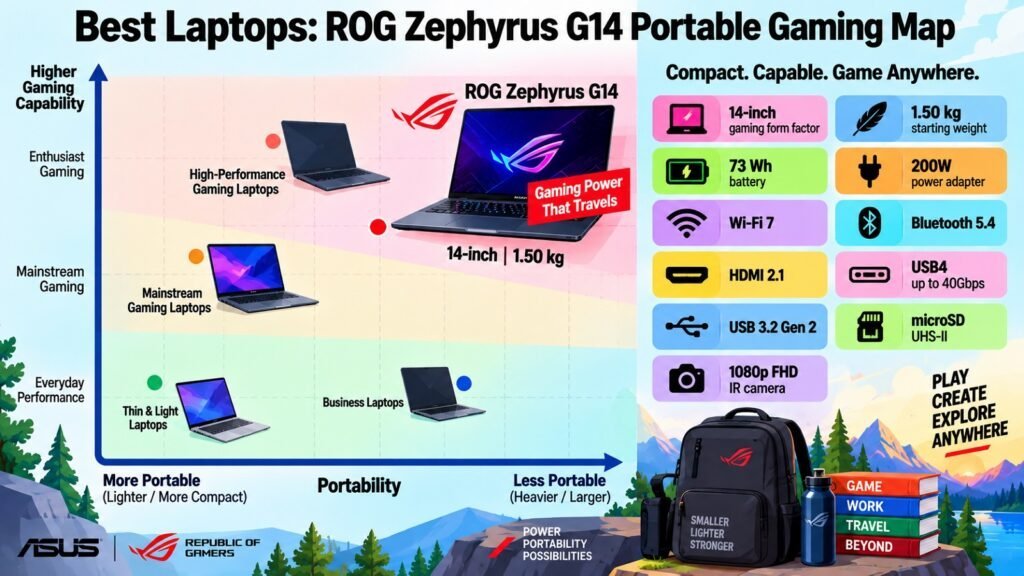
The ASUS ROG Zephyrus G14 (2026) stands apart from other laptops as the definitive portable gaming machine. Available in an Intel GU405 variant (up to Core Ultra 9 + RTX 5080) and an AMD GA403 (Ryzen AI 9 465 + RTX 5060), both fit into a CNC-machined aluminum chassis weighing around 1.5 kg. The Nebula HDR OLED display reaches 1,100 nits peak with VESA DisplayHDR 1000 True Black certification. The AMD configuration with RTX 5060 starts at approximately $1,899. RAM is soldered on both variants — it cannot be changed after purchase — so choosing the right memory configuration at the time of buying is essential.
Best Laptops: ASUS ROG Zephyrus G14 (2026) — Major Specifications
| Specification | Details |
| 🧠 Processor (CPU) | Intel GU405: Core Ultra 9 386H (Panther Lake); 16 cores, up to 4.9 GHz. AMD GA403: Ryzen AI 9 465; 10 cores/20 threads, up to 5.0 GHz; 50 TOPS NPU |
| 🎮 Graphics (GPU) | RTX 5060 (8 GB GDDR7), 5070 Ti, or 5080 (16 GB GDDR7) depending on config; Blackwell architecture; DLSS 4.5; G-SYNC Compatible |
| 💾 RAM | Intel GU405: up to 64 GB LPDDR5X-8533. AMD GA403: 32 GB LPDDR5X-8533. Soldered — not upgradeable |
| 🗄️ Storage | 1× M.2 2280 PCIe 4.0 user-replaceable SSD; 1 TB or 2 TB configurations |
| 🖥️ Display | 14-inch Nebula HDR OLED; 2880×1800 at 242 ppi; 120 Hz; 1,100 nits peak; DisplayHDR 1000 True Black; G-SYNC; anti-reflective |
| 🔋 Battery & Charging | 73 Wh; ~8–9 hrs productivity (Silent mode); 10+ hrs video; 0–50% in ~30 min; USB-C PD up to 100 W |
| 🌡️ Thermals & Cooling | Tri-Fan + dual exhaust heatsink (137 copper fins, 48,371 mm²); liquid metal compound; ROG Intelligent Cooling; ~53 dB at full load |
| 🔌 Ports & Connectivity | 3× USB 3.1 Gen 2 Type-A; 1× USB4 (40 Gb/s); 1× Thunderbolt 4; HDMI 2.1; SD card reader; 3.5 mm jack; Wi-Fi 7; Bluetooth 6.0 |
| 🛡️ Build & Features | CNC-machined aluminum; RGB backlit keyboard; 1080p IR webcam; Armoury Crate software |
| ⚖️ Weight & Dimensions | ~1.5 kg (3.31–3.48 lbs); 15.9–16.3 mm thick; 311×220 mm |
Best Laptops: ASUS ROG Zephyrus G14 (2026) — User Type Recommendation: Who Should Buy It?
| User Type | Is This Laptop a Good Fit? Why? |
| 🎓 Students | ⚠️ — Premium display and build, but price and gaming focus are beyond typical student needs. |
| 💼 Business Professionals | ⚠️ — Capable for productivity but gaming aesthetic may not suit corporate environments. |
| 🏠 Everyday Users | ⚠️ — Excellent display and adequate battery in productivity mode; more machine than most need. |
| 🎨 Content Creators | ✅ — 1,100 nit HDR OLED, dedicated RTX GPU, and up to 64 GB RAM make it a capable creator machine. |
| 🎮 Gamers | ✅ — Best portable gaming laptop in its class; RTX 5060–5080, 120 Hz OLED, G-SYNC, all at ~1.5 kg. |
| 👨💻 Developers & Power Users | ✅ — Strong multi-core, up to 64 GB RAM, full port selection including Thunderbolt 4 and USB4. |
Best Laptops: ASUS ROG Zephyrus G14 (2026) — Quick Pros and Cons
| Pros | Cons |
| ✅ 14-inch Nebula HDR OLED: 1,100 nits, DisplayHDR 1000 True Black | ❌ RAM soldered; must be configured correctly at purchase |
| ✅ RTX 5060 to 5080 in a ~1.5 kg chassis | ❌ Fan noise ~53–55 dB under full gaming load |
| ✅ Full port selection: Thunderbolt 4, USB4, HDMI, SD card reader | ❌ Gaming on battery significantly reduces runtime and performance |
| ✅ 0–50% charge in ~30 min; USB-C PD supported | ❌ Price escalates quickly with higher GPU tiers |
5. Best Laptops: Lenovo ThinkPad X13 Gen 7 — Best for Business Users
Credit: iken3
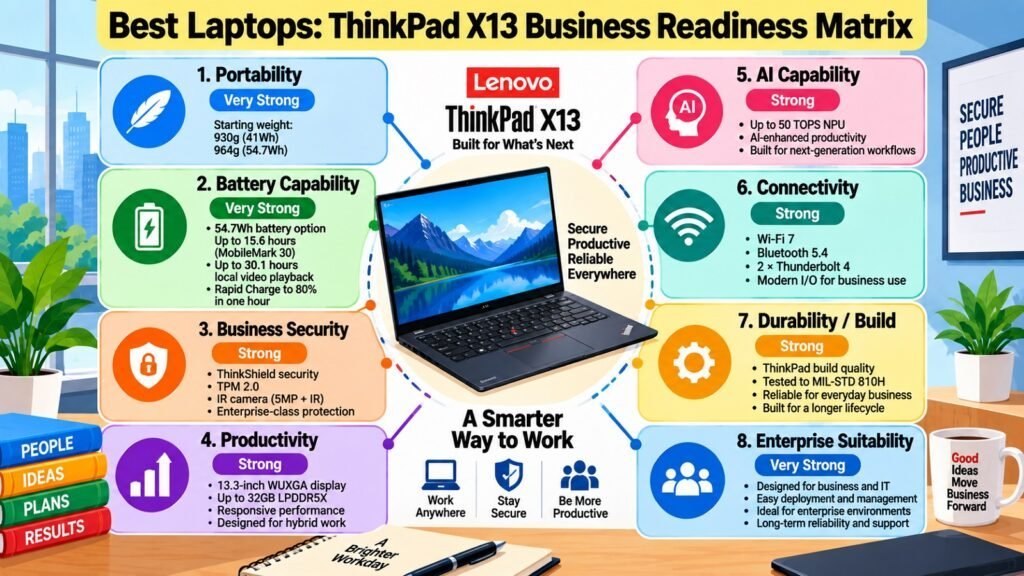
The Lenovo ThinkPad X13 Gen 7 (Intel) is one of the best choices for business users who need maximum portability without sacrificing enterprise capability. Starting at approximately 930 g, it is the lightest ThinkPad in Lenovo’s current lineup, yet it delivers Intel Core Ultra Series 3 (Panther Lake) performance, ThinkShield security, and an iFixit repairability score of 9 out of 10 — with the battery, SSD, and WWAN module all customer-replaceable. Pricing starts at approximately $1,499. RAM is soldered and non-upgradeable, so memory should be configured to fit long-term needs at purchase. Independent battery life testing was not confirmed in available review data at the time of publication.
Best Laptops: Lenovo ThinkPad X13 Gen 7 — Major Specifications
| Specification | Details |
| 🧠 Processor (CPU) | Intel Core Ultra Series 3 (Panther Lake); Core Ultra 5 or Ultra 7 options; Intel Xe3 integrated graphics; AI NPU acceleration |
| 🎮 Graphics (GPU) | Intel Xe3 integrated graphics (Panther Lake SoC); no discrete GPU option; suited for productivity and light creative tasks |
| 💾 RAM | 16 GB or 32 GB LPDDR5X-8533; configurable up to 64 GB; soldered — not upgradeable |
| 🗄️ Storage | PCIe Gen 5 NVMe SSD up to 1 TB; customer-replaceable |
| 🖥️ Display | 13.3-inch FHD+ IPS (1920×1200); 16:10; touch or non-touch options; ~400 nits |
| 🔋 Battery & Charging | 41 Wh or 54.7 Wh options; customer-replaceable battery; 4G/5G WWAN optional; independent test data not confirmed at publication |
| 🌡️ Thermals & Cooling | Active fan cooling; Panther Lake efficiency reduces thermal load vs prior Arrow Lake gen; specific noise/temp data not confirmed |
| 🔌 Ports & Connectivity | 2× USB-C (Thunderbolt/USB4); 1× USB-A; HDMI 2.1; 3.5 mm jack; Wi-Fi 7; Bluetooth; optional 4G/5G; optional NFC |
| 🛡️ Build & Features | MIL-STD chassis; ThinkShield security; fingerprint reader; IR webcam (Windows Hello face) on select configs; TrackPoint; iFixit 9/10 repairability; 100% recycled cobalt battery |
| ⚖️ Weight & Dimensions | Starting ~930 g (2.05 lbs) on Intel config; exact dimensions vary by configuration |
Best Laptops: Lenovo ThinkPad X13 Gen 7 — User Type Recommendation: Who Should Buy It?
| User Type | Is This Laptop a Good Fit? Why? |
| 🎓 Students | ✅ — Exceptionally light, durable, and repairable; price is a stretch but it is a long-term investment. |
| 💼 Business Professionals | ✅ — Built for business: ThinkShield, MIL-STD, TrackPoint, optional 5G, sub-1 kg; ideal daily commuter. |
| 🏠 Everyday Users | ⚠️ — Works for everyday tasks but the enterprise focus and price exceed typical home-use needs. |
| 🎨 Content Creators | ⚠️ — Handles light photo editing; 13-inch FHD+ display and integrated GPU limit demanding creative work. |
| 🎮 Gamers | ❌ — Integrated Xe3 graphics not suited for gaming; productivity-only machine. |
| 👨💻 Developers & Power Users | ✅ — Up to 64 GB RAM, PCIe Gen 5 SSD, Thunderbolt, excellent keyboard, under 1 kg — top dev ultraportable. |
Best Laptops: Lenovo ThinkPad X13 Gen 7 — Quick Pros and Cons
| Pros | Cons |
| ✅ Under 1 kg (starting ~930 g) — lightest ThinkPad available | ❌ 13.3-inch FHD+ may feel small for extended screen work |
| ✅ iFixit 9/10 repairability; customer-replaceable battery and SSD | ❌ RAM soldered; must be sized correctly at purchase |
| ✅ ThinkShield, MIL-STD, optional 5G/NFC — full enterprise spec | ❌ No discrete GPU; limited to Xe3 integrated graphics |
| ✅ Classic ThinkPad keyboard with TrackPoint pointing stick | ❌ Independent battery life data not yet confirmed at publication |
6. Best Laptops: HP OmniBook X Flip 14 Next Gen AI PC — Best for 2-in-1 Flexibility
Credit: iken3
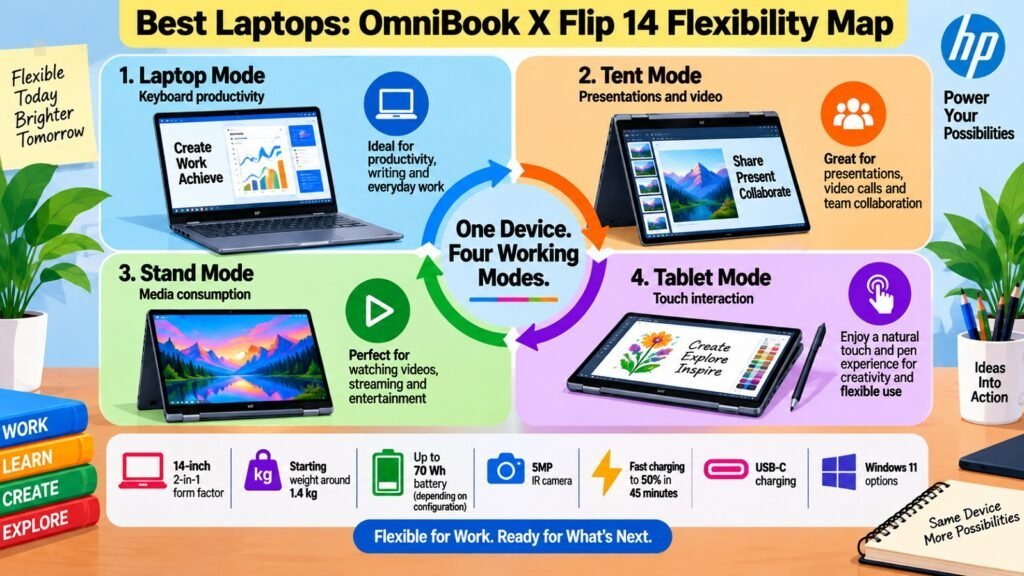
The HP OmniBook X Flip 14 Next Gen AI PC earns its place among the best laptops for 2-in-1 versatility. Its 360-degree hinge transitions between clamshell, tablet, tent, and reverse modes, and it is offered with Intel Core Ultra or AMD Ryzen AI processors depending on configuration. Display options range from a 2K IPS touchscreen on base models to a 3K OLED at up to 120 Hz on premium configurations. Base models with IPS displays start below $1,000, while OLED variants rise considerably. RAM is onboard and non-upgradeable, so the chosen capacity is permanent. Stylus support and Thunderbolt availability vary by specific model, so confirm before purchasing.
Best Laptops: HP OmniBook X Flip 14 Next Gen AI PC — Major Specifications
| Specification | Details |
| 🧠 Processor (CPU) | Intel: Core Ultra 5 325 / Core Ultra 7 256V (Series 2) or Panther Lake Series 3 depending on config; up to 4.8 GHz; NPU up to 50 TOPS. AMD: Ryzen AI 5 340 / Ryzen AI 7 / Ryzen AI 300 series; NPU up to 50 TOPS |
| 🎮 Graphics (GPU) | Intel: Arc 140V (8 GB, Xe2) or Xe3 iGPU (Panther Lake). AMD: Radeon 840M or higher. No discrete GPU option |
| 💾 RAM | 16 GB LPDDR5x standard; configurable to 32 GB on select models; onboard — not upgradeable |
| 🗄️ Storage | 512 GB PCIe Gen 4 NVMe standard; configurable up to 2 TB |
| 🖥️ Display | 14-inch 16:10 edge-to-edge touch; IPS option: 2K (1920×1200) at 400 nits. OLED option: 3K (2880×1800) at 48–120 Hz, 500 nits SDR / 1,100 nits HDR, 100% DCI-P3 |
| 🔋 Battery & Charging | HP claims all-day battery life; fast USB-C charging; exact capacity and hours vary by configuration |
| 🌡️ Thermals & Cooling | Active dual-fan cooling with copper plate; intelligent fan management; specific thermal data not confirmed in reviews at publication |
| 🔌 Ports & Connectivity | 2× USB-C; 1× USB-A; HDMI 2.1; 3.5 mm jack; Wi-Fi 7; Bluetooth 6.0; Thunderbolt support varies by processor config |
| 🛡️ Build & Features | Aluminum chassis with recycled materials; MIL-STD tested; 360° hinge; backlit keyboard; fingerprint reader; Poly Camera Pro webcam; HP Wolf Security; EPEAT Gold; Windows 11 |
| ⚖️ Weight & Dimensions | ~1.4–1.5 kg (~3.1–3.3 lbs); specific dimensions vary by configuration |
Best Laptops: HP OmniBook X Flip 14 Next Gen AI PC — User Type Recommendation: Who Should Buy It?
| User Type | Is This Laptop a Good Fit? Why? |
| 🎓 Students | ✅ — Versatile modes, touch display, all-day battery, and lightweight design suit campus life well. |
| 💼 Business Professionals | ✅ — Four flexible modes, MIL-STD build, Wi-Fi 7, and HP Wolf Security make it a capable travel device. |
| 🏠 Everyday Users | ✅ — Adapts easily between couch browsing, video calls, and work; touch display adds everyday convenience. |
| 🎨 Content Creators | ⚠️ — OLED option with 100% DCI-P3 is solid for photo and design; integrated GPU limits heavy video or 3D work. |
| 🎮 Gamers | ❌ — Integrated GPU only; designed for productivity and flexibility, not gaming performance. |
| 👨💻 Developers & Power Users | ⚠️ — Up to 32 GB RAM and fast SSD help; no discrete GPU and 14-inch screen may limit very intensive setups. |
Best Laptops: HP OmniBook X Flip 14 Next Gen AI PC — Quick Pros and Cons
| Pros | Cons |
| ✅ 360° hinge: laptop, tablet, tent, and reverse modes | ❌ RAM onboard and non-upgradeable |
| ✅ 3K OLED touch option: 120 Hz, 100% DCI-P3, 1,100 nit HDR | ❌ No discrete GPU across all configurations |
| ✅ MIL-STD durability and HP Wolf Security features | ❌ Thunderbolt support and stylus availability vary by model |
| ✅ AI-enhanced Poly Camera Pro webcam with noise reduction | ❌ Battery capacity and exact specs vary widely across configuration range |
7. Best Laptops: Acer Swift Go 14 AI — Best for Students and Budget Buyers

Credit: iken3
Among the best laptops for students and budget-focused buyers, the Acer Swift Go 14 AI (2026) delivers a remarkable set of capabilities for its affordable price. Powered by Intel Core Ultra Series 3 Panther Lake processors, it recorded over 20 hours and 51 minutes in the PCMark 10 video loop battery test — one of the longest results among 14-inch Windows laptops tested this year. It starts at approximately 1.12 kg and includes a broad port selection that outperforms many premium rivals. The reviewed OLED configuration is limited to 1920×1200 at 60 Hz, which is a trade-off compared to higher-refresh alternatives, but it remains a capable everyday display at this price point.
Best Laptops: Acer Swift Go 14 AI — Major Specifications
| Specification | Details |
| 🧠 Processor (CPU) | Intel Core Ultra 7 355 (Panther Lake, Series 3) on reviewed config; 8 cores/8 threads; P-Cores up to 4.7 GHz; Intel Xe3 iGPU; also available in other Core Ultra Series 3 variants |
| 🎮 Graphics (GPU) | Intel Xe3 integrated graphics; Intel Arc B390 on select higher configs (per Acer US); no discrete NVIDIA GPU |
| 💾 RAM | 16 GB DDR5 on reviewed config; varies by model; check upgradeability at point of purchase |
| 🗄️ Storage | 512 GB PCIe Gen 4 NVMe on reviewed config; other capacities available by region |
| 🖥️ Display | 14-inch OLED (reviewed); 1920×1200 at 60 Hz; 16:10; also available in 2K/3K OLED at 120 Hz or 2K IPS on base models |
| 🔋 Battery & Charging | 65 Wh; 20 hrs 51 min (PCMark 10 video loop, Trusted Reviews); Acer quotes 22 hrs; 65 W charger; 50% in ~35 min; full in ~75 min |
| 🌡️ Thermals & Cooling | Active fan cooling; Panther Lake efficiency reduces heat vs prior gen; specific noise/temp data not confirmed |
| 🔌 Ports & Connectivity | 2× USB 3.0/3.1 Gen 1 Type-A; 2× USB4/Thunderbolt 4 (40 Gb/s); HDMI; 3.5 mm jack; Wi-Fi 7; Bluetooth 5.4 |
| 🛡️ Build & Features | Laser-etched aluminum; 180° opening; fingerprint reader on power button; backlit keyboard; Copilot+ PC on qualifying configs |
| ⚖️ Weight & Dimensions | Starting ~1.12 kg (2.47 lbs); ultra-thin chassis — exact dimensions not published by Acer at time of review |
Best Laptops: Acer Swift Go 14 AI — User Type Recommendation: Who Should Buy It?
| User Type | Is This Laptop a Good Fit? Why? |
| 🎓 Students | ✅ — 20+ hrs battery, 1.12 kg, broad ports, and accessible price — purpose-built for campus life. |
| 💼 Business Professionals | ✅ — Solid Panther Lake performance, excellent battery, professional aluminum design; good for mobile workers. |
| 🏠 Everyday Users | ✅ — Lightweight, long-lasting, and well-priced; handles all everyday computing reliably. |
| 🎨 Content Creators | ⚠️ — OLED display with good contrast; 60 Hz and integrated GPU limit demanding creative production. |
| 🎮 Gamers | ❌ — Integrated Xe3 graphics handle casual games only; not designed for gaming. |
| 👨💻 Developers & Power Users | ✅ — Strong CPU, broad port selection with USB4/Thunderbolt 4, long battery; solid for dev work without discrete GPU. |
Best Laptops: Acer Swift Go 14 AI — Quick Pros and Cons
| Pros | Cons |
| ✅ 20+ hrs battery — among the longest tested in its class in 2026 | ❌ Reviewed OLED: 60 Hz and 1920×1200 only on SFG14-I71 model |
| ✅ Two USB4/Thunderbolt 4 ports plus two USB-A — rare at this price | ❌ No discrete GPU; integrated Xe3 only on standard configurations |
| ✅ Lightweight at 1.12 kg; competitive pricing vs premium rivals | ❌ No built-in SD card reader on reviewed model |
| ✅ Laser-etched aluminum chassis with professional finish | ❌ RAM and storage upgradeability varies by model; confirm at purchase |
8. Best Laptops: Razer Blade 16 (2026) — Best for High-Performance Gaming
Credit: iken3
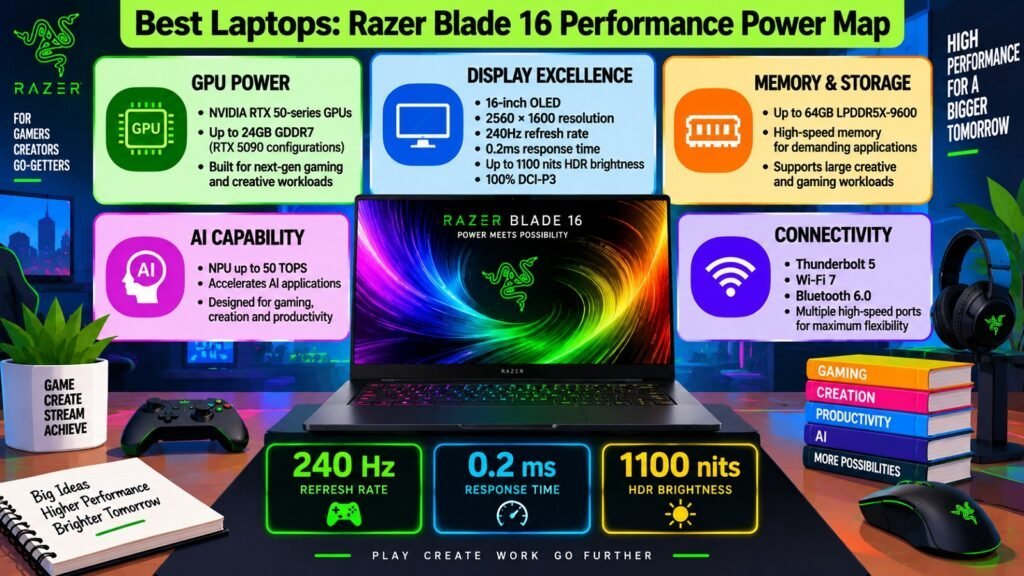
The Razer Blade 16 (2026) represents the pinnacle of laptops for high-performance gaming. It pairs Intel’s Core Ultra 9 386H with up to an RTX 5090 at 160–165 W TGP inside a CNC-machined aluminum chassis just 14.9 mm thin and weighing 2.14 kg. Despite that GPU tier, Tom’s Hardware measured nearly 13 hours of non-gaming battery life — remarkable for this class. Thunderbolt 5 is a significant connectivity upgrade. Pricing starts at $3,499 for RTX 5080 configurations; RTX 5090 variants reach approximately $4,900. LPDDR5X-9600 RAM is soldered and cannot be upgraded, so the configuration at purchase is permanent. The 280 W adapter required for Performance mode adds travel bulk.
Best Laptops: Razer Blade 16 (2026) — Major Specifications
| Specification | Details |
| 🧠 Processor (CPU) | Intel Core Ultra 9 386H (Panther Lake, Series 3); 16 cores/16 threads; P-Cores up to 4.9 GHz; 50 TOPS NPU |
| 🎮 Graphics (GPU) | NVIDIA RTX 5090 (24 GB GDDR7) on top config; also RTX 5060, 5070, 5070 Ti, 5080 (16 GB GDDR7); up to 165 W TGP; Blackwell; DLSS 4.5 |
| 💾 RAM | 16 GB, 32 GB, or 64 GB LPDDR5X-9600; soldered — not upgradeable; reviewed: 32 GB |
| 🗄️ Storage | 1 TB or 2 TB PCIe Gen 4 NVMe SSD; reviewed: 2 TB |
| 🖥️ Display | 16-inch OLED; 2560×1600; 240 Hz; DisplayHDR TrueBlack 1000; 1,100 nits HDR / 500 nits SDR; thin bezels |
| 🔋 Battery & Charging | 90 Wh; ~13 hrs non-gaming (Tom’s Hardware); up to 15 hrs video per Razer; 50% in ~30 min; Thunderbolt 5 supports 240 W USB-C charging; 280 W proprietary adapter for Performance mode |
| 🌡️ Thermals & Cooling | Updated vapor chamber + thermal hood; sustains RTX 5090 at 160–165 W TGP in 14.9 mm chassis; Quiet Mode limits GPU to ~100 W |
| 🔌 Ports & Connectivity | 3× USB 3.2 Gen 2 Type-A; 1× Thunderbolt 5 (80 Gb/s, 240 W PD); 1× Thunderbolt 4 (100 W PD); HDMI 2.1; UHS-II SD reader; 3.5 mm jack; proprietary power port; Wi-Fi 7; Bluetooth 6.0 |
| 🛡️ Build & Features | CNC-milled T6 aluminum; matte black anodized; per-key RGB; glass precision touchpad; fingerprint reader; 1080p webcam; 6-speaker THX Spatial Audio; 2-yr battery warranty |
| ⚖️ Weight & Dimensions | 2.14 kg (4.71 lbs); 14.9 mm thick; 355.1×250.5 mm |
Best Laptops: Razer Blade 16 (2026) — User Type Recommendation: Who Should Buy It?
| User Type | Is This Laptop a Good Fit? Why? |
| 🎓 Students | ❌ — Price and gaming focus make it impractical for student budgets and needs. |
| 💼 Business Professionals | ⚠️ — Excellent battery and premium design suit professional use; gaming aesthetic and adapter bulk are drawbacks. |
| 🏠 Everyday Users | ❌ — Far more laptop than everyday use requires; cost cannot be justified for general tasks. |
| 🎨 Content Creators | ✅ — RTX 5090, 240 Hz OLED, Thunderbolt 5, up to 64 GB RAM, and THX 6-speaker audio — outstanding creator machine. |
| 🎮 Gamers | ✅ — Best high-performance gaming in this weight class; RTX 5090 at 165 W, 240 Hz OLED, G-SYNC compatible. |
| 👨💻 Developers & Power Users | ✅ — Thunderbolt 5, fast NVMe, LPDDR5X-9600 memory, powerful Panther Lake CPU — excellent for AI and compute work. |
Best Laptops: Razer Blade 16 (2026) — Quick Pros and Cons
| Pros | Cons |
| ✅ RTX 5090 at 165 W TGP in a 14.9 mm, 2.14 kg chassis | ❌ RAM soldered; capacity is permanent from purchase |
| ✅ ~13 hrs non-gaming battery life — exceptional for this GPU tier | ❌ 280 W proprietary adapter required for Performance mode; adds travel weight |
| ✅ Thunderbolt 5 (80 Gb/s, 240 W PD) plus Thunderbolt 4 | ❌ Starts at $3,499; RTX 5090 configs reach ~$4,900 |
| ✅ 240 Hz OLED; DisplayHDR TrueBlack 1000; 1,100 nit HDR | ❌ CPU multi-core trails thicker HX-class laptops under sustained load |
Conclusion: Choosing the Best Laptops for Your Needs
Credit: iken3
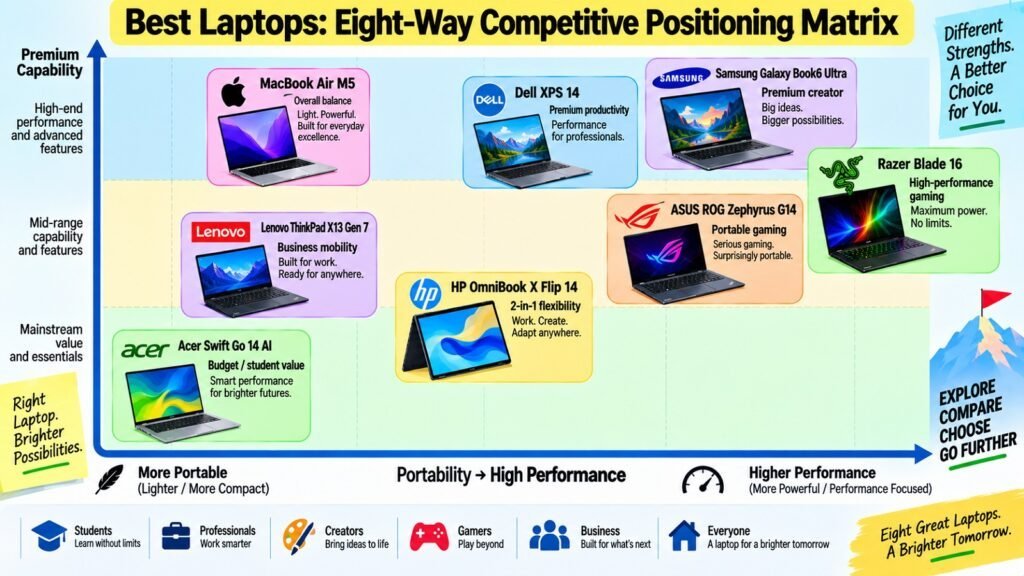
The eight laptops in this guide differ meaningfully across performance, graphics, display quality, battery life, portability, build, and value — and the right pick depends entirely on what you need from a laptop. For most users, the Apple MacBook Air with M5 is the strongest overall choice. Its M5 chip, fanless silence, 15–18 hours of battery life, and premium aluminum build at $1,099 offer a level of daily practicality that is hard to beat. For gaming, the ASUS ROG Zephyrus G14 is the best portable option, while the Razer Blade 16 is for those who need maximum GPU power. The Samsung Galaxy Book6 Ultra is the clearest recommendation for content creators.
Business users will find the Lenovo ThinkPad X13 Gen 7 purpose-built for their needs. The Dell XPS 14 excels at premium productivity with its Tandem OLED display and dramatically improved battery life. The HP OmniBook X Flip 14 covers 2-in-1 flexibility with four versatile modes. For students and budget-conscious buyers, the Acer Swift Go 14 AI delivers outstanding endurance at an accessible price. No single laptop is the right choice for everyone. Evaluate processor performance, display, battery, graphics, portability, and value against your own priorities, and the answer will become clear.
Best Laptops: Key Strengths at a Glance
| 8 Best Laptops | Primary Strength |
|---|---|
| Apple MacBook Air with M5 | Balanced performance, portability, battery life, and everyday usability |
| Samsung Galaxy Book6 Ultra | Premium creator performance with a high-end AMOLED display and discrete graphics |
| Dell XPS 14 (2026) | Premium productivity with strong processing, AI capability, and display options |
| ASUS ROG Zephyrus G14 (2026) | Portable gaming performance in a compact 14-inch form factor |
| Lenovo ThinkPad X13 Gen 7 | Business-focused mobility, productivity, security, and enterprise features |
| HP OmniBook X Flip 14 Next Gen AI PC | Flexible 2-in-1 design with laptop, tent, stand, and tablet modes |
| Acer Swift Go 14 AI | Student-friendly combination of portability, OLED display, AI capability, and value |
| Razer Blade 16 (2026) | High-end gaming performance with a fast OLED display and powerful graphics options |