Table of Contents
Introduction: Computer Network as the Hidden Engine of Modern Systems
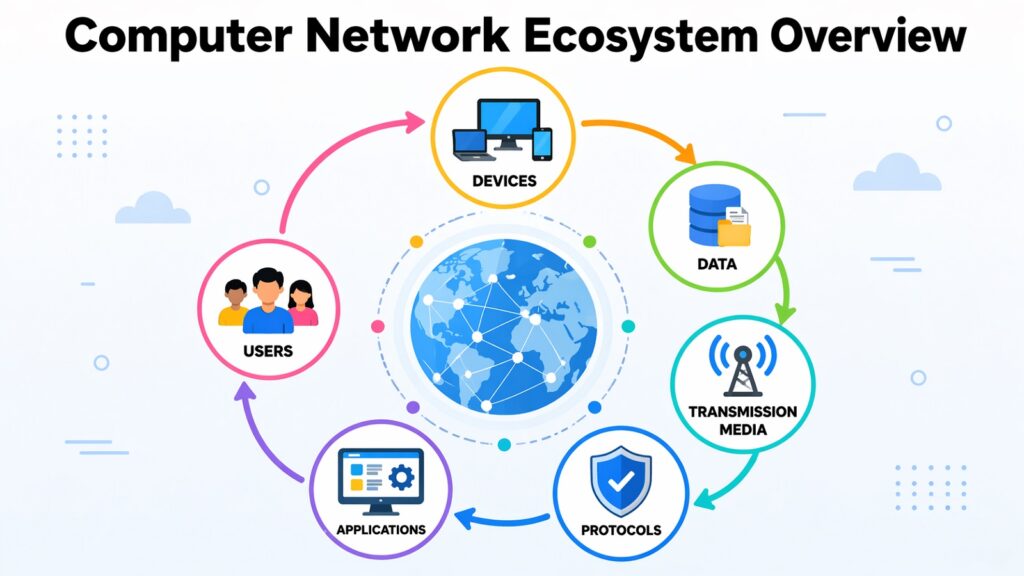
Every time you send a message, stream a video, or open a web page, something invisible is doing the heavy lifting. That something is a computer network. It runs in the background, quietly connecting devices, moving data, and making digital life feel effortless. Most people never think about it. But it is always there, always working. A computer network is an important aspect of modern technology. Without it, devices would be isolated, data could not travel, and the digital world as we know it would simply not function. From a single home router to the global infrastructure that supports the internet, a computer network is the foundation on which everything else is built.
Understanding a computer network matters more now than it ever has. Businesses run on networked systems. Hospitals share patient data across facilities. Schools deliver lessons through connected platforms. The deeper you look at any modern technology, the more you find a network holding it together. It is not just wires and signals. It is structure, logic, and flow, designed carefully.
This article walks through eight core systems that define how a computer network is built and how it works. From basic definitions to enterprise-level design, each section reveals a different layer of the same connected world. The goal is to make these ideas clear and useful, even if you have never studied networking before.
Computer Network: Key Aspects at a Glance
| Computer Network Key Aspects | What It Covers |
| What Is a Computer Network | Devices, nodes, links, and data exchange between connected systems |
| Types of Networks (LAN, WAN, MAN) | Scale, coverage, and purpose across local, wide, and metropolitan areas |
| Local Area Network | Design, speed, and control within homes, offices, and campuses |
| Wide Area Network | Long-distance connectivity, reliability, and carrier infrastructure |
| Network Topologies | Physical and logical layouts like star, mesh, bus, and ring |
| Routing and Switching | How data packets move and find their correct paths within networks |
| Network Protocols | Rules like TCP/IP and HTTP that govern how data is sent and received |
| Enterprise Network Design | Scalable, secure, and reliable networks built for large organizations |
1. What Is a Computer Network: Understanding the Core System
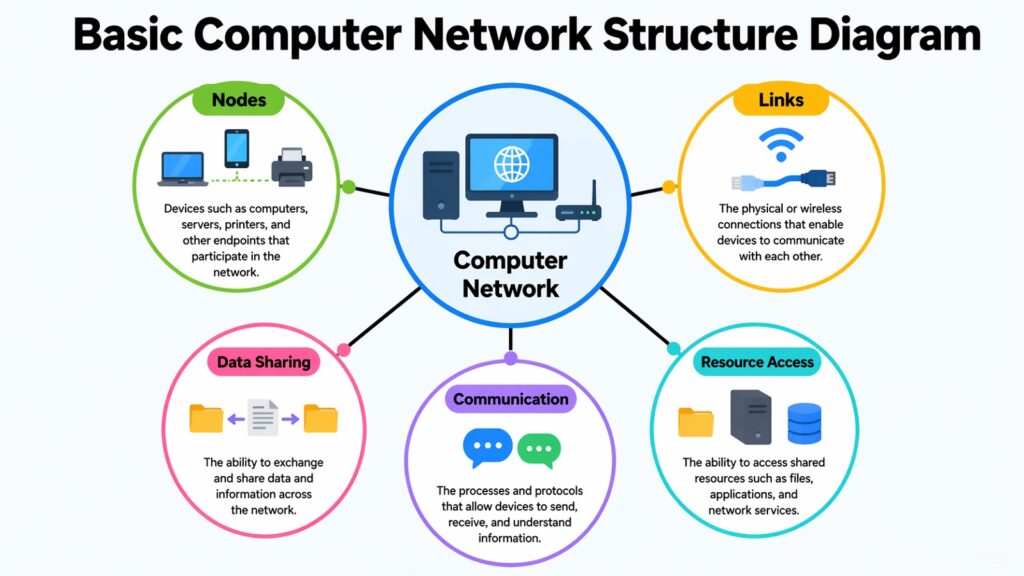
A computer network is a group of devices connected together so they can share information and resources. These devices, often called nodes, can be computers, smartphones, printers, servers, or any hardware capable of sending and receiving data. The connections between them, called links, can be physical cables or wireless signals. Together, nodes and links form the backbone of any network.
The primary function of a computer network is to facilitate communication. When you send an email or access a file located on a different machine, data is transmitted from one node to another via these connections. This data is not transmitted as a single large unit. Instead, it is divided into smaller segments known as packets, which traverse the network and are reassembled at their final destination. This approach enhances the speed and efficiency of data transfer.
A computer network also allows resource sharing. Instead of every device needing its own printer or storage drive, a network lets multiple devices use the same resources. A single printer on an office network can serve thirty computers. A file server can store documents for an entire organization. This saves cost and simplifies management.
At the core of every network is a set of rules that tells devices how to communicate. These rules, known as protocols, ensure that data sent from one device can be correctly understood by another, even if the devices are made by different manufacturers. The internal logic of a network, from how packets are labeled to how errors are corrected, all flows from these foundational rules.
Computer Network: Core Concepts and Their Meanings
| Concept | Explanation |
| Node | Any device connected to a network, such as a computer, router, or printer |
| Link | The physical or wireless connection between nodes that carries data |
| Packet | A small unit of data broken from a larger message for efficient transmission |
| Protocol | A set of rules that govern how devices communicate across a network |
| Bandwidth | The maximum amount of data a network link can carry per unit of time |
| IP Address | A unique number assigned to each device to identify it on the network |
| MAC Address | A hardware-level identifier built into every network interface card |
| Latency | The time it takes for data to travel from one node to another in a network |
2. Types of Computer Network: LAN, WAN, and MAN Explained
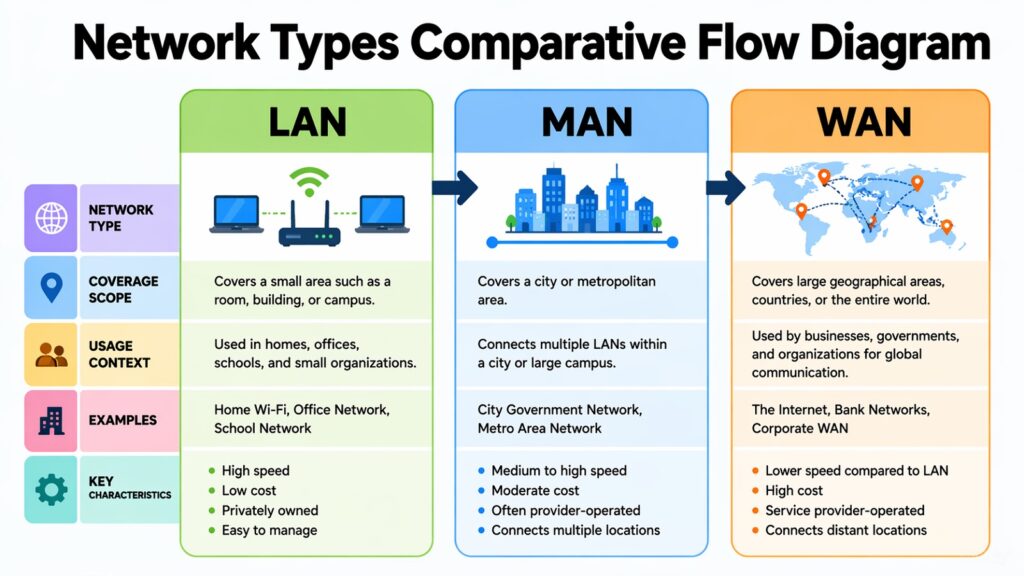
Not all computer networks are the same size or serve the same purpose. Networks are generally grouped by their geographic coverage and the way they are used. The three most common types of computer networks are Local Area Networks, Wide Area Networks, and Metropolitan Area Networks. Each one operates at a different scale and addresses different needs.
A Local Area Network, or LAN, covers a small area like a home, office, or school building. It connects devices within that space and usually offers high speed and low cost. Most LANs are privately owned and managed, which gives users more control over performance and security. Home Wi-Fi is one of the most familiar examples of a LAN.
A Wide Area Network, or WAN, spans much larger distances, sometimes crossing cities, countries, or continents. The internet itself is the largest WAN in existence. WANs typically rely on infrastructure owned by telecommunications providers. They connect multiple smaller networks and allow data to travel across vast distances, though usually at higher cost and slightly more complexity than a LAN.
A Metropolitan Area Network, or MAN, falls between the two. It covers a city or a large campus, often used by organizations that need to connect multiple buildings across a few kilometers. MANs are commonly built using fiber optic cables and are often managed by internet service providers or large institutions like universities or government bodies.
Computer Network Types: Comparison of LAN, WAN, and MAN
| Network Type | Key Characteristics |
| LAN (Local Area Network) | Covers a single building or campus, high speed, privately owned |
| WAN (Wide Area Network) | Spans countries or continents, lower speed than LAN, uses carrier infrastructure |
| MAN (Metropolitan Area Network) | Covers a city or region, often uses fiber optic cables |
| PAN (Personal Area Network) | Very short range, connects personal devices like phones and laptops |
| CAN (Campus Area Network) | Connects buildings within a university or corporate campus |
| SAN (Storage Area Network) | Dedicated network for high-speed access to storage devices |
| VPN (Virtual Private Network) | A secure tunnel over a public network, often used to extend LANs |
| Internet | The largest WAN, connecting billions of devices globally |
3. Local Area Computer Network: Design Within Limited Spaces
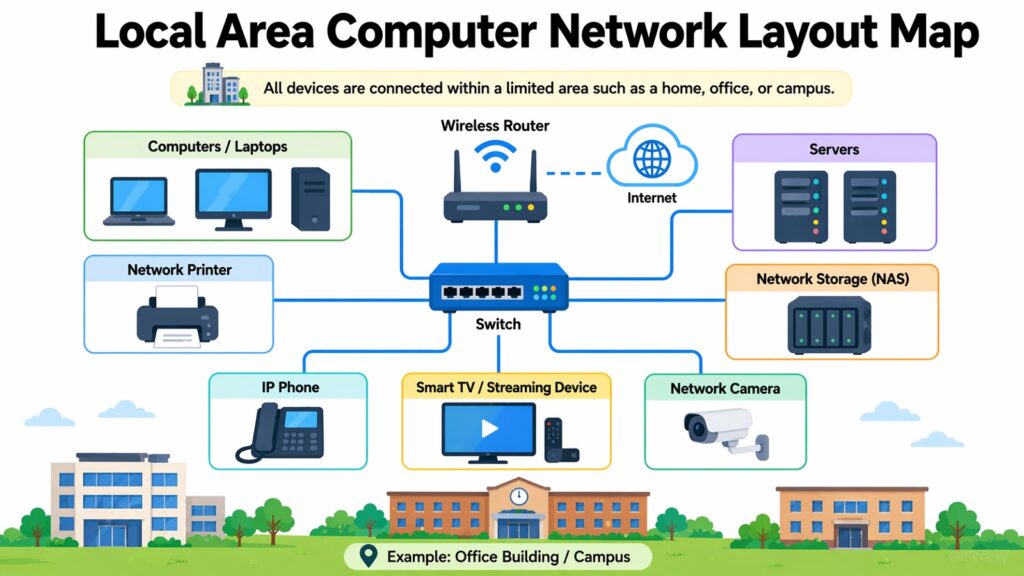
A local area computer network is built for close-range connectivity. Within a single building, floor, or campus, it allows devices to share data at high speeds without relying on any external infrastructure. The design of a LAN affects how fast it runs, how secure it is, and how easy it is to manage.
Speed is one of the strongest advantages of a LAN. Most modern wired LANs run on Ethernet technology and can reach speeds of 1 gigabit per second or more. Wireless LANs using Wi-Fi are somewhat slower but have improved significantly with newer standards like Wi-Fi 6, which supports speeds up to 9.6 gigabits per second in ideal conditions. For most everyday tasks, both options are more than fast enough.
The cost of building a LAN is relatively low compared to other network types. Basic switches, cables, and a router can connect an entire small office for a modest investment. Because the network stays within a private space, there is no need to pay a telecommunications provider for transmission. This keeps operating costs down over time.
Design choices in a LAN have a direct effect on performance. How devices are connected, what kind of switch is used, and how the cables are laid out all influence speed and reliability. A well-designed LAN minimizes unnecessary traffic, separates sensitive data through segmentation, and provides enough capacity to handle peak usage without slowing down.
Computer Network LAN: Design Factors and Their Effects
| Design Factor | Impact on Network |
| Ethernet cabling (Cat5e/Cat6) | Determines maximum speed and signal quality within the LAN |
| Network switch capacity | Affects how many devices can communicate simultaneously |
| Wi-Fi standard (Wi-Fi 5, Wi-Fi 6) | Defines wireless speed limits and coverage range |
| VLAN segmentation | Separates traffic for security and performance management |
| Network topology (star, mesh) | Shapes how data flows and how faults affect the network |
| DHCP server configuration | Automates IP address assignment to connected devices |
| Firewall placement | Controls what traffic enters or leaves the local network |
| Redundant links | Prevents single points of failure and improves uptime |
4. Wide Area Computer Network: Expanding Connectivity Across Distances
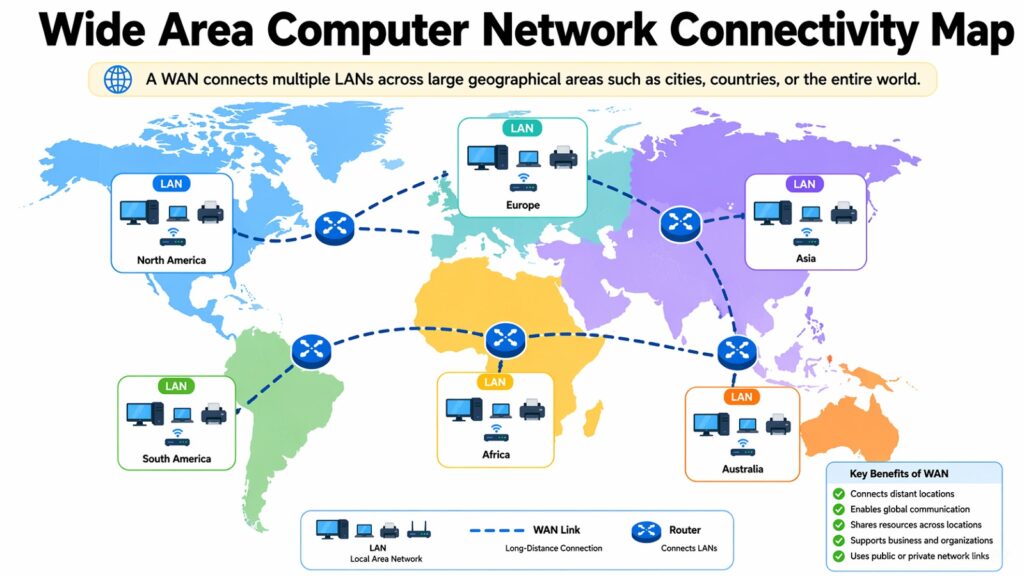
A wide area computer network solves a problem that a LAN cannot: connecting systems that are far apart. Whether it is two offices in different cities or a global company with locations across multiple continents, a WAN makes it possible for those distant systems to communicate as though they were in the same room.
Data traveling across a WAN takes a longer and more complex path than data on a LAN. It passes through multiple routers, switches, and often undersea cables or satellite links. Each hop introduces a small delay, which is why latency tends to be higher on a WAN than on a local network. Despite this, WANs are engineered for reliability. Redundant paths ensure that if one route fails, traffic can be rerouted automatically.
Most organizations do not build their own WAN infrastructure. Instead, they lease bandwidth from telecommunications providers who maintain the physical cables and equipment. Technologies like MPLS (Multiprotocol Label Switching) are commonly used in enterprise WANs to direct traffic efficiently and ensure that important data, like voice or video, gets priority over less time-sensitive traffic.
Scalability is a key consideration in WAN design. As a business grows and adds new locations, the network must be able to accommodate that growth without needing a complete rebuild. Modern SD-WAN technology addresses this by using software to manage WAN connections dynamically, which makes it easier to add new sites and optimize performance across the entire network.
Computer Network WAN: Key Components and Their Roles
| Component | Role in WAN |
| MPLS (Multiprotocol Label Switching) | Routes data efficiently using labels rather than IP lookups |
| Leased lines | Dedicated private connections between two locations with guaranteed bandwidth |
| SD-WAN | Software-defined management of WAN links for flexibility and cost savings |
| Border router | Connects the local network to the wider WAN infrastructure |
| Fiber optic backbone | High-capacity physical medium for long-distance data transmission |
| VPN tunneling | Encrypts data traveling over public networks for security |
| Redundant paths | Alternate routes that maintain connectivity if one path fails |
| QoS (Quality of Service) | Prioritizes time-sensitive traffic like voice and video over data |
5. Computer Network Topologies: How Structure Shapes Flow
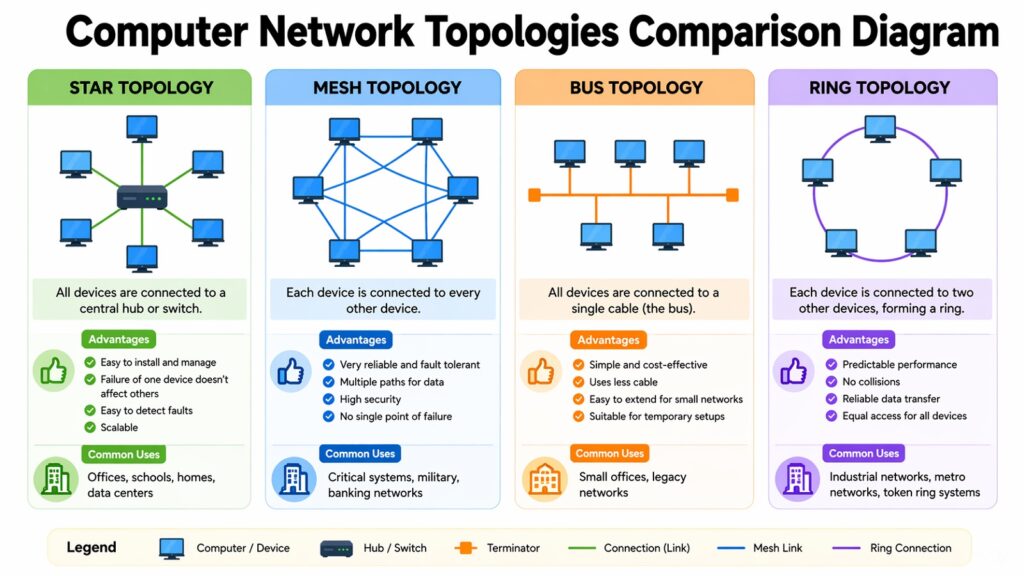
The arrangement of nodes and links in a computer network is referred to as its topology. This configuration, whether it is physical or logical, significantly influences data flow, the network’s ability to manage failures, and the ease of expansion. Selecting the appropriate topology is among the most crucial choices in network design.
The star topology is the most common in modern networks. All devices connect to a central hub or switch, and data passes through that central point. If one device fails, it only affects that device. The rest of the network keeps running. However, if the central hub fails, the entire network goes down. This makes the central device a single point of failure that must be managed carefully.
The mesh topology takes a different approach. Every node connects to multiple other nodes, creating many possible paths for data to travel. This makes the network highly resilient. If one link fails, data can take a different route. Full mesh networks are expensive and complex to build, but partial mesh designs offer a good balance between cost and fault tolerance.
The bus topology connects all devices to a single shared cable. It is simple and cheap to set up but does not scale well. If the main cable fails, the whole network stops. The ring topology arranges devices in a circle, with data traveling in one direction around the ring. It can be efficient under steady load but struggles when one node fails. Most real-world networks use a combination of topologies to balance cost, performance, and resilience.
Computer Network Topologies: Structure and Trade-offs
| Topology | Key Characteristics |
| Star | Centralized design, easy to manage, single point of failure at hub |
| Mesh | Multiple paths between nodes, high fault tolerance, expensive to build |
| Bus | Single shared cable, low cost, poor scalability, one failure affects all |
| Ring | Circular data flow, predictable performance, vulnerable to node failure |
| Tree (Hierarchical) | Extends star topology in layers, used in large campus networks |
| Hybrid | Combination of topologies, balances cost and resilience in real-world use |
| Point-to-Point | Direct connection between two nodes, simple and reliable |
| Daisy Chain | Devices linked in a line, easy to extend but fragile under failure |
6. Routing and Switching in Computer Network: Managing Data Movement
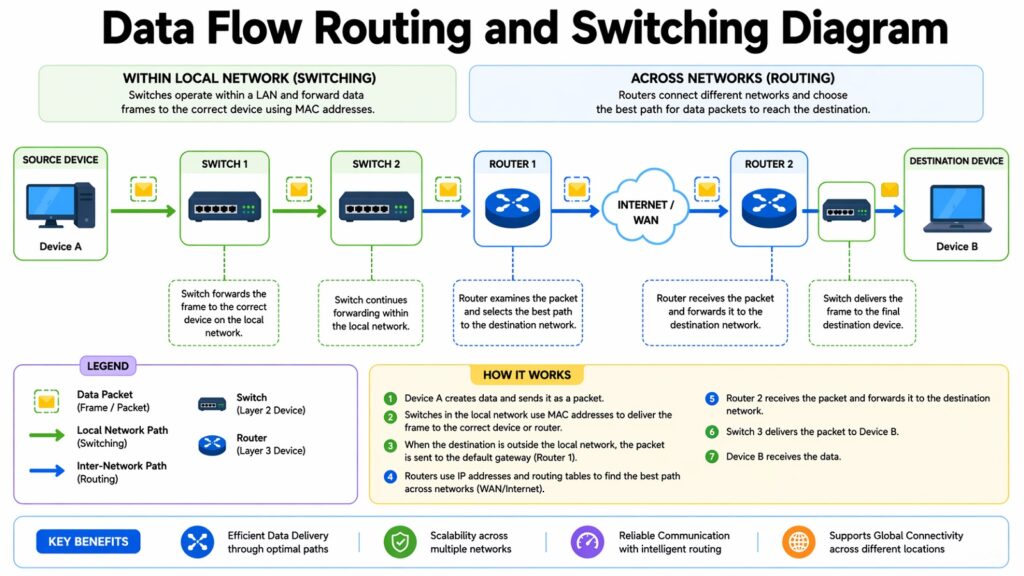
Inside a computer network, two processes are responsible for getting data from one place to another: routing and switching. They work at different levels of the network, but both serve the same fundamental goal of directing traffic efficiently and accurately.
Switching happens at the local level. A network switch receives a data packet, reads the destination address, and sends it directly to the correct port. This happens within a single network segment, such as a LAN. Switches keep a table of MAC addresses and the ports they correspond to, which allows them to forward packets without broadcasting to every device. This makes communication within a local network fast and efficient.
Routing happens at a higher level. A router connects different networks and decides the best path for data to travel between them. When you load a web page, your request travels from your home network through your router to your internet provider and eventually to a server somewhere in the world. Routers use routing tables and algorithms to calculate the most efficient path, taking into account factors like network congestion and link availability.
Together, routing and switching form the decision-making layer of a computer network. Switches handle communication within a network, while routers handle communication between networks. In larger systems, these functions can be combined in a single device or distributed across many specialized machines, depending on the scale and complexity of the network design.
Computer Network Routing and Switching: Roles and Differences
| Function | Description |
| Layer 2 switching | Forwards frames within a local network using MAC address tables |
| Layer 3 routing | Directs packets between different networks using IP addresses |
| Routing table | A database in the router listing known paths to destination networks |
| OSPF protocol | A dynamic routing protocol that finds shortest paths inside a network |
| BGP protocol | Manages routing between autonomous systems across the internet |
| Spanning Tree Protocol | Prevents loops in switched networks by blocking redundant paths |
| VLAN routing | Allows communication between different VLANs through a Layer 3 device |
| Load balancing | Distributes traffic across multiple paths to prevent congestion |
7. Computer Network Protocols: Rules That Keep Systems Running
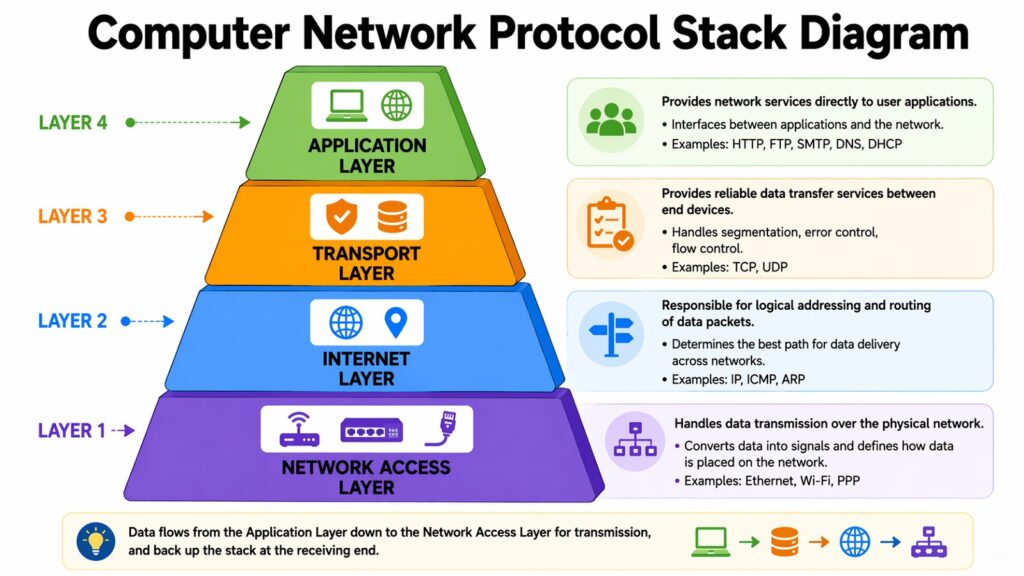
A computer network would be chaos without protocols. Protocols are the agreed-upon rules that tell devices how to format, send, receive, and interpret data. Without them, a message sent from one device would be meaningless to another. Protocols create the common language that makes communication across a diverse network possible.
TCP/IP is the foundational protocol suite of the internet and most modern networks. TCP, which stands for Transmission Control Protocol, ensures that data arrives completely and in the right order. It breaks data into packets, numbers them, sends them, and confirms that each one arrives safely. IP, or Internet Protocol, handles addressing and routing, making sure each packet knows where to go. Together, they form the backbone of almost all digital communication.
HTTP, or Hypertext Transfer Protocol, governs how web browsers and servers communicate. When you type a web address into a browser, HTTP defines the format of the request your browser sends and the response the server returns. HTTPS adds a layer of encryption through TLS, protecting the data from being intercepted in transit. Most websites today use HTTPS as the default.
Other protocols are designed for more specialized functions. DNS is responsible for converting human-readable domain names into IP addresses. SMTP is utilized for sending emails. FTP facilitates the transfer of files between computers. DHCP automatically allocates IP addresses to devices within a network. Each protocol is dedicated to a specific function, and collectively, they create the comprehensive rulebook that ensures the smooth operation of a computer network.
Computer Network Protocols: Functions and Applications
| Computer Network Protocols | Primary Function |
| TCP/IP | Core suite for data transmission and addressing across networks |
| HTTP/HTTPS | Rules for web browser and server communication, with HTTPS adding encryption |
| DNS | Translates domain names into IP addresses for routing purposes |
| SMTP | Governs the sending and relaying of email messages between servers |
| FTP/SFTP | Handles file transfers between systems, SFTP adds security via encryption |
| DHCP | Automatically assigns IP addresses to devices joining a network |
| ICMP | Used for error reporting and diagnostics, the basis of the ping command |
| TLS/SSL | Encrypts data in transit to protect it from interception or tampering |
8. Enterprise Computer Network Design: Building Scalable Systems
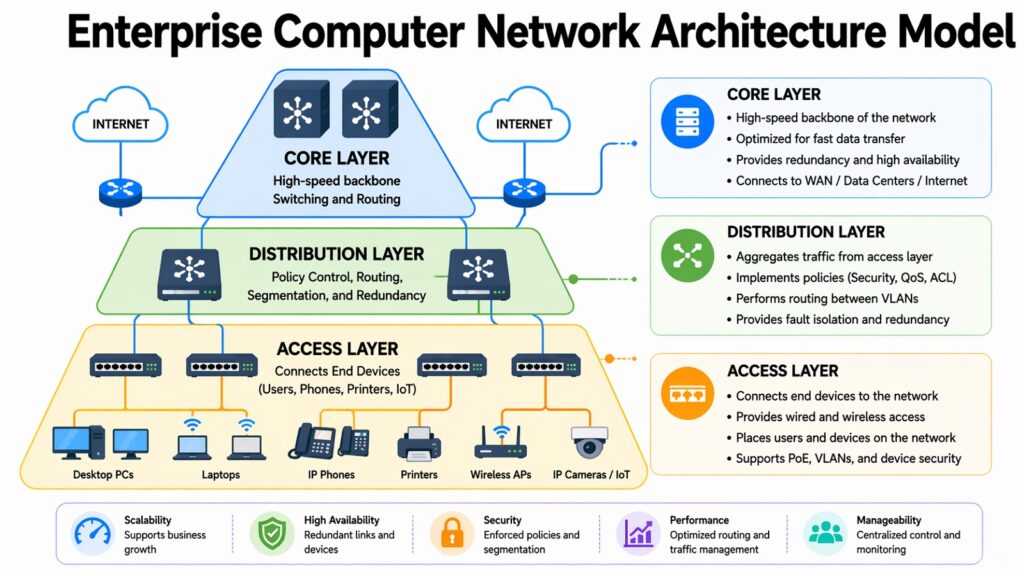
When a large organization builds a computer network, the design process is far more involved than setting up a home router. Enterprise networks must serve thousands of users, handle enormous volumes of data, stay secure against constant threats, and remain available around the clock. Every design decision carries consequences at scale.
Scalability is the first major concern. An enterprise network must grow with the organization without requiring constant rebuilding. This is typically achieved through a hierarchical design with three layers: the access layer, which connects individual devices; the distribution layer, which aggregates traffic and applies policies; and the core layer, which provides high-speed connectivity between different parts of the network. This three-tier model has been the standard approach in enterprise networking for decades.
Security is built into every layer of a well-designed enterprise network. Firewalls control what traffic can enter and leave the network. Intrusion detection systems monitor for suspicious activity. Network segmentation through VLANs limits how far a security breach can spread. Zero-trust architecture, which requires every user and device to be verified before accessing any resource, is increasingly common in modern enterprise design.
Reliability is maintained through redundancy. Critical links and devices are duplicated so that if one fails, another takes over automatically. High-availability configurations for routers and switches minimize downtime. Backup internet connections from different providers ensure that a single outage does not cut off the organization. The result is a network designed not just to function, but to keep functioning even when things go wrong.
Computer Network Enterprise Design: Key Elements and Their Purpose
| Design Element | Purpose |
| Three-tier hierarchy (access, distribution, core) | Organizes traffic flow and simplifies management at scale |
| Redundant links and devices | Eliminates single points of failure and ensures continuous uptime |
| VLAN segmentation | Separates departments and limits the spread of security incidents |
| Firewall and IDS/IPS | Monitors and controls traffic to block unauthorized access and threats |
| Zero-trust architecture | Requires verification of all users and devices regardless of location |
| SD-WAN integration | Manages multiple WAN connections dynamically for cost and performance |
| Network monitoring tools | Provides real-time visibility into performance, faults, and traffic patterns |
| Disaster recovery planning | Ensures the network can recover quickly after a major failure or outage |
Conclusion: Computer Network as a Unified System of Design and Flow
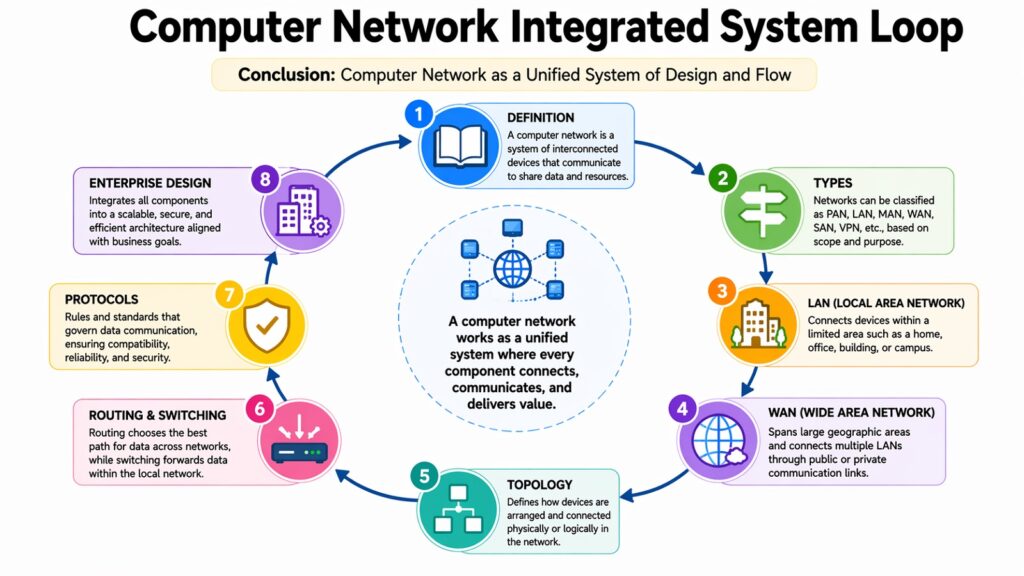
A computer network is never just cables and signals. It is a system built on deliberate choices, each one shaping how data moves, how fast it arrives, and how reliably it reaches its destination. From the basic definition of a node to the layered complexity of an enterprise design, every concept in networking connects to something else. Nothing works in isolation.
The structure of a computer network, whether a simple star topology in an office or a redundant mesh across a global enterprise, determines its personality. Some networks are built for speed. Others are built for resilience. The best ones are designed to be both. Protocols keep the conversation orderly. Routing and switching keep the traffic moving. Together, they form a system that is more than the sum of its parts.
What is striking about all of this is how invisible it usually is. The infrastructure running beneath every digital interaction is enormously complex, but it rarely draws attention to itself. That invisibility is, in a way, the measure of its success. A well-designed computer network disappears into the background and simply works.
The importance of computer networks will only grow from here. As more devices come online, as artificial intelligence demands faster data movement, and as organizations spread across more locations and time zones, the pressure on network design will increase. The principles covered in this article, scale, structure, protocols, and security, will remain central to every network built in the years ahead. Understanding them now is not just useful. It is necessary.
Computer Network: 8 Core Systems
| Core Systems of Computer Network | Core Takeaway |
| What Is a Computer Network | A system of connected nodes and links designed to share data and resources |
| Types of Networks | LAN, WAN, and MAN each serve different scales and purposes |
| Local Area Network | High-speed, low-cost design for buildings and campuses |
| Wide Area Network | Long-distance connectivity using carrier infrastructure and redundancy |
| Network Topologies | Physical and logical layouts define efficiency and fault tolerance |
| Routing and Switching | Switches manage local traffic; routers direct data between networks |
| Network Protocols | TCP/IP, HTTP, DNS, and others provide rules for reliable communication |
| Enterprise Design | Scalable, secure, and redundant systems built for large organizations |