Table of Contents
Introduction: Why Digital Safety Matters in a Connected World
Every day, billions of people reach for a screen. They check messages, transfer money, shop online, and scroll through social feeds. Life has shifted online in ways that would have seemed extraordinary just two decades ago. With that shift has come a quiet but serious need: the need for Digital Safety.
Digital Safety has become one of the most important aspects of modern technology. It is the practice of protecting yourself, your information, and your devices while using digital technology. It is not a concept reserved for cybersecurity professionals. It belongs to anyone who uses a smartphone, opens an email, or logs into an account. That means digital safety is everyone’s responsibility.
The digital world offers genuine benefits, but it also introduces risk. Cybercriminals exploit browser vulnerabilities. Scammers impersonate banks and government agencies. Data brokers collect and sell personal information without most people realizing it. Identity thieves piece together stolen details to open fraudulent accounts. According to the FBI’s Internet Crime Complaint Center, losses from cybercrime exceeded ten billion dollars in the United States alone in 2023.
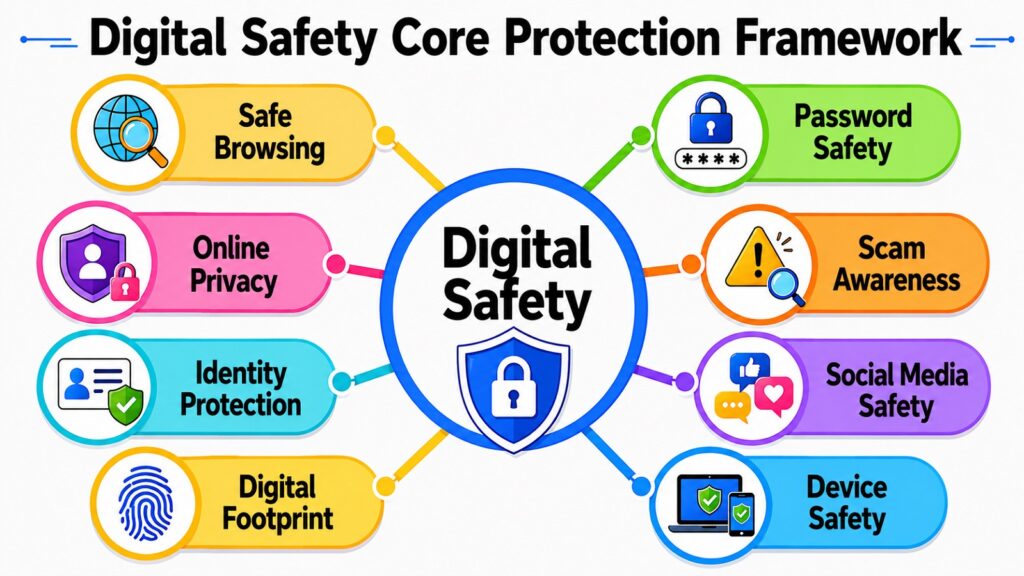
What makes Digital Safety effective is not any single tool or habit. It is the combination of knowledge, awareness, and protective measures working together. This article explores eight foundational aspects of Digital Safety. Each one addresses a different part of your online life, and together they form a comprehensive approach to staying protected.
Table 1: Digital Safety – Eight Aspects and Their Contributions
| Aspect of Digital Safety | How It Contributes to Protection |
| Safe Browsing Practices | Reduces exposure to malicious websites, downloads, and deceptive content |
| Password Security | Prevents unauthorized access to accounts through strong credential management |
| Online Privacy Protection | Limits unnecessary exposure of personal data to third parties |
| Awareness of Online Scams | Helps users recognize and avoid fraud before it causes harm |
| Identity Protection | Reduces the risk of personal information being misused or stolen |
| Social Media Safety | Prevents oversharing and protects accounts from compromise |
| Digital Footprint Management | Controls long-term online presence and protects reputation |
| Secure Device Protection | Keeps hardware and software secure against unauthorized access and malware |
1. Digital Safety Through Safe Browsing Practices
Safe browsing marks the commencement of Digital Safety. Each time you launch a browser, you engage with websites, advertisements, and downloadable content. While the majority of these interactions are benign, some are not, and distinguishing between them is not always straightforward.
Phishing websites are among the most common threats to digital safety. They are designed to look like legitimate services, copying the visual design of banks or social media platforms. The URL is usually slightly different from the real site, but many users do not check it closely. Once a person enters their credentials, that information goes directly to an attacker.
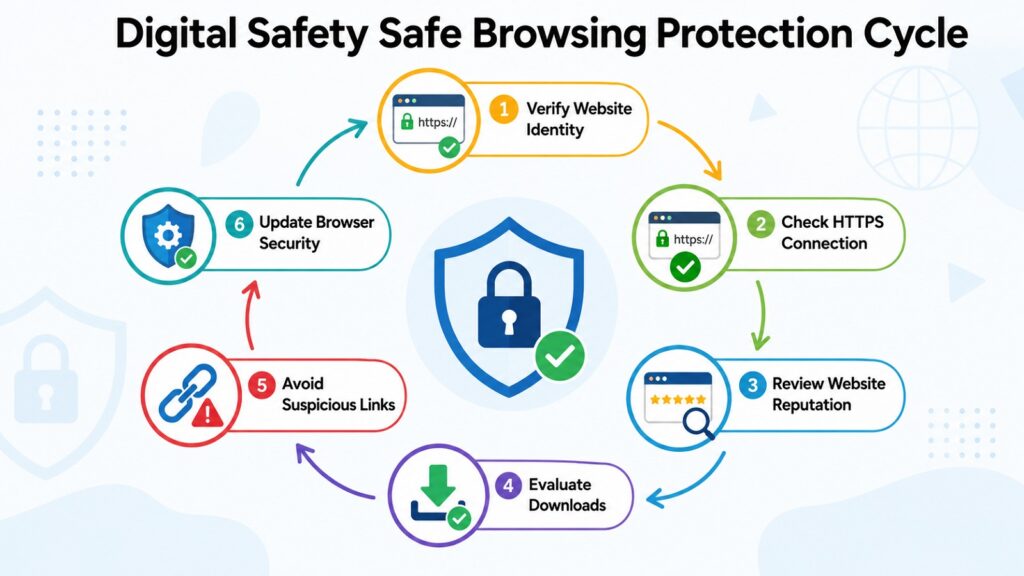
Drive-by downloads are another risk. Some websites push malicious software onto your device simply by loading the page, exploiting outdated browser software or plugins. Malvertising, which involves injecting harmful code into online advertisements, can affect even reputable websites. Keeping your browser updated is one of the simplest defenses against both of these threats.
Good browsing habits include looking for the padlock icon in your browser’s address bar, which indicates an encrypted HTTPS connection. Being skeptical of shortened URLs, avoiding links in unsolicited messages, and downloading files only from trusted sources all reduce your exposure. Browser extensions that block intrusive ads and known malicious domains add a practical extra layer of protection.
The practical takeaway is to pause before you click. Check the URL of any site that asks for your personal information. Keep your browser updated. These small habits eliminate a wide range of browsing-related risks before they become problems.
Table 2: Digital Safety – Safe Browsing Practices and Associated Risks
| Safe Browsing Practice | Risk It Helps Reduce |
| Verify the website URL before entering details | Phishing and credential theft via fake sites |
| Look for HTTPS and padlock in the address bar | Data interception on unencrypted connections |
| Keep your browser updated | Drive-by malware downloads through browser exploits |
| Use an ad blocker from a reputable source | Malvertising and unwanted tracking scripts |
| Download files only from trusted sources | Malware, spyware, and ransomware infections |
| Avoid clicking links in unsolicited emails or messages | Phishing and redirect to malicious sites |
| Be cautious with browser extensions | Data collection and malicious extension behavior |
| Use private browsing when on shared devices | Exposure of login credentials and browsing history |
2. Digital Safety and the Importance of Password Security
Passwords are often the only barrier between your accounts and an attacker. Despite their importance, password habits remain one of the weakest points in Digital Safety. Reusing passwords, choosing short predictable combinations, and never updating credentials are all extremely common mistakes.
Brute-force attacks test millions of combinations until the right one is found. Short passwords built around common words can be cracked in seconds with modern hardware. Credential stuffing attacks take credentials exposed in one breach and try them across dozens of other services, exploiting the widespread habit of password reuse.
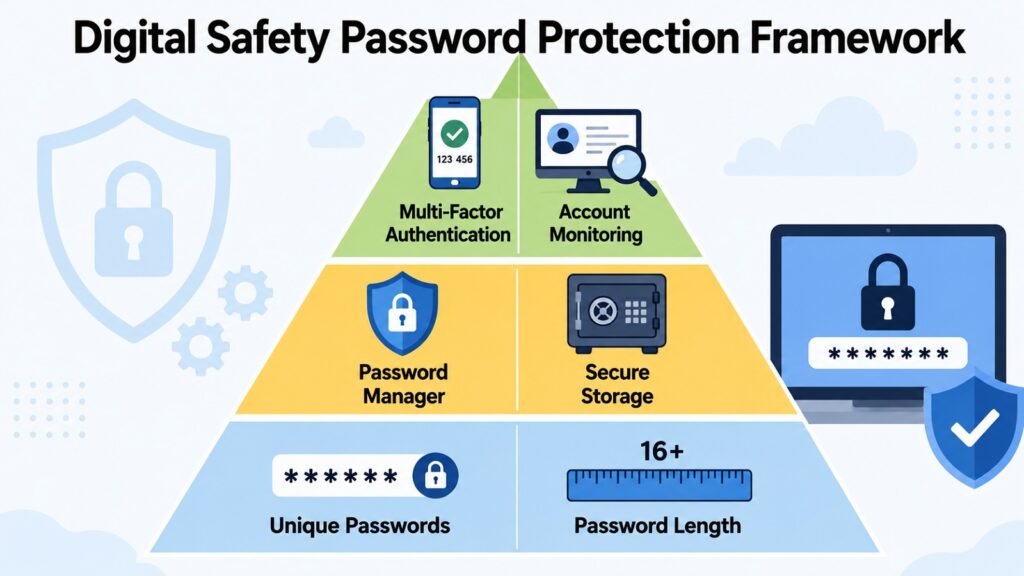
A strong password is at least twelve characters long and combines uppercase letters, lowercase letters, numbers, and symbols. Passphrases work well because they are both strong and memorable. A phrase like ‘purple-train-Tuesday-wallet’ is far harder to crack than something like ‘P@ss123’. Password managers generate, store, and fill in unique passwords for every account, removing the temptation to reuse them. Popular options include Bitwarden and 1Password.
Multi-factor authentication, commonly called MFA or 2FA, adds a second verification step beyond the password. This usually takes the form of a code from your phone or an authenticator app. Even if an attacker has your password, they cannot access your account without that second factor. Enabling MFA on email, banking, and social media accounts significantly reduces the risk of account takeover.
The key takeaway is clear. Utilize a password manager to generate distinct passwords for each account. Activate multi-factor authentication whenever it is offered. Implementing these two measures significantly mitigates most password-related security risks.
Table 3: Digital Safety – Recommended Password Practices and Security Benefits
| Password Practice | Primary Security Benefit |
| Use a minimum of twelve characters per password | Increases resistance to brute-force attacks |
| Combine letters, numbers, and symbols | Reduces predictability and cracking speed |
| Use a unique password for every account | Prevents credential stuffing across multiple services |
| Use a passphrase of four or more random words | Strong and easier to remember than complex short passwords |
| Store passwords in a reputable password manager | Eliminates the need to reuse or memorize passwords |
| Enable multi-factor authentication on all major accounts | Protects access even when a password is compromised |
| Avoid using personal information in passwords | Reduces risk from social engineering and targeted guessing |
| Change passwords after a data breach notification | Prevents continued access from stolen credentials |
3. Digital Safety Through Strong Online Privacy Protection
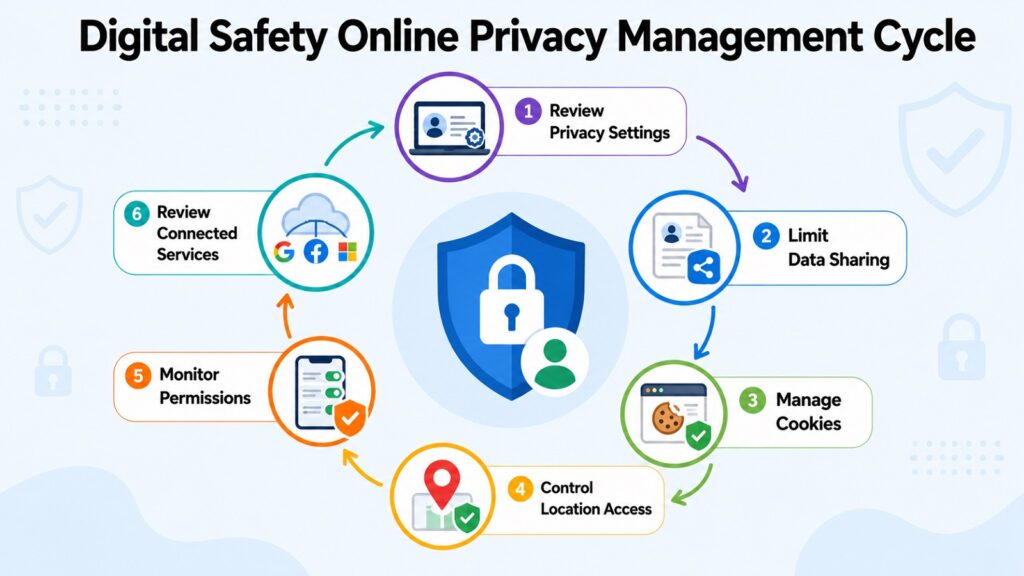
Privacy and security are closely related. Digital Safety depends partly on measures that keep attackers out, and partly on privacy habits that limit how much information is available to exploit. The less personal data floating around, the smaller the attack surface, and better for overall digital safety.
Every time you visit a website or use an app, data is gathered about you. This includes the pages you visit, your searches, your location, and your behavior patterns. Much of this collection happens automatically through cookies, tracking pixels, and browser fingerprinting scripts that most users never see or think about.
Third-party cookies placed by advertising networks track your activity across multiple websites, building a profile of your interests and habits. That profile can be sold or exposed in a breach. Location sharing adds another layer of risk. Many apps request location access for legitimate reasons, but some ask for it without any clear need. Granting those permissions creates a detailed record of your physical movements over time.
Privacy settings on platforms like Google and Meta give users some control over data use. Reviewing those settings periodically, limiting app permissions to what is necessary, and opting out of data-sharing programs where possible all reduce your exposure. Forms on websites often ask for more information than they need. If a service does not genuinely require your phone number or date of birth, there is no reason to provide it.
The practical takeaway is to treat your personal data as something with real value. Review app permissions regularly, use browser privacy tools, and be selective about what you share. Privacy protection is about staying in control of your own information.
Table 4: Digital Safety – Common Privacy Risks and Protection Measures
| Privacy Risk | Practical Protection Measure |
| Cross-site tracking through third-party cookies | Use a browser with tracker blocking or install a privacy extension |
| Excessive app location access | Review and restrict location permissions to only essential apps |
| Over-sharing on online forms | Provide minimum required information and use alias emails where appropriate |
| Data profiling by advertising networks | Opt out of ad personalization through platform privacy settings |
| Unencrypted data transmission | Use only HTTPS sites and avoid unsecured public Wi-Fi without a VPN |
| Stale permissions from unused apps | Regularly audit and delete apps you no longer use |
| Account data exposure in breaches | Monitor breach notifications via services like Have I Been Pwned |
| Browser fingerprinting | Use privacy-focused browsers or extensions that resist fingerprinting |
4. Digital Safety and Awareness of Online Scams
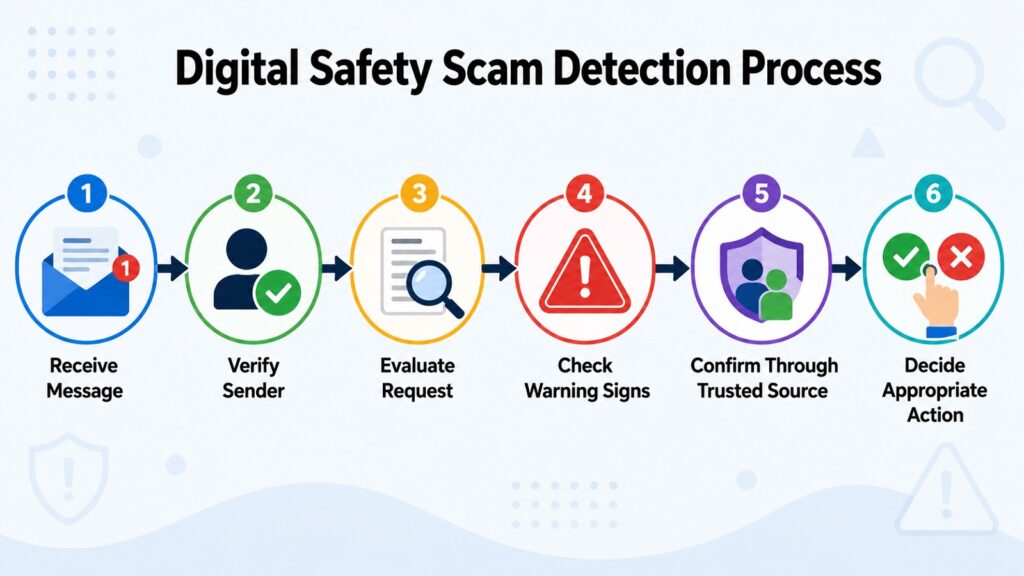
Online scams succeed not because victims are unintelligent but because scammers are skilled. They understand human psychology and know that people respond quickly to fear, urgency, and authority. The FBI reported that scams and fraud represented the vast majority of cybercrime losses in 2023, and the methods used to deliver them continue to evolve.
Phishing is the most widespread form. Deceptive messages appear to come from a trusted source, typically a bank, delivery company, or government agency, and ask the recipient to click a link or provide information. Smishing delivers the same deception by text. Vishing uses automated phone calls to manufacture urgency. Impersonation scams involve attackers posing as a family member in trouble or a romantic partner, building trust before requesting money.
Shopping scams involve fake online stores that take payment and deliver nothing. Investment fraud promises unrealistic returns on cryptocurrency. Tech support scams display fake browser warnings and pressure users to call a number where someone steals their payment details. What makes all of these effective is that they are designed to override careful thinking. Urgency is the weapon.
The antidote is to slow down and verify independently. If a message claims to be from your bank, call the number on the back of your card rather than any number provided in the message. Red flags include unsolicited contact, requests for payment through gift cards or cryptocurrency, and pressure to act immediately.
The practical takeaway is to pause and verify before acting. A brief moment of skepticism and an independent check can save you from serious financial and personal harm.
Table 5: Digital Safety – Common Scam Types and Primary Warning Signs
| Scam Type | Primary Warning Sign |
| Phishing email | Urgent request with a link to verify account details or login |
| Smishing text message | Unexpected text with a shortened link asking for personal information |
| Vishing phone call | Caller claims threat to account or legal trouble and demands immediate action |
| Impersonation or romance scam | Online contact builds emotional connection then requests money |
| Fake online store | Unusually low prices, no verifiable contact details, accepts only wire transfer |
| Investment fraud | Promises of guaranteed high returns with little or no risk |
| Tech support scam | Browser pop-up claims your computer is infected and displays a callback number |
| Gift card scam | Request to pay a debt, fee, or emergency using store gift card codes |
5. Digital Safety Through Effective Identity Protection
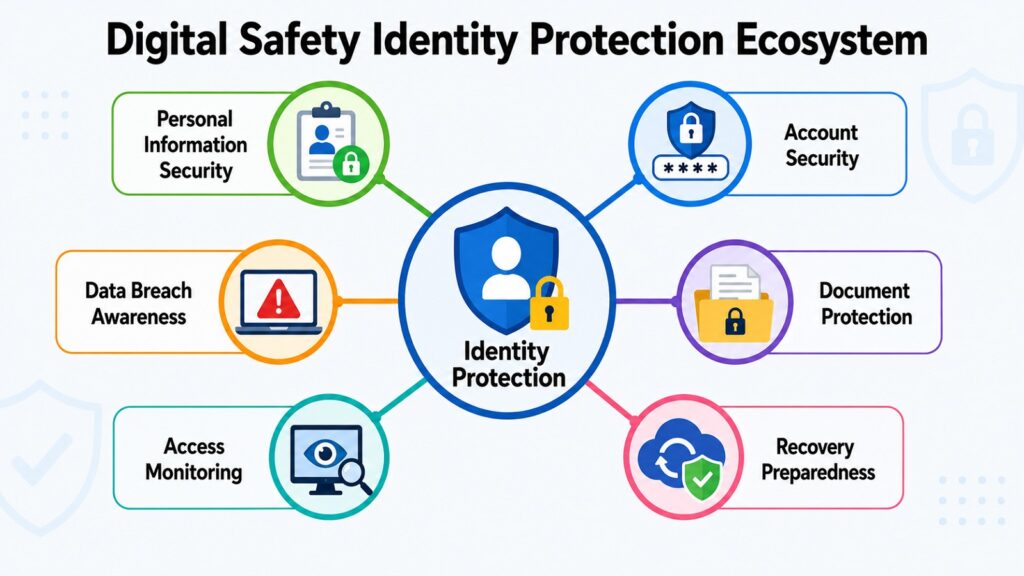
Your identity is made up of data points: your name, date of birth, address, identification numbers, and financial account details. When criminals collect enough of them, they can open fraudulent accounts, take out loans, file false tax returns, or impersonate you in ways that take years to fully resolve. Identity protection is one of the most critical and underestimated components of Digital Safety.
Data breaches are the primary source of stolen identity information. When a company that holds your data is compromised, attackers may access millions of records at once. Major breaches in 2023 affected customers of banks, healthcare providers, retailers, and government agencies. The exposed data typically includes email addresses, passwords, dates of birth, and sometimes financial details.
Physical document security matters as much as digital hygiene. Documents like your passport and financial statements contain sensitive information. Shredding documents before discarding them and storing originals securely are basic but important habits. Account recovery mechanisms can also be exploited. Security questions based on publicly available information are easy targets. Using false answers that only you know adds protection that genuine personal details cannot.
Monitoring for unauthorized activity is essential. Checking financial statements regularly, reviewing credit reports for accounts you did not open, and signing up for breach notification services all help you catch problems early. Placing a credit freeze with reporting agencies prevents new credit from being opened in your name without your authorization.
The essential lesson is that safeguarding your identity requires establishing consistent practices. Regularly review your accounts, ensure the security of your documents, keep an eye on your credit, and handle sensitive personal information with the same diligence you would apply to physical valuables.
Table 6: Digital Safety – Common Identity Risks and Preventive Actions
| Identity Risk | Preventive Action |
| Personal data exposed in a data breach | Monitor breach alerts and change passwords on affected accounts promptly |
| Stolen physical identity documents | Store sensitive documents securely and shred before discarding |
| Social engineering using personal details | Avoid sharing sensitive personal information publicly online |
| Fraudulent account opening in your name | Place a credit freeze with major reporting agencies |
| Exploitation of predictable security questions | Use false or random answers that only you know |
| Unauthorized financial transactions | Review bank and credit card statements at least monthly |
| Account takeover using stolen credentials | Enable multi-factor authentication on all financial and email accounts |
| Tax fraud using your identity | File your tax return early each year and monitor for duplicate filings |
6. Digital Safety Best Practices for Social Media Use
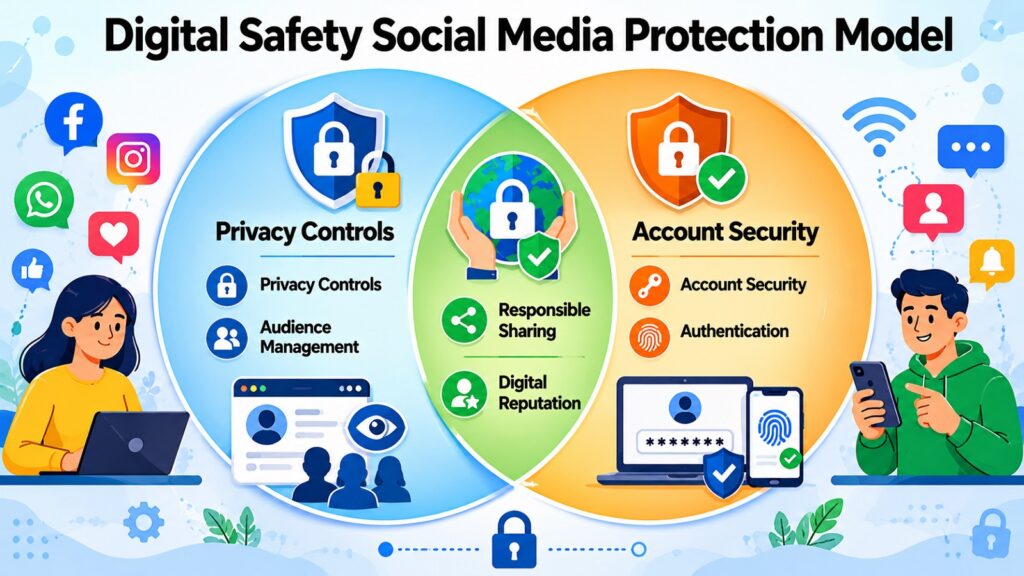
Social media platforms are built for sharing, and people share a great deal. Photos of daily life, location check-ins, opinions, and workplace details all flow through these platforms constantly. That openness creates connection and community. It also creates Digital Safety risks that most users do not fully consider.
Oversharing is one of the most common problems. When someone posts about being away on vacation, they announce that their home is unoccupied. When someone consistently tags the same school in photos of their child, they create a locatable record. The information shared on social media can be combined to build a detailed picture of a person’s routine and vulnerabilities that skilled attackers can exploit.
Privacy settings are implemented for valid reasons, yet many users fail to examine them frequently. Publicly visible profiles can be viewed by anyone. Limiting your audience to trusted contacts greatly minimizes your risk of exposure. Additionally, fake profiles pose a significant threat. Impersonators establish accounts that seem to represent actual individuals and utilize them to disseminate false information or perpetrate scams. Receiving a friend request from someone you believed you were already connected to is frequently indicative of impersonation.
Account security on social media deserves the same attention as financial accounts. A strong unique password and 2FA (two-factor authentication) keep your account secure. Third-party apps connected to social media accounts sometimes retain access long after you stop using them. Reviewing and revoking those connections periodically is a simple but valuable practice.
The practical takeaway is to treat every post as potentially permanent and public, regardless of your current settings. Screenshots travel. Privacy defaults change. Think before you post.
Table 7: Digital Safety – Common Social Media Risks and Safety Practices
| Social Media Risk | Corresponding Safety Practice |
| Oversharing location or daily routine | Avoid real-time location posts and delay sharing travel details |
| Public profile visible to strangers | Set profile visibility to friends or connections only |
| Fake friend request from an impersonator | Verify requests via another communication channel before accepting |
| Social engineering using profile information | Limit publicly visible personal details such as employer and hometown |
| Account compromise from weak password | Use a strong unique password and enable two-factor authentication |
| Unauthorized third-party app access | Regularly review and revoke unused connected apps |
| Targeted phishing based on shared content | Be cautious about what interests or life events you share publicly |
| Permanent record of deleted posts | Think carefully before posting since screenshots and archives persist |
7. Digital Safety and Managing Your Digital Footprint
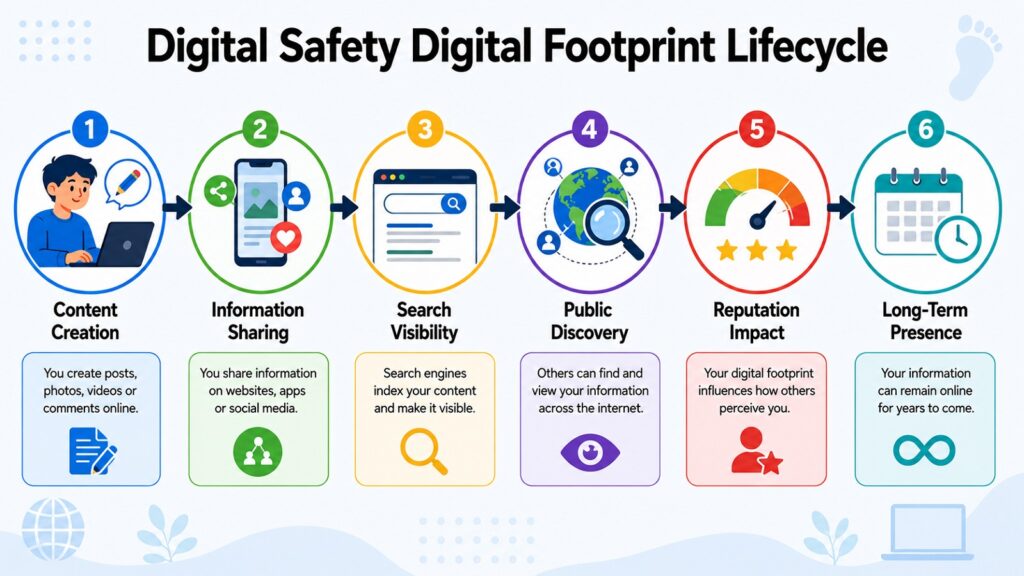
Every interaction you have online leaves a trace. The websites you visit, comments you post, accounts you create, and forms you fill in all contribute to a record of your digital life. That record is your digital footprint, and it has real consequences for your privacy, reputation, and security.
Digital footprints come in two forms. An active footprint is the information you deliberately share, such as social media posts, reviews, and profile details. A passive footprint is created without your direct involvement through tracking cookies, browsing histories, and data that services collect automatically. Both forms accumulate over time, often without people realizing how extensive the record has become.
Search engines index publicly available content, meaning that things you posted years ago may still appear in results today. Old accounts on platforms you have forgotten about may hold personal information and could be vulnerable if those platforms are later compromised. An extensive footprint also gives attackers more material to work with, making targeted scams and impersonation easier to attempt.
Digital footprints affect real-world opportunities too. Employers routinely search applicants’ names online before making hiring decisions. Universities and landlords may do the same. A positive digital footprint can be an asset. A careless one can create lasting damage to reputation and professional prospects.
The practical takeaway is to be intentional about your online presence. Periodically search your own name to see what appears. Delete accounts you no longer use. Review what is publicly visible on platforms you still rely on. Deliberate choices about what you share make a meaningful difference to your long-term Digital Safety.
Table 8: Digital Safety – Common Sources of Digital Footprints and Their Potential Impact
| Source of Digital Footprint | Potential Impact |
| Social media posts and profile information | Affects reputation, privacy, and susceptibility to social engineering |
| Online forum comments and reviews | Searchable by name and may reflect outdated opinions or personal details |
| Old and forgotten online accounts | Vulnerable to breaches and may hold sensitive stored information |
| Search engine-indexed public content | Visible to employers, institutions, and anyone searching your name |
| Data broker records compiled from various sources | Can expose address history, financial status, and personal relationships |
| App usage data collected passively | Builds behavioral profile used for advertising and potentially sold |
| Location data from mobile apps | Creates a record of physical movements over extended periods |
| Online shopping and subscription history | Reveals spending habits and preferences accessible in data breaches |
8. Digital Safety Through Secure Device Protection
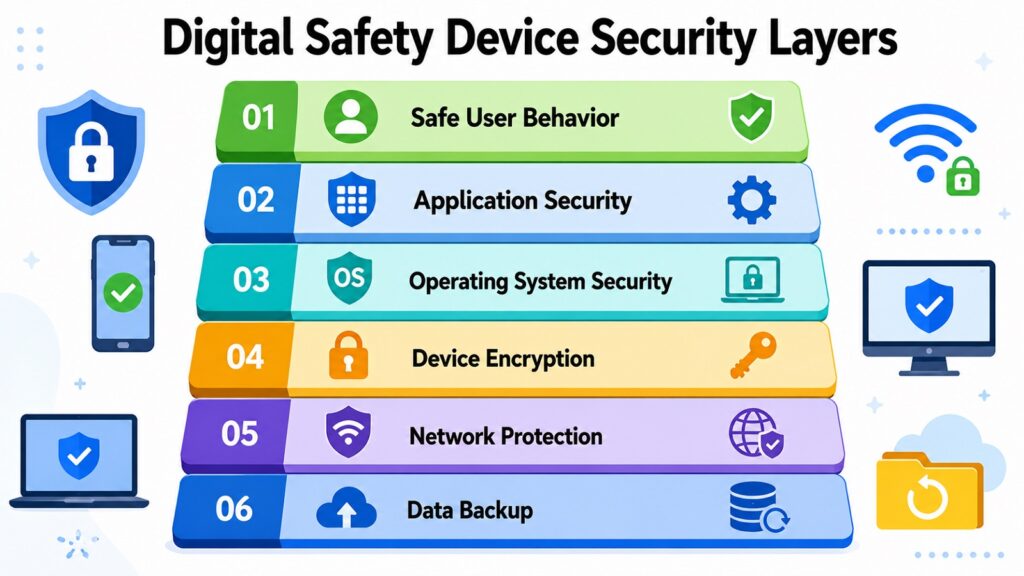
Your devices are the physical gateways to your digital life. Your phone holds messages, contacts, banking apps, and photos. Your laptop stores documents, emails, and credentials. Each of these devices, if compromised, can expose a significant amount of sensitive information.
Software updates represent a critical yet often overlooked component of device security. When developers identify vulnerabilities, they issue patches to address these issues. Postponing updates allows known vulnerabilities to remain exposed to potential attackers. The WannaCry ransomware incident in 2017 impacted hundreds of thousands of devices in 150 countries, primarily exploiting a Windows vulnerability for which a patch had already been made available. Numerous affected systems had merely failed to implement the update.
Antivirus and antimalware software provide ongoing protection against malicious programs and monitor behavior in real time. Application permissions also matter. When you install an app, it often requests access to your camera, microphone, contacts, and location. Reviewing those permissions and revoking anything unnecessary reduces your exposure in ways that many people overlook.
Encryption protects data stored on your device by making it unreadable to anyone without your passcode. Most modern smartphones encrypt their data by default when a screen lock is set. Laptops may need encryption enabled manually. Regular backups protect against data loss from ransomware or theft. Storing backups in at least two places, with one being offline or in a separate cloud account, ensures recovery when it matters most.
The practical takeaway is that device security is built through consistent habits. Apply updates promptly, review permissions regularly, enable encryption, and maintain backups. These practices make your devices significantly harder to compromise and keep your data recoverable.
Table 9: Digital Safety – Device Security Measures and Risks They Mitigate
| Device Security Measure | Risk It Helps Mitigate |
| Apply software and OS updates promptly | Exploitation of known unpatched vulnerabilities |
| Use reputable antivirus or antimalware software | Malware, ransomware, spyware, and trojan infections |
| Review and restrict app permissions | Unauthorized access to camera, microphone, contacts, and location |
| Enable full-disk encryption | Data theft from lost or stolen devices |
| Maintain regular offline or cloud backups | Data loss from ransomware, device failure, or theft |
| Use a VPN on public or unsecured Wi-Fi | Interception of data on unencrypted networks |
| Set a strong screen lock passcode or biometric | Unauthorized physical access to your device |
| Remove apps you no longer use | Outdated app vulnerabilities and unnecessary permission retention |
Conclusion: Building Long-Term Digital Safety Habits
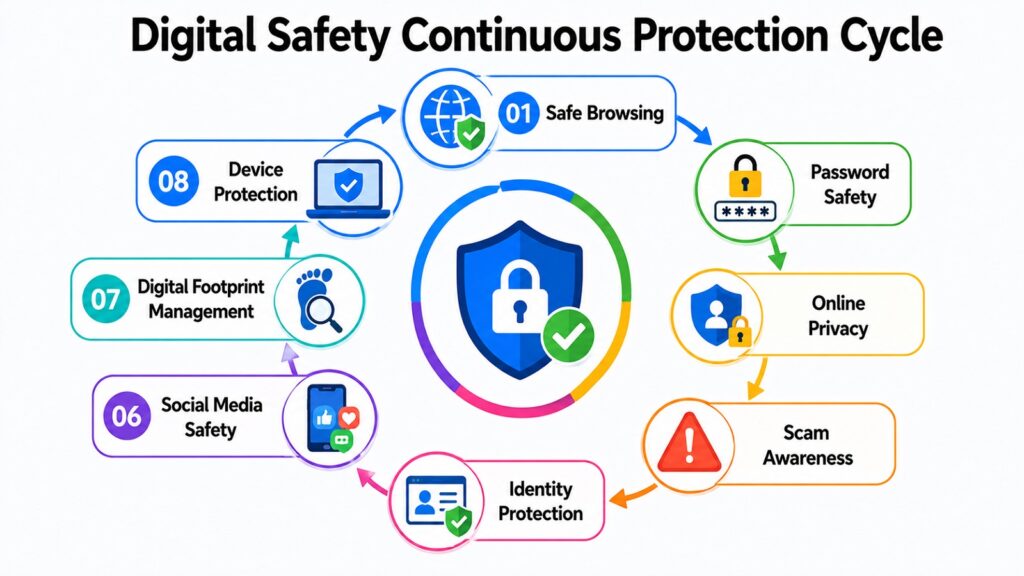
Digital Safety is not a destination. It is a practice, one that requires consistent attention and a willingness to adapt as technology and threats evolve. The eight aspects explored in this article are deeply connected. A weakness in one area can undermine the protections in another.
Safe browsing reduces your exposure to harmful content. Strong passwords close a major entry point for attackers. Privacy protection limits what can be collected and misused. Scam awareness helps you recognize manipulation before it causes harm. Identity protection keeps your most sensitive information out of criminal hands. Social media safety prevents oversharing from becoming a vulnerability. Managing your digital footprint gives you long-term control over your online presence. Device protection ensures the tools you rely on remain trustworthy.
The greatest misconception about Digital Safety is that it requires technical expertise. It does not. It requires awareness, informed habits, and deliberate effort applied consistently over time. The threats change, but the core principles remain stable. Being cautious, verifying before acting, keeping software current, and thinking before sharing are habits that serve you well regardless of what comes next.
Take time to review your current practices across each of the eight areas covered here. Small changes, made consistently, add up to meaningful protection. Digital Safety is ultimately about confidence: the confidence to use technology without fear, knowing that you have taken reasonable steps to protect yourself.
Table 10: Digital Safety – Eight Aspects and Key Takeaways
| Aspect of Digital Safety | Key Takeaway |
| Safe Browsing Practices | Pause before clicking, verify URLs, and keep your browser updated to avoid malicious content |
| Password Security | Use unique strong passwords for every account and always enable multi-factor authentication |
| Online Privacy Protection | Limit what you share online and review app and platform permissions regularly |
| Awareness of Online Scams | Slow down when pressured to act, verify through official channels, and trust your instincts |
| Identity Protection | Monitor your accounts, secure your documents, and consider a credit freeze for added safety |
| Social Media Safety | Think of every post as potentially permanent and limit what your profile reveals publicly |
| Digital Footprint Management | Search yourself periodically, delete old accounts, and be intentional about your online presence |
| Secure Device Protection | Apply updates promptly, enable encryption, restrict permissions, and maintain regular backups |