Table of Contents
Introduction: Why Network Fundamentals Matter in Every Computer Network
Every time you open a browser, stream a video, join a video call, or send a message, a computer network is working silently in the background. These networks do not run on magic. They run on Network Fundamentals — the core concepts that define how devices connect, communicate, and move data from one point to another. Without a firm grasp of these fundamentals, everything else in networking becomes difficult to follow.
Network Fundamentals represent the core elements of any computer network. They establish the basis for all networking technologies. Prior to delving into more complex subjects such as network types, LAN, WAN, routing, switching, protocols, topologies, and enterprise network design, it is crucial to grasp these foundational components first. Neglecting them is akin to attempting to construct a house without first laying the foundation.
These fundamentals explain how devices identify and find each other, how data is broken into manageable pieces and reassembled at the destination, and how rules allow machines made by different manufacturers to communicate without confusion. They explain why your home Wi-Fi works differently from a corporate data center, and why a video call feels choppy when your connection is slow even though your internet plan promises high speeds.
In everyday life, Network Fundamentals show up constantly. When you load a webpage, packets of data travel through multiple devices before reaching your screen. When you store a file in the cloud, that file travels across links and nodes using IP addresses and protocols you never see. When a gamer complains about lag, they are experiencing the effects of latency — another core fundamental. These are not abstract ideas. They are real processes happening every second across billions of devices worldwide.
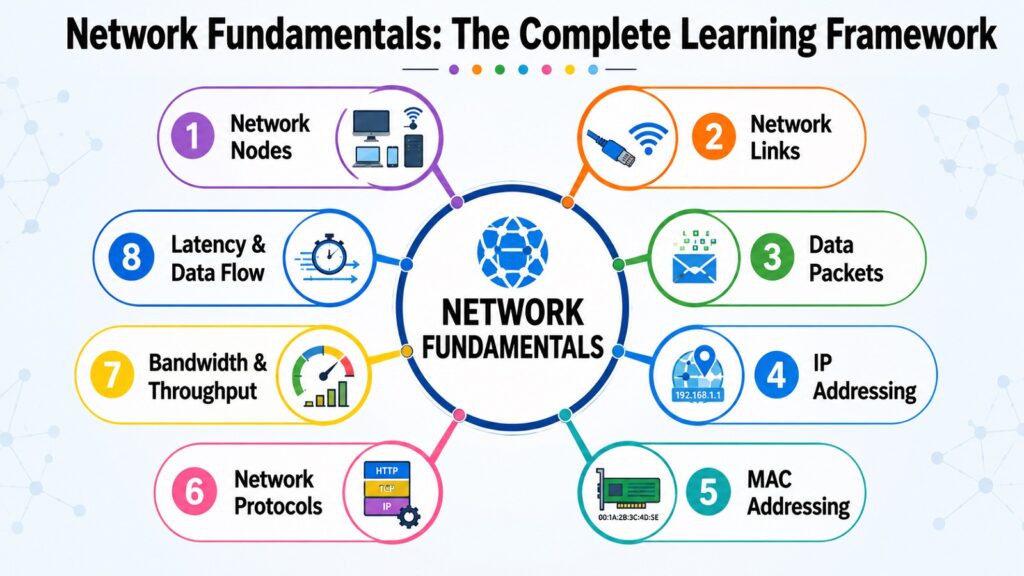
This article walks through eight key Network Fundamentals in plain language. The eight concepts are: network nodes, network links, data packets, IP addressing, MAC addressing, network protocols, bandwidth and throughput, and latency and data flow. Together, they give both the theoretical foundation and the practical understanding needed to study, design, manage, and troubleshoot computer networks at any level.
Table 1: Eight Network Fundamentals and What Each One Covers
| Network Fundamentals | What It Covers |
| Network Nodes | Devices that send, receive, or forward data in a network |
| Network Links | Physical and wireless pathways connecting devices |
| Data Packets | Small units of data transmitted independently across networks |
| IP Addressing | Logical addresses that identify devices on a network |
| MAC Addressing | Hardware-level identifiers built into network interface cards |
| Network Protocols | Agreed rules that govern how devices communicate |
| Bandwidth & Throughput | Network capacity and actual data transfer rate |
| Latency & Data Flow | Response time and the complete journey of data packets |
1. Network Fundamentals: Understanding Network Nodes
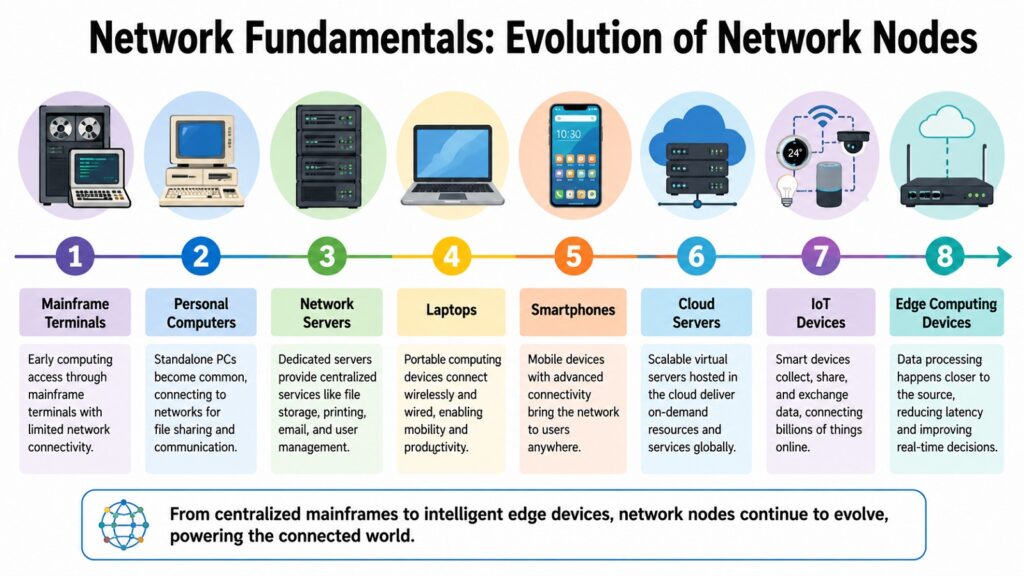
Network Fundamentals commence with network nodes, as every instance of digital communication initiates and concludes with a connected device. A network node refers to any device that is capable of sending, receiving, or forwarding data within a network. This concept is intentionally broad. Devices such as laptops, smartphones, printers, routers, servers, and even smart thermostats are all considered network nodes, provided they are connected and able to exchange data.
Nodes fall into two broad categories. End devices, also called hosts, are the devices that users interact with directly. These include desktop computers, laptops, tablets, smartphones, and IoT devices such as smart speakers and security cameras. Intermediary devices, on the other hand, are responsible for moving data between end devices. Routers, switches, hubs, firewalls, and access points all belong to this group. They do not originate or consume data themselves but direct it efficiently through the network.
Nodes are essential for nearly every modern digital service. Resource sharing depends on nodes — when a printer is shared across an office network, every computer on that network becomes a node that can send print requests. Cloud computing depends on massive clusters of server nodes working in coordination. IoT environments depend on thousands of small sensor nodes feeding data to central platforms for analysis.
The concept of network nodes has changed significantly since the early days of computing. Early networks connected only a handful of mainframe computers. Today, a single enterprise network may include thousands of nodes across multiple physical locations, including edge computing devices deployed closer to users to reduce delays.
Here is a real-world example. When you type a website address into your browser, your laptop acts as a node that generates the request. That request travels through your home router, which is another node, and then through your internet service provider’s infrastructure, which includes many intermediary nodes, before reaching the web server that hosts the website. The response follows a similar path in reverse. Multiple nodes cooperate silently to deliver a webpage in under a second.
The IEEE, which sets many networking standards, recognizes the role of nodes in defining network structure and addressing schemes. Once you understand nodes, the next logical question is what physically or wirelessly connects them — and that is where network links come in.
Table 2: Common Network Nodes and Their Primary Functions in Network Fundamentals
| Node Type | Primary Function |
| Desktop Computer | Sends and receives data as an end-user host device |
| Smartphone | Accesses networks wirelessly as a mobile host node |
| Router | Forwards packets between different networks |
| Switch | Directs traffic between devices within a local network |
| Server | Hosts resources and services for other nodes to access |
| Firewall | Filters and controls traffic between network segments |
| Access Point | Provides wireless connectivity to devices within range |
| IoT Sensor | Collects and transmits environmental or operational data |
2. Network Fundamentals: Exploring Network Links
Network Fundamentals rely on network links to create the physical and wireless connections between devices. A link is the pathway through which data travels from one node to another. Without links, nodes are isolated devices with no way to exchange information. The quality, speed, and type of link used in a network directly affects how that network performs.
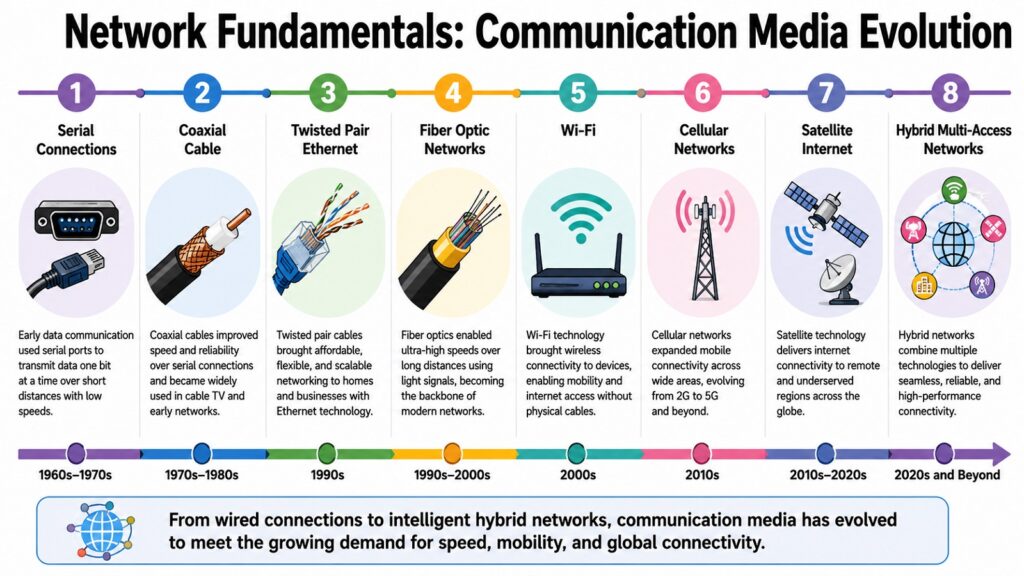
Links come in two broad forms: wired and wireless. Ethernet cables connect devices in homes and offices, while fiber-optic cables carry data as pulses of light at far higher speeds, used in data centers and internet backbone infrastructure. On the wireless side, Wi-Fi handles local connectivity in homes and workplaces, and cellular networks like 4G LTE and 5G extend wireless access across wide areas.
Different environments call for different types of links. A home network typically uses a combination of Wi-Fi for mobile devices and Ethernet cables for stationary equipment like gaming consoles or desktop computers. A data center connects servers using high-speed fiber cables because the volume of data moving between servers is enormous and latency must be minimized. A remote field sensor for agriculture might use a cellular or satellite link because there is no wired infrastructure in the area.
Every link type comes with trade-offs. Wired connections tend to be more stable and faster but are limited by cable length and installation cost. Wireless connections offer flexibility and mobility but can be affected by interference, distance from the access point, and the number of devices sharing the same frequency band. Fiber-optic links are fast and capable of transmitting data over long distances with minimal signal loss, but they cost more than copper cables.
Communication links have changed dramatically over the decades. Early telephone networks used copper wires built for voice, not data. Today, fiber optics and advanced wireless standards carry the load of cloud computing, high-definition video, and real-time collaboration.
Once devices are connected through links, the next question is how information is actually organized for transmission. That is where data packets enter the picture.
Table 3: Common Network Link Technologies and Their Key Characteristics in Network Fundamentals
| Link Technology | Key Characteristics |
| Ethernet (Copper) | Reliable, low-cost wired connection for local networks |
| Fiber Optic | High-speed, long-distance transmission using light signals |
| Wi-Fi | Wireless local area connectivity using radio frequencies |
| 4G LTE | Wide-area cellular wireless with moderate speed and coverage |
| 5G Cellular | Next-generation wireless with high speed and low latency |
| Coaxial Cable | Used in older cable internet and television infrastructure |
| Powerline Adapter | Transmits data through existing electrical wiring |
| Satellite Link | Provides connectivity in areas without wired infrastructure |
3. Network Fundamentals: Understanding Data Packets
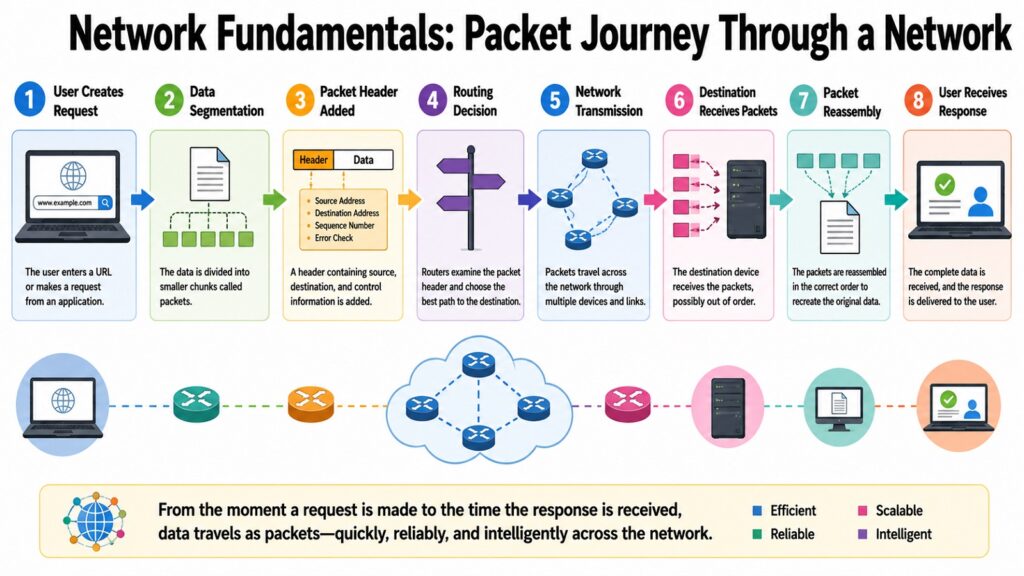
Network Fundamentals depend on a clever method of organizing information for transmission: the data packet. Rather than sending a complete file or message as one continuous stream, modern networks break data into small, manageable units called packets. Each packet travels independently through the network and is reassembled at the destination into the original data. This method is known as packet switching.
A data packet has two main parts. The header carries control information: the source IP address, the destination IP address, the packet’s sequence number, and other details needed to route and reassemble the data correctly. The payload is the actual chunk of content being delivered — a fragment of a video file, a piece of a web page, or part of an email message. Some packets also include a trailer that helps detect errors in transmission.
Packet switching is far more efficient than the older method of circuit switching, which reserved a dedicated communication path between two devices for the entire duration of a conversation. Imagine calling someone on an old telephone network — the line was exclusively yours from start to finish, even during silent moments. Packet switching shares network capacity among many users at the same time by allowing different packets to take different routes. This makes networks far more scalable and resilient.
The shift from circuit switching to packet switching was a defining moment in networking history. The early ARPANET, built in the late 1960s, was among the first large-scale packet-switched systems, and its architecture made the modern internet possible.
When you watch a video online, that video is not delivered as one large file in a single stream. It is broken into thousands of small packets, each sent through whatever network path is available at that moment. Some packets may arrive out of order. The receiving device uses the sequence numbers in the headers to put them back in the right order before playing the video. If a packet is lost, protocols like TCP request a retransmission.
Packets require an addressing system to know where to go. That brings us to IP addressing — the logical system that gives every device on a network a unique identity.
Table 4: Key Packet-Related Concepts and Their Roles in Network Fundamentals
| Packet Concept | Purpose |
| Packet Header | Carries source and destination addresses and sequence data |
| Payload | Contains the actual fragment of data being transmitted |
| Packet Trailer | Provides error detection information for data integrity |
| Sequence Number | Allows packets to be reassembled in the correct order |
| Packet Switching | Routes packets independently across shared network paths |
| MTU (Max Unit Size) | Defines the largest packet size a network link supports |
| Packet Loss | Occurs when packets fail to reach the destination device |
| Retransmission | TCP mechanism that resends lost or corrupted packets |
4. Network Fundamentals: Understanding IP Addressing
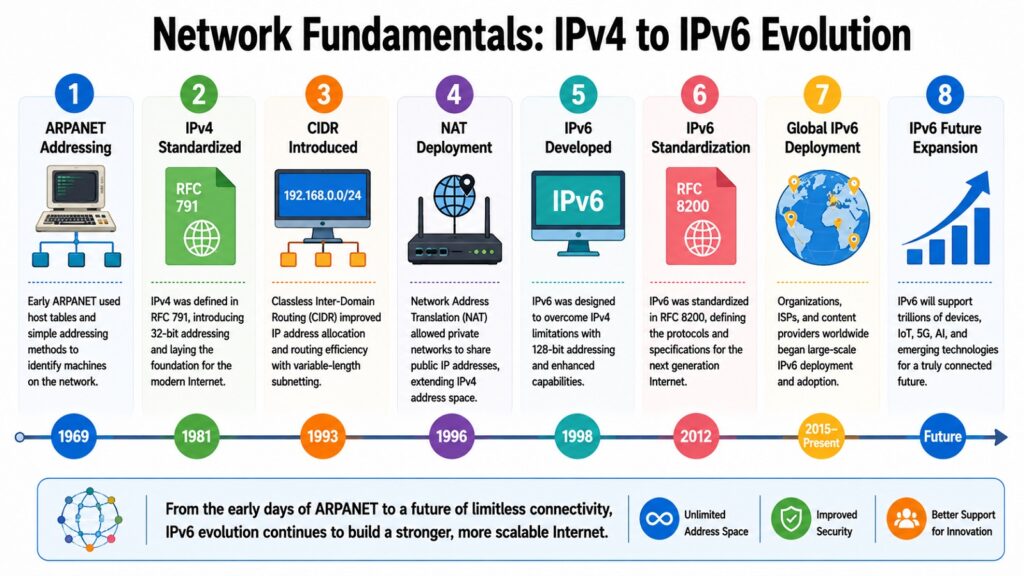
Network Fundamentals use IP addressing to give every device on a network a unique logical identity. IP stands for Internet Protocol, and an IP address is a numerical label assigned to each device participating in a network that uses this protocol for communication. Without IP addresses, routers would have no way to determine where to send data packets.
There are two versions in use today. IPv4 uses 32-bit numbers written as four dot-separated groups, such as 192.168.1.1, supporting around 4.3 billion unique addresses. That seemed vast when the protocol was standardized in 1981 but proved insufficient as internet-connected devices multiplied. IPv6 uses 128-bit hexadecimal addresses, providing an effectively unlimited pool. The Internet Assigned Numbers Authority, or IANA, manages global IP address allocation.
IP addresses can be public or private. Public IP addresses are globally unique and routable across the internet. Private IP addresses, such as those in the 192.168.x.x and 10.x.x.x ranges, are used within local networks and are not directly visible on the internet. A home router typically receives one public IP address from the internet service provider and assigns private IP addresses to all devices in the home using a process called Network Address Translation, or NAT.
Subnetting is a method to break apart a larger IP network into smaller, more manageable sub-networks. This approach enhances performance and security without necessitating additional hardware. Subnetting is commonly utilized in enterprise networks to structure departments and regulate traffic flow among them.
Every time you visit a website, your device sends a request to the website’s IP address. When you type a domain name into your browser, the Domain Name System translates that name into an IP address that routers can use to forward your request. Cloud services such as storage platforms and video streaming services operate across many servers, each with its own IP address, working together to serve millions of users at once.
While IP addresses identify devices logically at the network level, another type of address identifies the actual physical hardware inside each device. That is the role of MAC addressing.
Table 5: Core IP Addressing Concepts and Their Purposes in Network Fundamentals
| IP Addressing Concept | Purpose |
| IPv4 | 32-bit addressing system supporting around 4.3 billion addresses |
| IPv6 | 128-bit system providing a vastly larger address pool |
| Public IP Address | Globally unique address routable across the internet |
| Private IP Address | Used within local networks; not routable on the internet |
| NAT | Allows many private addresses to share one public IP address |
| Subnetting | Divides a network into smaller, manageable sub-networks |
| DHCP | Automatically assigns IP addresses to devices on a network |
| DNS | Translates domain names into IP addresses for routing |
5. Network Fundamentals: Understanding MAC Addressing
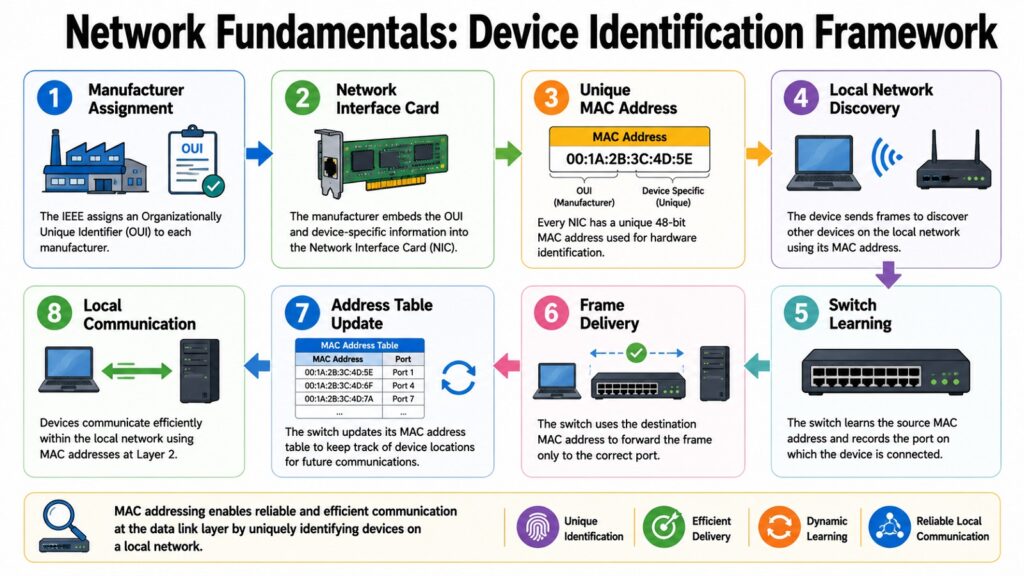
Network Fundamentals also depend on MAC addressing to identify devices at the hardware level. A MAC address, which stands for Media Access Control address, is a unique identifier assigned to a network interface card, commonly called a NIC. Every NIC in every device — whether a laptop, smartphone, router, or printer — has a MAC address built into it during manufacturing.
A MAC address is a 48-bit number typically written as six pairs of hexadecimal digits separated by colons or hyphens, such as 00:1A:2B:3C:4D:5E. The first three pairs of digits identify the manufacturer, known as the Organizationally Unique Identifier, or OUI. The last three pairs are assigned by the manufacturer to make the address unique within their product range. The IEEE maintains the registry of OUI assignments.
MAC addresses serve a different purpose and scope compared to IP addresses. An IP address is logical and may change as a device transitions between networks. Conversely, a MAC address is associated with the physical hardware and remains constant. IP addresses are responsible for routing across networks and the internet, while MAC addresses facilitate delivery within a local network segment.
A practical comparison helps clarify this. Think of an IP address as a mailing address that tells the postal service which city and street to deliver to, while the MAC address is like the name on the mailbox at a specific house. You need both to complete the delivery accurately. The Address Resolution Protocol, or ARP, maps IP addresses to MAC addresses within a local network, allowing devices to find each other at the hardware level.
When your router receives a packet destined for your laptop, it uses ARP to find the MAC address linked to your laptop’s local IP address and then forwards the packet over the local Ethernet or Wi-Fi connection. Both addressing systems work together — one handles global routing, the other handles the final local delivery. Understanding both sets the stage for the next fundamental: the rules that govern how all these devices communicate, which are called protocols.
Table 6: Key MAC Addressing Concepts and Their Functions in Network Fundamentals
| MAC Addressing Concept | Function |
| MAC Address | Unique 48-bit hardware identifier on a network interface card |
| OUI (First 3 Pairs) | Identifies the manufacturer that produced the network card |
| Device-Specific ID | Last three pairs distinguish individual devices from same maker |
| NIC | Hardware component containing the permanent MAC address |
| ARP | Maps IP addresses to MAC addresses within a local network |
| Local Communication | MAC addresses direct packets within a single network segment |
| Immutability | MAC addresses are fixed at manufacture and rarely change |
| IP vs MAC Scope | IP addresses work globally; MAC addresses work locally |
6. Network Fundamentals: Understanding Network Protocols
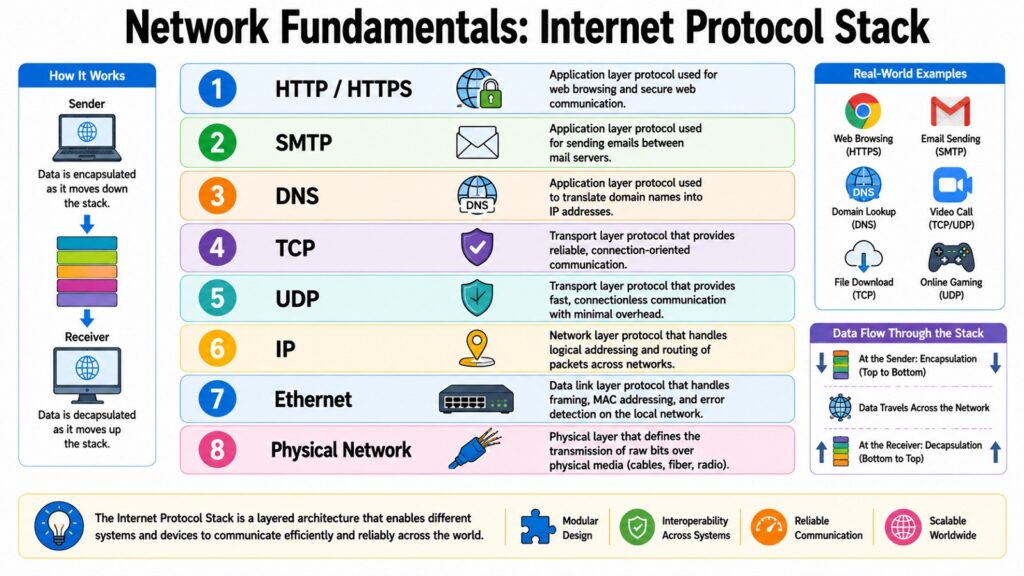
Network Fundamentals rely on network protocols to make communication between devices possible across different hardware platforms and operating systems. A protocol is a set of agreed-upon rules that defines how data is formatted, transmitted, received, and acknowledged between devices. Protocols remove ambiguity — without them, a server running one operating system would have no reliable way to talk to a client running a completely different one.
Think of protocols the way you might think of language conventions in everyday life. When two people agree to communicate in English and follow the same rules of grammar and meaning, they can exchange information reliably. Protocols do the same thing for machines, making sure a packet sent from a device in one country is correctly understood by a server in another.
Several protocols form the backbone of everyday internet communication. TCP ensures packets arrive in the correct order and requests retransmission of lost ones. UDP sends packets without guaranteeing delivery, making it faster and suited for video calls and gaming. HTTP and HTTPS govern how browsers and servers exchange pages, with HTTPS adding encryption. DNS translates domain names to IP addresses. DHCP assigns IP addresses automatically. SMTP handles email transmission between servers.
The necessity for standardized protocols became evident as computer networks grew beyond individual organizations. Standards organizations such as the Internet Engineering Task Force (IETF) and the IEEE have significantly contributed to the establishment of the protocols that underpin the contemporary internet. These protocols are recorded as technical specifications known as RFCs — Request for Comments — which can be adopted by any manufacturer or software developer.
In practice, protocols work in layers. When you send an email, SMTP handles the mail transfer, TCP ensures reliable delivery of packets, IP routes those packets across the network, and Ethernet or Wi-Fi protocols manage transmission at the hardware level. Each layer does its job without needing to know the details of the others. Understanding protocols leads directly into a related question: how fast can a network actually move data? That is where bandwidth and throughput become essential.
Table 7: Widely Used Network Protocols and Their Primary Purposes in Network Fundamentals
| Protocol | Primary Purpose |
| TCP | Ensures reliable, ordered packet delivery with error checking |
| UDP | Sends packets quickly without guaranteed delivery or ordering |
| HTTP / HTTPS | Governs data exchange between web browsers and servers |
| DNS | Resolves domain names into routable IP addresses |
| DHCP | Assigns IP addresses automatically to devices joining a network |
| SMTP | Handles email transmission between mail servers |
| FTP | Transfers files between a client and a server over a network |
| ICMP | Sends error messages and tests network connectivity diagnostics |
7. Network Fundamentals: Understanding Bandwidth and Throughput
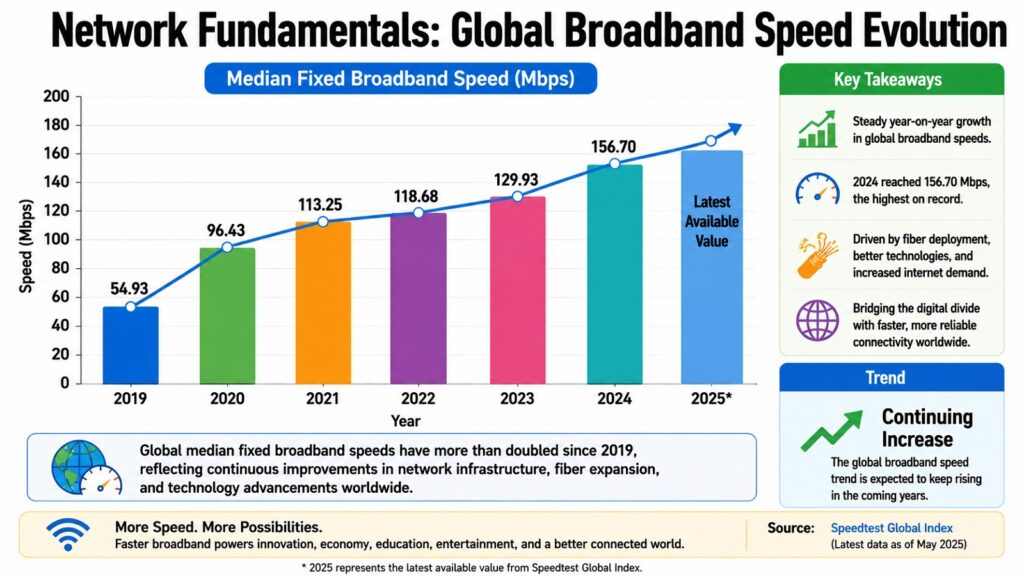
Network Fundamentals include measuring how much data a network can carry and how much it actually delivers. These two measurements — bandwidth and throughput — are often confused but they mean different things in practice.
Bandwidth denotes the theoretical maximum volume of data that a network connection can transmit at any given time, quantified in bits per second. A fiber broadband connection that is marketed as 1 Gbps possesses a bandwidth of one gigabit per second under optimal conditions. Throughput, on the other hand, represents the actual volume of data successfully transmitted over a specified duration, taking into account real-world factors. In practice, throughput is nearly always less than bandwidth.
Several factors reduce throughput below the bandwidth ceiling. Network congestion occurs when too many devices compete for the same limited capacity. Hardware limits in routers, switches, or network interface cards can create bottlenecks. High rates of packet loss force protocols like TCP to retransmit data, which reduces the effective transfer rate. Physical interference, especially in wireless networks, affects signal quality and cuts throughput. Protocol overhead — the control data added to packets by headers and acknowledgment mechanisms — also uses up part of available bandwidth.
Consider video streaming. A platform might deliver a 4K stream that needs around 25 Mbps of steady throughput. A household with a 100 Mbps broadband connection and several family members all using the network at once may find that available throughput for any single stream drops well below 100 Mbps. High bandwidth alone does not mean smooth streaming if congestion or poor routing is eating into actual throughput.
Online gaming is similarly sensitive. A game may need only a small amount of bandwidth, but it requires consistent throughput without sudden drops. Enterprise applications such as cloud backups and video conferencing platforms consume sustained throughput and need careful network planning to avoid performance drops. According to Ookla’s global broadband data, median fixed broadband speeds have risen steadily in many regions over the past decade, but user experience depends far more on throughput under load than on peak bandwidth figures.
Performance also depends on how quickly data travels through the network — and that is what latency measures.
Table 8: Bandwidth and Throughput Concepts and Their Practical Meaning in Network Fundamentals
| Concept | Practical Meaning |
| Bandwidth | Maximum theoretical data capacity of a network connection |
| Throughput | Actual data successfully transferred under real conditions |
| Network Congestion | Traffic overload that reduces available throughput for users |
| Packet Loss | Lost packets force retransmission and lower effective throughput |
| Protocol Overhead | Header and control data that consume part of total bandwidth |
| Hardware Bottleneck | Older or slower equipment limits throughput below bandwidth ceiling |
| Signal Interference | Wireless noise reduces throughput in Wi-Fi environments |
| QoS | Prioritizes critical traffic to maintain throughput for key services |
8. Network Fundamentals: Understanding Latency and Data Flow
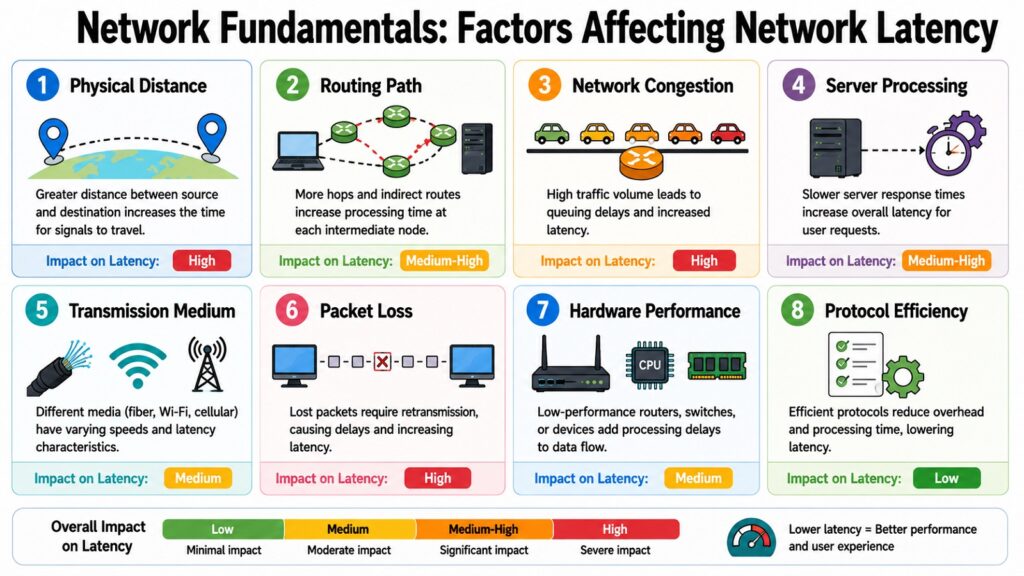
Network Fundamentals also include understanding latency — the time it takes for data to travel from one point to another and back. Latency is measured in milliseconds, and while bandwidth determines how much data can travel, latency determines how quickly a response arrives. In many real-world applications, latency matters more than bandwidth.
Latency is shaped by several factors. Physical distance matters most — a request traveling across continents takes time even at near light-speed. Each intermediary router adds a small processing delay. Congestion causes queuing delays when routers handle more traffic than they can clear. The transmission medium also plays a role: fiber carries signals faster than copper, and satellite links introduce more delay due to the vast distances signals must cross.
A data packet’s journey encapsulates all the topics discussed in this article. A user utilizing a laptop, which serves as a node, inputs a search query and hits enter. The laptop subsequently divides the query into packets, each containing headers with IP addresses. The network interface card, recognized by its MAC address, transmits these packets to the home router via a link. The router then directs them towards the server by utilizing its routing table. At each local segment, ARP is responsible for mapping IP addresses to MAC addresses. TCP guarantees the accurate delivery of the packets. Once the server replies, the entire exchange — involving nodes, links, packets, addresses, and protocols — is completed within milliseconds.
Online gaming shows why latency matters more than bandwidth in many situations. In a competitive multiplayer game, 20 milliseconds of latency versus 150 milliseconds is the difference between a smooth experience and noticeable delay. Video conferencing requires latency below about 150 milliseconds to feel natural. Financial trading systems care about microseconds — even tiny delays carry real cost.
Modern networking continues to push latency lower. Content delivery networks place servers closer to users to cut travel distance. Edge computing moves processing near the devices generating data. 5G is designed to reach latency as low as one millisecond in controlled conditions, enabling applications in autonomous vehicles and industrial automation that earlier networks could not support.
Table 9: Major Factors Affecting Latency and Data Flow in Network Fundamentals
| Latency Factor | Effect on Data Flow |
| Physical Distance | Greater distance between nodes increases round-trip time |
| Routing Hops | Each intermediary router adds a small processing delay |
| Network Congestion | Queuing at busy routers increases packet delivery time |
| Transmission Medium | Fiber carries signals faster than copper or satellite links |
| Processing Delay | Time routers take to read and forward each arriving packet |
| Propagation Delay | Time the signal physically takes to travel the network path |
| Queuing Delay | Packets wait in buffers when a router is handling heavy load |
| Content Delivery Networks | Reduce latency by placing servers closer to end users |
Conclusion: Mastering Network Fundamentals for Stronger Networking Knowledge
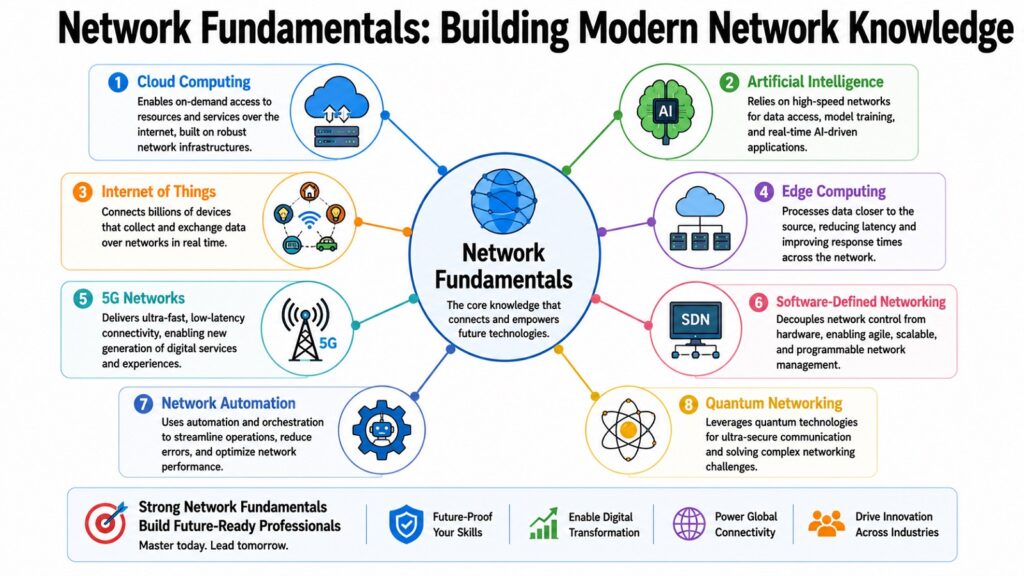
Network Fundamentals are not just academic concepts. They are the working vocabulary of every computer network in existence. Every email, video stream, cloud service, and online transaction depends on nodes, links, packets, IP addresses, MAC addresses, protocols, bandwidth, throughput, latency, and data flow operating together in a coordinated and reliable way.
Understanding these Network Fundamentals changes how you see digital communication. A slow page load could be congestion, high latency, or a TCP retransmission. A dropped video call makes more sense when you know that UDP cannot recover lost packets. A printer that only works on certain devices becomes clearer once you understand MAC addressing and local delivery.
These Network Fundamentals make advanced topics much easier to absorb. Routing protocols, switching, firewalls, VPNs, and software-defined networking all build on the eight concepts in this article. Those who understand the fundamentals find that complex topics make sense far more quickly.
These Network Fundamentals also support the next wave of digital infrastructure. Cloud computing, AI platforms, edge computing, and the Internet of Things all depend on nodes, links, packets, addressing, protocols, and the management of latency and throughput. Next-generation networks like 5G build on these same principles. Every networking expert started with these foundations. The path forward runs through them.
Table 10: Key Takeaway from Each Network Fundamentals Concept
| Network Fundamentals | Key Takeaway |
| Network Nodes | Every device that connects to a network is a node with a role |
| Network Links | The type of link shapes speed, reliability, and range |
| Data Packets | Breaking data into packets makes transmission efficient |
| IP Addressing | Logical addresses route packets across local and global networks |
| MAC Addressing | Hardware addresses deliver packets within local segments |
| Network Protocols | Agreed rules allow devices from any maker to communicate |
| Bandwidth & Throughput | Capacity and real-world delivery are not the same measure |
| Latency & Data Flow | Response time shapes user experience more than speed alone |