Table of Contents
Introduction: Internet Connectivity as the Backbone of Modern Life
When you join a video call from your living room, pay a bill on your phone, or stream a film late at night, you are relying on something you rarely think about. Internet Connectivity is the quiet system underneath all of it. It is not a single cable or a single device. It is a web of technologies that work together to carry information from one place to another, often in fractions of a second. Internet connectivity has become an essential pillar of our modern technology.
The scale of this system is hard to fully grasp. Billions of people now depend on reliable Internet Connectivity for work, education, healthcare, and basic communication. A student submitting an assignment, a doctor consulting a remote patient, a small business accepting an online order — all of these moments depend on the same underlying framework of connected networks.
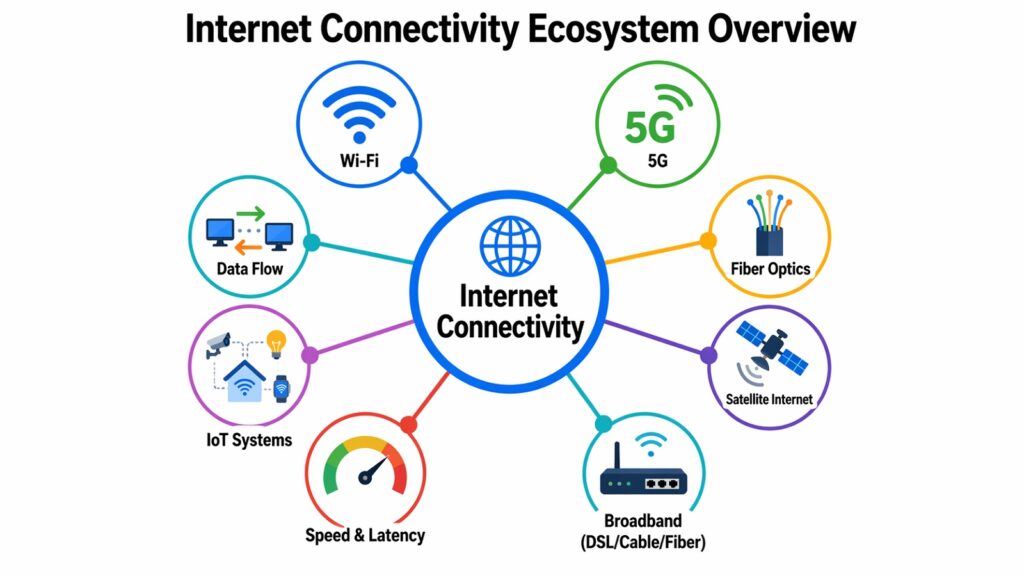
What makes Internet Connectivity so interesting is that it is not built on a single technology. It is actually a layered system made up of at least eight different types of technologies, each serving a different role. Some technologies focus on speed, others on reach, and others on handling large numbers of devices at once. Together, they create the connected world most people take for granted.
This article walks through those eight technologies in plain terms. The goal is not to turn you into a network engineer. The goal is to help you understand how your connection to the internet actually works, what shapes its quality, and where it might be heading next.
Table 1: Internet Connectivity — Key Aspects at a Glance
| Aspects of Internet Connectivity | Key Detail |
| What Is Internet Connectivity | The process by which devices connect to global networks to send and receive data |
| Evolution of Wi-Fi (Wi-Fi 5 to Wi-Fi 7) | Wi-Fi 7 (802.11be) offers speeds up to 46 Gbps, a major leap from Wi-Fi 5’s 3.5 Gbps |
| Understanding 5G | 5G delivers peak speeds up to 20 Gbps with latency as low as 1 millisecond |
| Fiber Optic Internet | Uses light pulses through glass fibers; supports speeds up to 100 Gbps commercially |
| Satellite Internet | Low Earth orbit satellites like Starlink orbit at around 550 km, reducing latency significantly |
| Broadband Technologies (DSL, Cable, Fiber) | DSL uses phone lines; cable uses coaxial cables; fiber uses glass strands for fastest speeds |
| Internet Speed and Latency | Speed measures data transfer rate; latency measures delay, ideally under 20ms for real-time use |
| IoT Connectivity Systems | Over 15 billion IoT devices were connected globally in 2023, relying on various wireless protocols |
1. Internet Connectivity Explained: What It Really Means Today
At its most basic, Internet Connectivity means that a device can exchange information with other devices and systems across a network. That might sound simple, but the process behind it involves many layers of hardware, software, and protocols working in coordination.
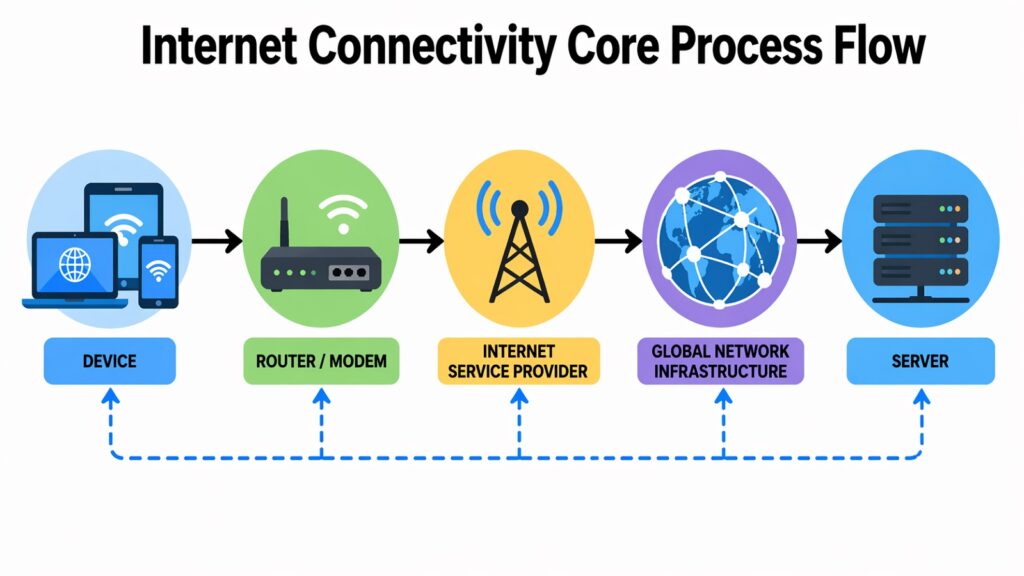
When you load a webpage, your device sends a request through your router, which passes it to your internet service provider, which routes it across a global network of servers and cables until it reaches the right destination. The response travels back through the same chain in milliseconds. Every message you send and every video you watch moves in small packets of data that are reassembled at the receiving end.
What makes a connection feel stable or unstable usually comes down to three things: the quality of the physical infrastructure carrying the signal, the consistency of the data path, and the amount of traffic on the network at any given time. A dropped connection or a slow page load often points to a problem somewhere along that chain.
The type of Internet Connectivity you use also matters. A wired connection through fiber optic cables will behave differently from a wireless connection through a 4G mobile network. Both get you online, but they differ in speed, reliability, and the distances they can cover. Understanding these differences is the first step in understanding the technologies that follow.
Table 2: Internet Connectivity — Core Concepts
| Internet Connectivity Concepts | Explanation |
| Data Packets | Information is broken into small packets that travel independently and reassemble at the destination |
| IP Address | A unique numerical label assigned to each device to identify it on a network |
| Bandwidth | The maximum rate at which data can be transmitted over a connection, measured in Mbps or Gbps |
| Latency | The time delay between sending a request and receiving a response, measured in milliseconds |
| Router | A device that directs data packets between networks and connects local devices to the internet |
| ISP (Internet Service Provider) | A company that provides customers with access to the internet via various physical or wireless links |
| Protocol (TCP/IP) | A set of rules governing how data is formatted, transmitted, and received across networks |
| Last Mile Connectivity | The final leg of the network that connects the ISP’s infrastructure to the end user’s location |
2. Internet Connectivity Through Wi-Fi: From Wi-Fi 5 to Wi-Fi 7
Wi-Fi changed how people relate to the internet. Before it became widespread, you needed a cable to get online. Wi-Fi removed that constraint and made Internet Connectivity something you could access from any corner of a home, an office, or a coffee shop. It became the dominant way most people connect their devices to a network.
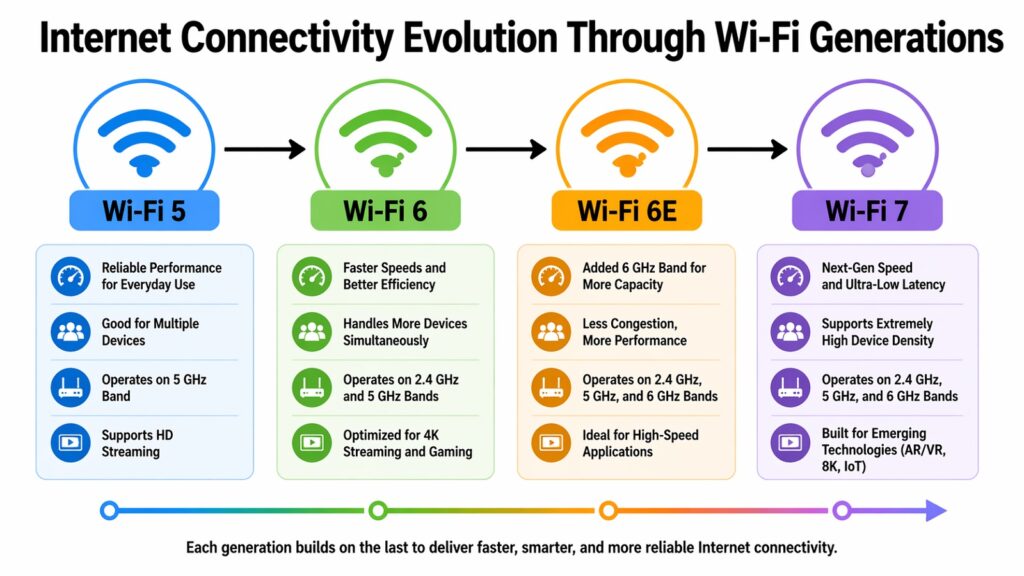
Wi-Fi technology has gone through several generations, each one faster and more capable than the last. Wi-Fi 5, also known as 802.11ac, arrived around 2013 and offered theoretical speeds up to 3.5 Gbps. It handled the demands of HD streaming and casual browsing well enough for most households at that time. Wi-Fi 6, released in 2019, pushed speeds to around 9.6 Gbps and introduced better performance in crowded environments. This was useful in places like airports and apartment buildings where many devices competed for the same signal.
Wi-Fi 7, the latest generation, takes things further. Built on the 802.11be standard, it supports speeds up to 46 Gbps and introduces multi-link operation, which allows devices to send and receive data across multiple frequency bands simultaneously. This makes the connection more stable and faster, especially when many devices are active at the same time.
For everyday users, these improvements show up in smoother streaming, faster file transfers, and more reliable calls when several people are online at once. Wi-Fi 7 also reduces latency significantly, which matters for gaming and real-time applications. The technology keeps getting quieter and better, which is exactly how good infrastructure should work.
Table 3: Internet Connectivity Through Wi-Fi — Generation Comparison
| Wi-Fi Generation | Key Specification |
| Wi-Fi 5 (802.11ac) | Theoretical max speed of 3.5 Gbps; operates on 5 GHz band; released in 2013 |
| Wi-Fi 6 (802.11ax) | Max speed of 9.6 Gbps; supports 2.4 GHz and 5 GHz; better in dense environments |
| Wi-Fi 6E | Adds 6 GHz band; less interference; wider channels up to 160 MHz |
| Wi-Fi 7 (802.11be) | Max speed up to 46 Gbps; multi-link operation; 320 MHz channel width |
| OFDMA Technology | Introduced in Wi-Fi 6; allows multiple devices to share a channel simultaneously |
| MU-MIMO | Multi-user, multi-input, multi-output; lets router communicate with multiple devices at once |
| Range Impact | Higher frequency bands (5 GHz, 6 GHz) offer speed but shorter range than 2.4 GHz |
| Real-World Throughput | Actual speeds are typically 40–60% of theoretical maximums due to interference and overhead |
3. Internet Connectivity and 5G: The Shift to Ultra-Fast Mobile Networks
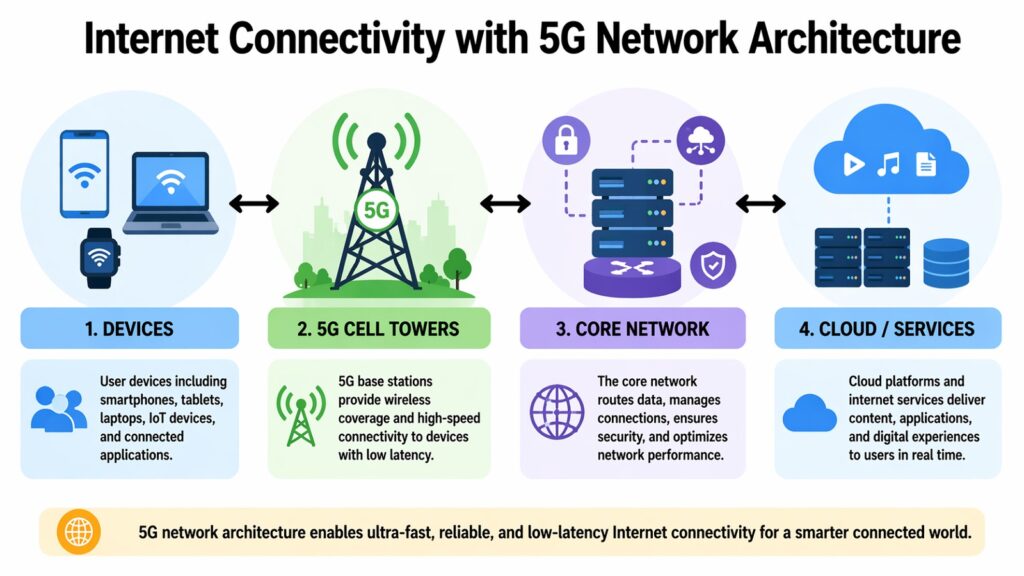
Mobile networks have always been a form of Internet Connectivity, but earlier generations had clear limits. 3G made mobile browsing possible. 4G LTE made it fast enough to stream video and work on the go. Then came 5G, which brought a set of improvements that go beyond raw speed.
5G networks can deliver peak download speeds up to 20 Gbps under ideal conditions, compared to 4G’s typical peak of around 1 Gbps. But the more important advancement may be latency. Where 4G has a typical latency of around 30 to 50 milliseconds, 5G brings that down to as low as 1 millisecond. For most users, this difference feels like the connection responds instantly rather than with a slight lag.
Another significant change is device density. 5G can support up to one million connected devices per square kilometer, compared to about 100,000 for 4G. This matters less for individual users and more for smart cities, industrial plants, and large public events where enormous numbers of devices need to stay connected at the same time.
For practical use, 5G improves mobile gaming, makes remote work more fluid, and opens up new possibilities for autonomous vehicles and telemedicine. Not every area has full 5G coverage yet, and the experience varies depending on which type of 5G spectrum a carrier deploys. But the trajectory is clear: mobile Internet Connectivity is moving toward something much closer to wired performance.
Table 4: Internet Connectivity and 5G — Key Facts
| Internet Connectivity and 5G Attributes | Detail |
| Peak Download Speed | Up to 20 Gbps under optimal conditions; typical real-world speeds range from 100 Mbps to 1 Gbps |
| Latency | As low as 1 millisecond; compared to 30–50 ms typical for 4G LTE |
| Device Density | Supports up to 1 million connected devices per square kilometer |
| Spectrum Types | Low-band (wide coverage), mid-band (balanced), mmWave (ultra-fast, short range) |
| 5G vs 4G Speed | 5G peak is roughly 20 times faster than 4G under controlled conditions |
| 5G NR Standard | New Radio; the global standard defined by 3GPP for 5G air interface technology |
| Global Rollout | Over 90 countries had active 5G networks by end of 2023 according to GSMA data |
| Use Cases | Supports smart infrastructure, autonomous systems, augmented reality, and industrial IoT |
4. Internet Connectivity with Fiber Optics: Speed at the Speed of Light
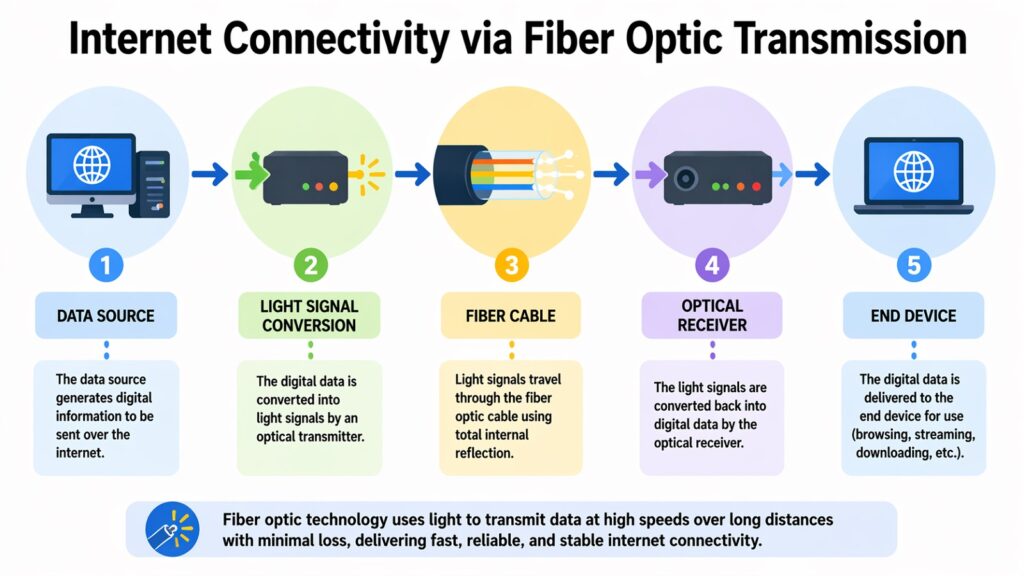
Fiber optic technology is one of the most significant developments in the history of Internet Connectivity. Unlike older copper-based systems that carry electrical signals, fiber optic cables carry light pulses through thin strands of glass or plastic. Light travels much faster than electricity, and it loses very little energy over long distances. This makes fiber optic connections faster, more reliable, and less susceptible to interference.
The practical difference is noticeable. A typical DSL or cable connection might deliver speeds of 50 to 200 Mbps under normal conditions. A fiber optic connection can deliver speeds from 1 Gbps to over 100 Gbps in commercial deployments. More importantly, fiber offers symmetric speeds, meaning upload and download rates are often equal. For video calls, remote work, and cloud-based tasks, this symmetry matters a great deal.
Fiber connections are also more consistent. Copper lines can suffer from electrical interference, signal degradation over distance, and weather-related fluctuations. Fiber cables are immune to electromagnetic interference, which means performance stays more stable throughout the day even when demand is high.
The main limitation of fiber is the cost and effort of deploying it. Running fiber cables to every home and business requires significant investment in physical infrastructure. Progress has been steady but uneven, with urban areas generally having much better access than rural regions. Still, fiber remains the gold standard for Internet Connectivity where it is available.
Table 5: Internet Connectivity with Fiber Optics — Core Details
| Internet Connectivity and Fiber Attributes | Detail |
| Signal Type | Light pulses transmitted through glass or plastic fibers instead of electrical signals |
| Maximum Commercial Speed | Up to 100 Gbps in commercial deployments; 1 Gbps typical for residential fiber |
| Latency | Typically 1–5 milliseconds, among the lowest of any consumer internet technology |
| Symmetrical Speeds | Upload and download speeds are often equal, unlike DSL or cable which favor downloads |
| Signal Degradation | Minimal over long distances; light signals retain integrity better than electrical ones |
| Interference Resistance | Not affected by electromagnetic interference, making it more stable than copper-based systems |
| Fiber Types | Single-mode fiber for long distances; multi-mode fiber for shorter, high-bandwidth links |
| Infrastructure Cost | Higher installation cost than DSL or cable due to the need for new cable runs and equipment |
5. Internet Connectivity via Satellite: Expanding Access
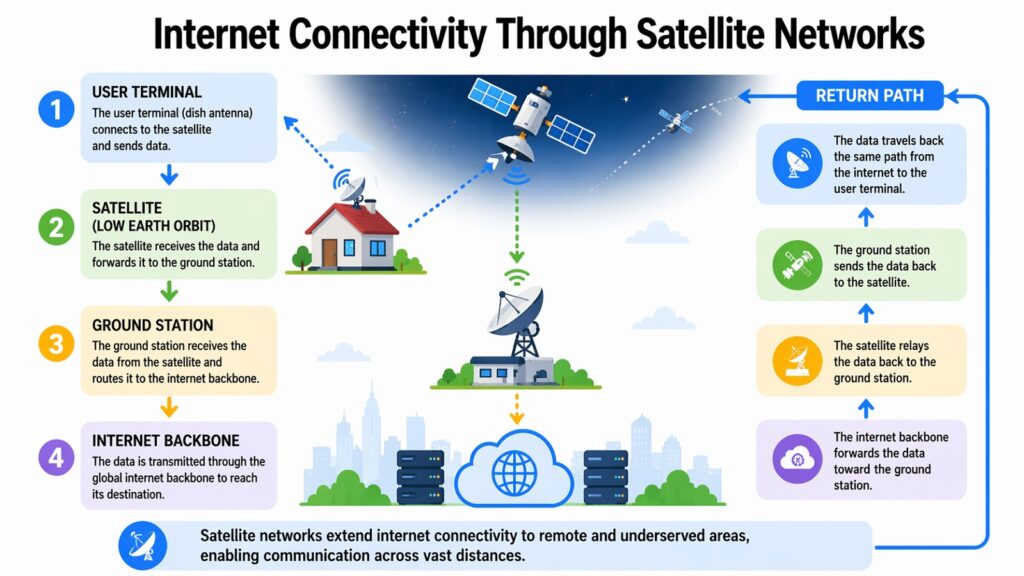
For a long time, satellite internet had a reputation for being slow and unreliable. Early systems used geostationary satellites parked about 35,000 kilometers above Earth. At that distance, the round-trip time for a signal could exceed 600 milliseconds, which made real-time applications like video calls nearly unusable. The service was treated as a last resort for areas where nothing else was available.
Low Earth orbit satellites changed that picture. Systems like SpaceX’s Starlink place satellites at altitudes between 340 and 1,200 kilometers. At those distances, latency drops to between 20 and 40 milliseconds, which is low enough for most everyday tasks including video calls and gaming. Starlink reported having over 2.7 million subscribers across more than 60 countries by early 2024.
Other satellite providers like Viasat and HughesNet still operate geostationary satellites, which makes their latency higher, though they offer wider geographic coverage. Amazon’s Project Kuiper is building another low Earth orbit network to compete in this space.
The appeal of satellite Internet Connectivity is its reach. It can serve remote villages, ships at sea, aircraft in flight, and disaster zones where no ground-based infrastructure exists. The main current limitations are price, which remains higher than ground-based broadband, weather sensitivity, and the challenge of handling very high numbers of users on a single satellite pass. But the technology is improving quickly, and satellite connectivity is becoming a real option rather than a compromise.
Table 6: Internet Connectivity via Satellite — Key Comparisons
| Internet Connectivity and Satellite Attributes | Detail |
| Geostationary Orbit Altitude | Approximately 35,786 km above Earth; used by Viasat, HughesNet |
| Low Earth Orbit Altitude | Approximately 340 to 1,200 km; used by Starlink and planned Kuiper constellation |
| Starlink Latency | Typically 20–40 ms for low Earth orbit satellites, compared to 600+ ms for geostationary |
| Starlink Subscriber Count | Over 2.7 million subscribers across 60+ countries reported in early 2024 |
| HughesNet Speed | Download speeds up to 25 Mbps; higher latency due to geostationary orbit |
| Weather Impact | Heavy rain and storms can cause signal interference, especially for higher frequency bands |
| Amazon Kuiper | Planned constellation of over 3,200 satellites in low Earth orbit, targeting global coverage |
| Primary Use Case | Serving rural, remote, maritime, and aviation users where ground-based infrastructure is absent |
6. Internet Connectivity Across Broadband Technologies: DSL, Cable, and Fiber
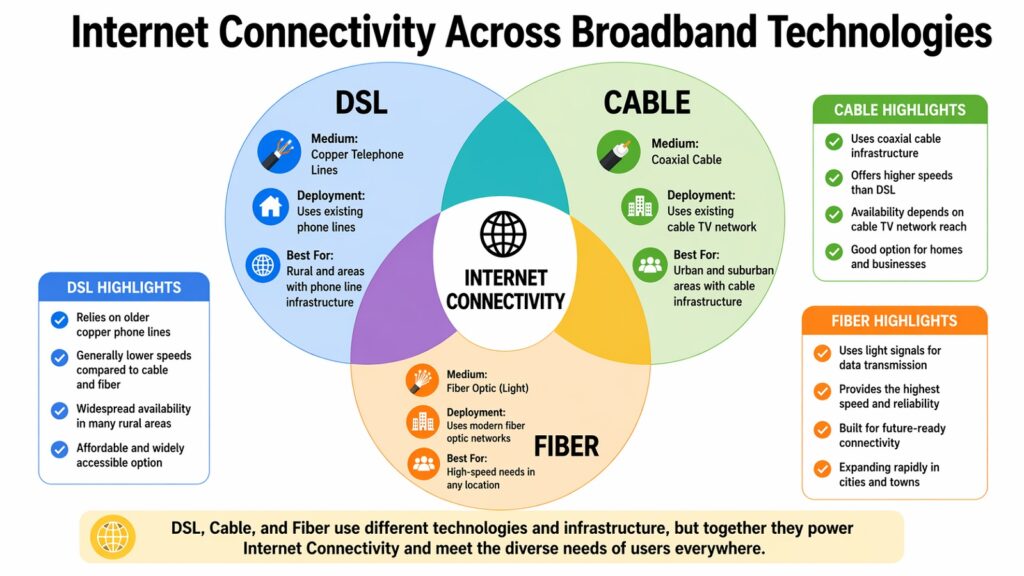
Broadband is the term used for high-speed Internet Connectivity that is always on and faster than older dial-up systems. Within that category, three technologies have been the most widely deployed over the past few decades: DSL, cable, and fiber. Each works differently, and each has strengths and limitations depending on where you live and what you need.
DSL, or Digital Subscriber Line, delivers internet through the copper telephone lines that already existed in most homes. This made DSL relatively cheap to deploy because it reused existing infrastructure. Speeds vary widely depending on how far a property is from the telephone exchange, but typical downloads range from 1 Mbps to around 100 Mbps. DSL is still common in many suburban and rural areas.
Cable internet uses the same coaxial cables that carry cable television signals. It generally offers faster speeds than DSL, with downloads commonly reaching 200 Mbps to 1 Gbps, though speeds are shared among users on the same local network segment. Performance can slow down during peak hours when many people in a neighborhood are online at the same time.
Fiber, as covered in an earlier section, offers the fastest and most consistent performance. It is the newest of the three and requires dedicated cable installation, which is why deployment has been slower. Where all three technologies are available, fiber is almost always the best choice for performance. But in many parts of the world, access to fiber remains limited, making DSL and cable important alternatives that keep millions of people connected.
Table 7: Internet Connectivity — DSL vs Cable vs Fiber Comparison
| Attribute | DSL / Cable / Fiber |
| Transmission Medium | DSL uses copper phone lines; cable uses coaxial cables; fiber uses glass strands |
| Typical Download Speed | DSL: 1–100 Mbps; Cable: 100 Mbps–1 Gbps; Fiber: 1 Gbps–100 Gbps |
| Upload Speed | DSL and cable favor downloads; fiber typically offers symmetrical upload and download |
| Latency | DSL: 20–50 ms; Cable: 10–30 ms; Fiber: 1–5 ms under normal conditions |
| Speed Consistency | DSL degrades with distance; cable slows during peak hours; fiber stays stable |
| Infrastructure Requirement | DSL reuses phone lines; cable reuses TV cables; fiber needs new dedicated cable runs |
| Availability | DSL and cable widely available in most urban and suburban areas; fiber more limited |
| Cost to Consumer | DSL typically lowest cost; cable mid-range; fiber higher but prices falling in many markets |
7. Internet Connectivity Performance: Understanding Speed and Latency
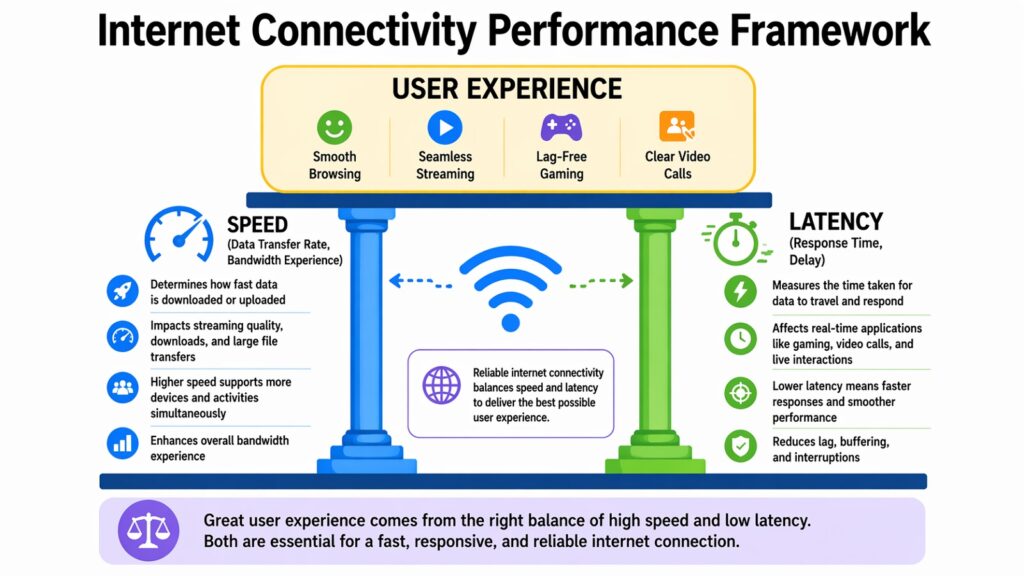
Two numbers define the quality of an Internet Connectivity experience more than any others: speed and latency. Most people know about speed, but latency is often overlooked, even though it shapes the feeling of a connection just as much.
Speed refers to how much data can move through a connection in a given unit of time. Think of it like a pipe carrying water. A wider pipe can carry more water at once, which is what higher bandwidth or speed means for internet data. If you are downloading a large file or streaming a 4K video, a faster connection gets the job done more quickly. Speeds are measured in megabits per second (Mbps) or gigabits per second (Gbps).
Latency is different. It refers to the delay between when data is requested and when it begins to arrive. Using the same water pipe analogy, latency is how long it takes the first drop of water to travel from one end of the pipe to the other. Even with a very wide pipe, if the pipe is very long, there will be a noticeable delay. Latency is measured in milliseconds, and for applications like online gaming, video calls, or financial transactions, keeping it low is critical.
A connection can have high speed but poor latency, or excellent latency but limited speed. The best Internet Connectivity delivers both. Fiber connections generally excel on both metrics. Satellite and DSL can struggle with latency even when they offer acceptable speeds. Understanding both numbers gives you a clearer picture of what a connection is actually capable of delivering.
Table 8: Internet Connectivity Performance — Speed and Latency Reference
| Metric or Use Case | Performance Benchmark |
| Streaming HD Video | Requires at least 5–10 Mbps; 4K streaming needs 25 Mbps or more |
| Video Conferencing (HD) | Typically requires 3–6 Mbps upload and download for smooth HD calls |
| Online Gaming Latency | Latency under 50 ms is acceptable; under 20 ms is preferred for competitive gaming |
| Fiber Latency | Typically 1–5 ms; among the lowest for consumer internet technologies |
| Satellite (GEO) Latency | 600+ ms latency; makes real-time applications like gaming and VoIP difficult |
| 5G Latency | As low as 1 ms under optimal conditions; typical range is 5–20 ms in deployed networks |
| Bandwidth vs Throughput | Bandwidth is the maximum possible rate; throughput is the actual rate experienced in real use |
| Jitter Impact | Variation in latency (jitter) above 30 ms causes noticeable disruption in voice and video calls |
8. Internet Connectivity in IoT Systems: Connecting Smart Devices Everywhere
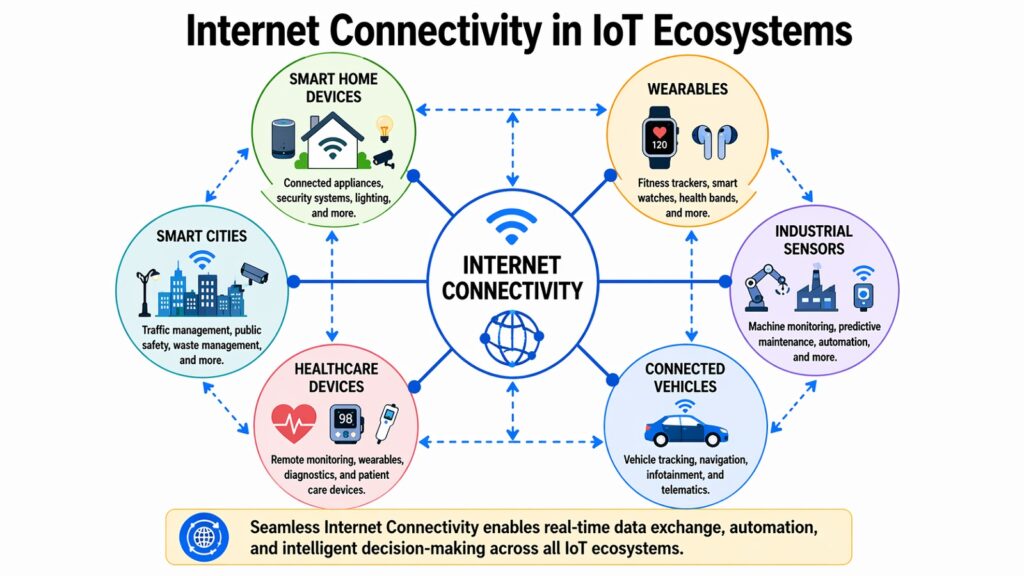
The Internet of Things, or IoT, refers to the growing network of physical devices that connect to the internet and communicate with each other. This includes everything from the smart speaker in your kitchen to the sensors in a factory floor. According to data from Statista, the number of connected IoT devices worldwide surpassed 15 billion in 2023 and is projected to reach over 29 billion by 2030.
IoT devices depend entirely on Internet Connectivity to function. A smart thermostat needs to communicate with a remote server to adjust temperatures based on your schedule. A health tracker needs to send data to a cloud platform for analysis. Industrial sensors need to relay readings back to a control system in near real time. All of this requires a steady, reliable connection.
Different IoT devices use different types of connectivity depending on their needs. Devices that need to stay close to home, like smart lights or door locks, typically use Wi-Fi or Bluetooth. Devices spread across large areas, like agricultural sensors or fleet tracking systems, use cellular networks or low-power wide-area networks like LoRaWAN or Sigfox. The right protocol depends on the required range, data volume, and power constraints.
As IoT systems grow, the demands on Internet Connectivity grow with them. Handling millions of devices simultaneously requires not just speed but also efficient use of network resources and strong security. Technologies like 5G and Wi-Fi 6 were partly designed with this kind of device-dense environment in mind, which is why the future of IoT and the future of connectivity are closely linked.
Table 9: Internet Connectivity in IoT Systems — Key Data Points
| IoT Attribute | Detail |
| Global IoT Devices (2023) | Over 15 billion connected IoT devices worldwide according to Statista estimates |
| Projected IoT Devices (2030) | Expected to exceed 29 billion connected devices globally by 2030 |
| Wi-Fi in IoT | Used for high-bandwidth home and office devices such as cameras, speakers, and displays |
| Bluetooth and BLE | Bluetooth Low Energy used for short-range, low-power devices like wearables and sensors |
| LoRaWAN | Low-power wide-area network; designed for long-range, low-data IoT like agricultural sensors |
| Cellular IoT (LTE-M, NB-IoT) | Narrow-band and LTE-M protocols enable mobile IoT devices with wide area coverage |
| 5G and IoT | 5G supports up to 1 million devices per square km, enabling large-scale industrial IoT deployments |
| IoT Security Concern | Many IoT devices have limited processing power, making security patches and encryption challenging |
Conclusion: Internet Connectivity as an Evolving System of Technology and Access
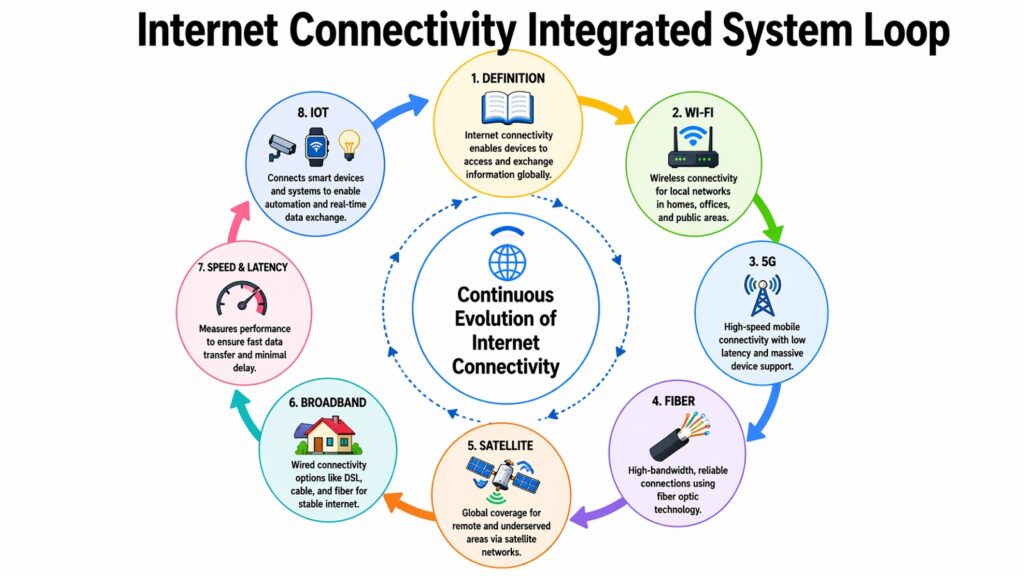
Across these eight technologies, a consistent theme emerges. Internet Connectivity is not a single thing. It is a collection of systems that each solve a different part of the same problem: getting information from one place to another as quickly, reliably, and broadly as possible.
Wi-Fi handles the last stretch inside buildings. Fiber handles the high-speed backbone. 5G handles the mobility layer. Satellite handles the remote corners of the planet. Broadband technologies like DSL and cable fill the gaps where newer infrastructure has not yet arrived. Speed and latency metrics define how well all of these work in practice. And IoT systems represent the growing demand that all of this infrastructure now has to serve.
What is striking is how each of these technologies compensates for the weaknesses of the others. Fiber is fast but hard to deploy everywhere. Satellite reaches everywhere but carries latency penalties. 5G is mobile but varies by spectrum type. Together, they create something more complete than any single technology could manage alone.
Looking ahead, the trajectory for Internet Connectivity is toward faster speeds, lower latency, and broader access. Technologies like Wi-Fi 7 and advanced 5G networks are pushing the ceiling higher. Satellite constellations are expanding reach into regions that have never had reliable broadband. IoT is creating new use cases that will require connectivity infrastructure to keep evolving. There is still a gap between those with strong, affordable connectivity and those without it. Closing that gap is one of the defining technical and social challenges of this decade. But the tools to do it are already taking shape.
Table 10: Internet Connectivity — The Evolving Landscape
| Internet Connectivity Technology Areas | Current and Future Direction |
| Wi-Fi 7 Adoption | Expected to expand rapidly through 2025–2026 in enterprise and high-density environments |
| 5G Expansion | Mid-band 5G deployment accelerating globally; mmWave growing in urban dense environments |
| Fiber Rollout | Governments in US, EU, and Asia funding rural fiber expansion through infrastructure programs |
| Satellite Coverage | SpaceX Starlink targeting near-global coverage; Amazon Kuiper launches planned through 2026 |
| IoT Growth | Industrial IoT and smart city projects driving demand for low-latency, high-density connectivity |
| Broadband Equity | FCC, EU, and ITU programs targeting universal broadband access in underserved communities |
| Edge Computing | Moving data processing closer to devices will reduce latency demands on core networks |
| 6G Research | Early 6G research ongoing; commercial deployment not expected before 2030 at the earliest |