Table of Contents
Introduction: Why System Software Is One of the Most Important Software Systems
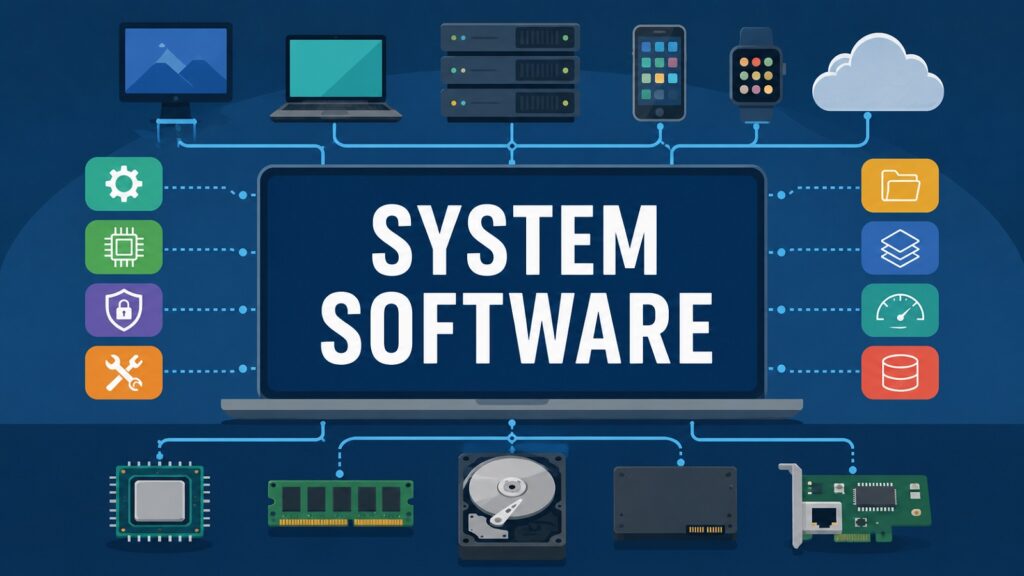
System Software is one of the most important Software Systems ever built, even though most people never see it at work. It sits quietly beneath every application, every screen tap, and every line of code that runs on a modern device. Without it, hardware would just be a collection of silent parts with no way to talk to each other. System Software gives those parts a shared language, a sense of order, and a way to cooperate with the programs people actually use every day.
The story of System Software begins with a simple problem. Early computers could only run one task at a time, and someone had to manually load instructions before anything happened. As machines grew faster and more capable, this manual process became a serious bottleneck. Engineers needed a layer of software that could manage memory, schedule tasks, and control hardware without constant human input. That need gave rise to the operating systems, drivers, firmware, and other tools that now form the backbone of computing.
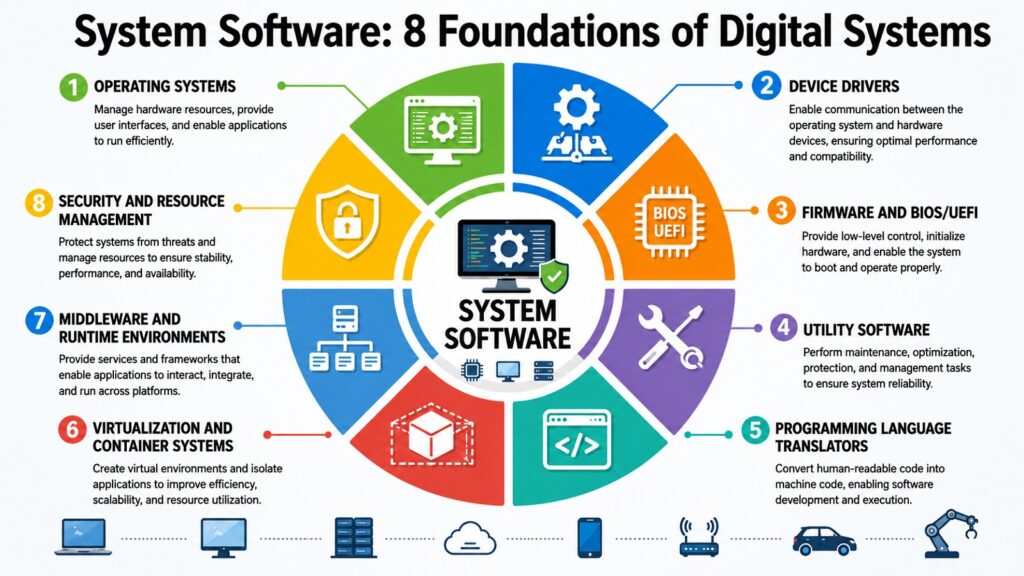
What makes System Software fascinating is that it is not one single program. It is a collection of distinct technologies working together toward the same goal, which is keeping digital systems stable, secure, and efficient. Operating systems manage resources. Drivers translate signals between hardware and software. Firmware wakes up a machine before anything else can run. Utility programs keep systems clean and protected. Compilers turn human ideas into machine instructions. Virtualization tools stretch a single machine into many. Middleware connects sprawling software ecosystems. Security tools guard everything from threats both old and new.
This article walks through all eight of these pillars one at a time. Each one solves a different problem, yet they all depend on each other to keep modern computing running smoothly. From the smartphone in your pocket to the cloud servers powering global businesses, System Software is the quiet force making it all possible. Even industrial systems, like factory controllers and medical equipment, rely on the same basic principles of resource management and hardware communication that consumer devices use every day. By the end, the connections between these eight areas should feel less like separate topics and more like one continuous story about how digital systems came to life.
System Software Foundations: An Overview of the Eight Pillars
| System Software Foundations | Description |
| Operating Systems | Manage hardware resources, memory, and running programs |
| Device Drivers | Translate signals between hardware and the operating system |
| Firmware and BIOS/UEFI | Initialize hardware before the operating system loads |
| Utility Software | Maintain performance, backups, and system protection |
| Language Translators | Convert human-written code into machine instructions |
| Virtualization and Containers | Run multiple systems or apps on shared hardware |
| Middleware and Runtimes | Connect applications and manage cross-platform execution |
| Security and Resource Management | Control access, permissions, and system scheduling |
1. System Software and Operating Systems: The Core of Digital Computing
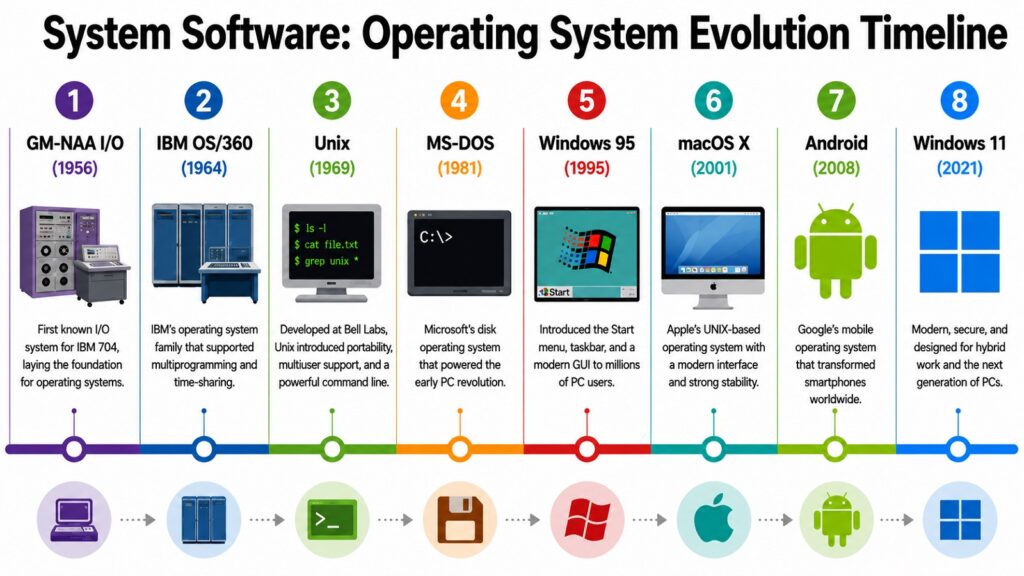
Operating systems represent the most prominent aspect of System Software, and this is well justified. Before their development, programmers were required to manually handle hardware resources, crafting instructions that communicated directly with processors and memory chips. This process was slow, susceptible to errors, and nearly unmanageable as machines became increasingly intricate. The operating system addressed these challenges by functioning as a manager, determining which programs are granted access to memory, processing power, and storage at any specific time.
Process management was one of the first breakthroughs. Early systems like batch processing setups could only handle one job at a time, forcing users to wait in long queues. As demand grew, engineers built systems that could juggle multiple processes, switching between them so quickly that users felt like they had a machine all to themselves. Memory management followed a similar path, moving from rigid allocation schemes to flexible systems that could borrow space from storage when physical memory ran short.
Unix, created at Bell Labs in 1969, set the template for much of what followed. Its hierarchical file system and portable design influenced nearly every operating system that came after it. Microsoft built on these ideas with MS-DOS and later Windows, turning personal computing into a mainstream product. Linux, started by Linus Torvalds in 1991, took a different path by staying open source, which let developers everywhere shape its growth. Apple took the Unix foundation and built macOS and iOS around it, while Google adapted the Linux kernel to create Android, now running on billions of devices worldwide.
Each of these systems carved out its own ecosystem, and that created lasting lessons about competition and cooperation in technology. Microsoft showed how tight integration with hardware partners could dominate a market. Linux proved that open collaboration could rival or beat closed development models, especially once it became the backbone of cloud servers and embedded devices worldwide. Apple demonstrated that controlling both hardware and software could deliver a smoother user experience. Android showed that adaptability across countless device makers could win sheer scale. Looking ahead, operating systems are shifting toward cloud-native designs and AI-assisted resource management, where the system itself predicts what users need before they ask.
System Software in Action: Notable Operating Systems and Their Origins
| Category | Description |
| Unix | Created at Bell Labs in 1969 by Thompson and Ritchie |
| MS-DOS / Windows | Developed by Microsoft, popularized personal computing |
| Linux | Started by Linus Torvalds in 1991, open source kernel |
| macOS | Built by Apple on a Unix-based foundation |
| Android | Developed by Google using the Linux kernel |
| iOS | Apple’s mobile operating system, released in 2007 |
| Windows Server | Microsoft’s enterprise platform for business networks |
| Chrome OS | Google’s lightweight, browser-centered operating system |
2. System Software and Device Drivers: Connecting Hardware and Software
Device drivers exist because no two pieces of hardware behave exactly alike, yet operating systems need a consistent way to talk to all of them. A driver acts as a translator, taking generic instructions from the operating system and converting them into the specific commands a piece of hardware understands. Without this layer, every application would need to know the inner workings of every printer, graphics card, and storage device on the market, which would be unworkable.
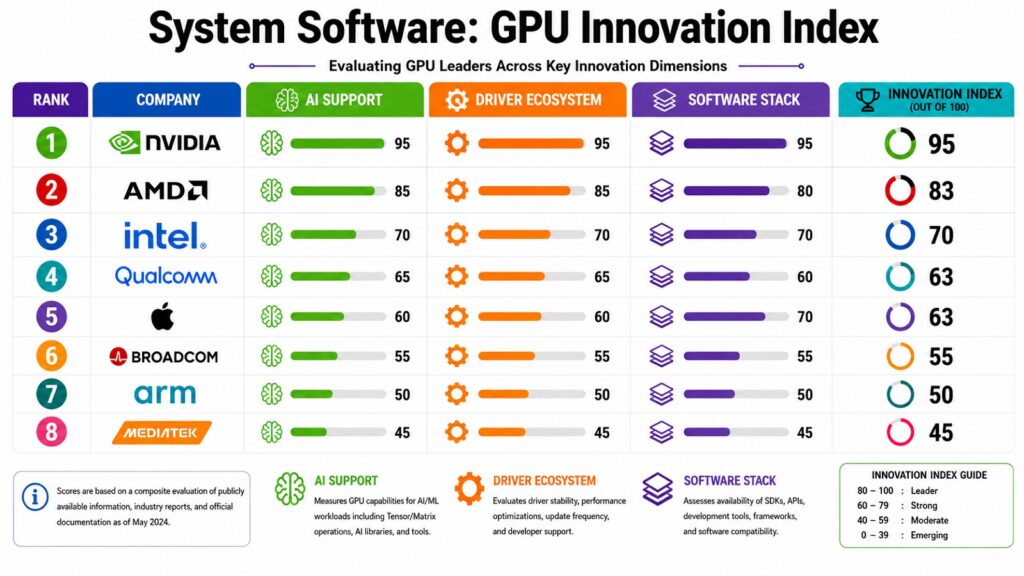
The challenge grows with hardware diversity. A graphics card from NVIDIA behaves differently at the chip level than one from AMD, even though both plug into the same type of slot and serve the same general purpose. Drivers hide these differences behind a common interface, so a game or design application can simply ask for a frame to be rendered without worrying about which company built the chip. This abstraction is one of the central ideas behind System Software as a whole, since it lets complexity exist below the surface while keeping things simple above it.
NVIDIA built an entire software ecosystem around its drivers, including tools for gaming performance and parallel computing used in artificial intelligence research. AMD followed a similar path, optimizing its drivers for both consumer graphics and data center workloads. Intel, meanwhile, focused heavily on integrated graphics and chipset drivers that ship with most laptops and budget desktops. Printer manufacturers built their own driver ecosystems too, often bundling utility software that handles everything from ink levels to scanning features.
As computing shifted toward specialized hardware like AI accelerators, drivers took on new importance. These accelerators often require highly tuned drivers to unlock their full performance, since generic instructions waste the specialized circuitry built into the chip. Companies now treat driver development as a competitive advantage rather than a background task. The better the driver, the more performance users can extract from the same physical hardware. Gaming hardware tells a similar story, where driver updates frequently deliver measurable speed gains in popular titles without any change to the underlying chip. This trend is likely to deepen as machine learning workloads continue pushing hardware toward more specialized designs.
System Software and Device Drivers: Major Hardware Categories
| Category | Description |
| Graphics Cards | NVIDIA and AMD drivers manage rendering and AI workloads |
| Processors | Intel and AMD chipset drivers handle core system communication |
| Printers | Manufacturer drivers manage printing, scanning, and ink data |
| Storage Devices | Drivers manage data transfer between drives and the system |
| Network Adapters | Drivers handle wireless and wired connection protocols |
| Audio Hardware | Sound card drivers manage input and output processing |
| Input Devices | Drivers translate keyboard and mouse signals into commands |
| AI Accelerators | Specialized drivers unlock performance for machine learning chips |
3. System Software and Firmware and BIOS/UEFI: The Hidden Software Layer
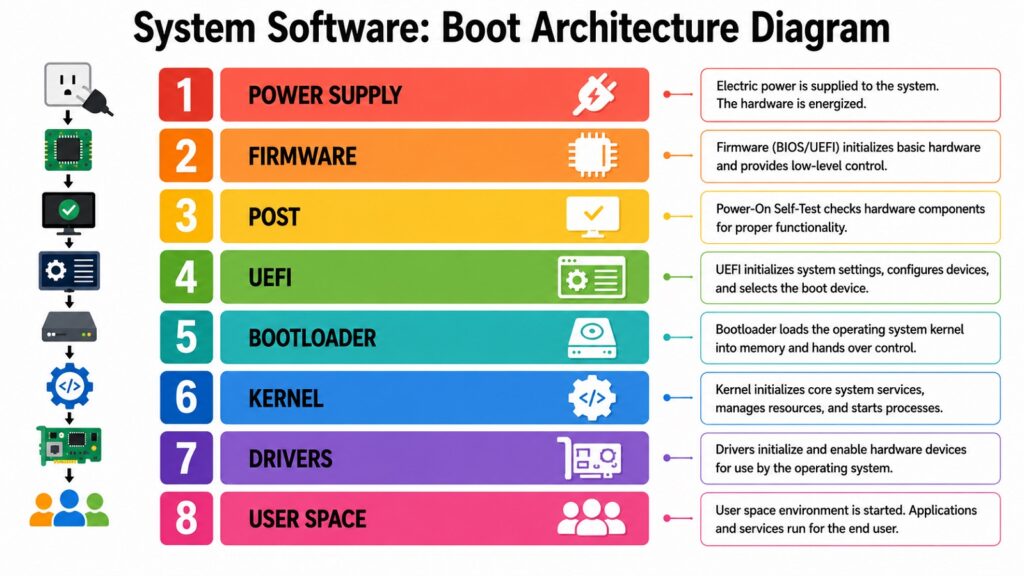
Firmware is the first software a computer runs, even before the operating system wakes up. It lives directly on a chip and handles the earliest moments of a machine’s life, checking hardware components and preparing the system to load something more complex. For decades, this job belonged to the BIOS, a simple program stored on a small chip on the motherboard. It worked, but it had real limits in speed, security, and flexibility.
UEFI replaced BIOS as the dominant firmware standard starting in the mid 2000s, offering faster boot times and support for larger storage drives. One of its most important additions was Secure Boot, a feature that checks whether the operating system loading on a machine has been tampered with. This single change addressed a long-standing security gap, since older systems had almost no way to verify that malicious code was not hiding in the boot process. Intel and other major hardware makers pushed hard for this transition, recognizing that firmware security was becoming as important as software security.
Firmware is not limited to desktop and laptop computers. Solid state drives run their own firmware to manage how data is written and read across memory cells. Routers rely on firmware to handle networking protocols before any user-facing software loads. Smartphones depend on firmware to manage radios, sensors, and power systems long before the operating system takes over. Even small household devices, like smart thermostats and wireless earbuds, now carry their own dedicated firmware to handle basic functions. Apple Silicon chips brought firmware and hardware design closer together than ever, building security features directly into the chip rather than treating them as an afterthought.
This hidden layer rarely gets attention, yet it carries enormous responsibility. A firmware flaw can compromise a system before any antivirus program or operating system safeguard even has a chance to act. The lesson from decades of firmware development is that security has to start at the very beginning of the boot process, not somewhere further down the chain. As digital systems grow more interconnected, this first layer of System Software is only becoming more important to get right.
System Software and Firmware: Examples Across Devices
| Category | Description |
| BIOS | Older firmware standard used before UEFI adoption |
| UEFI | Modern firmware standard with Secure Boot support |
| Secure Boot | Verifies operating system integrity during startup |
| SSD Firmware | Manages how data is written across memory cells |
| Router Firmware | Handles networking protocols before user software loads |
| Smartphone Firmware | Controls radios, sensors, and power management |
| Apple Silicon Firmware | Integrates security features directly into the chip |
| Embedded Firmware | Runs on consumer electronics with limited processing power |
4. System Software and Utility Software: Maintaining Performance and Reliability
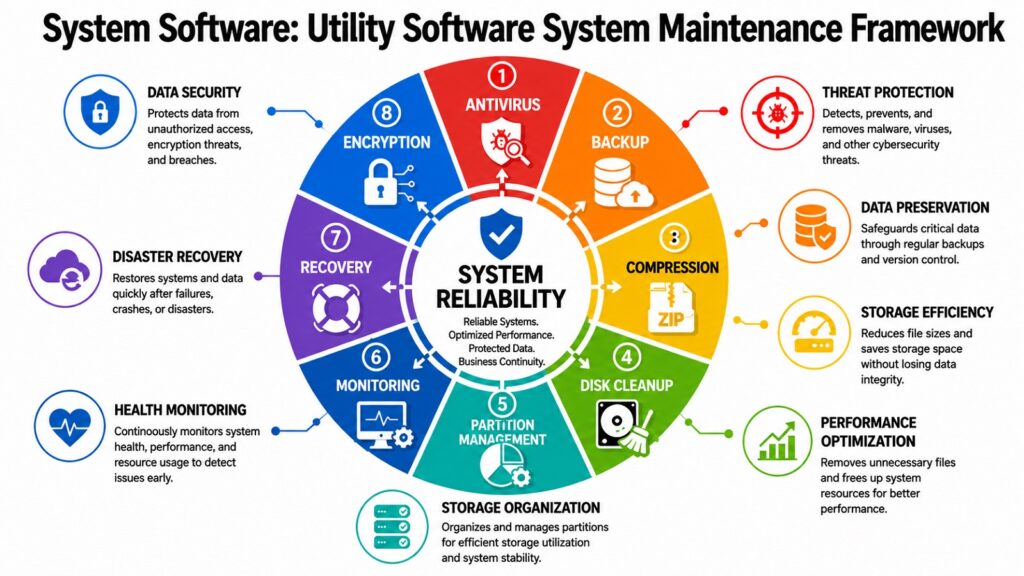
Utility software fills in the gaps that operating systems leave open, focusing on maintenance, optimization, and protection rather than running everyday applications. These programs do not get much credit, but they quietly keep digital systems healthy. Antivirus software, disk cleanup tools, backup programs, and compression utilities all fall under this category, and each one solves a specific problem that would otherwise pile up over time.
Microsoft Defender is a good example of how far utility software has come. It started as a basic spyware removal tool and grew into a full security suite built directly into Windows, scanning files in real time and blocking threats before they cause damage. This evolution mirrors a broader shift in computing, where security stopped being optional and became a baseline expectation for any operating system. Similarly, compression tools like WinRAR solved a real and persistent problem, letting users shrink files for storage or transfer without losing any data.
Backup software addressed another growing concern as digital systems became central to both personal and business life. Losing years of photos, documents, or financial records to a hardware failure used to be a common and painful experience. Backup utilities, ranging from simple file copying tools to automated cloud backup services, turned this risk into something manageable. Disk utilities rounded out the picture by helping detect failing drives, organize storage space, and repair file system errors before they caused total data loss.
As computing environments became more complex, with multiple devices, cloud accounts, and constant connectivity, the demand for reliable utility software only grew. System monitoring tools now track everything from temperature to memory usage, giving users early warnings before small problems turn into major failures. Many of these tools now run quietly in the background, learning normal patterns of behavior so they can flag anything unusual without constant manual checking. The overall lesson is simple: as systems multiply and use cases pile up, ad-hoc fixes work for a while but reliable maintenance tools become essential.
System Software and Utility Tools: Categories and Functions
| Category | Description |
| Antivirus Software | Detects and removes malicious programs in real time |
| Microsoft Defender | Built-in Windows security suite for threat protection |
| Backup Tools | Protect data against hardware failure or accidental loss |
| Compression Software | WinRAR and similar tools reduce file size for storage |
| Disk Utilities | Detect failing drives and repair file system errors |
| System Monitors | Track temperature, memory, and processor usage |
| Cleanup Tools | Remove temporary files to free storage space |
| Encryption Utilities | Protect sensitive files from unauthorized access |
5. System Software and Programming Language Translators: Turning Code into Execution
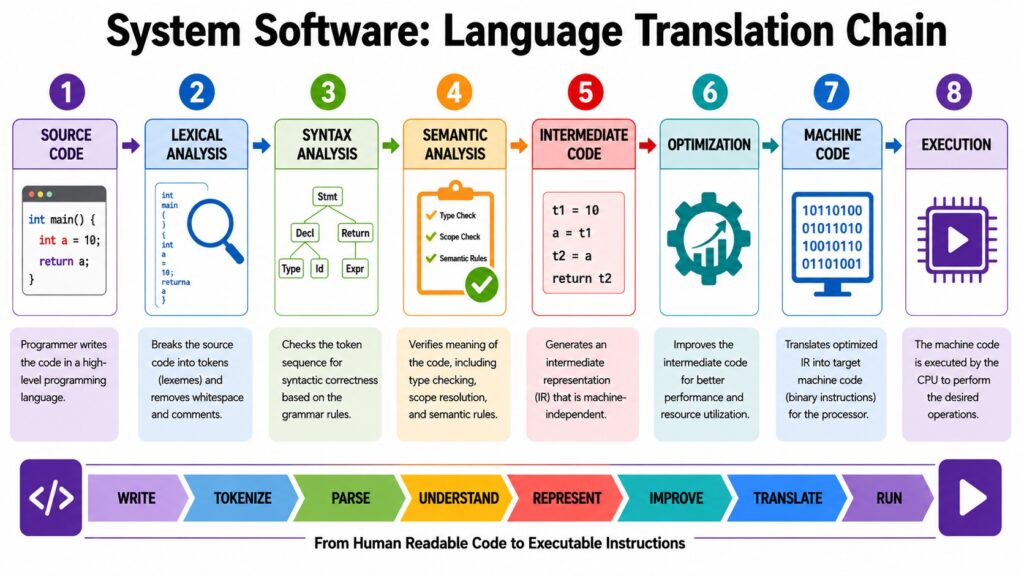
Programming language translators solve a problem that exists at the very heart of software development. Humans write code in languages designed to be readable, but processors only understand machine instructions made of binary patterns. Compilers, interpreters, and assemblers bridge this gap, and without them, software development as we know it would not exist. Every application, from a small mobile game to a massive enterprise platform, depends on this translation step happening correctly and efficiently.
Abstraction is the core idea that made this possible. Early programmers had to write in assembly language, working line by line with hardware-specific instructions. This was tedious and made code nearly impossible to reuse across different machines. Higher level languages introduced abstraction, letting developers describe what they wanted without specifying every hardware detail. Compilers and interpreters took on the job of figuring out the details, freeing programmers to focus on logic and design instead of hardware quirks.
GCC, the GNU Compiler Collection, became one of the most influential tools in this space, supporting multiple programming languages and powering countless open source projects since the 1980s. LLVM later introduced a more modular approach to compiler design, making it easier to support new languages and optimize code for different types of processors. The Java Virtual Machine took a different route, letting Java code run on any device with a compatible virtual machine installed, a concept that shaped how cross-platform software gets built today. Python interpreters followed a similar philosophy, prioritizing flexibility and ease of use over raw execution speed.
These tools did more than translate code. They created entire ecosystems around themselves, with communities building libraries, frameworks, and tools tailored to each language. Modern compilers now apply sophisticated optimization techniques, rearranging and simplifying code to run faster without changing what it actually does. Some optimizations even adjust their behavior based on the specific processor a program will run on, squeezing out extra speed that a generic compiler would miss. This ongoing focus on optimization shows how language translators continue evolving alongside hardware, ensuring that software keeps pace with the processors it runs on.
System Software and Language Translators: Tools That Power Development
| Category | Description |
| GCC | GNU Compiler Collection, supports multiple programming languages |
| LLVM | Modular compiler framework used across many modern tools |
| Java Virtual Machine | Runs Java code across different operating systems |
| Python Interpreter | Executes Python code with a focus on flexibility |
| Assemblers | Convert low-level assembly code into machine instructions |
| Just-In-Time Compilers | Translate code during execution for faster performance |
| Clang | Compiler front end built on the LLVM framework |
| Interpreters | Execute code line by line without full compilation |
6. System Software and Virtualization and Container Systems: Building Digital Infrastructure
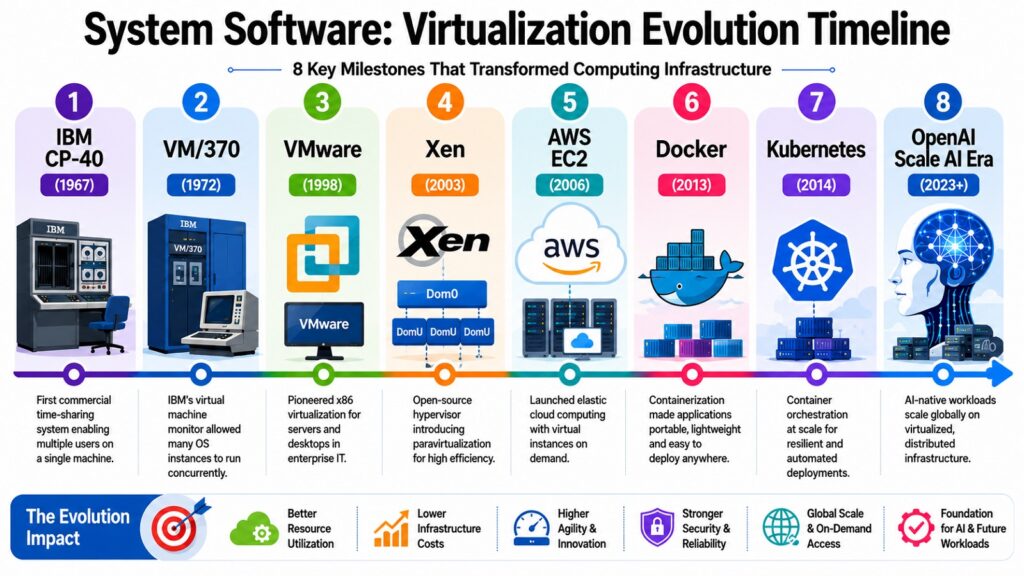
Virtualization changed System Software from something tied to a single physical machine into the foundation of entire digital infrastructures. The core idea is straightforward: instead of dedicating one computer to one task, virtualization software lets a single machine pretend to be several independent ones. This solved a long standing problem of wasted hardware capacity, since most servers historically sat idle for much of the day while running just one application.
VMware was among the early companies to make virtualization practical for businesses, allowing organizations to run multiple operating systems on shared hardware. This dramatically improved efficiency and reduced the cost of maintaining large server rooms. As cloud computing matured, companies like Amazon with AWS and Microsoft with Azure built massive infrastructures on top of virtualization, renting out computing power to businesses that no longer needed to own physical servers at all. This shift turned computing into a flexible, on-demand resource rather than a fixed capital expense.
Containers introduced a leaner alternative to full virtualization. Instead of simulating an entire computer, container systems like Docker package just the application and its dependencies, sharing the underlying operating system kernel. This made containers faster to start and more efficient to run at scale. Kubernetes then emerged to manage large numbers of containers across clusters of machines, automating tasks like scaling, recovery, and load balancing that would otherwise require constant manual attention.
The shift from heavy virtual machines toward lightweight containers carries an important lesson about how technology evolves. Solutions that work well at one scale often get replaced by leaner alternatives as demand grows and efficiency becomes more important. This pattern shows no signs of slowing down, with edge computing and serverless architectures pushing virtualization concepts into even smaller and more distributed environments. Businesses that once needed entire data centers can now run global operations through a handful of cloud accounts and a small technical team. The future of digital infrastructure will likely keep building on this same foundation of flexible, software-defined resources.
System Software and Virtualization: Technologies Shaping Cloud Computing
| Category | Description |
| VMware | Early leader in business virtualization software |
| Docker | Popularized lightweight container-based application packaging |
| Kubernetes | Manages and scales containers across server clusters |
| Amazon AWS | Major cloud platform built on virtualized infrastructure |
| Microsoft Azure | Cloud platform offering virtualized enterprise services |
| Hyper-V | Microsoft’s virtualization platform for Windows servers |
| Virtual Machines | Simulate complete computers on shared physical hardware |
| Serverless Computing | Runs code without managing dedicated virtual servers |
7. System Software and Middleware and Runtime Environments: Enabling Software Ecosystems
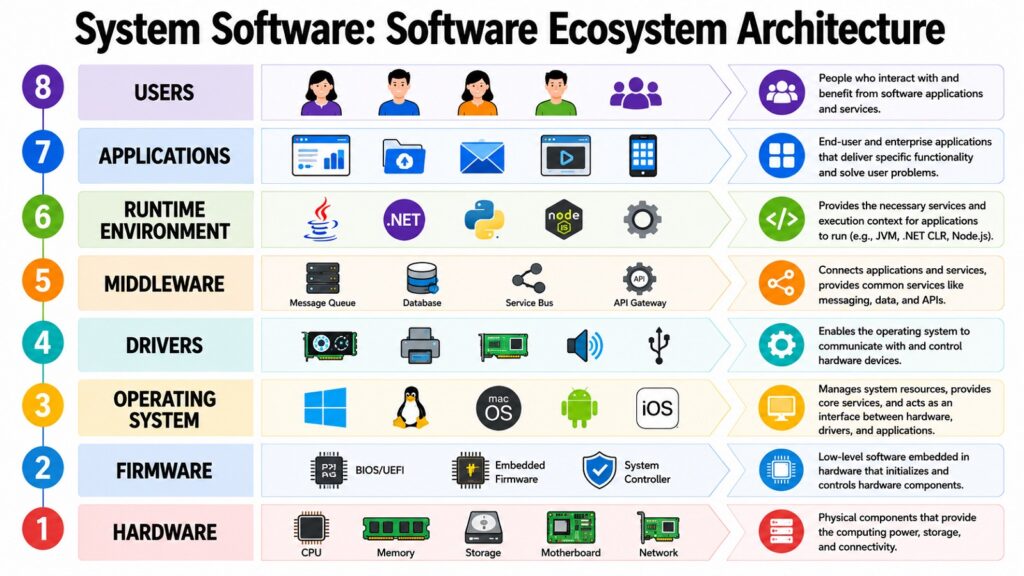
Middleware and runtime environments handle a problem that operating systems were never designed to solve on their own, which is letting separate applications and services work together smoothly. As software grew more interconnected, businesses needed more than just a place to run programs. They needed a way for those programs to share data, communicate across networks, and operate consistently no matter what hardware sat underneath them.
APIs became the common language for this kind of communication, defining clear rules for how one piece of software can request information or services from another. The Java Virtual Machine, already discussed for its role in translating code, also functions as a runtime environment, managing memory and execution for Java applications across countless servers and devices. Microsoft built the .NET Framework to serve a similar purpose within its own ecosystem, giving developers consistent tools and libraries no matter which Windows-based system they were targeting.
Runtime libraries quietly support nearly every application in use today, providing common functions so developers do not need to rewrite basic operations from scratch every time. Application servers took this further, managing the deployment, scaling, and security of business applications running across many machines at once. Java’s ecosystem and Microsoft’s platform both demonstrated how interoperability could become a defining feature of enterprise software, letting companies build systems that worked across different teams, departments, and even different countries.
As organizations transitioned to distributed applications that are deployed across various servers and cloud regions, the significance of middleware has increased substantially. Modern cloud-native architectures rely heavily on lightweight middleware to facilitate communication among numerous small services that collaborate. This evolution signifies a wider transformation in software development, prioritizing numerous small, interconnected components rather than a singular, large application. Teams are now able to update an individual small service without impacting the entire system, which accelerates development but also heightens the importance of dependable middleware. Middleware continues to serve as the essential link that integrates these components as systems become increasingly intricate.
System Software and Middleware: Technologies Connecting Software Ecosystems
| Category | Description |
| APIs | Define rules for communication between separate programs |
| Java Virtual Machine | Functions as a runtime environment for Java applications |
| .NET Framework | Microsoft’s runtime and library platform for developers |
| Application Servers | Manage deployment and scaling of business applications |
| Runtime Libraries | Provide shared functions so code is not rewritten |
| Message Queues | Allow services to exchange data without direct connection |
| Web Servers | Handle requests between browsers and backend applications |
| Microservices Frameworks | Coordinate communication among small distributed services |
8. System Software and Security and Resource Management: Protecting Digital Systems
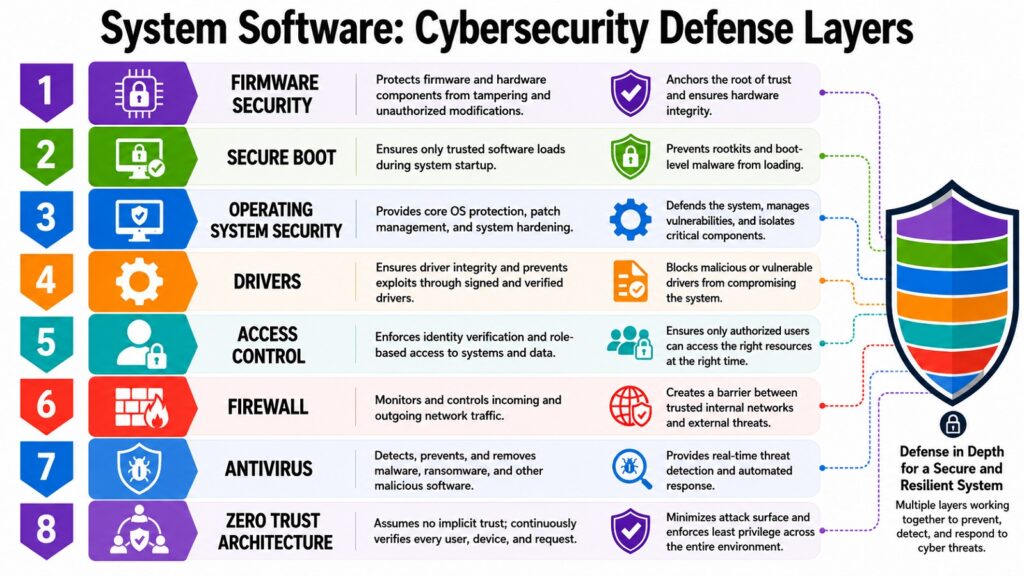
Security and resource management became inseparable from System Software the moment computers started connecting to networks and serving multiple users at once. Every operating system needs to decide who can access what, when programs get to run, and how shared resources like memory and processing power get divided fairly. As cyber threats grew more sophisticated, these basic management functions evolved into something far more defensive and deliberate.
Access controls and permissions form the foundation of this protection. Early systems offered fairly basic restrictions, but as threats multiplied, operating systems introduced layered permission systems that limit what programs and users can do even if they manage to gain some level of access. SELinux, developed with contributions from the National Security Agency, introduced mandatory access controls into Linux systems, enforcing strict rules about what processes are allowed to touch regardless of normal user permissions. Microsoft Defender, mentioned earlier as utility software, also plays a direct security role by monitoring system behavior and blocking suspicious activity in real time.
Zero Trust architecture signifies a major transformation in contemporary security paradigms. Instead of presuming that anything within a network is inherently secure, Zero Trust regards every request as potentially malicious until it is verified otherwise, necessitating ongoing authentication. This methodology emerged from the critical insights gained from significant breaches, where intruders, once they infiltrated a network, could navigate freely due to the default trust placed in internal systems. Concurrently, resource management has adapted to these security advancements, as scheduling and monitoring tools must now identify not only performance issues but also unusual patterns that could indicate an attack.
Looking forward, artificial intelligence is reshaping both sides of this equation. Security tools increasingly use machine learning to detect unusual behavior faster than human analysts could manage alone, while attackers experiment with AI to find new weaknesses. This arms race shows no sign of slowing, which means resource management and security will likely keep merging further, treating protection as a continuous and adaptive process rather than a fixed set of rules. The systems that adapt fastest to this shifting landscape will likely set the standard that everyone else follows in the years ahead.
System Software and Security: Tools That Protect Digital Systems
| System Software Security Categories | Description |
| Access Controls | Restrict what users and programs are allowed to do |
| SELinux | Enforces mandatory access controls within Linux systems |
| Microsoft Defender | Monitors system behavior and blocks suspicious activity |
| Zero Trust Architecture | Requires continuous verification instead of automatic trust |
| Firewalls | Filter network traffic based on defined security rules |
| Encryption Protocols | Protect data from being read by unauthorized parties |
| Intrusion Detection | Identifies unusual activity that may signal an attack |
| AI-Based Security Tools | Use machine learning to detect emerging threats |
Conclusion: How System Software Powers the Digital World
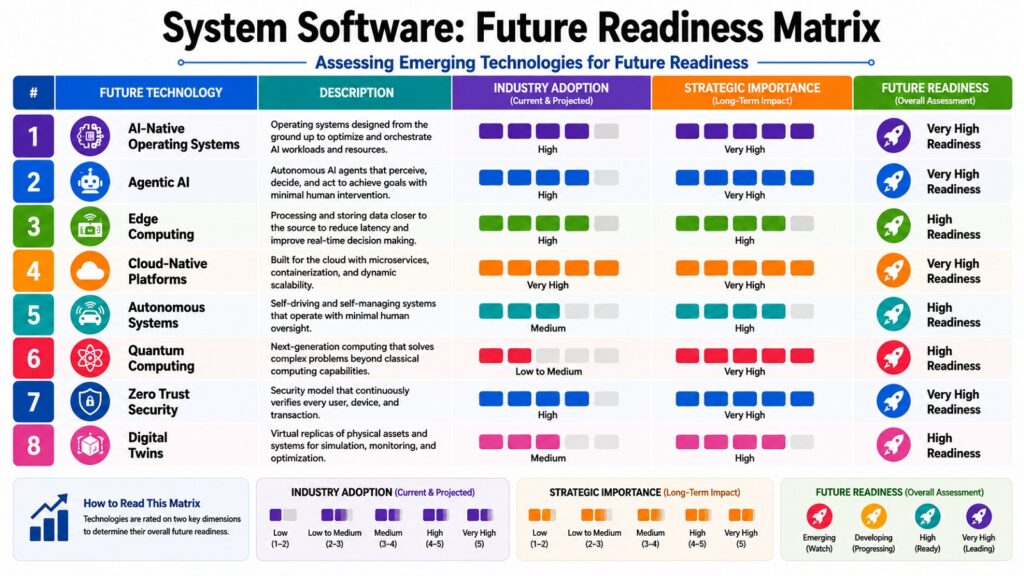
System Software is one of the most important Software Systems because it quietly carries the weight of everything built on top of it. Operating systems manage resources, drivers translate between hardware and software, firmware wakes machines up safely, and utility programs keep everything running smoothly. Translators turn human code into action, virtualization stretches single machines into vast infrastructures, middleware connects sprawling ecosystems, and security tools guard it all against constant threats. None of these pieces work in isolation, and that interdependence is exactly what makes System Software so foundational.
Looking back across decades of development, a few lessons stand out clearly. Abstraction made complexity manageable, letting each layer hide its details from the layers above it. Open collaboration, shown clearly through Linux and GCC, proved just as powerful as closed development models built by single companies. Security stopped being an afterthought and became something engineers had to design for from the very first moment a machine powers on. Scalability, demonstrated through virtualization and containers, turned rigid hardware into flexible, on-demand infrastructure that can grow or shrink as needed.
These same lessons continue shaping where computing is headed next. Cloud computing depends entirely on the virtualization and middleware layers discussed throughout this article. Artificial intelligence increasingly relies on specialized drivers and resource management techniques to squeeze maximum performance out of modern hardware. Edge computing pushes firmware and operating system principles into smaller, more distributed devices than ever before. Each of these trends builds directly on foundations that took decades of careful engineering to establish.
System Software may never get the spotlight that flashy applications receive, but it remains the invisible engine driving the entire digital age forward. Every click, every search, and every connected device owes its function to these eight foundational pillars working quietly in the background.
System Software Lessons and Future Trends Worth Remembering
| System Software Lessons | Description |
| Abstraction | Hides complexity so higher layers stay simple |
| Open Collaboration | Linux and GCC proved open development can scale |
| Security By Design | Protection must start at the earliest boot stages |
| Scalability | Virtualization turned fixed hardware into flexible infrastructure |
| Cloud Computing | Relies heavily on virtualization and middleware layers |
| AI Integration | Demands specialized drivers and adaptive resource management |
| Edge Computing | Pushes firmware and operating system logic to small devices |
| Continuous Security | Threat detection is shifting toward constant, adaptive monitoring |