Table of Contents
Introduction — Application Software: Understanding Its Role in Modern Software Systems
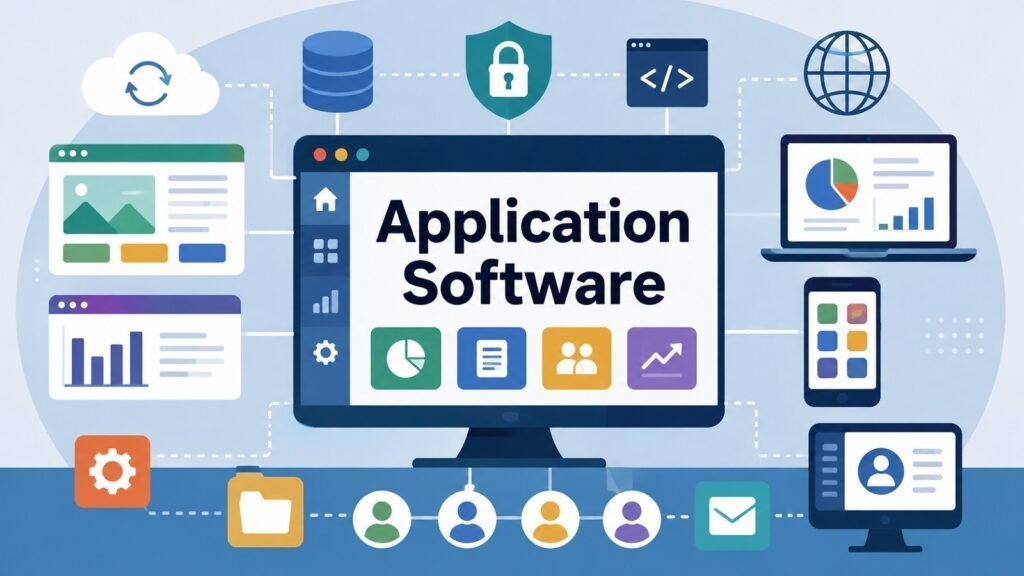
Application Software is the category of software designed to translate computing capabilities into practical tasks, workflows, services, and experiences for individuals, businesses, and institutions. Unlike system software, which manages hardware and core operations, application software exists for a direct human purpose. It is the layer through which people and organizations actually use computers to get things done.
Among all software systems, application software holds a uniquely central position. It represents the primary layer through which computing capabilities are applied to real-world needs. Whether a business processes transactions, a researcher analyzes data, or a consumer streams entertainment, application software is the medium making those activities possible. Understanding it is therefore a prerequisite for understanding how modern digital systems create value.
Application software maintains a clear but complementary relationship with system software. Operating systems and device drivers provide the platform; application software uses that platform to serve specific user purposes. The distinction matters because the two layers have different design priorities, different user relationships, and different criteria for success. Conflating them leads to confused analysis and poor software decisions.
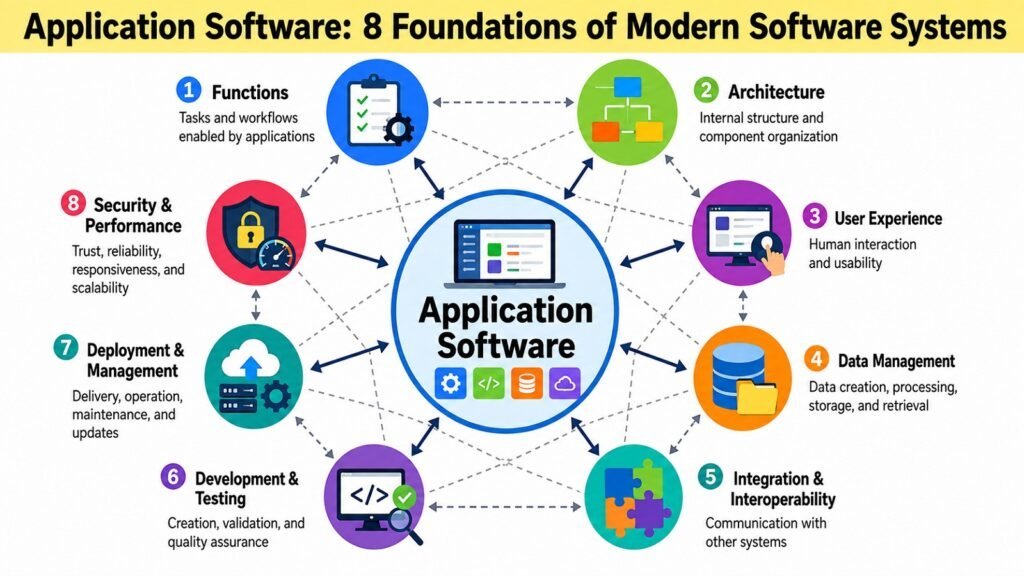
Across its history, application software has expanded far beyond desktop programs. Today it spans web applications, mobile apps, cloud-based platforms, enterprise systems, and increasingly AI-enabled applications that reason, generate, and adapt. Each environment carries its own requirements, constraints, and user expectations. Truly understanding application software requires examining the eight foundations that together determine its value: functions, architecture, user experience, data management, integration, development and testing, deployment and management, and security and performance. These are not separate concerns but an integrated framework, and the table below presents them as a conceptual map.
Table 1: Application Software — Eight Foundations at a Glance
| Foundation | Central Focus |
| Functions | Converting computing capabilities into useful user tasks and workflows |
| Architecture | Structuring applications for scalability, maintainability, and reliability |
| User Experience | Designing interfaces and interactions that are usable and effective |
| Data Management | Collecting, storing, processing, and presenting data accurately |
| Integration and Interoperability | Connecting applications with other systems, services, and platforms |
| Development and Testing | Building applications that are reliable, maintainable, and fit for purpose |
| Deployment and Management | Delivering, operating, and sustaining applications throughout their lifecycle |
| Security and Performance | Ensuring applications are trustworthy, responsive, and resilient |
1. Application Software Functions: Powering Digital Tasks and Workflows
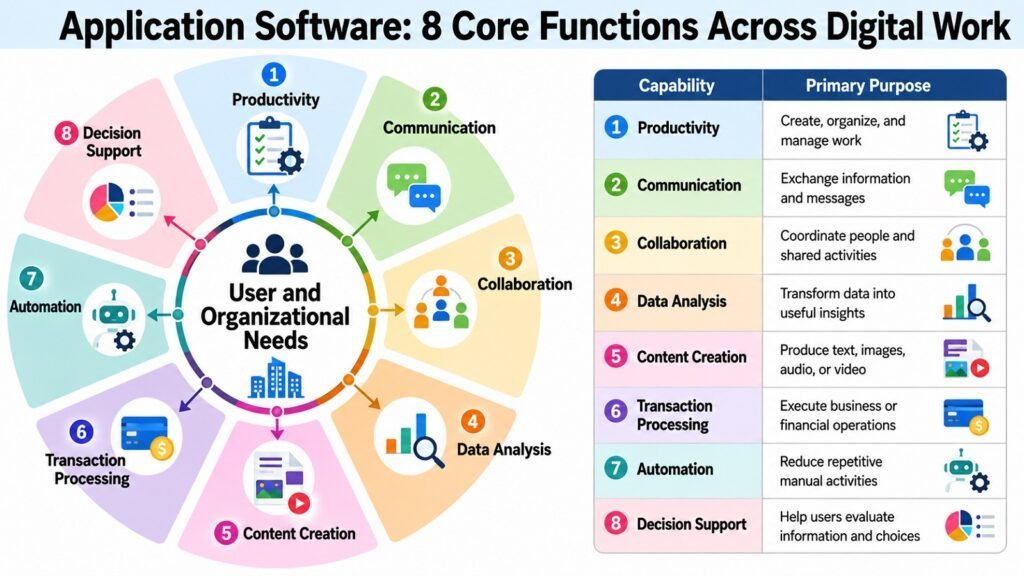
At the most fundamental level, application software exists to do something useful. Its functions are the capabilities it provides to help users accomplish specific goals within particular contexts. Understanding them means going beyond listing what an application can do and examining why it was designed that way, what user needs it addresses, and how it turns computing resources into practical outcomes.
Different applications are built around fundamentally different needs. A word processor centers on document creation. An enterprise resource planning system coordinates procurement, inventory, finance, and logistics. A ride-sharing application connects passengers, drivers, and payment systems in real time. Each function set reflects a deliberate design choice about what problems the software solves and for whom. That alignment between function and user need determines whether an application delivers genuine value.
Modern application software increasingly combines multiple functions within a single environment. Communication platforms handle messaging, video, file sharing, and task management. Business intelligence tools ingest, transform, analyze, and visualize data. These multifunctional environments offer real efficiency advantages but also introduce tension between depth and breadth. An application attempting too much can become difficult to learn, slow to use, and costly to maintain.
The practical outcomes that functions enable extend well beyond the immediate task. Productivity software reduces time and effort in creating documents and presentations. Data analysis tools surface patterns that human judgment alone would miss. Customer-facing applications expand access to services across geographic and time boundaries. These downstream effects matter as much as the direct functions because they determine the real-world impact of the software. Research in software usability consistently shows that feature complexity does not equate to functional value, and a leaner, purpose-driven application often outperforms a bloated one in adoption and long-term satisfaction.
Table 2: Application Software — Major Functional Purposes and Their Practical Roles
| Functional Purpose | Primary Practical Role |
| Productivity | Creating, editing, and managing documents, spreadsheets, and presentations |
| Communication and Collaboration | Enabling real-time and asynchronous interaction among users and teams |
| Information Management | Organizing, retrieving, and maintaining structured records and knowledge |
| Data Analysis and Reporting | Transforming raw data into insights and decision-support outputs |
| Transaction Processing | Recording, validating, and completing financial and operational transactions |
| Content Creation | Producing digital media including text, images, audio, and video |
| Automation | Reducing manual effort by executing repetitive tasks through software logic |
| Decision Support | Providing analytical tools and models to assist complex organizational decisions |
2. Application Software Architecture: Structuring Modern Applications
The internal structure of an application determines far more than how it is built. Architecture shapes how software performs under load, how easily it can be updated or scaled, how reliably it handles failures, and how well different parts can evolve independently. Application architecture is therefore a foundational design decision with lasting consequences, not a technical detail reserved for engineers.
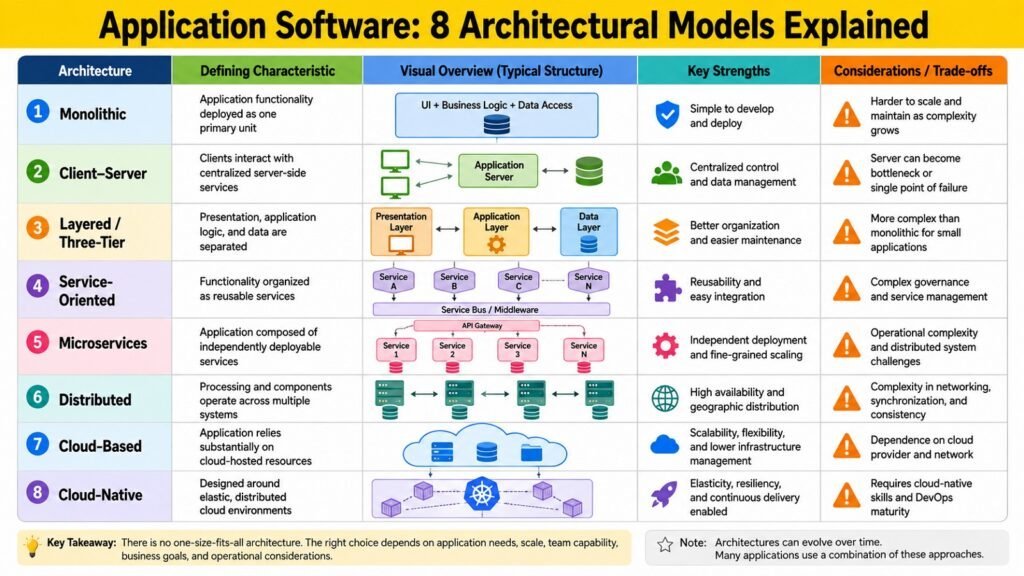
Early applications were commonly monolithic, combining user interface, business logic, and data access into a single deployable unit. This approach simplifies initial development but creates maintenance and scalability challenges as the application grows. Client-server and three-tier architectures addressed this by distributing logic across presentation, processing, and data layers. Service-oriented and microservices architectures pushed further, decomposing applications into distinct, independently deployable services that can be scaled and maintained individually.
Cloud-native architecture has become increasingly prevalent as organizations move to cloud infrastructure. It emphasizes containerization, dynamic scaling, and automation, enabling applications to adapt to changing demand without manual intervention. These advantages come with architectural complexity that demands significant operational expertise. There is no universally optimal architecture. The right choice depends on scale requirements, organizational capabilities, budget, and the nature of the application being built.
Two principles that apply across all architectural models are coupling and cohesion. Low coupling means components have minimal dependencies on one another, making the system easier to change and test. High cohesion means each component has a clear, focused responsibility. Applying both consistently produces applications that are more maintainable, more testable, and more resilient. Evaluating an architecture means asking not just which model it uses but how well it embodies these principles in practice.
Table 3: Application Software — Architectural Approaches and Their Defining Characteristics
| Architecture / Concept | Defining Characteristic or Major Trade-off |
| Monolithic | Single deployable unit; simple initially but harder to scale and maintain |
| Client-Server | Separates user-facing clients from centralized server-side processing |
| Three-Tier / Layered | Divides application into presentation, logic, and data layers for clarity |
| Service-Oriented Architecture | Composes applications from shared, reusable enterprise services |
| Microservices | Independently deployable services; high flexibility but operational complexity |
| Cloud-Native | Designed for containers, dynamic scaling, and cloud infrastructure |
| Event-Driven | Components communicate through events rather than direct calls; high decoupling |
| Separation of Concerns | Design principle ensuring each component has a single, focused responsibility |
3. Application Software User Experience: Designing Human-Centered Applications
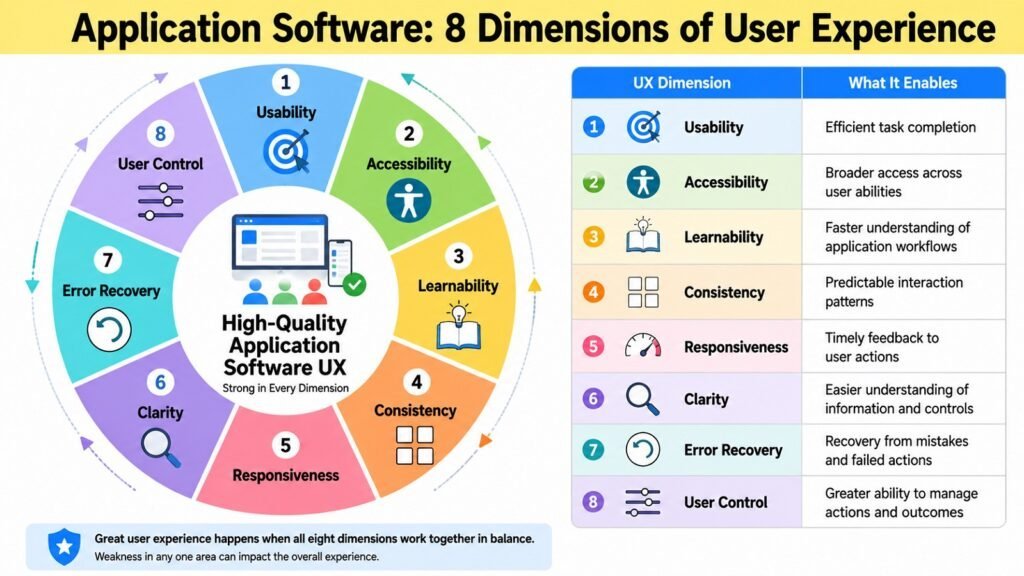
User experience determines whether application software is not just functional but genuinely usable. It encompasses how information is presented, how tasks are completed, how the application responds to input, and how confident users feel while working. Good user experience does not emerge from attractive visual design alone. It emerges from a deep understanding of user goals, mental models, and working contexts.
The relationship between user experience, user interface, and usability is layered. The interface is the visible surface — buttons, forms, menus, and layouts. Usability is the quality with which users accomplish goals through that interface without unnecessary friction. User experience extends further still, covering the emotional quality of the interaction, the degree of user control, and the fit between software and the real work it supports. Accessibility is a fundamental dimension of this: applications that cannot be used by people with visual, motor, or cognitive differences exclude significant audiences and may fail legal requirements in many jurisdictions. The Web Content Accessibility Guidelines provide an internationally recognized baseline.
User experience requirements differ meaningfully across environments. Mobile applications must account for small screens, touch input, and brief, goal-directed usage patterns. Enterprise applications must support complex workflows for professional users who may spend many hours a day in the software. Poor enterprise UX has documented consequences: errors, inefficient workarounds, longer training periods, and reduced adoption. These costs are real and measurable. Emerging interaction models — conversational interfaces, voice, and AI-assisted workflows — expand design possibilities but also introduce new challenges around trust, transparency, and appropriate reliance on automated assistance.
Table 4: Application Software — Key User Experience Dimensions and Their Practical Significance
| UX Dimension | Practical Significance |
| Usability | Enables users to complete tasks accurately and efficiently with minimal effort |
| Accessibility | Ensures the application can be used by people with diverse abilities and needs |
| Consistency | Reduces cognitive load by applying predictable patterns across the interface |
| Feedback and Responsiveness | Keeps users informed of system status and the results of their actions |
| Information Architecture | Organizes content and navigation so users can find what they need quickly |
| Error Prevention and Recovery | Reduces mistakes through design and provides clear paths to correction |
| Personalization | Adapts interface and content to individual user preferences and roles |
| Learnability | Allows new users to acquire proficiency within a reasonable time and effort |
4. Application Software Data Management: Turning Data Into Usable Information
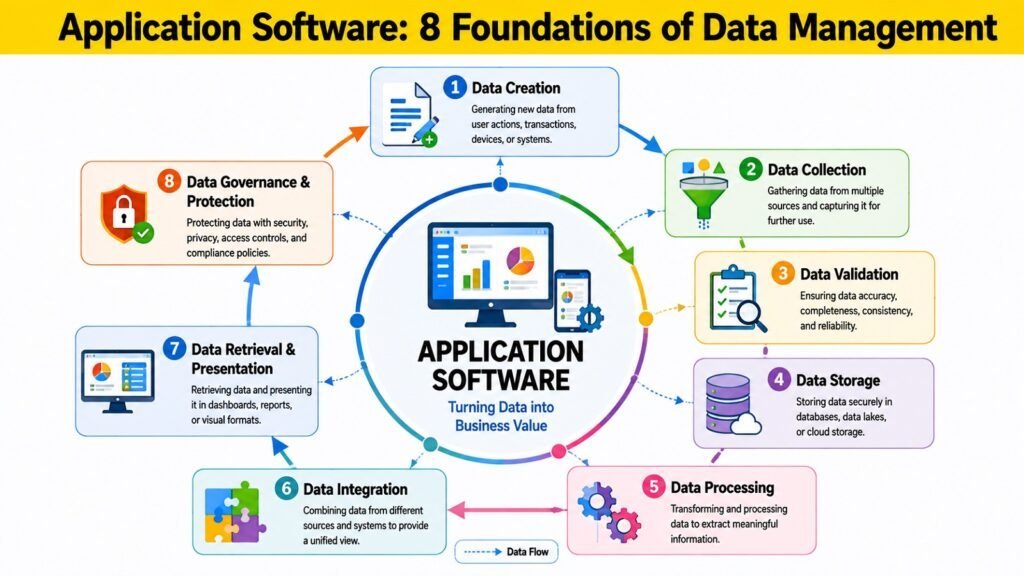
Data is the raw material that application software transforms into useful information. Every meaningful action an application performs — recording a transaction, generating a report, personalizing a recommendation — depends on data being collected, stored, processed, and retrieved accurately and reliably. Data management is therefore not a background infrastructure concern but a central dimension of application quality.
Applications interact with databases through queries, transactions, and APIs. The choice of data model — relational, document-oriented, key-value, graph, or time-series — influences how data is organized, how efficiently it can be queried, and how easily the application can evolve. Relational databases remain dominant for structured, transaction-oriented data, while alternative models suit workloads where flexibility, scale, or specialized access patterns matter more. Data integrity — the principle that stored information accurately reflects real-world entities — requires not only correct application logic but also database-level constraints, transaction management, and validation throughout the data flow. When integrity fails, every function depending on that data produces flawed outputs.
Modern applications increasingly operate across distributed, cloud-based, and real-time data environments. Data may span multiple databases, stream from sensors, or aggregate from partner systems. Managing it coherently requires careful attention to consistency, latency, and conflict resolution. Privacy and governance add a further dimension. Regulations such as the General Data Protection Regulation impose obligations on how applications handle personal data, and good data governance builds user trust while reducing the risk of costly incidents. Applications that treat governance as a design requirement from the outset are better positioned than those that add it retrospectively.
Table 5: Application Software — Data Management Concepts and Their Practical Roles
| Data Management Concept | Practical Role |
| Data Integrity | Ensures stored data accurately reflects real-world facts and relationships |
| Transaction Management | Guarantees that related data operations succeed or fail together atomically |
| Data Modeling | Defines how data is organized and related to support application requirements |
| Query Optimization | Improves speed and efficiency of data retrieval operations |
| Data Synchronization | Keeps data consistent across distributed devices and systems |
| Data Governance | Establishes policies for data quality, privacy, access, and lifecycle management |
| Caching | Reduces latency and database load by storing frequently accessed data temporarily |
| Backup and Recovery | Protects against data loss and enables restoration after failures or incidents |
5. Application Software Integration and Interoperability: Connecting Digital Systems
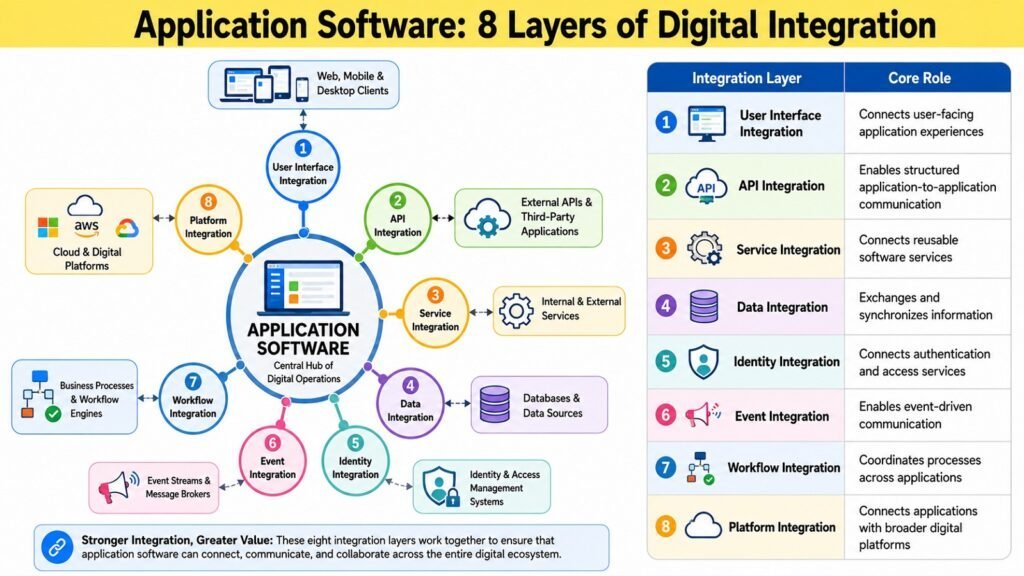
Modern application software rarely operates in isolation. Most applications function as part of a larger digital ecosystem, exchanging information with other applications, cloud services, payment systems, identity providers, and analytics platforms. The ability to connect with these systems reliably and meaningfully is not an optional enhancement but a core capability that determines how much value an application can deliver within its environment.
Integration and interoperability are related but distinct. Integration refers to the technical act of connecting systems so they can communicate. Interoperability describes the broader quality of exchanging meaningful information that produces correct, useful results on both sides. An application may be technically integrated with another system without genuine interoperability if the data exchanged is misinterpreted or inconsistent. REST and GraphQL APIs are the primary mechanisms for web-based integration, while message-based systems using protocols such as AMQP or Apache Kafka support asynchronous, event-driven patterns. Middleware platforms and integration-as-a-service tools reduce the complexity of connecting heterogeneous systems through pre-built connectors. Standards such as OpenAPI improve compatibility and reduce integration effort.
Integration introduces risks that deserve serious attention. Tightly coupled integrations break when either system changes. Poorly designed integrations can expose sensitive data, create bottlenecks, or produce inconsistent information when connected systems return conflicting results. A practical evaluation asks three questions: Can the systems communicate reliably under normal and failure conditions? Does the exchanged data carry consistent meaning on both sides? Can the integration be maintained as requirements evolve without extensive rework? Integrations meeting all three criteria add genuine value; those failing on any dimension introduce risk and operational cost.
Table 6: Application Software — Integration and Interoperability Mechanisms
| Integration Mechanism / Concept | Concise Role |
| REST API | Provides a widely adopted standard for HTTP-based data exchange between systems |
| GraphQL API | Enables flexible, query-driven data retrieval from a single endpoint |
| Message Queues | Decouples systems by routing events and data asynchronously between components |
| Middleware / iPaaS | Connects heterogeneous systems using pre-built connectors and transformations |
| Webhooks | Triggers real-time notifications to external systems when specific events occur |
| Data Exchange Formats | JSON and XML provide standardized structures for sharing data across platforms |
| OpenAPI Specification | Standardizes API documentation to improve compatibility and integration clarity |
| Identity Federation | Enables single sign-on and trusted identity sharing across connected systems |
6. Application Software Development and Testing: Building Reliable Applications
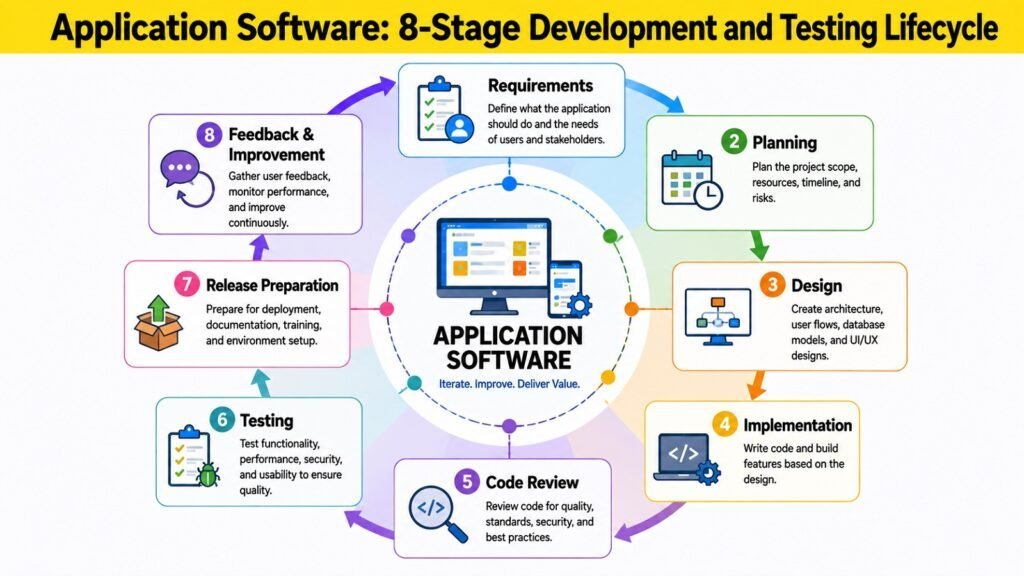
Reliable application software results from a disciplined process that moves from clear requirements through thoughtful design, careful implementation, rigorous testing, and systematic quality assurance. Weaknesses at any stage compound as development progresses, making the entire process — not just the final product — the true determinant of software quality.
Requirements analysis establishes what the application must do and for whom. Ambiguous or incomplete requirements are a common source of costly rework. Design decisions made early — about architecture, data models, user interactions, and integration points — set constraints that are expensive to reverse later. Agile and iterative development approaches have become the dominant paradigm, emphasizing short delivery cycles, frequent user feedback, and the ability to course-correct as understanding improves. Continuous integration automates code validation, catching integration defects early when they are cheapest to fix. DevOps practices extend this automation into deployment and operations.
Testing is not a single activity but a layered discipline. Unit tests verify individual components in isolation. Integration tests confirm that components work together as designed. System and acceptance tests validate the application against requirements and user needs. Performance, usability, and security testing address dimensions that functional tests alone cannot reveal. Research in software engineering consistently shows that defects discovered early cost a fraction of those found after deployment, making early and comprehensive testing an economically sound investment. Technical debt — the accumulated cost of shortcuts and deferred maintenance — must be actively managed, as unaddressed debt compounds over time, slowing development and increasing defect rates.
Table 7: Development and Testing Practices and Their Primary Purpose
| Practice | Primary Purpose |
| Requirements Analysis | Establishes what the application must do before design or coding begins |
| Agile / Iterative Development | Delivers software incrementally, enabling early feedback and course correction |
| Continuous Integration | Automates code merging and validation to detect integration defects early |
| Unit Testing | Verifies that individual software components function correctly in isolation |
| Integration Testing | Confirms that connected components interact as intended |
| Acceptance Testing | Validates that the delivered software meets agreed user requirements |
| Code Review | Identifies defects and quality issues through structured peer examination |
| Technical Debt Management | Tracks and reduces accumulated suboptimal code to maintain development velocity |
7. Application Software Deployment and Management: Delivering and Sustaining Applications
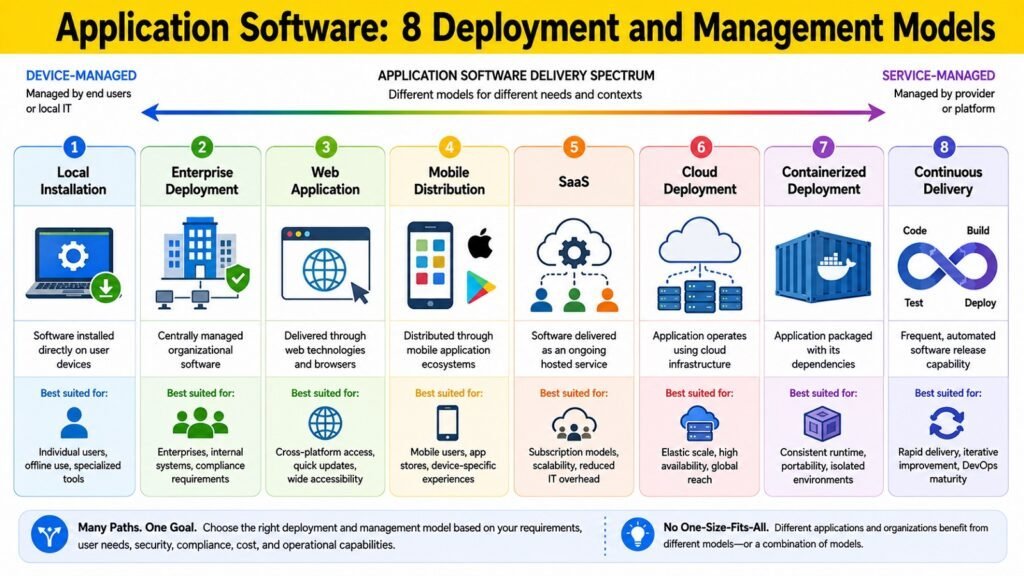
Completing development is not the same as delivering value. Application software must be deployed into environments where users actually interact with it, then maintained, monitored, and updated throughout its operational lifetime. Deployment and management are ongoing disciplines that determine whether an application continues to function reliably and improve over time.
Deployment models have diversified considerably. Traditional software was distributed on physical media and installed locally. Web delivery shifted responsibility to servers, making applications accessible through browsers without the need of local installation. Mobile platforms distribute through app stores, with review and update mechanisms managed outside the developer organization. Cloud and SaaS deployment provides on-demand access, with infrastructure managed by service providers and updates delivered transparently. Containerization, using technologies such as Docker and Kubernetes, packages applications with their dependencies for consistent deployment across environments. Orchestration platforms automate scaling and management, supporting continuous delivery practices that allow frequent, reliable releases.
Monitoring and observability are essential disciplines once an application is in production. Logs, metrics, and traces reveal whether an application is performing correctly, where bottlenecks occur, and what errors users encounter. Organizations that invest in observability resolve issues faster, often before users report them. Application lifecycle management also requires sustained attention: applications must eventually be updated, replaced, or retired as needs evolve, technology shifts, or the cost of maintenance outweighs the value delivered. Balancing current operational needs against long-term investment priorities is an ongoing organizational responsibility.
Table 8: Application Software — Deployment and Management Practices
| Deployment/Management Practice | Defining Purpose |
| Web-Based Delivery | Distributes applications through browsers without requiring local installation |
| SaaS / Cloud Deployment | Provides on-demand application access with provider-managed infrastructure |
| Containerization | Packages applications and dependencies for consistent cross-environment deployment |
| Container Orchestration | Automates scaling, deployment, and management of containerized applications |
| Continuous Delivery | Automates release pipelines to enable frequent, reliable software deployments |
| Monitoring and Observability | Tracks application health, performance, and errors in production environments |
| Patch and Update Management | Applies security fixes and improvements without disrupting user operations |
| Application Lifecycle Management | Governs planning, delivery, operation, and retirement of software applications |
8. Application Software Security and Performance: Ensuring Trust and Efficiency
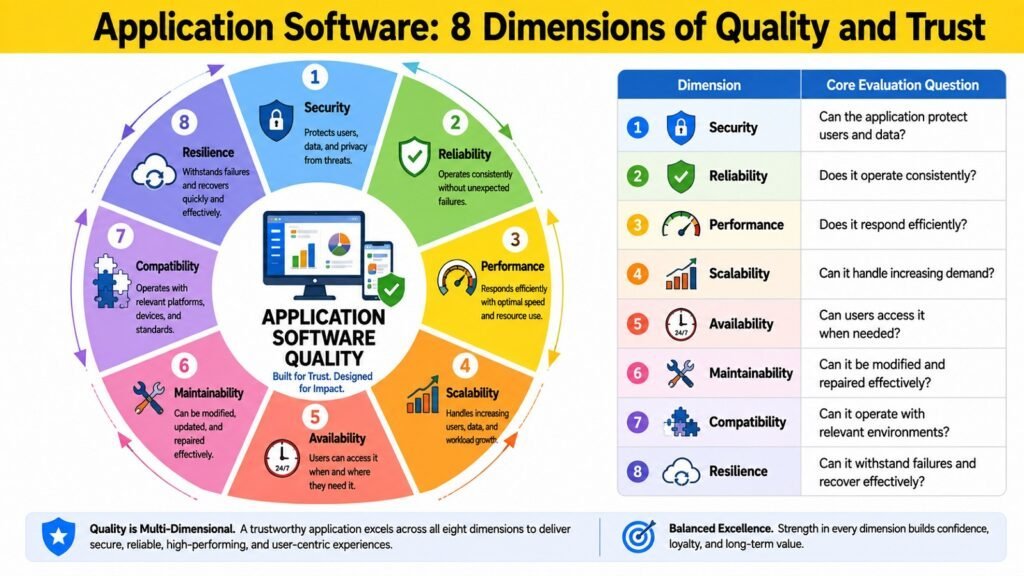
Security and performance are interconnected foundations that together determine whether application software is trustworthy and genuinely useful under real operating conditions. An application may be functionally complete and well-designed yet fail in deployment if it cannot protect user data or respond within acceptable time frames.
Application security begins with understanding the threat landscape. The OWASP Top Ten, published by the Open Web Application Security Project, identifies the most critical application security risks — including injection attacks, broken authentication, and security misconfigurations — based on documented, recurring vulnerabilities. Secure coding practices, which apply validation, sanitization, and appropriate access controls throughout the codebase, are the most reliable defense. Authentication and authorization define who can access an application and what they may do. Multi-factor authentication reduces account compromise risk significantly. Role-based and attribute-based access control models ensure users access only data and functions appropriate to their roles. Encryption, in transit via Transport Layer Security and at rest, protects data during communication and storage.
Performance covers the speed, efficiency, and reliability with which an application serves users. Response time is the most directly perceptible characteristic: research shows users begin losing confidence after delays of just a few seconds, and abandonment rates rise sharply beyond that threshold. Throughput determines whether the application can serve its intended user base under peak demand. Scalability — the capacity to maintain acceptable performance as demand grows — depends on architecture, database design, infrastructure, and caching strategies. Security controls can introduce performance overhead, and performance optimizations can sometimes create attack surfaces if implemented carelessly. Both qualities must therefore be built into applications from the outset rather than retrofitted after development.
Table 9: Application Software — Security and Performance Considerations
| Security / Performance Consideration | Practical Purpose or Concern |
| Authentication | Verifies user identity before granting access to application resources |
| Authorization and Access Control | Restricts user actions to those appropriate for their roles and permissions |
| Encryption (TLS / at rest) | Protects data from interception and unauthorized access during transit and storage |
| Secure Coding Practices | Prevents common vulnerabilities such as injection attacks and authentication flaws |
| Response Time Optimization | Ensures the application responds within thresholds that maintain user confidence |
| Scalability | Maintains acceptable performance as user demand and data volume grow |
| Availability and Resilience | Keeps the application operational and recoverable during failures or disruptions |
| Vulnerability Management | Identifies, prioritizes, and remedies security weaknesses throughout the lifecycle |
Conclusion — Application Software: Evolution, Importance, and Future
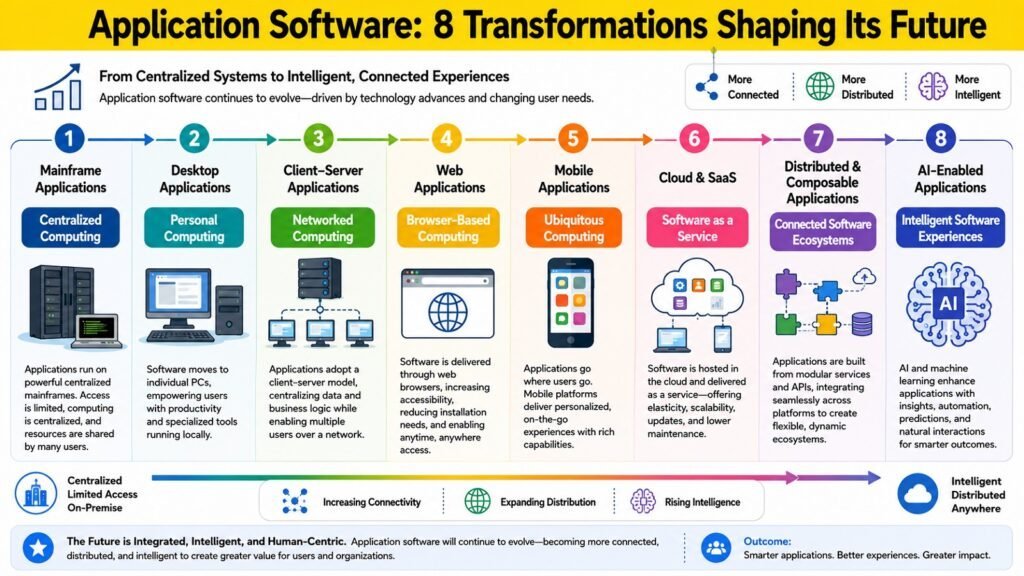
The eight foundations explored in this article are not independent topics but interconnected dimensions of a single system. An application architecture shapes how user experience can be designed. Data management quality affects integration reliability. Development practices determine security posture and performance characteristics. Deployment choices influence how quickly improvements reach users. Viewing application software through this integrated framework reveals why surface-level assessments — judging software by its feature list or interface appearance — so often fail to predict whether it will deliver lasting value.
Application software stands as one of the most important software systems because it is the mechanism through which computing capabilities become practical reality. Operating systems provide the platform; networks provide the connectivity. But application software is the layer through which people and organizations actually create, communicate, decide, transact, learn, and automate. The value of computing infrastructure is only as real as the applications that put it to use.
The trajectory of application software has moved steadily toward greater accessibility, integration, and intelligence. Early desktop applications required local installation and operated largely in isolation. Web applications introduced ubiquitous browser-based access. Mobile applications brought computing into daily physical life. Cloud and SaaS platforms shifted infrastructure responsibility to providers, allowing development effort to concentrate on functionality and experience. AI-enabled applications now incorporate reasoning, generation, and adaptation into workflows that once required exclusively human judgment. Future directions include AI-native applications built from the ground up around machine learning capabilities, composable architectures that assemble capabilities from interoperable components, and multimodal interfaces combining text, voice, image, and gesture across devices.
Throughout these changes, the eight foundations remain the right lens for evaluating application software. Technologies and delivery models evolve; the questions of whether an application functions effectively, maintains data integrity, integrates reliably, and remains secure and performant do not. Practitioners, evaluators, and users who understand these foundations are better equipped to make informed decisions about software that increasingly mediates how organizations operate and how people live and work.
Table 10: Application Software — Major Evolutionary and Future Directions
| Direction / Trend | Defining Characteristic or Implication |
| Web Applications | Shifted access to browsers, enabling universal reach without local installation |
| Mobile Applications | Extended computing to smartphones and tablets for on-the-go, context-aware use |
| Cloud and SaaS Platforms | Transferred infrastructure management to providers, enabling focus on functionality |
| Microservices Adoption | Decomposed monoliths into independent services for flexibility and faster delivery |
| AI-Native Applications | Built around machine learning capabilities for reasoning, generation, and adaptation |
| Composable Architecture | Assembles applications from interoperable components to improve agility and reuse |
| Multimodal Interfaces | Combines text, voice, and visual input to broaden interaction possibilities |
| Deeper Ecosystem Integration | Connects applications across platforms, devices, and partners as a unified experience |