Table of Contents
Introduction: Understanding DevOps in Modern Software Development
Software teams have consistently encountered a fundamental challenge. They must develop rapidly, maintain reliability, and ensure alignment among all stakeholders. For an extended period, achieving this objective seemed unattainable. Release cycles were prolonged, bugs were identified late in the process, and communication between developers and operations teams was minimal. The introduction of DevOps aimed to address these issues.
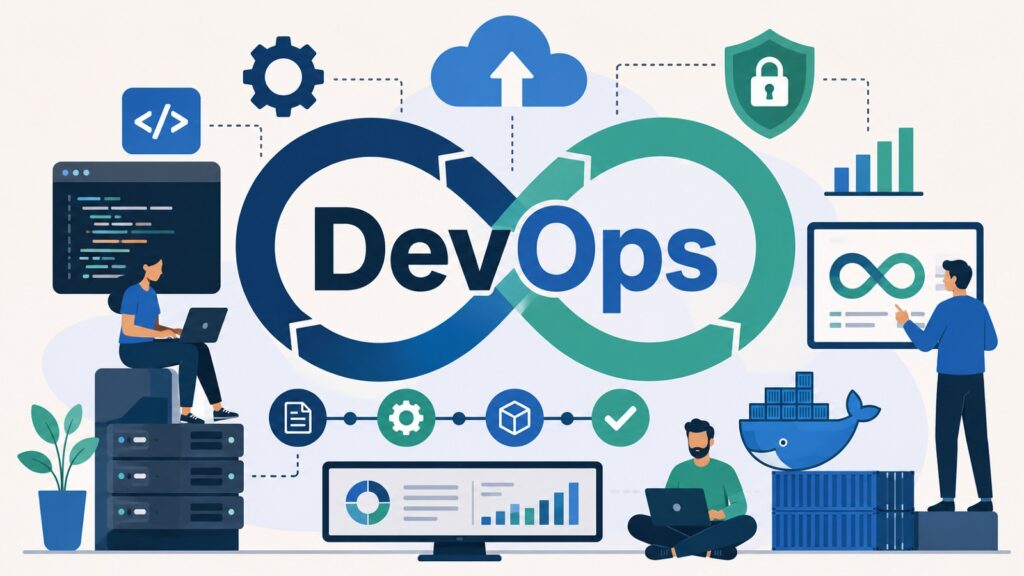
DevOps joins software development and IT operations into one way of working. It is not just a tool or a set of rules. It blends culture, practice, automation, and learning into a single system. DevOps is an important aspect of modern software and cloud computing because it helps teams build, ship, run, secure, and improve software in both cloud and on-site environments.
The road to DevOps grew from real pain. Traditional software had long, stiff release cycles. Agile helped by shortening sprints and improving teamwork inside development groups, but it left a wide gap between developers and operations. DevOps closed that gap. It extended Agile thinking across the whole software lifecycle and gave every team a shared stake in the outcome.
The business case for DevOps has grown year after year. Teams that adopt it well report shorter release times, fewer production failures, better software quality, and higher morale. These gains do not come from any one tool. They come from changing how people work, how processes are designed, and how teams take ownership of what they build.
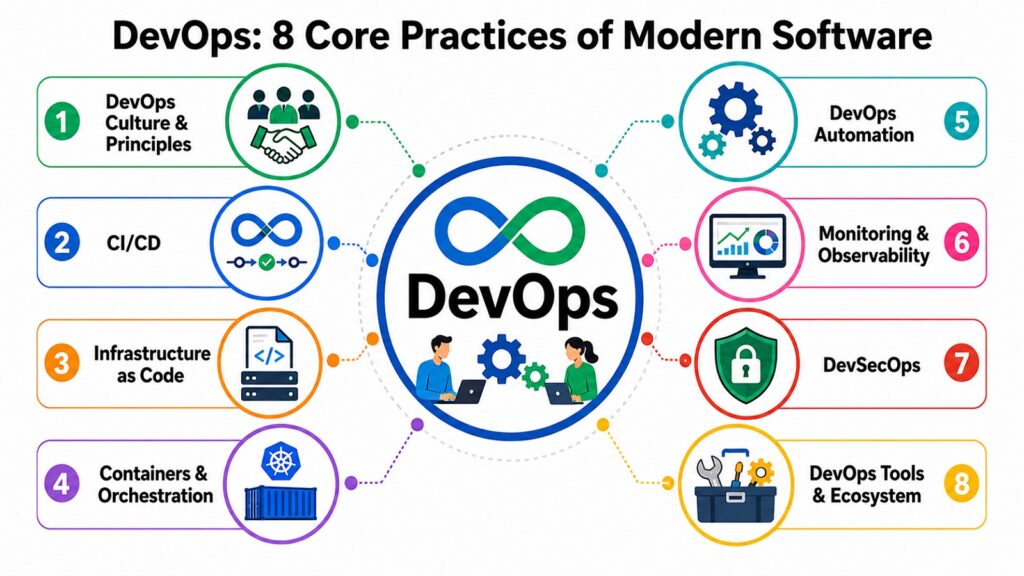
This article covers eight core DevOps areas. Each DevOps area looks at one area in depth, explaining what problem it solves and what value it delivers. Together, these eight areas paint a clear picture of what mature DevOps looks like in a real engineering team.
Table 1: DevOps — Eight Core Practices at a Glance
| DevOps Practice | Role Within DevOps |
| Culture & Principles | Sets shared values, teamwork, and a habit of learning across all teams |
| CI/CD Pipelines | Automates code testing and release for faster, more reliable delivery |
| Infrastructure as Code | Manages systems through version-controlled code for consistency and scale |
| Containers & Orchestration | Gives apps a portable, scalable home across cloud and local environments |
| Automation | Removes manual work from development, testing, and daily operations |
| Monitoring & Observability | Shows what is happening in live systems so teams can act fast |
| DevSecOps | Puts security checks inside every stage of the build and deploy process |
| Tools & Ecosystem | Supports each stage of software delivery through a set of linked tool types |
1. DevOps Culture & Principles: Building Collaborative Software Teams
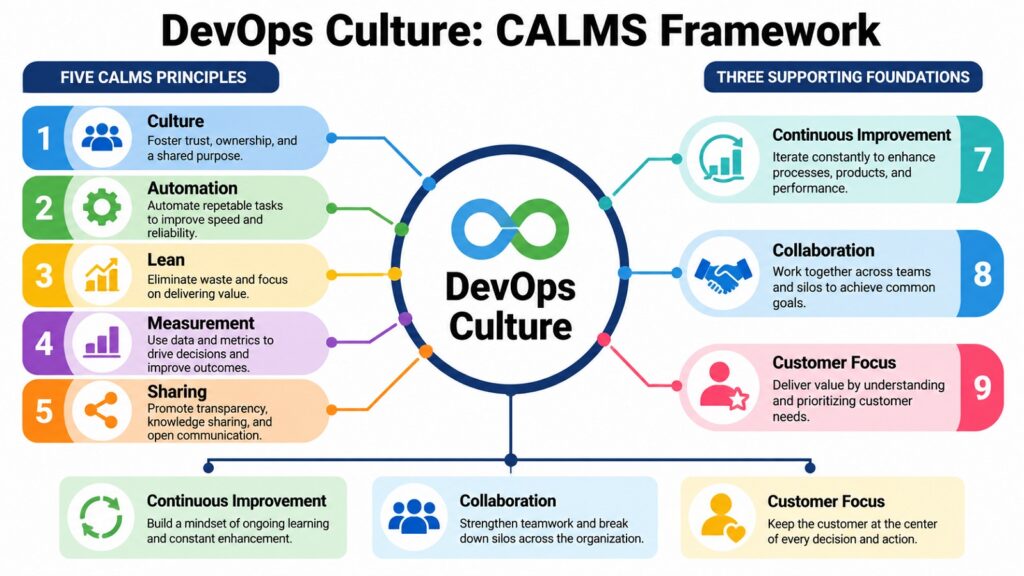
Culture is where many DevOps efforts fall short. Tools are easy to buy. Pipelines can be set up in a day. But changing how people work together takes real effort and strong leadership. Teams that skip cultural change and go straight to tooling rarely get the full value of DevOps.
The problem DevOps culture was built to solve is a familiar one. Dev teams pushed features and moved on. Operations teams valued stability above all else and resisted change. Quality teams worked at the end of the line, under time pressure. Security sat outside the process entirely. These splits led to slow releases, fragile systems, and a culture where blame replaced learning.
DevOps extended Agile thinking into operations, security, and infrastructure. It replaced handoffs between siloed teams with shared ownership across the full software lifecycle. Development, operations, quality, and security engineers began working together from the start of a project rather than at the end.
The CALMS model describes DevOps culture well. It stands for Culture, Automation, Lean, Measurement, and Sharing. Each part supports the rest. A culture of teamwork helps automation take hold. Lean thinking cuts waste from delivery workflows. Measurement gives teams the data they need to improve. Sharing spreads know-how and reduces single points of failure across the organization.
Cultural change is slower than technical change, and that is worth accepting early. Engineers who spent years in isolated teams do not shift overnight. Trust builds through shared work, open talk, and leaders who model what they ask of others. Continuous learning through post-incident reviews, internal talks, and team wikis all help a DevOps culture grow stronger over time.
Table 2: DevOps Cultural Principles and Their Organizational Purpose
| DevOps Cultural Principles | Organizational Purpose |
| Collaboration | Breaks down walls between dev, ops, security, and QA teams |
| Shared Ownership | Gets teams to take joint responsibility for quality and system health |
| Continuous Learning | Builds team strength through post-mortems, training, and knowledge sharing |
| Customer Focus | Keeps engineering choices tied to real user needs and business goals |
| Rapid Feedback | Cuts the time between action and insight so teams can improve faster |
| Automation Mindset | Favors consistent, repeatable steps over manual, error-prone work |
| Measurement Culture | Uses data and metrics to guide decisions and show growth over time |
| Transparency | Promotes open talk about failures, progress, and shared team goals |
2. DevOps CI/CD: Accelerating Continuous Software Delivery
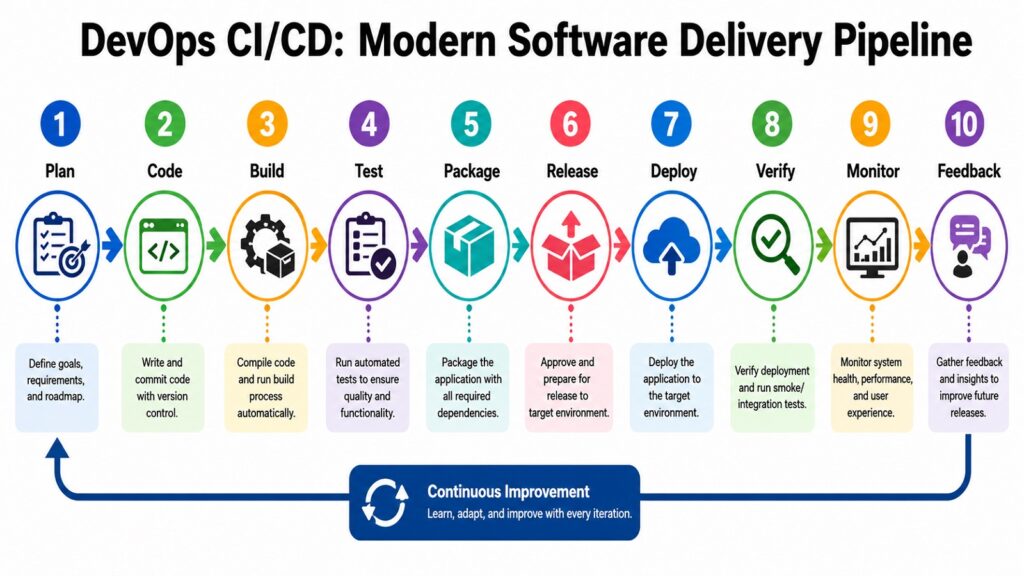
Before CI/CD, releasing software was a major event. Teams spent weeks combining code from multiple developers, sorting out conflicts, running tests by hand, and building release packages. Each release carried real risk. A bug found late could delay a product by days or even weeks. The process was slow, costly, and hard to repeat.
Continuous Integration changed that picture. When developers commit code to a shared repo, automated systems run tests right away to check that the new code fits with the rest. Problems surface in minutes, not days. Smaller, more frequent commits also make integration much easier to manage.
Continuous Delivery extends this idea. Every build that passes all automated tests is packaged and ready to deploy at any time. The team still decides when to release. Continuous Deployment goes one step further by sending every passing build straight to production without human approval. This works well for teams with strong test coverage, but it is not right for every product or industry.
A modern DevOps CI/CD pipeline runs from code commit through automated tests, code checks, security scans, artifact creation, staging deploy, integration tests, and finally production release. After release, monitors watch the system and trigger rollbacks if something goes wrong. Research from the DORA group has shown that high-performing teams deploy far more often and recover from failures far faster than lower-performing ones.
CI/CD is not just a technical win. It gives engineering teams faster feedback, less risk per release, and more confidence in what they ship. Businesses see shorter time to market, fewer outages, and better customer trust. This is why CI/CD sits at the core of every mature DevOps setup.
Table 3: DevOps CI/CD Pipeline Stages and Their Engineering Purpose
| DevOps CI/CD Pipeline Stages | Engineering Purpose |
| Code Commit | Starts the pipeline when a developer pushes new code to the shared repo |
| Automated Testing | Runs unit, integration, and function tests to check that code works correctly |
| Static Code Analysis | Checks code quality, style rules, and known security vulnerability patterns |
| Artifact Creation | Packs the tested app into a deployable artifact or container image |
| Staging Deployment | Deploys the artifact to a test environment for further checks |
| Integration Testing | Confirms the app works correctly with other services it depends on |
| Production Deployment | Releases the verified artifact to the live system, manually or by automation |
| Post-Deployment Monitoring | Watches the live system and triggers rollback if critical issues appear |
3. DevOps Infrastructure as Code: Managing Infrastructure Efficiently
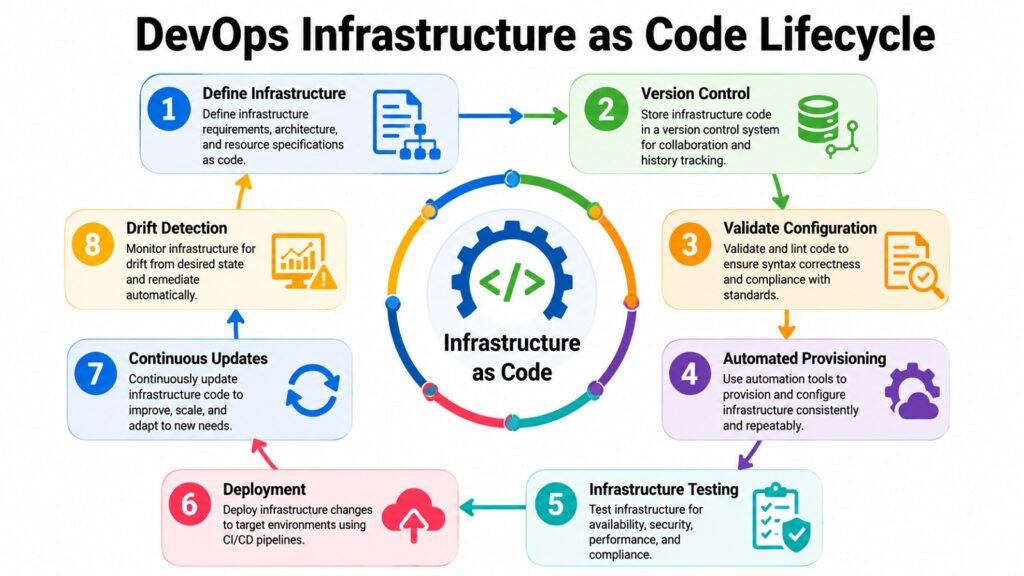
For most of computing history, infrastructure was set up by hand. Someone followed a checklist, applied settings step by step, and hoped the result matched what was needed. The knowledge of how a system was built often lived in one person’s head. This worked when environments were small. It broke down fast as systems grew.
Manual setup creates what engineers call configuration drift. Servers that were meant to be identical slowly become different because of small undocumented fixes, different habits across team members, and one-off changes that never get recorded. When production issues arise from drift, finding the cause is slow and often frustrating.
Infrastructure as Code treats server setup the same way as application code. Network rules, storage settings, server config, and security policies are all written in code files that can be reviewed, version-controlled, tested, and deployed through automated pipelines. Every change has a record. Every environment can be built the same way, every time.
Declarative Infrastructure as Code lets engineers say what they want the environment to look like, not how to build it step by step. The tooling figures out the steps. Immutable infrastructure takes this further: instead of changing a running server, a fresh one is built from a known-good config and the old one is replaced. This stops drift at the root.
Cloud environments get the most out of this approach. Teams managing many services across multiple regions can keep environments consistent, copy production setups for testing, and recover from failures fast when everything is defined in code. Infrastructure as Code is now treated as a basic requirement in any serious cloud engineering team.
Table 4: DevOps Infrastructure as Code Concepts and Their Practical Purpose
| IaC Concept | Practical Purpose Within DevOps |
| Declarative Configuration | Defines what the infrastructure should look like without scripting each step |
| Version Control for Infra | Tracks all infra changes with full history and the ability to roll back |
| Immutable Infrastructure | Replaces changed servers with fresh builds to keep environments clean |
| Configuration Management | Applies the same software settings across all servers and environments |
| Infrastructure Testing | Checks infra code before deploy using automated test tools |
| Environment Replication | Rebuilds any environment reliably from code for dev, staging, or testing |
| Cloud Resource Automation | Creates and manages cloud services through code at any scale |
| Disaster Recovery Readiness | Allows fast environment rebuild from code after a failure or outage |
4. DevOps Containers & Orchestration: Powering Cloud-Native Applications
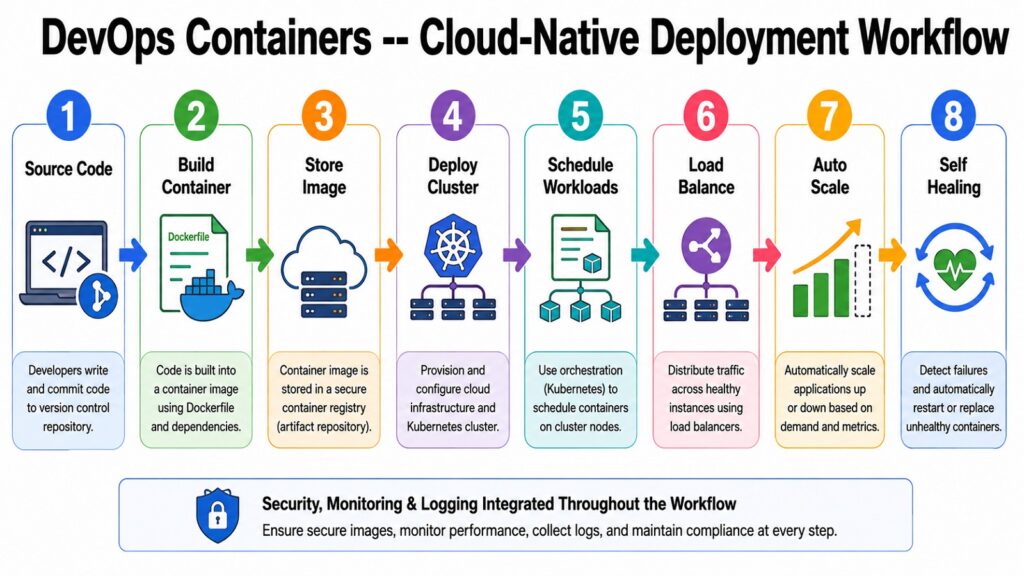
One of the oldest problems in software delivery is the gap between where code is written and where it runs. An app that works perfectly on a developer’s laptop may fail in staging or production because of differences in libraries, operating system versions, or config settings. Containers were designed to close that gap for good.
A container packs an app together with everything it needs to run — its runtime, libraries, and config. It then runs the same way on any host that supports the container engine, regardless of what lies underneath. This portability is what makes containers so useful in DevOps pipelines, where code must travel reliably from a developer’s machine through testing and into production.
Containers are lighter than virtual machines. A virtual machine carries a full operating system for each instance, making it heavy and slow to start. Containers share the host OS kernel and start in seconds. This matters a lot in microservices setups, where an application is split into many small services, each running in its own container.
Container orchestration handles the task of running many containers across many servers. When an application has dozens or hundreds of containers, managing them by hand is not realistic. Orchestration systems automate scheduling, health checks, service lookup, load sharing, rolling updates, and self-repair. When a container fails, the system spots it and starts a new one within seconds.
Cloud providers now offer managed container services that cut down the complexity of running orchestration at scale. This close fit between containers, cloud computing, and DevOps has made containerization a standard feature of modern software delivery. Teams that use it gain portability, resilience, and the operational efficiency that cloud-native apps require.
Table 5: DevOps Container and Orchestration Concepts and Their Role
| Container Concept | Role Within DevOps |
| Container Image | Packs an app and its dependencies into a portable, repeatable unit |
| Container Runtime | Runs container images the same way across different host environments |
| Microservices Architecture | Splits apps into small, independent services that each run in a container |
| Container Scheduling | Places containers on available hosts based on resource needs and policies |
| Service Discovery | Lets containers find and talk to other services in the cluster automatically |
| Horizontal Scaling | Adds or removes container instances based on live traffic demand |
| Rolling Updates | Deploys new container versions step by step to avoid service downtime |
| Self-Healing | Restarts or replaces failed containers automatically to keep the app running |
5. DevOps Automation: Driving Speed, Accuracy, and Efficiency
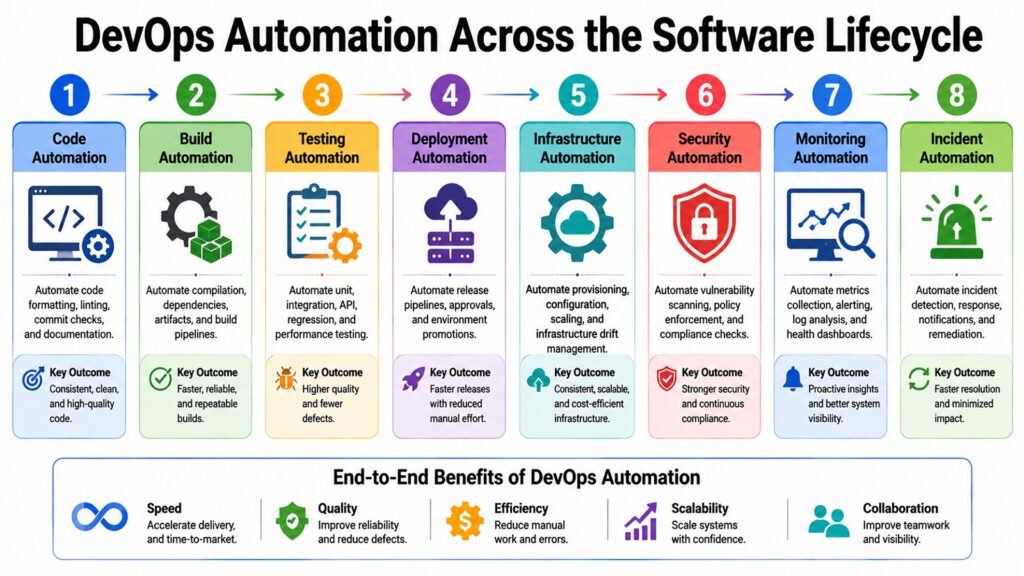
Automation is the engine of DevOps. Without it, most of the speed and reliability this approach promises cannot be achieved at any real scale. Manual work is limited by how fast people can move, how much they can focus, and how often they make mistakes. Automation replaces those limits with consistent steps that run the same way every time.
The reach of DevOps automation covers the whole software lifecycle. That includes code quality checks, security scans, server setup, config management, software releases, monitoring, compliance checks, and incident response. When each of these runs on its own, engineers spend less time on repetitive tasks and more time on creative problem-solving.
Test automation is one of the most foundational forms. A solid automated test suite runs in minutes after every code commit and gives instant feedback on whether new changes break existing features. Without this, every release needs time-consuming manual checks, which creates pressure to release less often and take on more risk per release.
Infrastructure automation lets environments be created, changed, and torn down through pipelines. Release automation ensures that every production deploy follows the same verified steps. Compliance automation checks that systems meet security and regulatory rules continuously rather than only during audits. Each layer reduces a category of human error from the delivery process.
Automation has limits that deserve honest attention. Automated systems need upkeep as code, environments, and requirements shift. Poorly built automation creates fragile pipelines that fail often and take more effort than the manual work they replaced. Good automation takes careful design and ongoing refinement. It is a practice, not a one-time setup task.
Table 6: DevOps Automation Categories and Their Primary Purpose
| Automation Category | Primary Purpose in DevOps |
| Build Automation | Compiles and packages app artifacts from source code without manual steps |
| Test Automation | Runs functional, integration, and regression tests on every code change |
| Security Scanning | Finds known vulnerabilities in code, libraries, and container images |
| Infrastructure Provisioning | Creates and configures cloud resources from version-controlled code |
| Deployment Automation | Releases tested software to target environments through repeatable steps |
| Configuration Management | Applies consistent system settings across all servers and environments |
| Compliance Automation | Checks systems against security rules and regulations on a live basis |
| Incident Response | Triggers alerts, escalations, and recovery steps when conditions are met |
6. DevOps Monitoring & Observability: Ensuring Reliable Software Operations
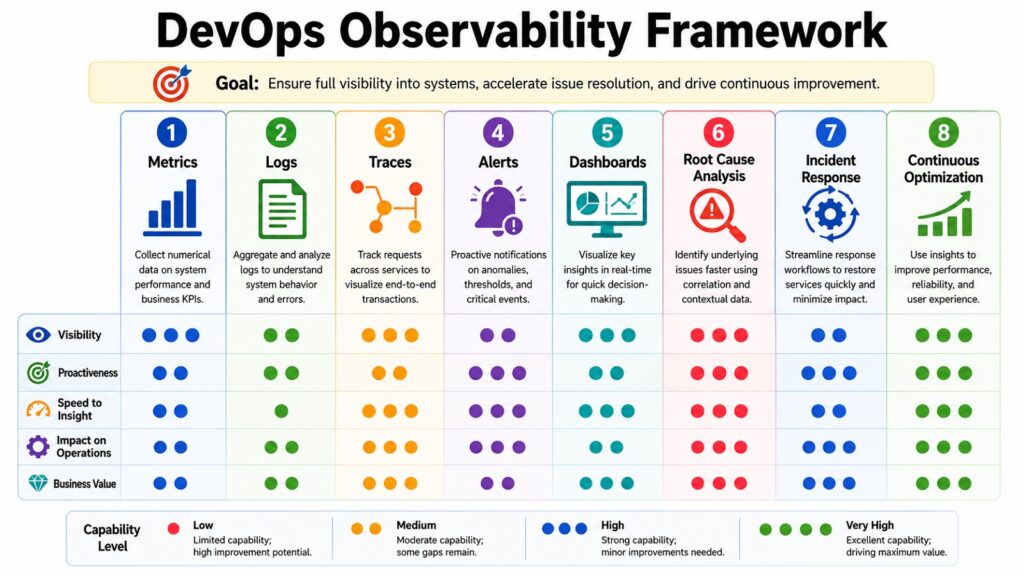
Shipping software fast means very little if teams cannot tell whether it works in production. Monitoring and observability give engineers the visibility they need to catch problems early, find their root cause, and keep systems running well. Without these practices, teams are flying blind after every release.
Monitoring and observability are related but not the same. Monitoring tracks set metrics — CPU use, memory, request speed, error rates — and tells teams whether the system is within expected bounds. Observability is broader. It measures how well the internal state of a system can be understood from its outputs alone. An observable system can answer questions that were not planned for when monitoring was first set up.
The three fundamental components of observability are metrics, logs, and traces. Metrics provide numerical insights into system performance over time, enabling the creation of dashboards and alerts. Logs document individual events along with their context, aiding in diagnosing specific failures. Traces track a single request as it moves through a distributed system, illustrating where latency accumulates and identifying the sources of errors across multiple services.
Modern apps made of many small services demand more from observability than traditional single-application setups. A failure in one service can ripple across many others in hard-to-predict ways. Alert design also matters a great deal. Too many alerts create noise and burn out engineers. Good alerting fires only when someone truly needs to act.
Observability data is valuable every day, not just during incidents. Tracking performance trends, catching slow queries, and measuring the effect of new releases all support continuous improvement. Teams that use this data regularly tend to run more stable systems and catch problems before users notice them.
Table 7: DevOps Monitoring and Observability Concepts and Their Contribution
| Monitoring Concept | Contribution to DevOps Reliability |
| Metrics Collection | Tracks system behavior over time to power dashboards and alerts |
| Log Aggregation | Gathers logs from all services in one place for faster failure diagnosis |
| Distributed Tracing | Follows requests across services to find the source of latency and errors |
| Alerting | Notifies engineers when a condition needs human action |
| Dashboards | Shows a visual summary of system health for engineering and ops teams |
| Incident Response | Guides structured steps to detect, escalate, and resolve production failures |
| Root-Cause Analysis | Finds the true cause of incidents to prevent them from happening again |
| Performance Optimization | Uses live data to find bottlenecks and improve app speed and efficiency |
7. DevSecOps: Integrating Security into the DevOps Lifecycle
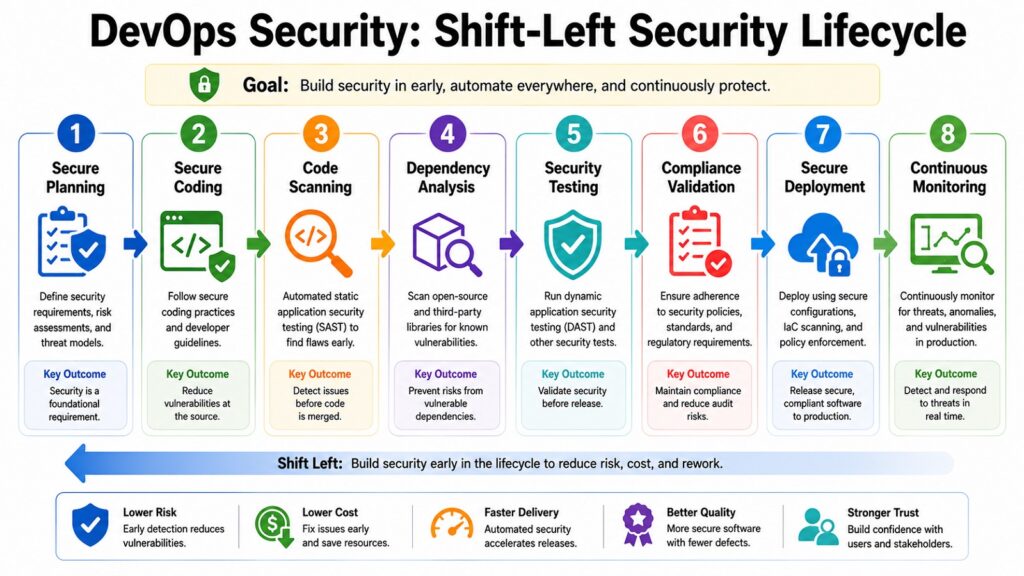
Security has long held an awkward place in software development. In older models, security reviews happened near the end of the process, when fixing problems was expensive and disruptive. Developers saw security as a roadblock. Security teams saw developers as the source of every risk. The relationship rarely worked well.
DevSecOps changes that. It brings security into every stage of the DevOps lifecycle rather than saving it for the end. The core idea is often called shifting security left, which means moving security activities earlier in the process, where issues are far cheaper to fix. A bug caught during development costs a fraction of one found in a live system under active use.
Secure coding is the first layer. Engineers learn to spot common vulnerability patterns and apply safe design rules from the start. Static analysis tools scan source code automatically during CI pipelines, flagging issues before code is merged. Dynamic testing tools run against the live application to find weaknesses that only show up during execution.
Dependency management has become a critical concern. Modern applications rely heavily on open-source libraries. A flaw in a widely used library can affect thousands of apps at once. Automated dependency scanning monitors the libraries an application uses and alerts teams when newly found vulnerabilities affect components already in production. Secrets management stops credentials from being stored in code — one of the most common and most avoidable types of security incident.
Compliance automation matters most in regulated industries. Checking systems against security rules continuously is far more reliable than a once-a-year audit. When compliance checks run inside deployment pipelines, non-compliant settings are caught before they reach production rather than being found weeks later during a review.
Table 8: DevSecOps Practices and Their Primary Security Objective
| DevSecOps Practice | Primary Security Objective |
| Shift Left Security | Finds and fixes vulnerabilities early when the cost of repair is low |
| Static Code Analysis | Scans source code for known vulnerability patterns during CI pipelines |
| Dynamic Application Testing | Tests live apps for security flaws that static analysis cannot find |
| Dependency Scanning | Monitors open-source libraries for newly found vulnerabilities on a live basis |
| Secrets Management | Prevents credentials and API keys from being stored in code or config files |
| Compliance Automation | Verifies that systems meet security standards on a continuous basis |
| Container Image Scanning | Checks container images for known security issues before production deploy |
| Continuous Security Monitoring | Detects threats and unusual behavior in production environments in real time |
8. DevOps Tools & Ecosystem: Supporting the Complete Software Lifecycle
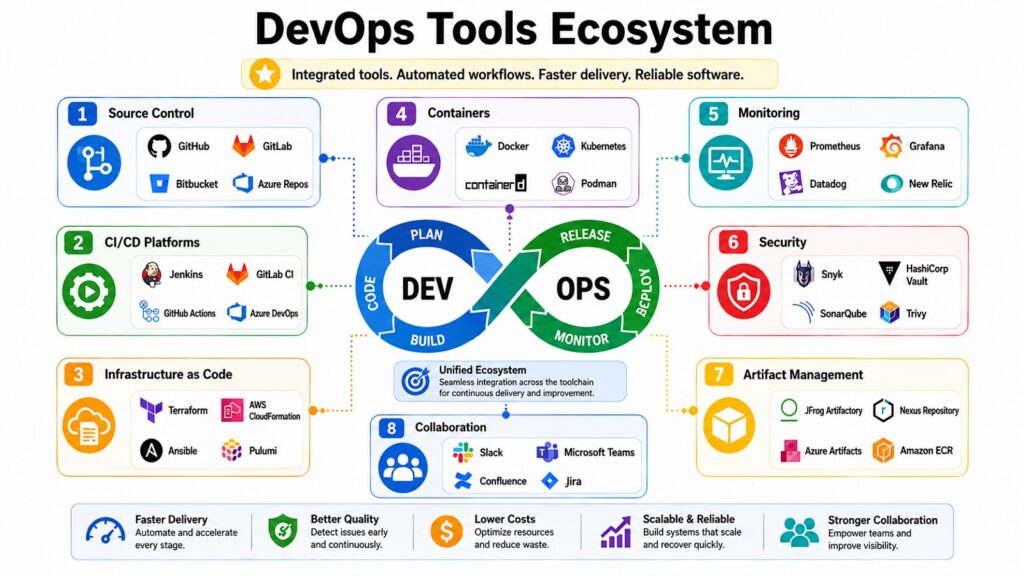
No single tool covers everything a mature DevOps team does. Instead, tools from many categories combine into one workflow that supports development, teamwork, automation, releases, infrastructure, security, and monitoring. Knowing the tool categories matters more than knowing any one product.
Source code management is where every engineering workflow starts. Version control lets multiple developers work on the same codebase at once, tracks every change with full history, supports code review before merging, and helps distributed teams stay coordinated. Without reliable version control, everything else in a DevOps pipeline is harder to manage and harder to audit.
CI/CD platforms move code from a commit through testing, packaging, and release. They connect to source code systems, run pipeline steps when code changes, execute test suites, and manage the promotion of tested artifacts across environments. How well this layer works directly affects how fast and reliably a team can ship software.
Monitoring and observability platforms collect metrics, gather logs, and store traces from live systems. They link into deployment pipelines so new releases are watched from the moment they go out. Incident management systems connect to monitoring tools to coordinate the response when something breaks, cutting down the time from detection to resolution.
Tool selection is a strategic decision as much as a technical one. Teams evaluate tools based on how well they integrate, what engineers already know, vendor support, community health, cost, and long-term fit with the architecture. A well-chosen toolset that matches the team’s scale and maturity delivers far better results than an impressive but overly complex stack that no one can operate well. Tools support DevOps practices — they do not define them.
Table 9: DevOps Tool Categories and Their Primary Function
| Tool Category | Primary Function in DevOps |
| Source Code Management | Tracks code changes, enables team collaboration, and stores full version history |
| CI/CD Platforms | Automates pipeline steps from code commit through testing and release |
| Infrastructure as Code Tools | Provisions and manages cloud and on-site infrastructure through code |
| Container Platforms | Builds, stores, and runs container images across all environments |
| Monitoring & Observability | Collects metrics, logs, and traces to keep live systems visible and healthy |
| Artifact Repositories | Stores versioned build artifacts and images for reliable, repeatable deploys |
| Collaboration Platforms | Supports team communication, docs, and knowledge sharing across engineering |
| Security & Compliance Tools | Automates vulnerability scanning, secrets handling, and policy checks in pipelines |
Conclusion: The Future of DevOps in Modern Software Engineering
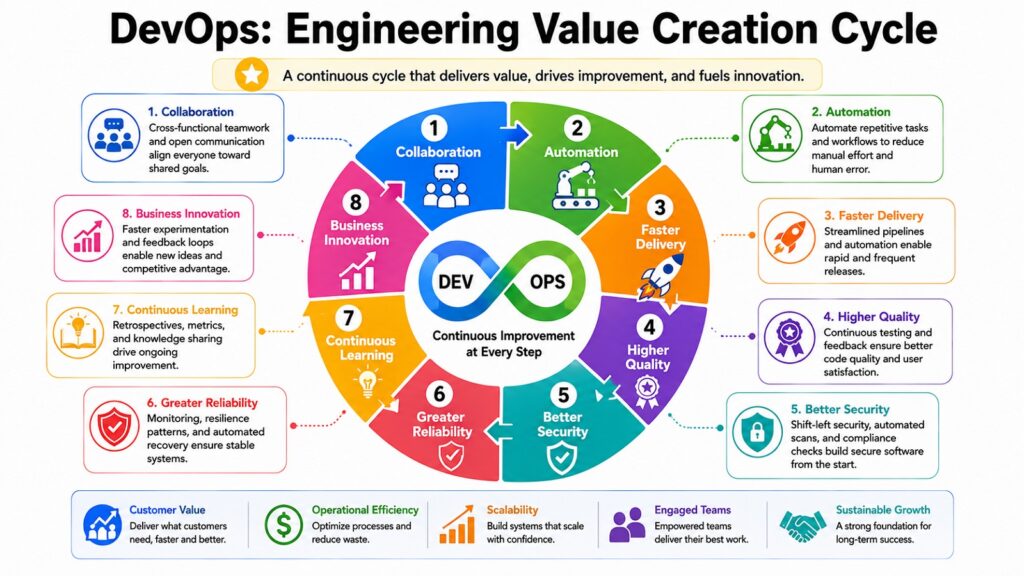
DevOps moved from a fringe idea to an industry standard in under two decades. That speed reflects how well it addresses problems that teams had been struggling with for far longer. By combining culture, teamwork, automation, continuous delivery, infrastructure management, containers, observability, and security into one approach, DevOps gives engineering teams the ability to build and run software at a pace that older models could never reach.
DevOps is an important aspect of modern software and cloud computing because it lets teams deliver reliable software efficiently while keeping up with the constant change that defines today’s technology landscape. Cloud-native systems need the automation and consistency DevOps provides. Distributed teams need the collaborative culture it fosters. Competitive markets reward the speed that CI/CD pipelines and release automation make possible.
The evolution of DevOps is still going. Platform engineering is emerging as an extension that builds internal developer platforms to standardize delivery across large organizations. Artificial intelligence is beginning to help with code review, test creation, anomaly detection, and incident response. These advances build on the DevOps foundation rather than replacing it.
The eight practices in this article form the core of that foundation. Each one is worth mastering on its own, but the real strength comes from combining all eight. Maturity across all these areas is what sets high-performing engineering teams apart from those still finding their footing. Each practice supports the others, and together they describe what real DevOps success looks like.
Table 10: DevOps — Eight Practices and Their Contribution to Successful Implementation
| DevOps Practice | Contribution to Successful DevOps Implementation |
| Culture & Principles | Creates the team foundation that makes all other DevOps practices work |
| CI/CD Pipelines | Speeds up delivery while keeping quality high through automated checks |
| Infrastructure as Code | Ensures consistent, reproducible environments across the full delivery chain |
| Containers & Orchestration | Enables scalable, portable, and resilient cloud-native app delivery |
| Automation | Cuts manual error and increases engineering speed across the whole lifecycle |
| Monitoring & Observability | Gives the visibility needed to stay reliable and keep improving over time |
| DevSecOps | Keeps security part of every step so quality and compliance are maintained |
| Tools & Ecosystem | Provides the linked technology layer that connects and supports all practices |