Table of Contents
Introduction: Data Storage as the Foundation of Modern Data Infrastructure
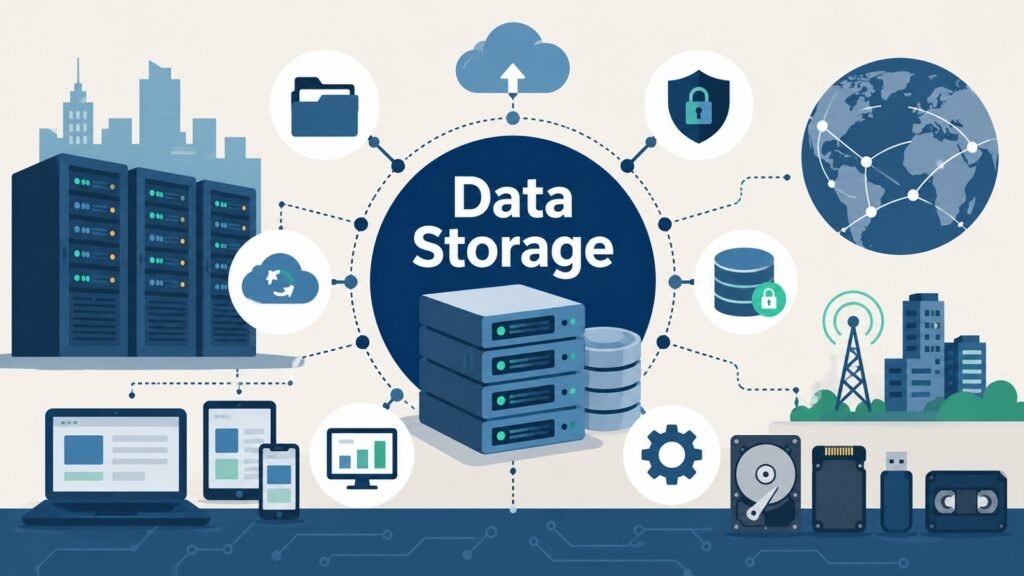
Data Storage means storing, organizing, protecting, and retrieving digital information. This happens on personal devices, inside companies, in the cloud, and on edge devices. It sounds simple, but it is one of the hardest problems in computing today. Every app you open depends on storage working well behind the scenes. Every database needs a place to hold its records. Every AI model needs storage to hold its training data and results.
Data Storage is one of the most important parts of Modern Data Infrastructure. Nothing else can work without it. Software needs a place to write results. Databases need a place to hold information. Analytics tools pull old data from storage to build reports. Even large AI systems depend on huge storage systems to hold data and model outputs.
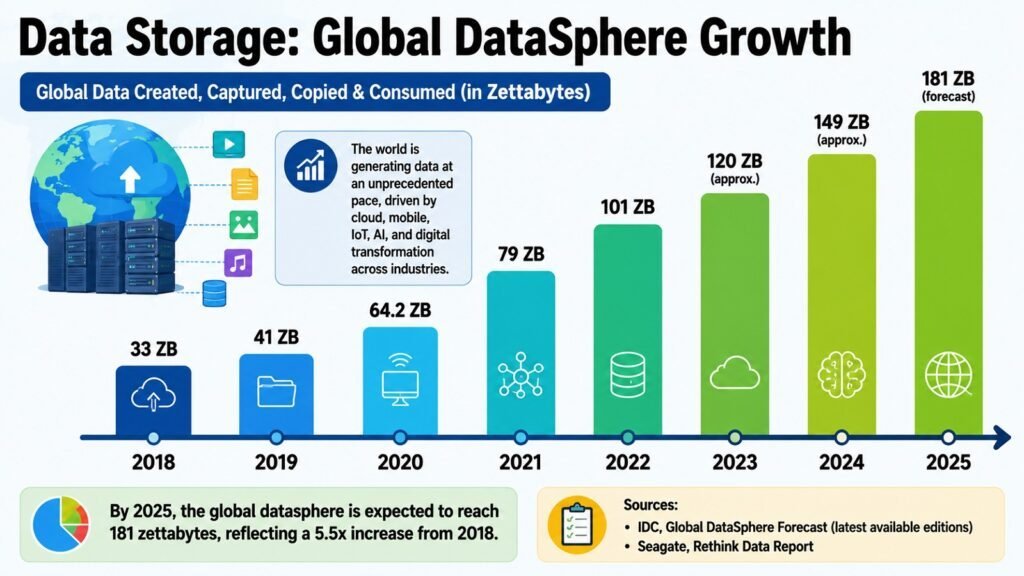
The significance of storage has increased due to scale. The growth of digital data has surpassed all expectations. Cloud computing has simplified the process of generating data without the necessity of owning hardware. The Internet of Things has introduced billions of sensors that continuously transmit data. AI systems require extensive datasets and rapid access to them. Additionally, businesses have transitioned their traditional paper records into digital formats. All these factors have driven advancements in storage systems.
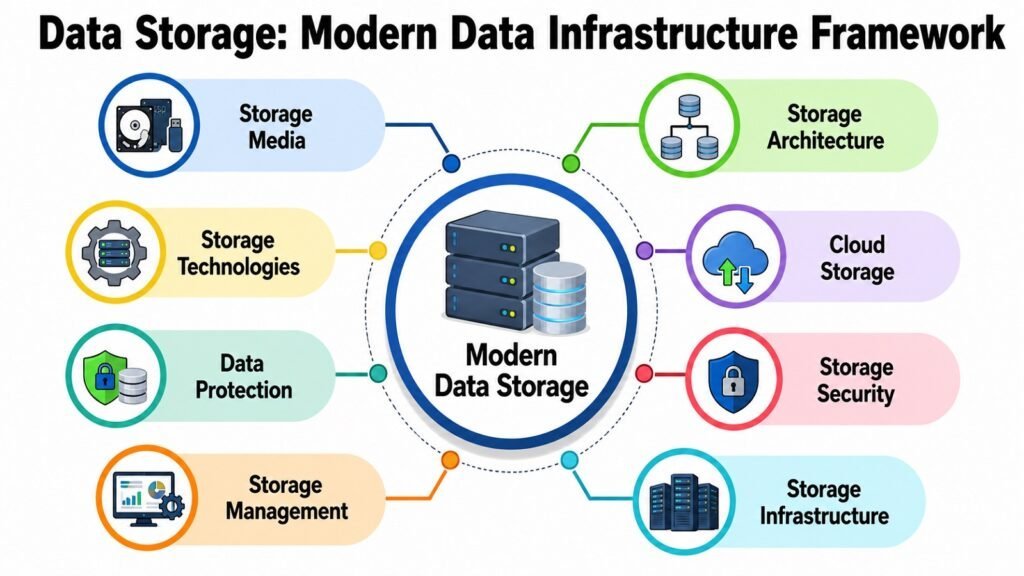
This article works as a full guide to modern Data Storage. It looks at both the technical side and the business side. It covers eight parts. These include the physical media that holds data, the way storage systems are built, and the technology behind them. It also covers cloud storage, protection, security, management, and infrastructure. Together, these parts show how storage systems get designed, built, protected, and improved over time. Each part builds on the one before it, so the article moves in a clear and logical order.
The table below gives a quick look at what each part covers before we go deeper.
Table 1: Data Storage — Eight Key Aspects at a Glance
| Data Storage Aspects | Primary Focus |
| Data Storage Media | Physical parts that hold digital information |
| Data Storage Architecture | How storage systems are built and shared |
| Data Storage Technologies | Tools that boost speed and efficiency |
| Data Storage in the Cloud | Flexible storage delivered over the internet |
| Data Storage Protection | Methods that guard data and support recovery |
| Data Storage Security | Practices that block unwanted access |
| Data Storage Management | Daily tasks that keep storage running well |
| Data Storage Infrastructure | Hardware and networks working as one system |
1. Data Storage Media: The Physical Foundation of Digital Information
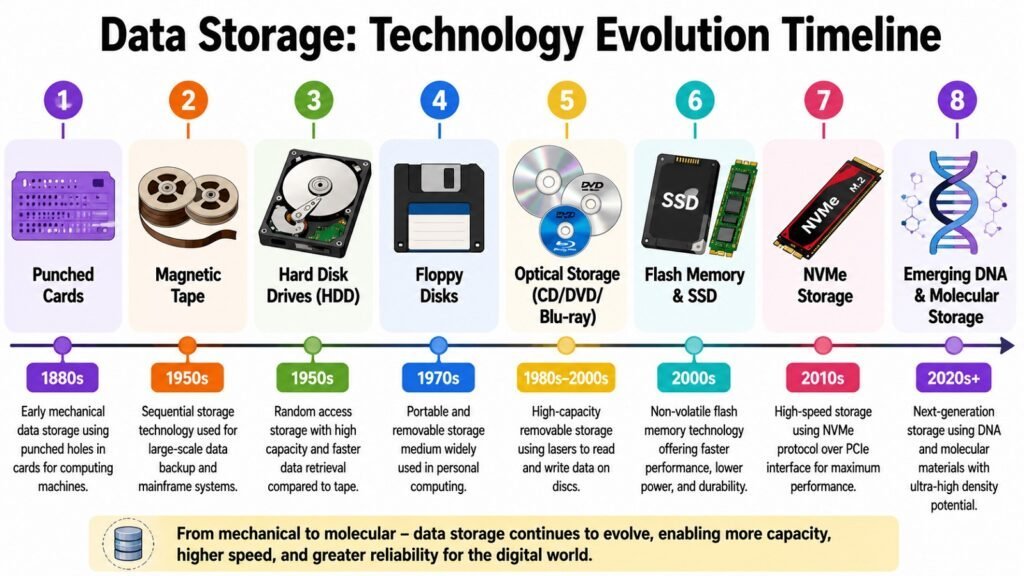
Data Storage starts with storage media. This is the physical technology that holds digital data. The story of storage media is a story of trade-offs. Hard disk drives ruled for decades. They offered large capacity at a low price. But they moved data more slowly than newer options. Optical media like CDs and DVDs offered a cheap way to share files. Their small capacity later pushed them out of common use.
Flash memory changed everything. Solid-state drives use flash chips instead of spinning disks. They read and write data much faster. They also use less power and survive shocks better. Companies moved to them quickly for tasks that need speed. Flash storage still costs more per gigabyte than a hard drive, though. This is why hard drives and solid-state drives still exist side by side. Hard drives work well for backups and bulk storage. Flash drives handle the tasks that need speed.
New storage ideas keep emerging. Some drives now use helium gas inside to pack in more storage. A newer type called storage class memory sits between RAM and flash in both speed and price. These new ideas solve a simple problem. Companies need more space, faster access, and strong reliability, all while keeping costs low.
The choice of storage media affects the whole Data Storage system. It shapes how fast an app responds. It affects how well a system holds up under heavy use. It changes the total cost of a storage plan. It also decides how well a system scales and how long data lasts. Picking the right media is not about choosing the newest option. It is about matching the physical traits of the media to real business needs.
Table 2: Data Storage Media Compared
| Aspect | Primary Focus |
| Hard Disk Drive (HDD) | Large capacity, low cost, slower speed |
| Solid State Drive (SSD) | Fast speed, no moving parts |
| Magnetic Tape | Very cheap for long-term storage |
| Optical Media | Portable, cheap, small capacity |
| NVMe Flash Storage | Very fast, used for heavy workloads |
| Hybrid Drives | Mixes HDD space with SSD-like speed |
| Storage Class Memory | Sits between RAM and flash |
| Helium-Filled Drives | Higher density, better energy use |
2. Data Storage Architecture: Designing Efficient Storage Systems
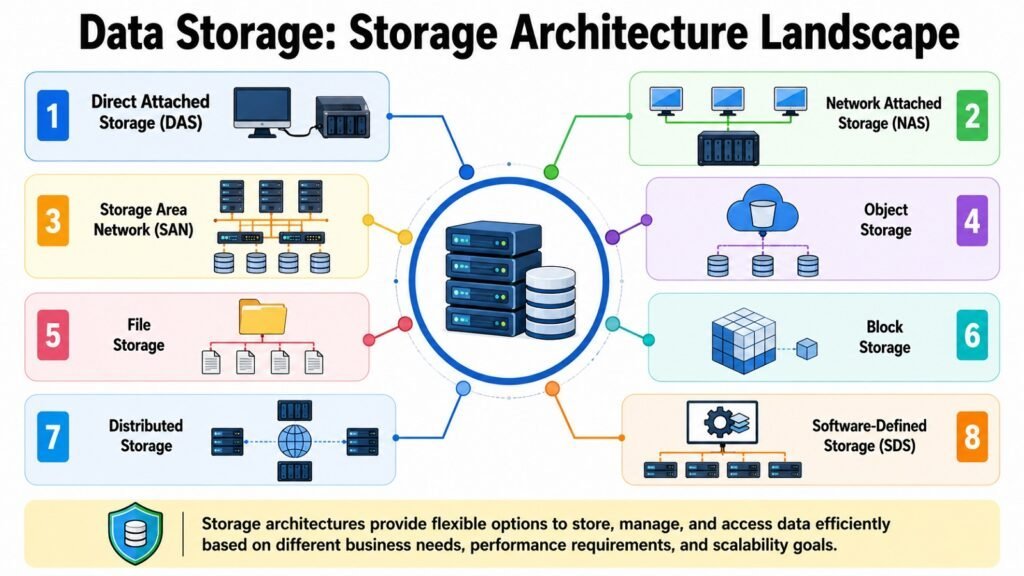
Data Storage Architecture decides how stored data gets organized and shared. It also affects how well a system scales and stays available over time. Direct Attached Storage, called DAS, connects storage right to one computer. It is simple and fast. But it does not share well across many users. This limits its use in large companies.
Network Attached Storage, or NAS, solves that sharing problem. It connects storage to a network so many users can reach the same files. Storage Area Networks, called SAN, go a step further. They build a fast, dedicated network just for storage traffic. This suits tasks that need quick access to large blocks of data, like databases.
Object storage handles a different job. It manages huge amounts of unstructured data, like photos, videos, and log files. Instead of using folders, object storage treats each file as its own object with extra details attached. This makes it easier to grow to a massive size. Distributed storage spreads data across many servers or locations. This boosts speed and keeps the system running even if one server fails. Software-defined storage takes this further. It separates the storage software from the hardware, giving companies more freedom to grow without being tied to one type of equipment.
Each type of architecture grew to solve a problem that older methods could not fix well. DAS solved simplicity. NAS solved sharing. SAN solved speed at scale. Object storage solved huge, unstructured growth. Distributed and software-defined storage solved flexibility and strength. Picking the right setup shapes business continuity, since a poor choice can create slowdowns or a single point of failure. It also shapes teamwork, growth, and how well a company supports cloud computing as digital change speeds up.
Table 3: Data Storage Architecture Models
| Aspect | Primary Focus |
| Direct Attached Storage (DAS) | Simple, fast, tied to one system |
| Network Attached Storage (NAS) | Shared file access for many users |
| Storage Area Network (SAN) | Fast, dedicated network for data blocks |
| Object Storage | Scales easily for photos and videos |
| Distributed Storage | Spreads data to lower failure risk |
| Software-Defined Storage | Splits storage software from hardware |
| Hyperconverged Storage | Combines compute, storage, and network |
| Hybrid Architecture | Mixes on-site and cloud storage |
3. Data Storage Technologies: Powering Performance and Scalability
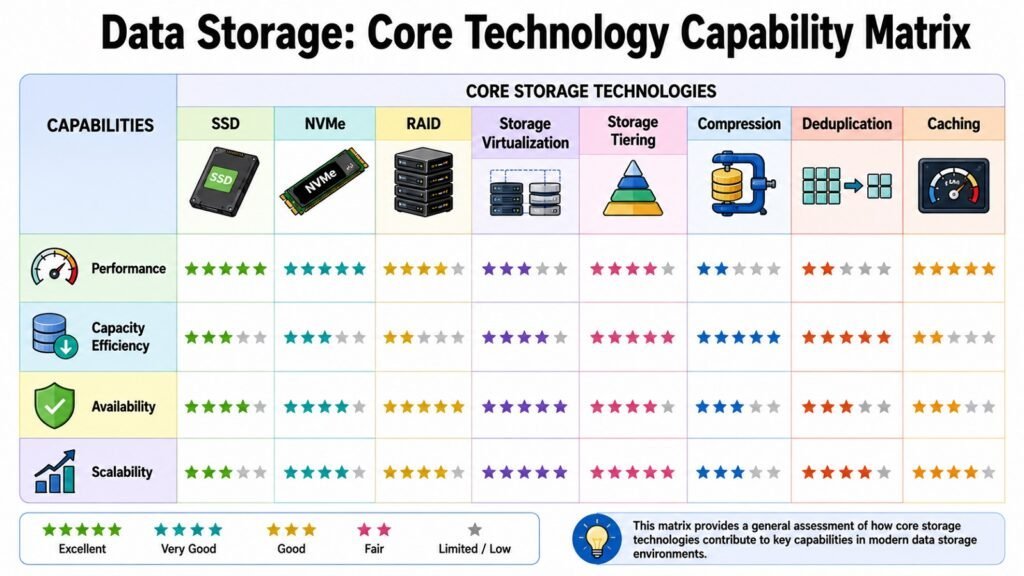
Modern Data Storage relies on many technologies working together. No single tool solves every problem alone. Solid-state drives boosted raw speed. NVMe, a protocol built for flash storage, pushed that speed even further. It cuts the delays found in older protocols made for hard drives. This shows a common pattern in storage. New hardware often needs a matching software update to reach its full potential.
RAID, short for Redundant Array of Independent Disks, tackles a different problem. It links several drives so data stays safe even if one drive fails. It also boosts speed by spreading tasks across many disks at once. Storage virtualization takes this idea further. It shows many physical drives as one single pool, which makes storage easier to manage.
Caching helps with speed. It keeps data that gets used often in a faster storage tier. This means the system does not need to fetch it from slower media each time. Compression shrinks the space that data takes up. It does this by encoding data more efficiently. Deduplication removes repeated copies of the same file. Both of these methods lower storage costs by a lot at scale. Storage tiering moves data between fast and slow storage. It moves data based on how often that data gets used. This balances speed against cost without needing manual work from IT staff.
These tools rarely work alone in real systems. A single storage setup might use NVMe drives, RAID for safety, deduplication to save space, and tiering to balance cost. All of these work together to support heavy tasks. This layered setup has become key as companies run AI training jobs, large databases, and virtual systems. Each of these workloads places different demands on storage, which is why no single technology can meet every need on its own.
Table 4: Data Storage Technologies and Their Purpose
| Aspect | Primary Focus |
| Solid State Drives (SSD) | Improves raw read and write speed |
| NVMe Protocol | Cuts delay for flash-based storage |
| RAID | Links drives for safety and speed |
| Storage Virtualization | Pools drives into one flexible unit |
| Caching | Keeps often-used data close and fast |
| Compression | Shrinks the space data takes up |
| Deduplication | Removes repeated copies of the same data |
| Storage Tiering | Balances speed and cost automatically |
4. Data Storage in the Cloud: Enabling Flexible and Scalable Solutions
Cloud computing changed Data Storage. It brought flexible, scalable storage that does not need any owned hardware. Public cloud storage comes from a provider who runs the hardware for you. This lets a company grow or shrink its storage without a high upfront cost. Private cloud storage keeps the hardware dedicated to one company. This suits firms with strict rules or strict security needs. Hybrid cloud storage mixes both approaches. Sensitive data stays on private hardware. Less sensitive tasks use the public cloud for extra capacity. Multi-cloud storage goes further. It spreads data across several providers, so no single vendor holds too much control.
Within these setups, providers usually offer object, file, and block storage. Object storage suits unstructured data like backups and media files. File storage works well when many people need shared access. This is much like older network storage. Block storage supports apps like databases. These apps need fast, quick access to structured data.
The business case for cloud storage rests on a few clear wins. Companies skip high upfront costs since cloud storage often follows a pay-as-you-go plan. Growth becomes far easier since more space can be added in minutes, not weeks. Teams gain more freedom since they can set up storage fast without waiting on new hardware orders.
Cloud storage rarely replaces older storage entirely. Most companies now run a mix. Some tasks stay on-site for speed, rules, or cost reasons. Other tasks move to the cloud for flexibility. This balanced approach matches how most companies actually work today. Knowing both the strengths and limits of cloud storage helps a company make smarter choices. This is better than treating the cloud as an automatic default for every task.
Table 5: Data Storage Cloud Models and Services
| Aspect | Primary Focus |
| Public Cloud Storage | Scalable, provider-run, pay-as-you-go |
| Private Cloud Storage | Dedicated hardware with tighter control |
| Hybrid Cloud Storage | Mixes private and public resources |
| Multi-Cloud Storage | Spreads data across several providers |
| Object Storage Service | Best for unstructured files and backups |
| File Storage Service | Shared access much like network storage |
| Block Storage Service | Fast access for structured workloads |
| Pay-As-You-Go Pricing | Cuts upfront hardware costs |
5. Data Storage Protection: Ensuring Business Continuity and Recovery
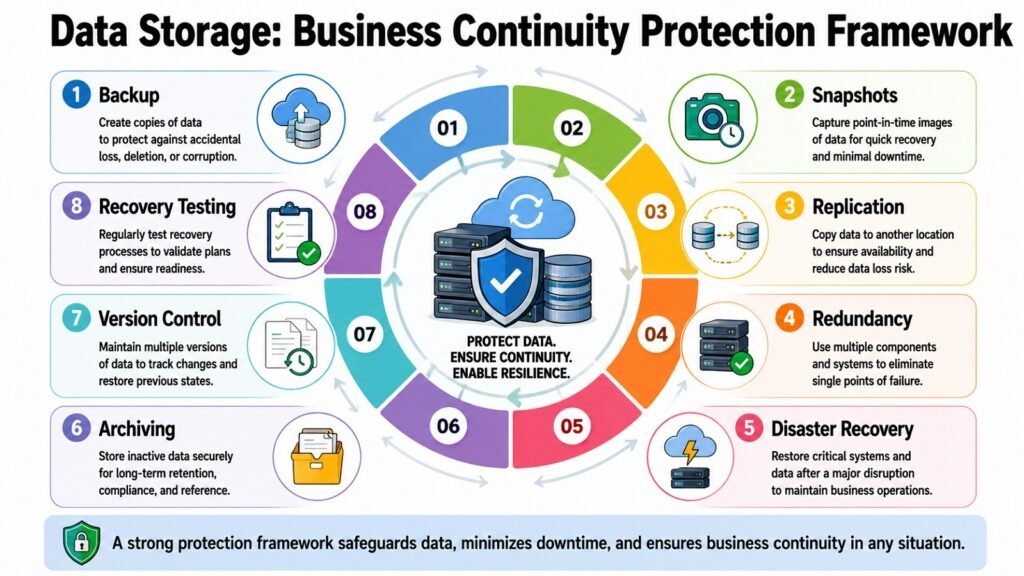
Protecting Data Storage matters because business continuity depends on data staying available. Hardware fails. Storms and floods strike. Staff deletes files by accident. Hackers target valuable data. Each risk calls for its own kind of defense. This is why companies use several protection methods together, rather than relying on just one.
Backups make copies of data at set times. This gives a company a way to restore data after loss or damage. Snapshots capture the state of a system at one point in time. This allows faster recovery than a full backup restore in many cases. Replication copies data to another place, often in near real time. This means a failure in one spot does not mean losing access to that data. Redundancy builds extra parts into a storage system. This way, one broken part does not bring down the whole setup.
Disaster recovery planning ties these tools into one plan. This plan restores service after a major event, whether that is a fire, a flood, or a large cyberattack. Archival storage serves a different goal. It keeps data that a company must hold for legal reasons, even if no one looks at it often.
None of these tools work well alone. Backups without replication leave a business exposed during the time it takes to restore data. Redundancy without a recovery plan may guard against a broken drive but not a full site outage. Strong protection comes from mixing these methods into a layered plan.
This strategy must be tailored to the specific risks faced by a company, rather than relying on a generic checklist. With the rise of ransomware attacks and the increasing frequency of storms, data protection has transitioned from merely a technical responsibility to an essential business requirement. It now plays a critical role in a company’s capacity to endure and recover from significant disruptions.
Table 6: Data Storage Protection Methods
| Aspect | Primary Focus |
| Backups | Restores data after loss or deletion |
| Snapshots | Captures system state for fast recovery |
| Replication | Copies data to another site in real time |
| Redundancy | Stops one broken part from causing an outage |
| Disaster Recovery Planning | Coordinates recovery after major events |
| Archival Storage | Keeps data that is rarely used but required |
| Failover Systems | Shifts tasks automatically during an outage |
| Retention Policies | Sets how long data must be kept |
6. Data Storage Security: Safeguarding Critical Digital Assets
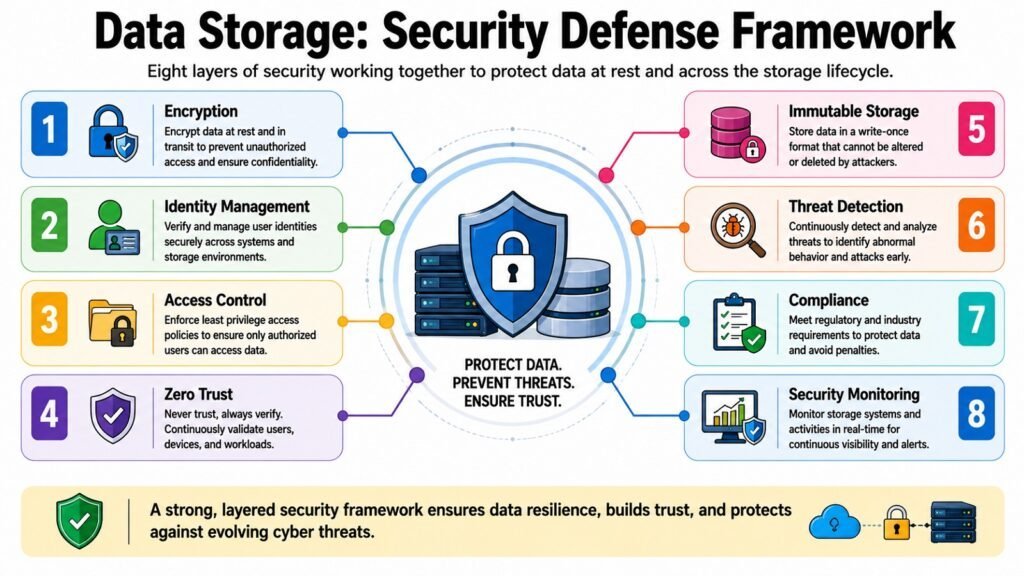
Data Storage Security guards data across its full life. This runs from the moment data is made to the moment it gets deleted. Encryption sits at the core of most security plans. It turns readable data into a locked code. You need a key to open it. This applies whether data sits on a disk or moves across a network. Identity and access management controls who can view or change stored data. This makes sure only the right people can reach sensitive files.
In recent years, the Zero Trust model has gained traction. The concept is straightforward: no user or system is granted automatic trust, even if it resides within the company’s own network. Every request is subject to verification, regardless of its origin. Additionally, immutable storage provides an extra layer of security by locking certain data, preventing any alterations once it has been recorded. This safeguards backups and vital records from being modified.
Ransomware protection has become a growing focus. Attacks that lock or steal data for money have grown more common. They have also grown more advanced. Companies mix locked backups, access controls, and close monitoring to lower the risk. This also limits the damage from these attacks. Rules and laws differ across industries and regions. These rules shape how a company must handle sensitive data. They often set specific security steps and audit needs. Governance and auditing give ongoing insight. They show who accessed what data and when. This supports both security and legal goals.
None of these steps work alone. Encryption alone cannot stop someone who has a stolen password. Access controls alone cannot bring back data after a ransomware attack succeeds. Layered security works best. Many defenses back each other up. This has become the standard approach that security experts recommend. Data keeps growing more valuable. Attacks keep growing smarter. Because of this, layered security has become a true need for any company that runs on digital information today.
Table 7: Data Storage Security Practices
| Data Storage Security Aspects | Primary Focus |
| Encryption | Locks data into an unreadable format |
| Identity and Access Management | Controls who can view or change data |
| Zero Trust Principles | Checks every access request without exception |
| Immutable Storage | Stops data from being changed once written |
| Ransomware Protection | Lowers risk and damage from attacks |
| Compliance Controls | Meets legal rules for handling data |
| Governance and Auditing | Tracks who accessed data and when |
| Multi-Factor Authentication | Adds an extra layer of identity checks |
7. Data Storage Management: Optimizing Capacity, Performance, and Governance
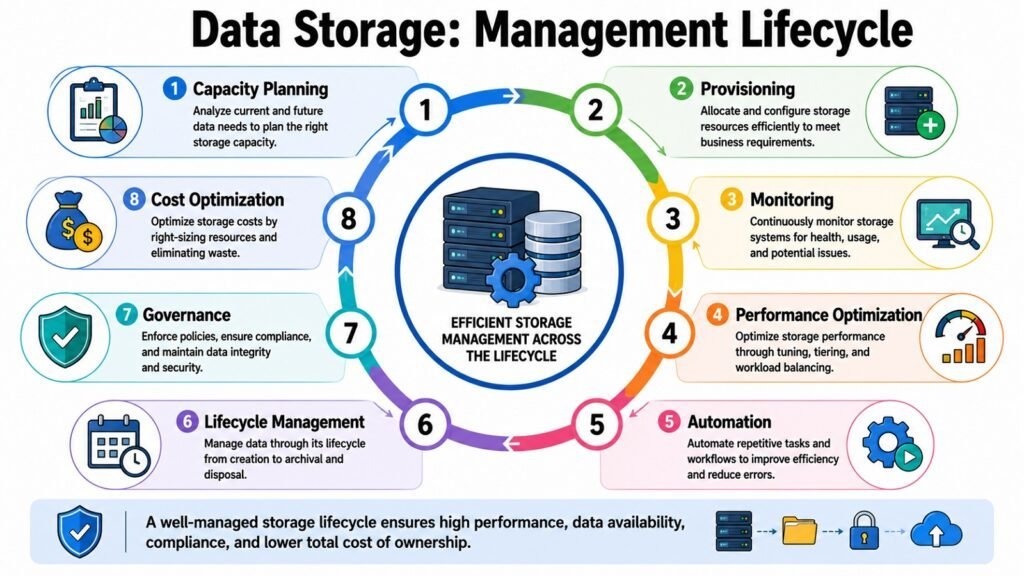
Data Storage Management keeps storage systems running well. This covers their full life. It runs from the moment data is made to the moment it gets archived or deleted. Capacity planning helps a company guess future storage needs. It looks at current growth trends. This avoids wasted spending. It also avoids sudden shortages. Monitoring tracks storage health and speed in real time. This catches problems before they turn into outages or lost data.
Automation now handles many routine storage tasks. This includes setting up new storage space. It also includes adjusting capacity based on demand. Both of these cut down manual work for IT teams. Lifecycle management applies rules that move data between storage tiers. It can also delete data once it no longer serves a purpose. This keeps costs in check as data grows. Governance and policy rules make sure storage habits match company standards. They also match legal needs. This matters more as privacy laws expand across regions.
Performance tuning continuously modifies storage systems to fulfill the requirements of applications and users. Cost management ensures that storage expenditures align with actual business value, preventing unlimited spending growth. These tasks do not function in isolation. Effective capacity planning relies on robust monitoring data. Automation is most effective when it is guided by well-defined rules. Cost management is only effective when lifecycle rules facilitate the transfer of data to more economical tiers at appropriate times.
Together, these tasks balance speed, growth, legal needs, and cost. They weigh all of this against real business goals. Companies now manage bigger and more spread-out storage setups. Because of this, AI and automation play a growing role. They predict failures before they happen. They also adjust settings without constant human input. This shift toward smart, automated management reflects a wider trend. Companies across every industry now lean more on data-driven tools to support long-term growth.
Table 8: Data Storage Management Functions
| Aspects of Data Storage Management | Primary Focus |
| Capacity Planning | Predicts future needs from growth trends |
| Performance Monitoring | Catches issues before they cause outages |
| Automation | Cuts manual storage administration work |
| Lifecycle Management | Moves or deletes data based on use |
| Governance and Policy Rules | Aligns storage habits with regulations |
| Performance Tuning | Adjusts systems to meet app demands |
| Cost Management | Keeps spending in line with real value |
| AI-Driven Management | Predicts failures and automates fixes |
8. Data Storage Infrastructure: Building the Backbone of Digital Systems
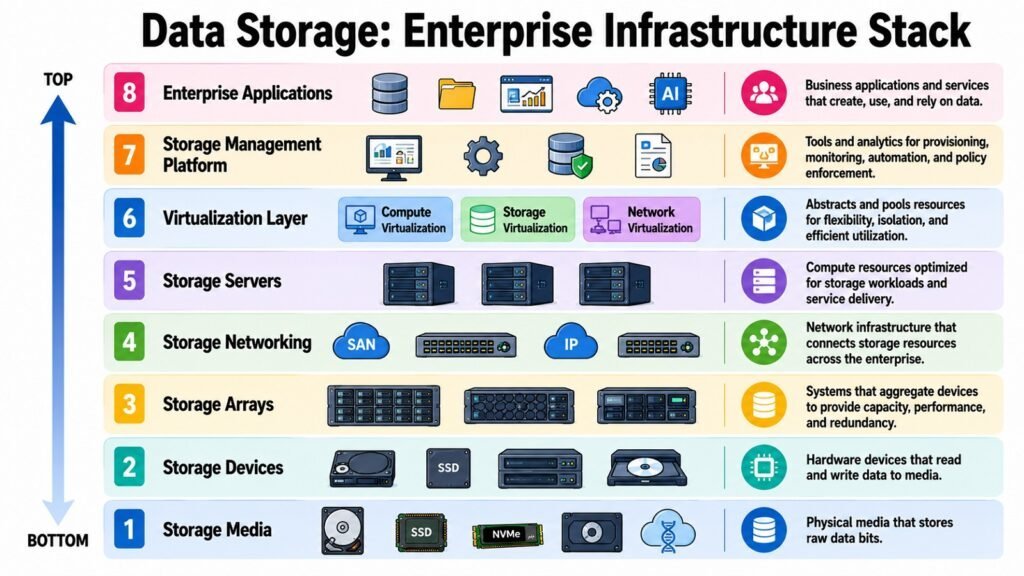
Data Storage Infrastructure combines hardware, networks, software, and support platforms into one system. This system is built to run modern digital work. Storage arrays group many physical drives into one unified system. They form the backbone of many company setups. They offer the space and safety that large operations need. Storage servers manage access to this hardware. They handle requests from apps and users. They also direct how data moves in and out of the array.
Storage networking links these parts together. This can use plain Ethernet. It can also use dedicated Fibre Channel networks. Newer, faster options now exist too. These are built for heavy storage tasks. Hyperconverged infrastructure marks a newer step forward. It merges compute, storage, and networking into one tightly built system. This makes setup and upkeep simpler than older, separately managed parts.
Edge storage has grown alongside the rise of Internet of Things devices. These devices need to process data close to where it is made. This cuts the delay of sending everything back to a central data center. Enterprise data centers remain the anchor point for most large storage setups. They house the equipment, cooling, and power that keep storage systems running around the clock.
These parts work together rather than alone. A storage array without proper networking cannot serve data well to the apps that need it. A data center without backup power cannot promise the uptime that modern businesses need. Strong storage infrastructure builds in backup at every layer. This runs from power supplies to network paths, so one broken part never brings down the whole system. Companies keep growing into cloud use, AI work, and edge computing. Because of this, storage infrastructure choices increasingly shape how well a company can grow and compete in a fast-moving digital world.
Table 9: Data Storage Infrastructure Components
| Aspects of Data Storage Infrastructure | Primary Focus |
| Storage Arrays | Groups physical drives into unified space |
| Storage Servers | Manages access requests to hardware |
| Storage Networking | Connects parts for data movement |
| Hyperconverged Infrastructure | Merges compute, storage, and network |
| Edge Storage | Processes data close to its source |
| Enterprise Data Centers | Houses equipment, power, and cooling |
| Redundant Power Systems | Prevents outages from power loss |
| High-Speed Interconnects | Supports heavy storage workloads |
Conclusion: The Future of Data Storage in Modern Data Infrastructure
The eight parts covered in this article do not stand alone. Storage media, architecture, technology, cloud storage, protection, security, management, and infrastructure form one linked system. Each piece depends on the others. The media chosen shapes what setup makes sense. The setup shapes which technology fits best. Cloud storage adds flexibility to these choices. Protection and security keep everything safe. Management ties daily work together. Infrastructure gives the physical base that holds it all up.
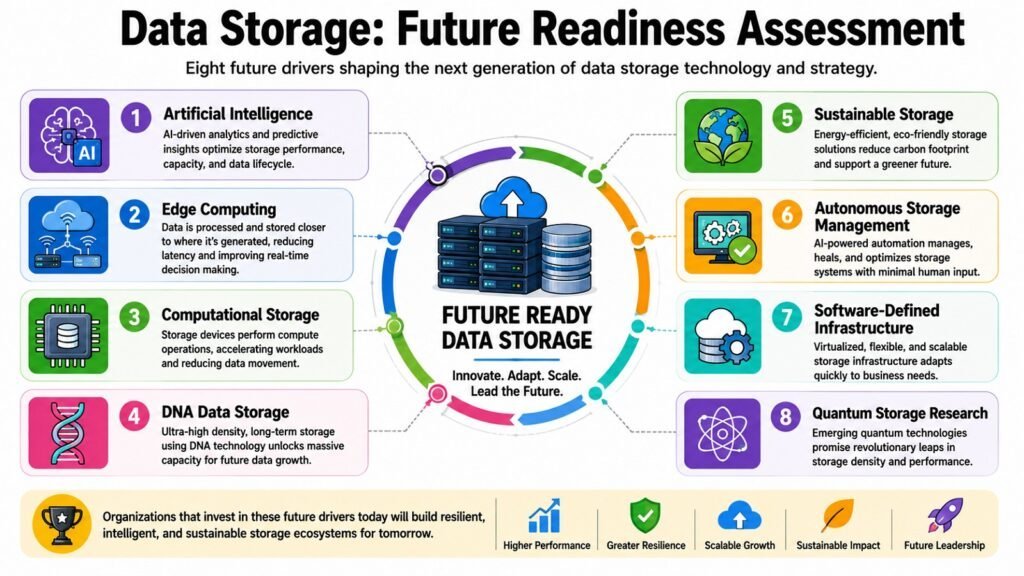
Looking ahead, a few forces are shaping where Data Storage goes next. Artificial intelligence keeps pushing demand for faster, bigger, and smarter storage. This storage must handle huge training datasets. Edge computing keeps pushing storage closer to where data is made. This reduces delay for time-sensitive apps. Computational storage moves processing power right into storage devices. This cuts the need to shuttle data back and forth for simple tasks.
Researchers are currently investigating DNA as a potential long-term storage solution. DNA provides significant density and longevity compared to traditional media. Sustainability has also emerged as an increasing priority. Organizations are now seeking storage solutions that consume less energy and minimize environmental impact. Autonomous storage management, driven by artificial intelligence, now performs tasks that previously required continuous human supervision.
Data Storage is no longer a technical detail tucked away in a server room. It has become a strategic skill. It drives new ideas. It supports business strength. It powers digital change across nearly every industry. Companies that treat storage as a real asset, not an afterthought, will adapt faster. They will recover more reliably. They will compete better in a world where digital data keeps growing without any sign of slowing down.
Table 10: Data Storage — Emerging Trends and Future Directions
| Data Storage Aspects | Primary Focus |
| Artificial Intelligence Integration | Drives demand for faster, larger storage |
| Edge Computing Expansion | Cuts delay for time-sensitive data |
| Computational Storage | Moves processing closer to stored data |
| DNA Storage Research | Explores extremely dense, lasting storage |
| Sustainability Initiatives | Cuts energy use and environmental impact |
| Autonomous Storage Management | Automates oversight using artificial intelligence |
| Storage Class Memory Growth | Bridges the gap between RAM and flash |
| Multi-Cloud Expansion | Adds flexibility across cloud providers |