Table of Contents
Introduction — DevOps CI/CD: The Foundation of Modern Software Delivery
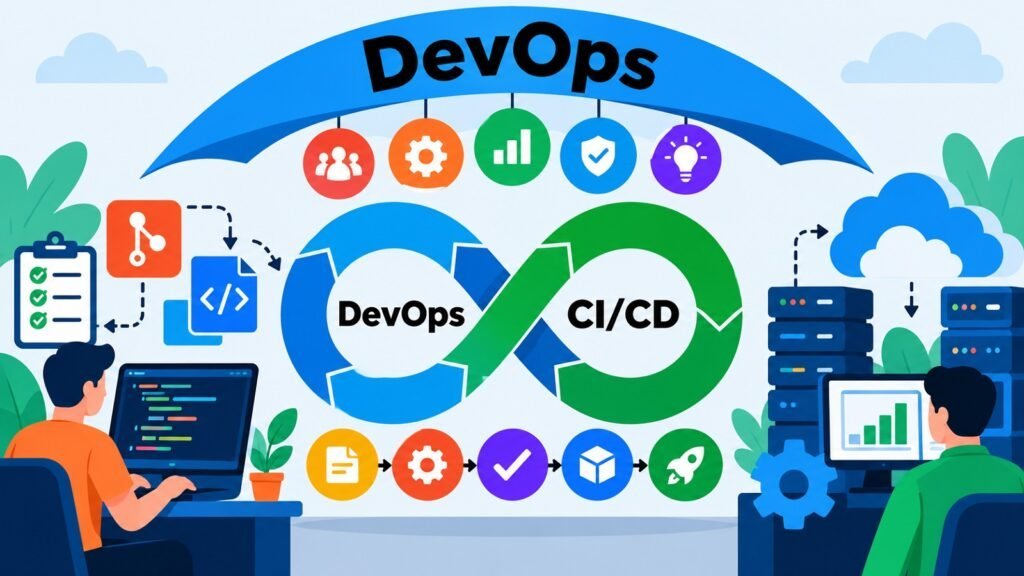
DevOps CI/CD refers to the integrated practice of Continuous Integration, Continuous Delivery, and Continuous Deployment within the broader DevOps discipline. Together, these practices form a structured approach to moving software changes through a series of automated and controlled stages until they reach end users. DevOps CI/CD is not simply a collection of tools. It is an interconnected system of practices, workflows, and controls designed to make software delivery faster, more reliable, and more repeatable.
Software development grew significantly more complex as teams expanded and deployment targets multiplied. Traditional approaches concentrated integration and testing late in the development cycle, creating long feedback loops, difficult merge conflicts, and fragile releases. DevOps CI/CD emerged by shifting these activities earlier and making them continuous. This reduced defect costs, shortened the feedback loop, and gave teams greater confidence in their codebase at any given moment.
Continuous Integration focuses on merging developer changes into a shared codebase regularly, supported by automated builds and rapid feedback. Continuous Delivery keeps software in a release-ready state, deployable on demand through a deliberate human decision. Continuous Deployment goes further by automating the release itself. Understanding how these three components relate is essential for designing an effective DevOps CI/CD system.
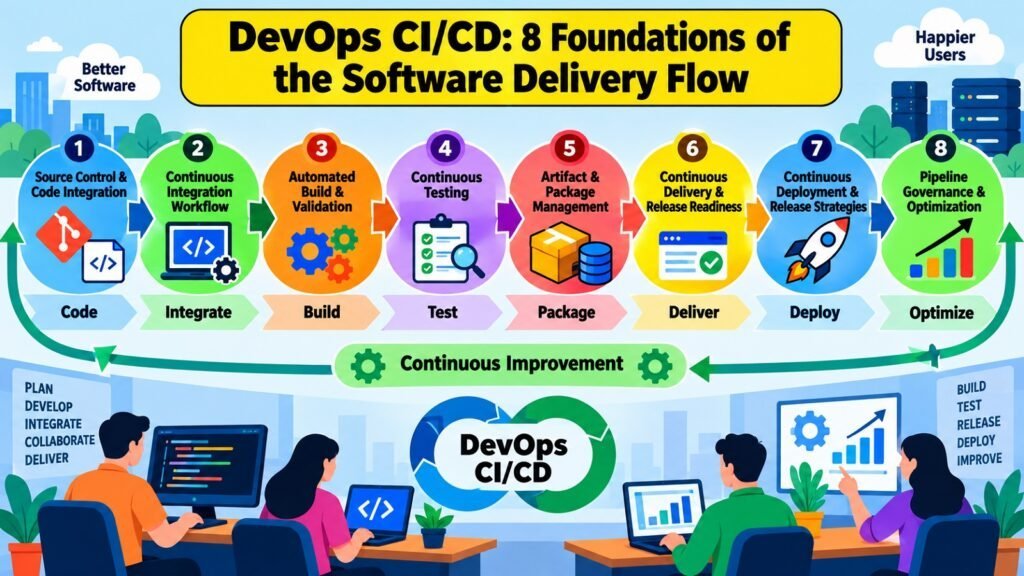
Source control, automated building, continuous testing, artifact management, delivery pipelines, deployment strategies, and pipeline governance all play distinct but interdependent roles. A weakness in any area creates problems that propagate downstream. This interconnected nature is what makes DevOps CI/CD a discipline rather than simply a set of automation scripts. The eight foundations examined here address both the theoretical principles and the practical mechanics that make CI/CD work.
Table 1: DevOps CI/CD — The Eight Foundations at a Glance
| Foundation | Role in DevOps CI/CD |
| CI Workflow | Governs how code changes are integrated frequently and validated automatically |
| Source Control & Code Integration | Tracks changes, manages branches, and connects individual work to shared pipelines |
| Automated Build & Validation | Transforms source code into consistent, verifiable software outputs |
| Continuous Testing | Provides automated quality feedback at appropriate stages of the pipeline |
| Artifact & Package Management | Controls the versioning, storage, and promotion of software outputs |
| Continuous Delivery & Release Readiness | Maintains software in a deployable state with controlled release criteria |
| Continuous Deployment & Release Strategies | Automates production delivery and manages how changes are exposed to users |
| Pipeline Governance & Optimization | Ensures reliability, auditability, and ongoing improvement of the delivery system |
1. DevOps CI/CD Continuous Integration Workflow: Connecting Code Changes
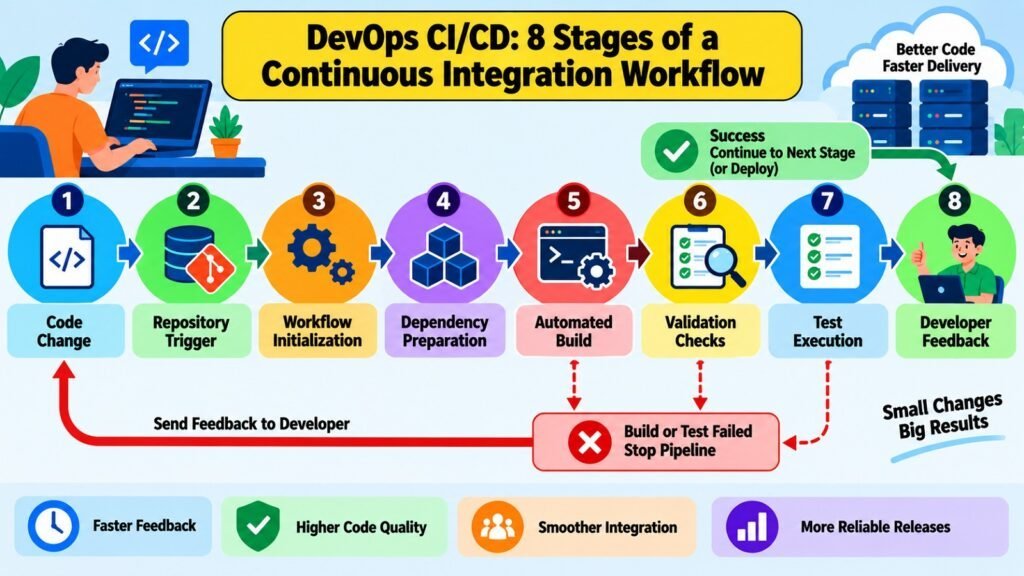
The Continuous Integration workflow is the operational heartbeat of DevOps CI/CD. Its central premise is that developers integrate their changes into a shared codebase frequently, and each integration triggers an automated response that validates whether the change fits cleanly with existing code. This cycle of integration and feedback prevents the accumulation of undetected problems that makes large, infrequent merges so difficult to manage.
When a developer submits a change, the CI workflow begins. The change enters version control, which triggers an automated process that retrieves the latest codebase, incorporates the new change, initiates a build, and runs validations. The sequence is designed to complete quickly so the developer still has context about the work just submitted. Failure returns specific, targeted feedback rather than a generic error that could take hours to diagnose.
The theoretical principle behind CI is that integrating small changes frequently is far less costly than integrating large batches infrequently. Research published in the Accelerate State of DevOps reports consistently found that high-performing engineering teams integrate and deploy software far more often than lower-performing teams, and that this frequency correlates with both higher reliability and shorter lead times. The value of CI comes from the discipline of keeping integration cycles short, not from any particular toolset.
Common CI workflow problems include slow feedback cycles, flaky automated checks, infrequent integration by developers who prefer isolated work, and overly complex pipelines. Each undermines the core value of CI. Effective DevOps CI/CD practice depends on keeping the CI workflow fast, reliable, and consistently used by every contributor.
Table 2: DevOps CI/CD — Continuous Integration Workflow Characteristics
| CI Workflow Stage or Characteristic | Description |
| Trigger | A code commit to the shared repository initiates the automated CI process |
| Checkout | The pipeline retrieves the current codebase including the submitted change |
| Build initiation | Source code is compiled or assembled and dependencies are resolved |
| Static validation | Code style checks, linting, and static analysis run before test execution |
| Automated test execution | Unit and integration tests validate that the change functions correctly |
| Feedback delivery | Pass or fail results are returned to the developer, ideally within minutes |
| Integration frequency | Changes are merged at least daily to prevent long-lived divergence |
| Failure policy | A failed pipeline blocks further downstream stages until the issue is resolved |
2. DevOps CI/CD Source Control & Code Integration: Managing Changes
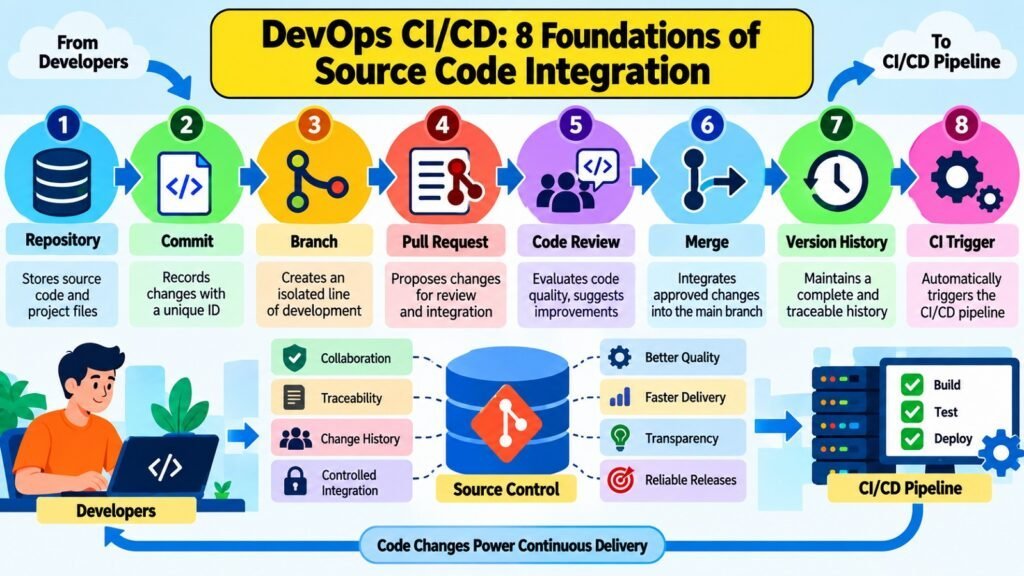
Source control is the foundation on which all DevOps CI/CD activity rests. A version control repository maintains a reliable, timestamped history of every change made to a codebase, recording what was changed, who changed it, and why. This history allows teams to trace defects to specific changes and integrate individual work into a coherent shared codebase without losing context or visibility.
Every meaningful action produces a commit — a discrete, recorded unit of change. Commits accumulate into branches, which allow teams to work on separate concerns without immediately affecting the shared codebase. When a piece of work is ready, it moves toward the main branch through a merge or a pull request. Pull requests create an opportunity for code review, where a peer examines the change for correctness, consistency, and conformance with standards before integration.
Branching strategy has a significant practical effect on integration smoothness. Short-lived branches integrated frequently produce smaller, more predictable merges. Long-lived branches that accumulate large volumes of change before integration create difficult, time-consuming merge conflicts. Trunk-based development, where developers integrate directly into the main branch at high frequency, is one established approach that reduces integration complexity at the cost of requiring strong automated safeguards.
Traceability is a particularly important property of sound source-control practice. When each commit is linked to a work item or issue, teams can determine exactly which change introduced a defect, which version was deployed at a specific time, and which changes are included in any given release. Common problems include merge conflicts from long-lived branches, repositories lacking consistent structure, and inadequate code review processes.
Table 3: DevOps CI/CD — Source Control and Code Integration Concepts
| Concept | Practical Role in DevOps CI/CD |
| Repository | Central store of source code, history, and metadata for the project |
| Commit | Discrete unit of change with author, timestamp, and description for traceability |
| Branch | Isolated line of development enabling parallel work without immediate conflict |
| Merge | Combines a branch’s changes into a target branch, resolving any conflicts |
| Pull request | Formal proposal to merge a change, enabling review before integration |
| Code review | Peer examination of a change for correctness, style, and standards compliance |
| Trunk-based development | Practice of integrating directly into the main branch at high frequency |
| Traceability | Linking commits to work items and releases to support audit and diagnosis |
3. DevOps CI/CD Automated Build & Validation: Creating Reliable Builds
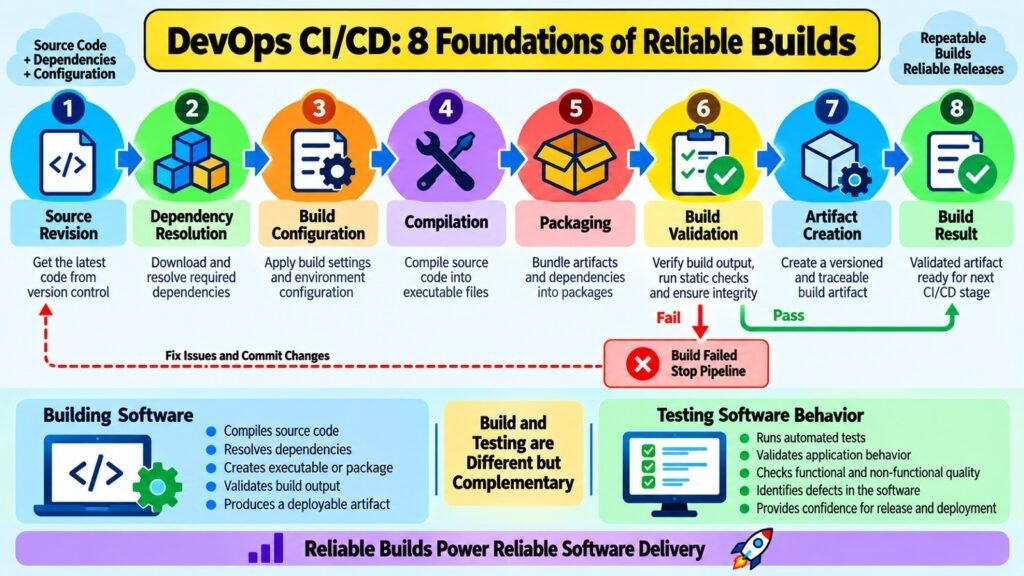
An automated build transforms source code and its declared dependencies into a software output that can be tested, stored, and deployed. Within DevOps CI/CD, the automated build converts a human-authored change into something a machine can execute. Its primary requirements are consistency and reproducibility: given the same source code and declared dependencies, the build process should produce the same output every time, regardless of where or when it runs.
A typical automated build pipeline resolves dependencies, compiles or packages source code, applies configuration, and then validates the result. Build validation confirms that compilation succeeded, that required artifacts were produced, and that the output meets structural expectations before any testing begins. This validation stage is distinct from continuous testing: it addresses whether software can be reliably produced, not whether it behaves correctly.
Reproducibility is essential for pipeline reliability. When a build produces different outputs under nominally identical conditions — a “flaky build” — teams lose confidence in downstream stages. A test failure becomes ambiguous: did the software fail, or did the build introduce a subtle inconsistency? Pinning dependency versions, using isolated build environments, and avoiding hidden external state are practical techniques for achieving consistent, reproducible builds.
Common causes of unreliable builds include inconsistent dependency resolution, differences between the build environment and the target environment, undocumented prerequisites, and build scripts that depend on external services at build time. DevOps CI/CD practice addresses these by treating the build environment as a controlled artifact and isolating builds from external state as much as possible.
Table 4: DevOps CI/CD — Automated Build and Validation Concepts
| Build or Validation Concept | Significance in DevOps CI/CD |
| Dependency resolution | Retrieves and locks the correct versions of libraries required by the build |
| Compilation | Transforms source code into an executable or deployable form |
| Build reproducibility | Ensures the same inputs always produce identical outputs across environments |
| Configuration validation | Checks that configuration files and settings are structurally correct before testing |
| Build isolation | Prevents hidden external state from affecting build consistency or reliability |
| Artifact generation | Produces a defined output — binary, container image, or package — for later use |
| Failure-fast principle | Halts the pipeline immediately when a build defect is detected to save time |
| Build caching | Reuses prior outputs for unchanged components to reduce build duration |
4. DevOps CI/CD Continuous Testing: Validating Software Quality
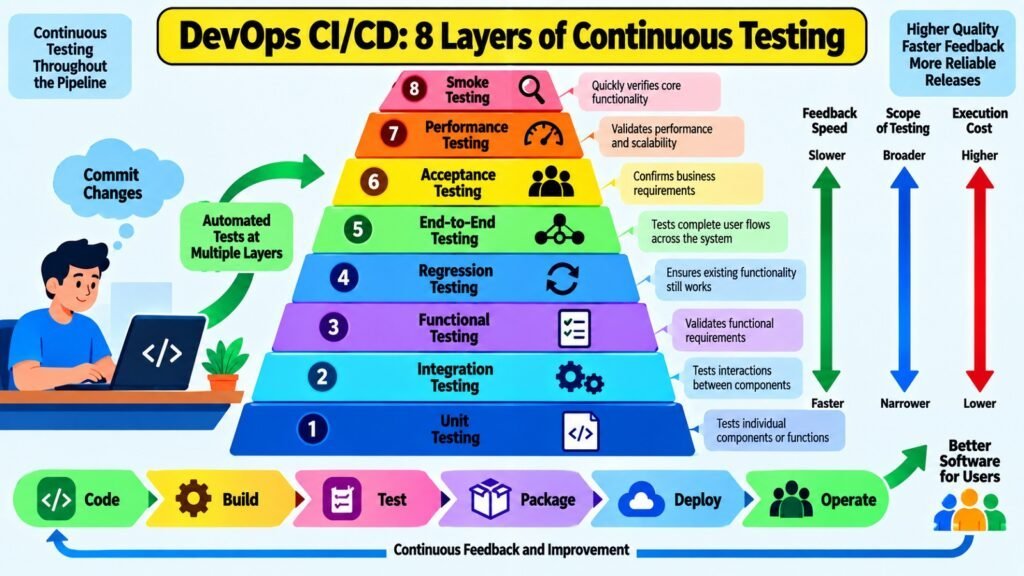
Continuous Testing integrates automated quality validation throughout the DevOps CI/CD pipeline rather than concentrating it at a single gate near the end of development. Rather than treating quality as something measured after software is complete, this approach measures it continuously as software evolves. The result is faster defect detection, shorter feedback cycles, and higher baseline confidence in the shared codebase at any point in time.
Different test types serve different purposes and belong at different points in the pipeline. Unit tests examine individual components in isolation and run quickly, making them suited to early stages. Integration tests verify that components interact correctly across defined boundaries. Functional and acceptance tests confirm behavioral requirements are met. End-to-end tests simulate complete user journeys but run more slowly and belong in later stages. The right testing strategy depends on the nature of the system and its engineering context.
Test reliability is among the most consequential properties of a Continuous Testing strategy. A flaky test — one that produces different results from identical inputs — introduces uncertainty into the pipeline. When developers cannot trust test results, they begin to ignore failures or override quality gates, defeating the purpose of continuous testing. Research on software delivery performance consistently identifies reliable automated testing as a key characteristic of high-performing engineering teams.
Excessive or poorly designed testing can itself become a pipeline bottleneck. A two-hour test suite provides far less continuous feedback than one that runs in ten minutes. Teams must balance coverage, execution time, and reliability when designing their strategy. Quality gates — defined criteria a change must meet before progressing — enforce standards without requiring manual review of every individual test result.
Table 5: DevOps CI/CD — Continuous Testing Approaches and Considerations
| Testing Approach or Consideration | Role in DevOps CI/CD Pipeline |
| Unit testing | Validates individual components in isolation; runs early for fast feedback |
| Integration testing | Verifies correct interaction between components across defined boundaries |
| Functional testing | Confirms that software meets specified behavioral and functional requirements |
| Regression testing | Detects unintended changes in previously working behavior after new changes |
| End-to-end testing | Simulates complete user journeys to validate the system as a whole |
| Flaky test management | Identifies and resolves tests producing inconsistent results to maintain trust |
| Quality gates | Defined pass/fail criteria a change must meet before progressing in the pipeline |
| Test execution time | Total test suite duration directly affects the speed of feedback in the pipeline |
5. DevOps CI/CD Artifact & Package Management: Controlling Software Outputs
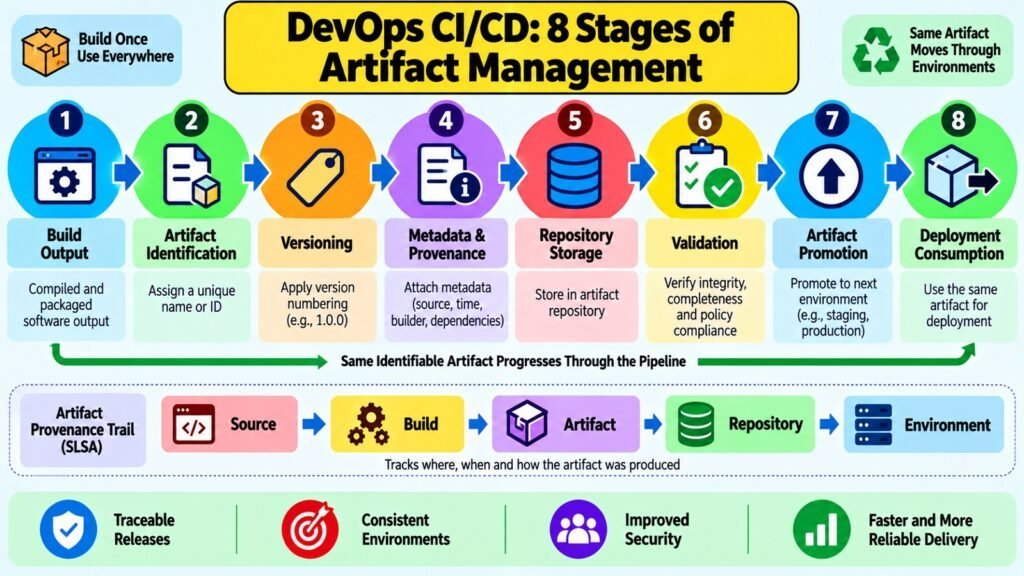
An artifact is the concrete output produced when source code passes through an automated build process. It may take the form of a compiled binary, a container image, a language-specific package, or any other deployable unit. Within DevOps CI/CD, the artifact represents tangible evidence that a specific set of source code, at a specific version, was built and validated in a controlled environment. Managing artifacts well ensures that the software tested is identical to what gets deployed.
Versioning is the most fundamental requirement of artifact management. Each artifact must carry a unique identifier linking it to the exact source code and build parameters that produced it. This allows teams to answer critical questions: which version is currently in production, which version ran when a defect was reported last week, and what changed between two specific builds. Without consistent versioning, these questions become difficult or impossible to answer reliably.
Immutability is equally important. An immutable artifact cannot be modified after creation. If a new build is needed, a new artifact with a new version identifier is produced. This prevents the subtle but dangerous situation where the same version label applies to different builds — a practice sometimes called “version aliasing” — which makes defect tracing and rollback decisions unreliable. Immutability is what gives a CI/CD pipeline its auditability.
Artifact repositories serve as the controlled storage layer, holding artifacts, maintaining metadata, enforcing retention policies, and controlling promotion rights. Common problems include inconsistent naming conventions, mutable artifacts, unclear provenance records, dependency conflicts, and excessive retention. Artifact promotion — moving the same validated artifact through environments rather than rebuilding — is the principle that guarantees continuity between testing and production.
Table 6: DevOps CI/CD — Artifact and Package Management Concepts
| Concept | Role in DevOps CI/CD |
| Artifact | The deployable software output produced by an automated build process |
| Versioning | Unique identifiers linking each artifact to its source code and build parameters |
| Immutability | Prevents post-build modification, ensuring tested artifacts are identical to deployed ones |
| Artifact repository | Controlled storage system for artifacts with metadata, access control, and retention |
| Provenance | Traceable record of where an artifact came from and how it was produced |
| Artifact promotion | Moving a validated artifact to a subsequent environment without rebuilding |
| Dependency management | Resolving and locking external package versions used in the build |
| Retention policy | Rules governing how long artifacts are stored before they are removed or archived |
6. DevOps CI/CD Continuous Delivery & Release Readiness: Preparing Software
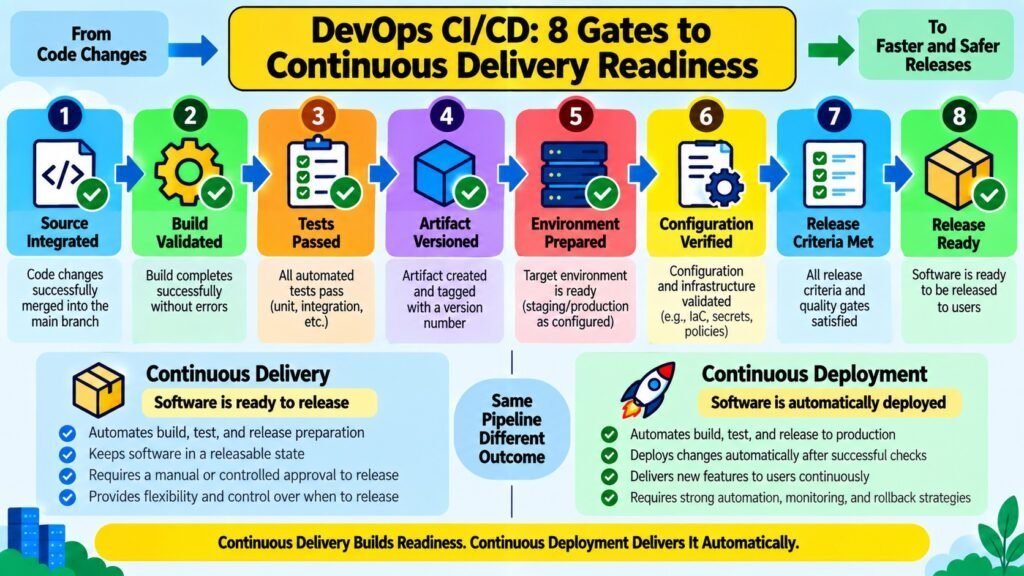
Continuous Delivery is the practice of keeping software in a state where it can be released to production at any time through a deliberate, authorized decision. This is distinct from Continuous Deployment, where every validated change is released automatically. In Continuous Delivery, automation handles building, validating, testing, and staging, while the final release decision remains with a human or an explicit organizational process. Many organizations have valid business, regulatory, or operational reasons for controlling exactly when changes reach production users.
Release readiness is the concrete outcome of a Continuous Delivery pipeline. It means a specific artifact has passed all defined validation stages, has been confirmed compatible with its target environment, and meets all organizational release criteria. These criteria may include test passage rates, performance benchmarks, security checks, or change advisory board approvals. Standardizing release criteria removes ambiguity from the release decision and is itself a meaningful governance activity.
Artifacts move through a progression of environments on the way to production readiness. A typical DevOps CI/CD pipeline includes a development environment for early integration, a testing environment for automated validation, and a staging environment that closely mirrors production for final acceptance. Environment consistency is critical: if staging differs substantially from production in configuration, scale, or dependencies, the validation it provides is proportionally less trustworthy.
Common challenges include environment drift, where staging gradually diverges from production; unclear or inconsistent release criteria; manual approval steps that create bottlenecks; and insufficient release documentation. DevOps CI/CD practice addresses these by treating release readiness as an explicit, measurable state rather than an informal judgment made at release time.
Table 7: DevOps CI/CD — Continuous Delivery and Release Readiness Concepts
| Concept | Role in Continuous Delivery |
| Continuous Delivery | Automation that keeps software deployable on demand via a human release decision |
| Release candidate | A validated artifact that has met all criteria for potential production deployment |
| Environment pipeline | Ordered sequence of environments through which software progresses before release |
| Environment consistency | Ensuring staging and other pre-production environments match production configuration |
| Release criteria | Defined, measurable conditions a release candidate must satisfy before deployment |
| Change advisory approval | Organizational review step that authorizes deployment for regulated environments |
| Release documentation | Records describing what is in a release, its dependencies, and its configuration |
| Environment drift | Gradual divergence between pre-production and production environments over time |
7. DevOps CI/CD Continuous Deployment & Release Strategies: Delivering Changes
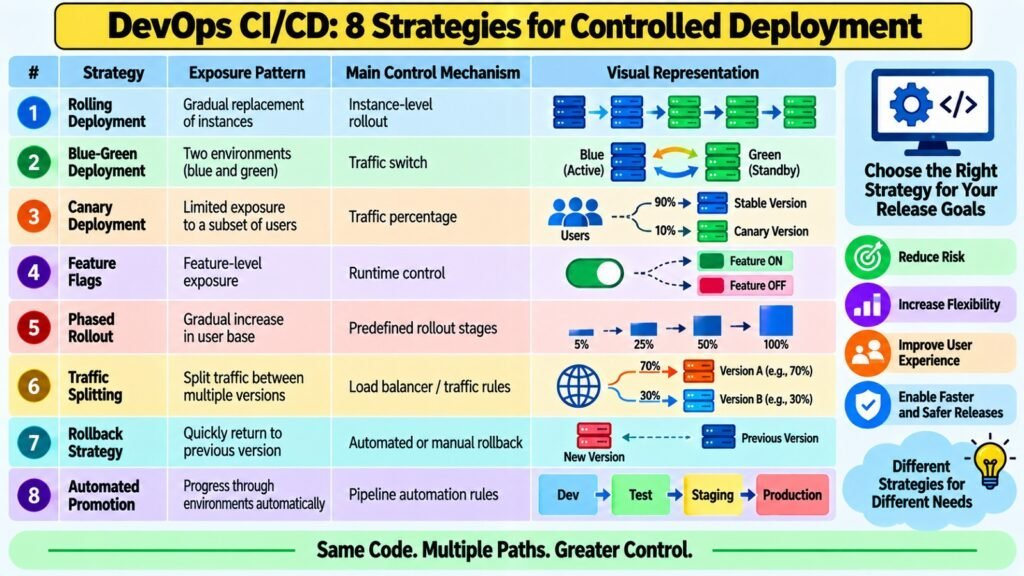
Continuous Deployment automatically releases every validated software change to production without a manual approval step. It is the most advanced form of DevOps CI/CD automation and requires high confidence in the pipeline’s automated validation stages, since there is no human review between a passing build and a live production deployment. It is appropriate for organizations with mature testing practices, strong monitoring, and software systems where incremental, frequent changes carry manageable risk.
The distinction between deployment and release matters and is often underappreciated. Deployment installs new software in a target environment. Release makes functionality available to end users. These two events need not happen simultaneously. Feature flags allow software to be deployed to production while keeping new functionality invisible to users until an explicit release decision is made, giving teams fine-grained control over exposure independently of the deployment schedule.
Several established release strategies help manage deployment risk. A rolling deployment gradually replaces running instances of the previous version with the new version, avoiding a complete simultaneous transition. A blue-green deployment maintains two identical production environments and switches traffic between them, enabling near-instant rollback. A canary release initially exposes the new version to a small, defined subset of users before a broader rollout, providing real-world validation with limited initial exposure.
Rollback planning is a necessary part of any release strategy. Every deployment should have a defined rollback procedure that can be executed quickly if the new version introduces problems. Rollback complexity varies by strategy: blue-green deployments support near-instant rollback through traffic rerouting, while rolling deployments may require reverting changes across multiple instances. This complexity should be a deliberate consideration when choosing a release strategy.
Table 8: DevOps CI/CD — Deployment and Release Strategy Characteristics
| Strategy or Concept | Distinguishing Characteristic |
| Continuous Deployment | Every validated change is automatically released to production without manual approval |
| Rolling deployment | Gradually replaces old instances with the new version to avoid a full simultaneous cutover |
| Blue-green deployment | Maintains two production environments; traffic is switched between them for zero-downtime release |
| Canary release | Routes a small percentage of production traffic to the new version for early validation |
| Feature flags | Separates deployment from release by controlling feature visibility independently of deployment |
| Deployment vs. release | Deployment installs software; release makes functionality available to users |
| Rollback strategy | Predefined procedure to revert to a previous version if a deployment causes problems |
| Traffic shifting | Gradual redirection of user traffic from old to new version to manage exposure risk |
8. DevOps CI/CD Pipeline Governance & Optimization: Improving Delivery
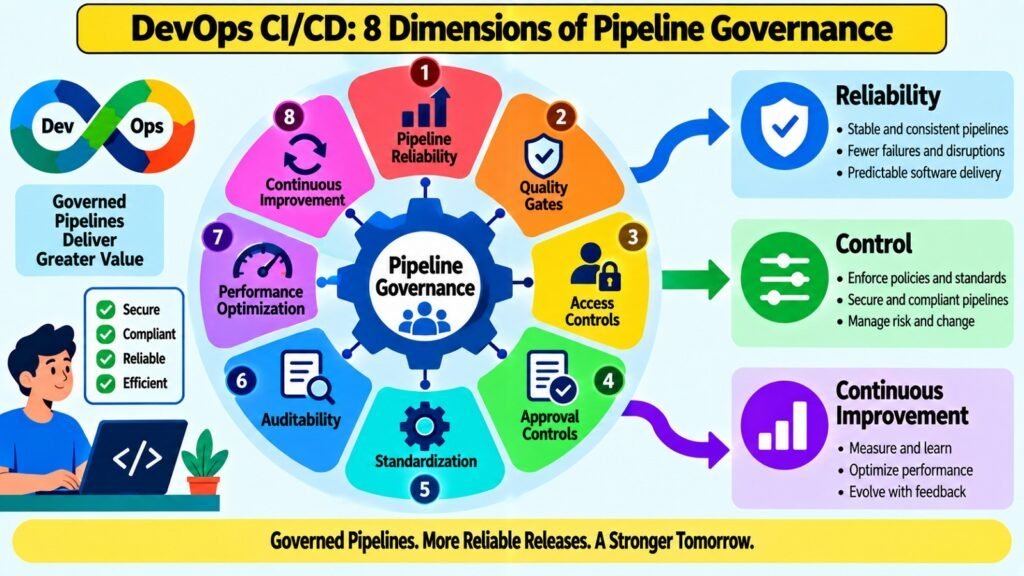
Pipeline governance refers to the policies, controls, and accountability structures that ensure a DevOps CI/CD pipeline operates in a controlled, auditable, and consistently applied manner. Governance establishes who can approve changes at each stage, what quality gates must pass before progression, which checks are mandatory, and how pipeline behavior is recorded for audit purposes. Without governance, even a technically sophisticated pipeline can produce inconsistent results or fail to satisfy regulatory and operational requirements.
Pipeline optimization addresses practical efficiency. A CI/CD pipeline that is slow or unreliable limits how frequently teams can integrate, validate, and release software. Common optimization activities include identifying and resolving bottlenecks, improving test suite execution speed, implementing parallel execution of independent stages, caching repeated operations, and reducing build and test infrastructure costs. Each of these activities directly improves the speed and reliability of the delivery loop.
The DORA research program, which has produced the Accelerate State of DevOps reports, identified four key delivery performance measures: lead time for changes, deployment frequency, change failure rate, and time to restore service. These metrics reveal different aspects of pipeline health. Lead time and deployment frequency reflect throughput. Change failure rate reflects reliability. Time to restore service reflects resilience. None of them prescribe universal target values, because appropriate benchmarks vary significantly by organization and context.
Governance and optimization are complementary rather than competing concerns. Governance ensures the pipeline is trustworthy and controlled. Optimization ensures it is efficient and fast enough to be used continuously rather than treated as an occasional formality. Together, they connect all the preceding DevOps CI/CD foundations into a coherent delivery system capable of sustained improvement.
Table 9: DevOps CI/CD — Pipeline Governance and Optimization Concepts
| Concept | Purpose in DevOps CI/CD Pipeline |
| Quality gates | Defined criteria that must pass before a change can progress to the next pipeline stage |
| Audit trail | Timestamped record of pipeline events supporting compliance and change traceability |
| Access controls | Permissions governing who can trigger, approve, or modify stages of the pipeline |
| Lead time for changes | Measures elapsed time from commit to production as an indicator of pipeline speed |
| Deployment frequency | Indicates how often the team releases software, reflecting pipeline throughput |
| Change failure rate | Proportion of deployments causing production problems, reflecting pipeline reliability |
| Time to restore service | Speed of recovery from production failures, reflecting pipeline resilience |
| Bottleneck analysis | Identifying stages with the longest wait or failure times to prioritize optimization |
Conclusion — DevOps CI/CD: Building a Stronger Delivery Foundation
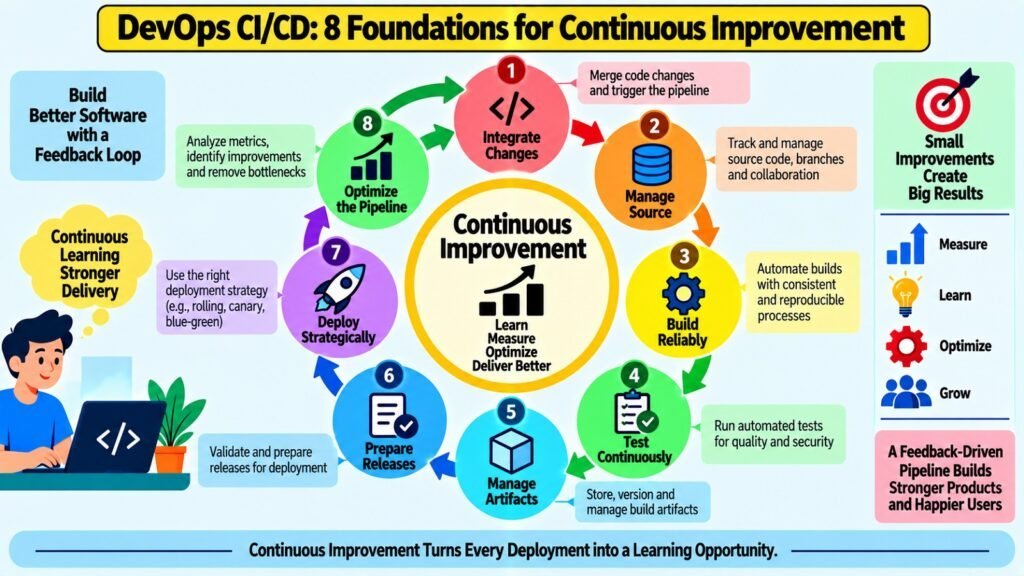
DevOps CI/CD is best understood as an interconnected system of engineering practices rather than a linear sequence of automated steps. The eight foundations examined here — Continuous Integration workflow, source control and code integration, automated build and validation, continuous testing, artifact and package management, continuous delivery and release readiness, continuous deployment and release strategies, and pipeline governance and optimization — each contribute a distinct capability. Their real value lies in how they reinforce one another: reliable source control enables consistent integration, consistent integration produces trustworthy builds, and trustworthy builds make test results meaningful.
It is worth reinforcing the relationship between DevOps CI/CD and the broader DevOps discipline. CI/CD is an important aspect of DevOps, but it does not constitute the whole of it. DevOps also encompasses culture, collaboration, monitoring and observability, security practices, and organizational structures that CI/CD pipelines alone cannot address. Treating automation as a substitute for these conditions is a common and costly mistake.
The central insight of effective DevOps CI/CD is that building a reliable pipeline is fundamentally a design problem, not a tool-selection problem. Organizations treating CI/CD as a checklist of tools often find their pipelines fragile, slow, and poorly trusted. Organizations that treat CI/CD as a system to design — with clear principles, measurable outcomes, and continuous attention to improvement — consistently achieve more reliable software delivery. The eight foundations here offer a durable checklist for evaluating or building any CI/CD system, whether the implementation is minimal or sophisticated.
Table 10: DevOps CI/CD — Eight Foundations Quick-Reference Checklist
| Foundation | Central Purpose |
| CI Workflow | Integrate code changes frequently with automated validation and fast feedback |
| Source Control & Code Integration | Track, review, and integrate changes with full traceability into the shared codebase |
| Automated Build & Validation | Produce consistent, reproducible software outputs and detect build defects early |
| Continuous Testing | Validate software quality continuously at appropriate pipeline stages |
| Artifact & Package Management | Version, store, and promote immutable software outputs with full provenance |
| Continuous Delivery & Release Readiness | Maintain software in a deployable state with controlled, criteria-based release preparation |
| Continuous Deployment & Release Strategies | Automate or control production delivery and manage user exposure through release strategies |
| Pipeline Governance & Optimization | Ensure the pipeline is reliable, auditable, efficient, and capable of continuous improvement |