Table of Contents
Introduction: Hypervisors and Their Role in Cloud Computing
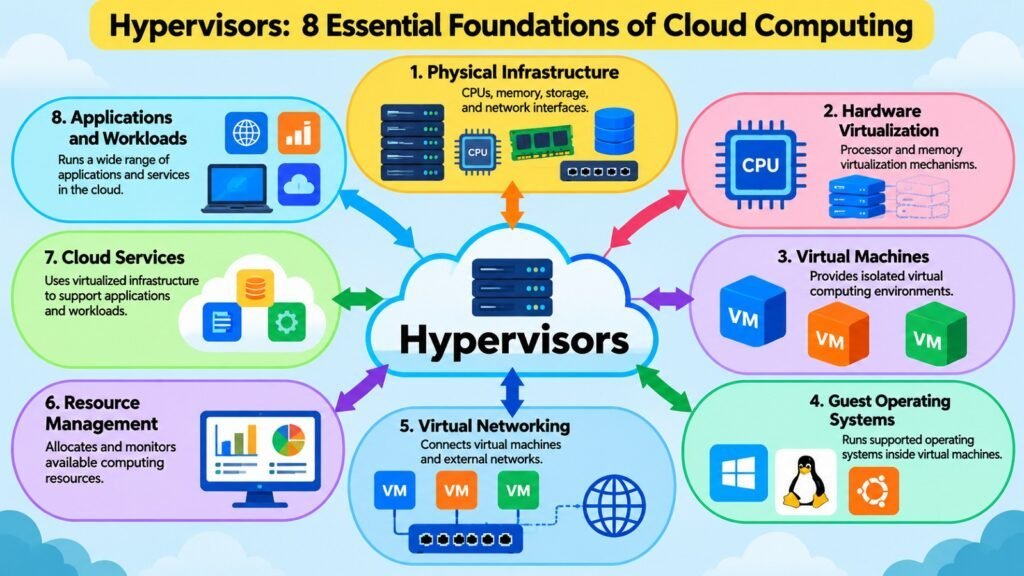
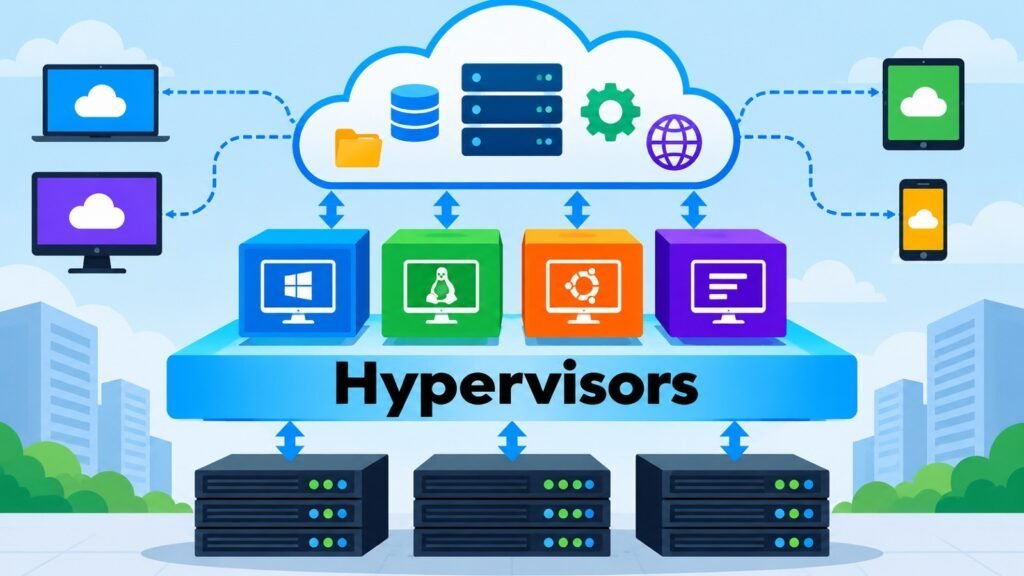
Hypervisors are important aspects of cloud computing because they convert a finite pool of physical hardware into many logically separate execution environments. A hypervisor, or virtual machine monitor, is the software layer that creates virtual machines (VMs), mediates their access to processors, memory, storage, and network devices, and preserves the boundaries that keep one tenant’s computation from disturbing another’s. The concept traces to the formal analysis of Popek and Goldberg (1974), who specified the conditions under which a control program could virtualize an instruction set efficiently and safely.
Four layers should be kept distinct throughout: the physical hardware, the hypervisor that governs it, the guest operating systems running on virtual hardware, and the workloads executing inside those guests. By decoupling workloads from particular machines, hypervisors raise resource utilization, permit rapid provisioning, support consolidation, and make capacity easier to scale and relocate, which explains much of their operational value. Hardware is thereby consumed through an abstraction, and operators can alter placement, capacity, and configuration without rewriting the applications that depend on it.
A hypervisor is nevertheless not a cloud platform: self-service provisioning, metering, policy enforcement, and fleet-wide scheduling belong to orchestration and cloud management systems that sit above the virtualization layer, and treating the two as interchangeable obscures where responsibility actually lies. This article, written for graduate students, doctoral candidates, and researchers, examines eight connected aspects that together describe how virtualized infrastructure is designed, operated, secured, and evolved. Each section builds on the one before it, moving from structure toward protection.
Table 1: Eight Aspects of Hypervisors in Cloud Computing
| Hypervisor Aspect | Focus of Discussion |
| Hypervisor Architecture | Mechanisms mediating processors, memory, and devices |
| Type 1 Hypervisors | Bare-metal designs for enterprise and cloud hosts |
| Type 2 Hypervisors | Hosted designs for development, testing, and research |
| VM Management | Lifecycle operations and control-plane coordination |
| Resource Allocation | Scheduling, overcommitment, and contention trade-offs |
| VM Isolation | Logical boundaries between co-resident workloads |
| Hypervisor Security | Attack surface, hardening, and shared responsibility |
| VM Migration | Live and cold relocation of running workloads |
1. Hypervisor Architecture: 8 Essential Components Explained
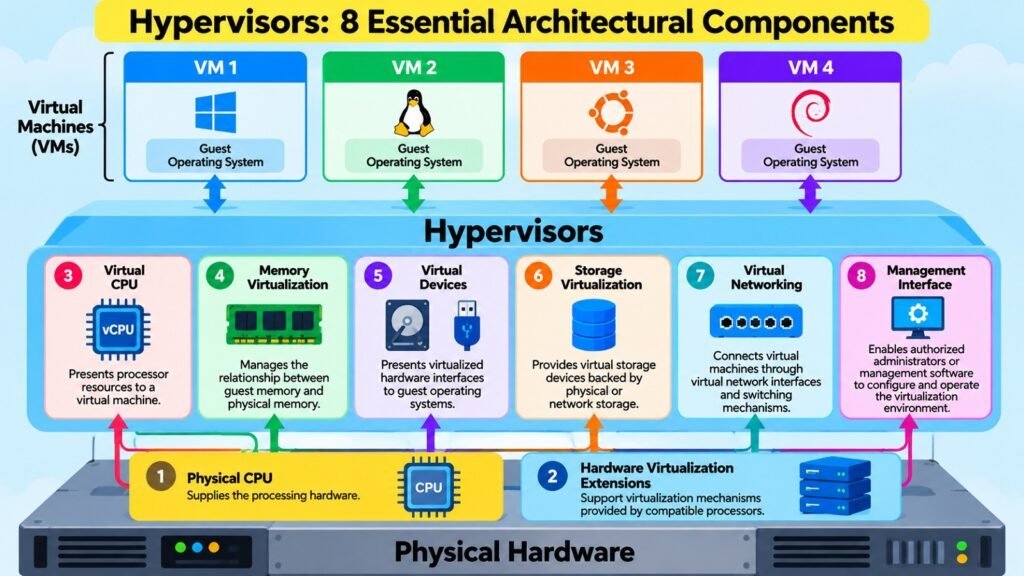
At its core, a hypervisor arbitrates between guest software that expects exclusive control of a machine and physical hardware that cannot be exclusively granted to every guest at once. It presents each VM with virtual processors, a contiguous-looking physical address space, and virtual devices, while retaining ultimate authority over the real resources beneath. Because processors, memory, storage controllers, and network adapters remain shared, its task is to schedule, translate, and mediate rather than merely to partition.
CPU virtualization illustrates the central difficulty, since guest kernels assume the highest privilege level that the hypervisor must itself retain. Early x86 processors did not trap every sensitive instruction cleanly, so implementations relied on binary translation or paravirtualization, approaches compared by Adams and Agesen (2006) and exemplified by Xen (Barham et al., 2003). Intel VT-x and AMD-V later introduced a privileged root mode beneath guest kernels, documented in Intel’s Software Developer’s Manual, which reduced the need for such workarounds.
Memory virtualization adds a second translation problem, because guest virtual addresses must map to guest physical addresses and then to machine addresses. Shadow page tables handled this in software, whereas nested paging, marketed as Extended Page Tables by Intel and Rapid Virtualization Indexing by AMD, performs the second translation in hardware at the price of costlier page walks (Bhargava et al., 2008). I/O follows a similar spectrum, from full device emulation through paravirtual interfaces such as virtio (Russell, 2008) to direct device assignment protected by an IOMMU.
The boundary of responsibility matters analytically. A hypervisor’s core duties are scheduling, memory management, interrupt handling, and device mediation, whereas inventory, policy, and automation belong to management consoles and orchestration tools. Monolithic, microkernel-style, and kernel-integrated designs shift performance, compatibility, attack surface, and isolation in different directions, so identical internal structure should never be assumed. Performance is shaped less by virtualization itself than by how often a workload forces transitions between guest and hypervisor, which is why hardware assistance and paravirtual drivers matter.
Table 2: Architectural Components of Hypervisors
| Architectural Component | Function in Hypervisor Systems |
| CPU scheduler | Multiplexes virtual processors onto physical cores |
| Privilege separation | Keeps guest kernels beneath hypervisor authority |
| Hardware virtualization extensions | Trap sensitive operations using VT-x or AMD-V |
| Nested paging | Hardware translation from guest to machine addresses |
| Memory manager | Allocates, reclaims, and protects machine memory |
| Virtual device models | Emulate or paravirtualize disks, networks, and consoles |
| IOMMU support | Restricts device DMA and enables direct assignment |
| Interrupt virtualization | Routes physical and virtual interrupts to guests |
2. Type 1 Hypervisors: 8 Powerful Features for Cloud Infrastructure
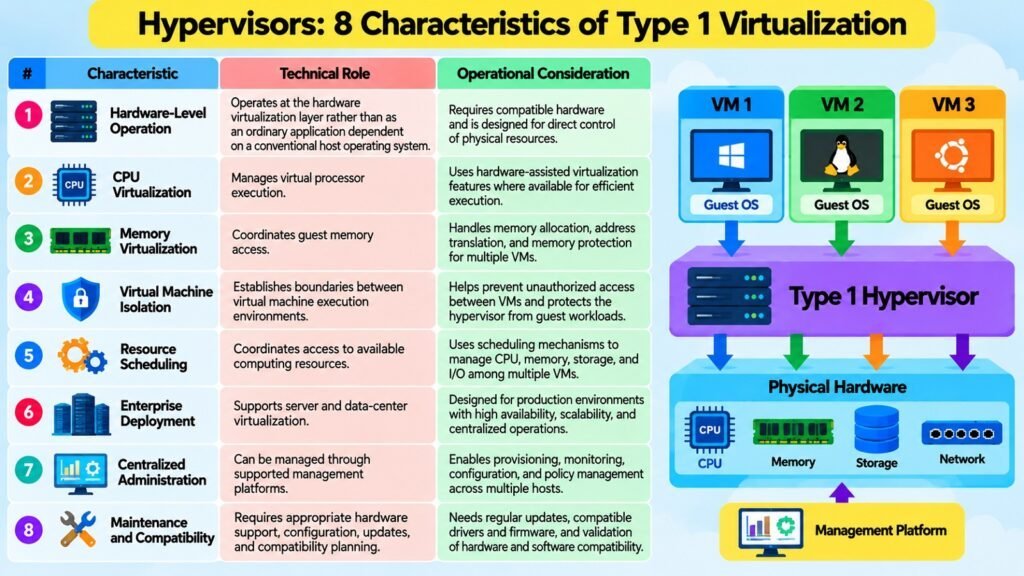
Type 1 hypervisors, usually called bare-metal hypervisors, run directly on the physical machine and assume hardware control without depending on a general-purpose host operating system in the manner of hosted designs. Their appeal in enterprise virtualization and cloud infrastructure rests on a shorter trusted path between workloads and hardware, direct scheduling authority, and administration that can be centralized across large host fleets. Enterprises must also weigh licensing models, ecosystem tooling, and staff expertise when comparing platforms.
Actual implementations complicate this taxonomy. VMware ESXi installs onto server hardware and uses its own kernel, the VMkernel, to manage processors, memory, storage, and networking. Microsoft Hyper-V places the hypervisor beneath the operating system, which then runs as a privileged root partition supplying drivers and management services to child partitions, as Microsoft’s architecture documentation describes.
KVM differs again: it is a Linux kernel module that exposes hardware virtualization to user space, with a component such as QEMU supplying device emulation, so Linux itself acts as the hypervisor (Kivity et al., 2007). Classifying KVM as an ordinary bare-metal product therefore oversimplifies its design, although it serves similar purposes. Public cloud operators illustrate the diversity: Amazon Web Services describes its Nitro hypervisor as built on core KVM technology, with networking, storage, and management functions offloaded to dedicated hardware, whereas Microsoft Azure builds on Hyper-V. Such cases show that the Type 1 label describes a position relative to hardware, not a guarantee of minimal code, simple administration, or superior assurance.
The strengths include efficient resource use, mature clustering, centralized administration, and scalability across many hosts. The trade-offs are equally concrete: operational complexity, dependence on certified hardware and driver ecosystems, and demanding patch and lifecycle maintenance. Performance and security depend on configuration, firmware, drivers, management components, and workload rather than on product category, so claims of universal superiority for ESXi, Hyper-V, or KVM are unsupported and should be tested against the intended environment.
Table 3: Type 1 Hypervisors and Their Technical Characteristics
| Characteristic | Technical Significance |
| Direct hardware control | Removes a general-purpose host layer from scheduling decisions |
| Dedicated kernel | ESXi’s VMkernel implements purpose-built resource management |
| Root partition model | Hyper-V runs management and drivers in a privileged partition |
| Kernel-integrated design | KVM reuses Linux scheduling, memory, and driver facilities |
| Centralized administration | Cluster managers coordinate policy across many hosts |
| Hardware compatibility | Vendor certification lists constrain supported platforms |
| Reduced software stack | Fewer components may narrow the exposed attack surface |
| Patch maintenance | Updates require host evacuation, planning, and validation |
3. Type 2 Hypervisors: 8 Key Characteristics and Use Cases
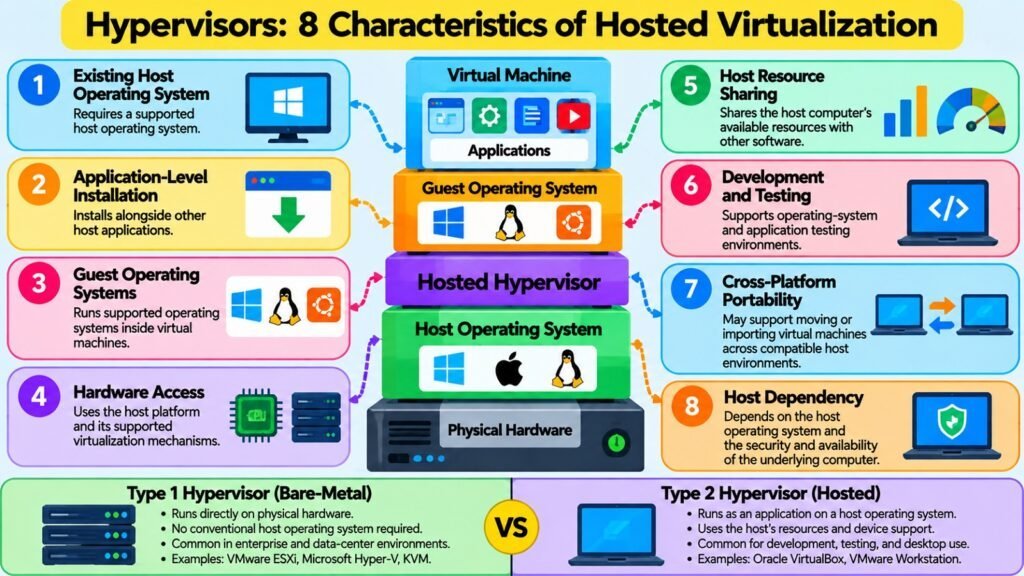
Type 2 hypervisors, or hosted hypervisors, execute as software on a conventional host operating system. The host retains control of the hardware and its drivers, the hypervisor presents virtual hardware to guest operating systems, and guests therefore reach physical devices through two cooperating layers. This arrangement simplifies installation and device compatibility, since existing host drivers are reused, but it ties VM availability and behavior to the host’s health, scheduling, and update cycle, while installation resembles that of any application.
Oracle VirtualBox, which runs on Windows, macOS, Linux, and Solaris hosts, and VMware Workstation, which targets Windows and Linux hosts, are the established examples, and their documentation describes snapshots and guest integration tools. Neither should be understood as a slower imitation of bare-metal products. Both exploit processor virtualization extensions, and VirtualBox installs host kernel components for that purpose, so performance depends on workload, configuration, host resources, and competing host activity rather than on category alone. Guest additions improve clipboard sharing, display handling, and shared folders, though each convenience also widens the interface between guest and host.
Typical use cases include software development, operating-system testing, educational laboratories, application compatibility checks, and controlled research environments, where portability and easy snapshotting outweigh the need for large-scale consolidation. Limitations arise from host dependencies, resource contention with host applications, uneven device support, and the host’s own security posture. Since the host sits beneath the hypervisor, a compromised host can inspect or alter the VMs it runs, which makes host hardening a precondition for trustworthy hosted virtualization. Comparison with Type 1 systems should therefore be framed around fit: a hosted hypervisor is rational for a researcher reproducing a legacy environment, while a bare-metal platform is rational for a consolidated cluster serving shared tenants. Unsupported generalizations about insecurity should be avoided.
Table 4: Hypervisors Compared by Type 1 and Type 2 Design
| Comparison Criterion | Type 1 and Type 2 Distinction |
| Execution layer | Type 1 runs on hardware; Type 2 runs atop a host OS |
| Hardware access | Type 1 controls devices directly; Type 2 relies on host drivers |
| Typical setting | Type 1 suits data centers; Type 2 suits desktops and laboratories |
| Performance overhead | Depends on workload, configuration, and host resources in both |
| Installation | Type 1 needs dedicated hosts; Type 2 installs like applications |
| Administration | Type 1 favors centralized tools; Type 2 favors local control |
| Host dependency | Type 2 availability follows host stability and updates |
| Security exposure | Type 2 inherits host risk; Type 1 inherits platform risk |
4. VM Management by Hypervisors: 8 Essential Lifecycle Operations
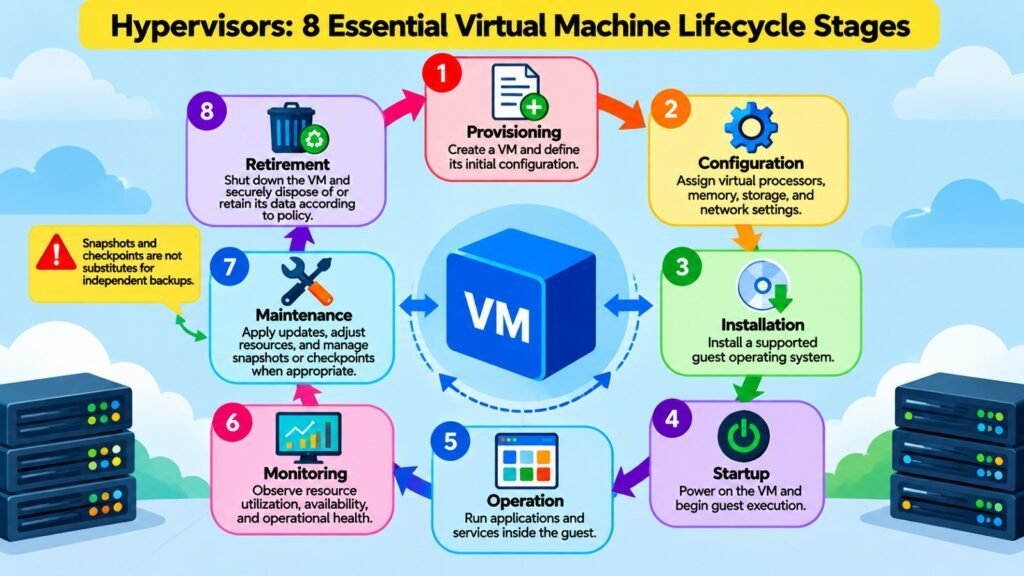
A VM passes through a lifecycle that begins with creation and provisioning, continues through configuration, startup, operation, monitoring, shutdown, and restart, and ends with retirement. At each stage the hypervisor translates administrative intent into concrete allocations of virtual CPUs, memory, virtual disks, and network attachments, while the guest operating system remains responsible for its own services, patching, and application state.
Operations interact with virtual hardware in ways that are easy to underestimate. Hot-adding memory or processors depends on guest support, resizing a virtual disk does not resize the file system inside it, and a restart may be needed before a configuration change takes effect. Network and storage attachments must also be reconnected correctly after relocation or restoration; otherwise, a machine can start successfully yet fail to serve its function.
Responsibility is distributed across layers, and its exact division varies by platform. The hypervisor starts, stops, and constrains VMs on a single host, whereas management consoles, cloud control planes, and orchestration services coordinate those operations across many hosts, enforce templates, and apply access policy, as vCenter Server does for ESXi hosts. Consistent configuration, role-based access control, monitoring, automation, and lifecycle documentation become critical once hundreds or thousands of machines are involved, because small inconsistencies multiply into operational risk. Infrastructure-as-code tooling strengthens this discipline by recording intended state in version-controlled definitions that can be reviewed and reproduced.
Snapshots, called checkpoints in Hyper-V, preserve a point-in-time state and serve testing or short-term rollback. They are not independent backups, since they typically depend on the original virtual disk, grow over time, and share the fate of the storage they protect, which is why vendor documentation advises against treating them as backup substitutes. Unmanaged growth creates further hazards, including stale machines that retain outdated software, configuration drift between nominally identical systems, and capacity shortfalls when sprawl outpaces planning. Retirement deserves particular attention, since orphaned disks, addresses, licenses, and credentials otherwise persist long after the workload has gone.
Table 5: VM Lifecycle Operations Managed Through Hypervisors
| Lifecycle Operation | Purpose and Practical Consideration |
| Provisioning | Creates machines from templates; standard images limit drift |
| Configuration | Sets vCPUs, memory, disks, and networks; document every change |
| Startup | Initializes virtual hardware; verify capacity before powering on |
| Shutdown | Guest-aware shutdown avoids file-system corruption |
| Restart | Applies kernel updates; schedule around service dependencies |
| Monitoring | Tracks utilization and health; alert before saturation |
| Snapshot or checkpoint | Supports short-term rollback; never a replacement for backups |
| Retirement | Reclaims storage and addresses; remove stale machines and records |
5. Hypervisors and Resource Allocation: 8 Critical Management Principles
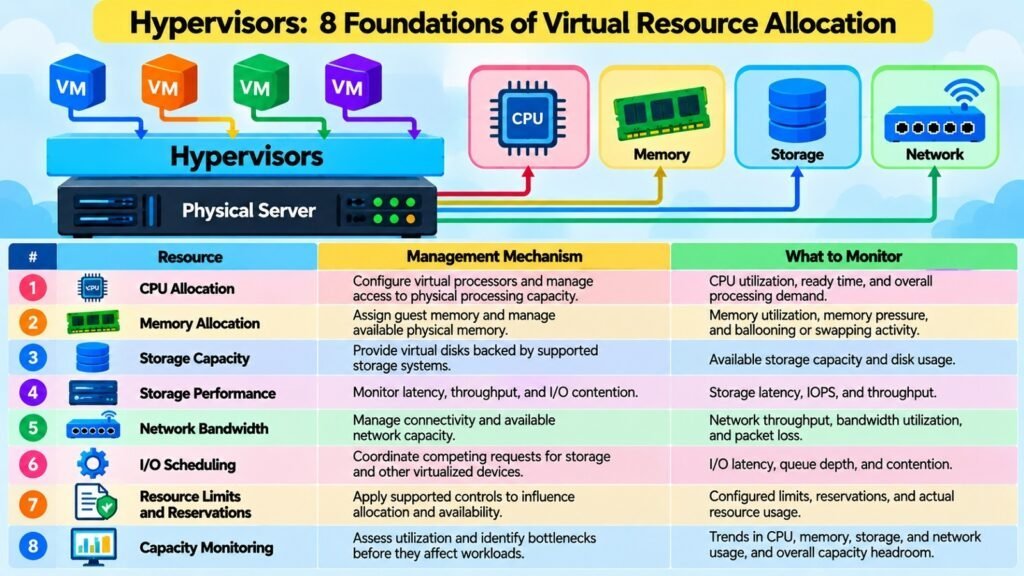
Allocation determines how a finite physical platform is divided among competing VMs. Hypervisors schedule virtual CPUs onto physical cores, assign machine memory to guests, carve storage capacity and throughput from shared devices, and distribute network bandwidth through virtual switches. Because a virtual resource is a promise rather than a dedicated component, assigning sixteen virtual CPUs does not guarantee the equivalent of sixteen physical cores whenever the host is contended, because contention rather than allocation alone determines delivered performance.
Workload characteristics shape these choices. A latency-sensitive transaction service benefits from reservations and conservative consolidation, whereas a batch analytics cluster may tolerate contention in exchange for higher density. Virtual CPU configuration illustrates the point: giving a VM more virtual processors than it can exploit may increase scheduling delay, because the hypervisor must find several physical cores available together or approximate that coordination. Storage and network allocation follow similar logic, since throughput caps, queue depths, and I/O priorities decide which tenants absorb the cost of congestion.
Administrators typically express policy through limits, reservations, and relative shares: a limit caps consumption, a reservation guarantees a minimum, and shares arbitrate under contention. Overcommitment lets total allocations exceed physical capacity on the assumption that workloads rarely peak simultaneously, which raises utilization and enables consolidation. Techniques such as ballooning, compression, and host swapping, described for ESX Server by Waldspurger (2002), reclaim memory when that assumption fails, though each carries performance costs.
The central trade-off lies between utilization and predictability. Aggressive consolidation lowers cost per workload yet exposes latency-sensitive services to scheduling delay, memory pressure, and storage queueing, which may breach service-level objectives. Evaluation therefore requires measurement: CPU ready or steal time, memory pressure, storage latency, network throughput, and application-level response times together reveal whether an allocation strategy is sound. No universal configuration exists, and these mechanisms should be distinguished from the billing, quota, and placement policies that belong to the cloud layer above.
Table 6: Resource Management Principles in Hypervisors
| Resource or Principle | Mechanism or Operational Implication |
| CPU scheduling | Time-slices vCPUs; contention appears as ready or steal time |
| Memory allocation | Maps guest memory to machine pages; pressure triggers reclamation |
| Storage | Shared datastores impose capacity and latency contention |
| Network bandwidth | Virtual switches apply shaping and share policies |
| Limits and reservations | Cap or guarantee consumption for selected machines |
| Overcommitment | Raises utilization but increases peak-contention risk |
| Capacity planning | Uses trend data to size clusters ahead of demand |
| Performance monitoring | Correlates host metrics with application-level behavior |
6. Hypervisors and VM Isolation: 8 Foundations of Workload Separation
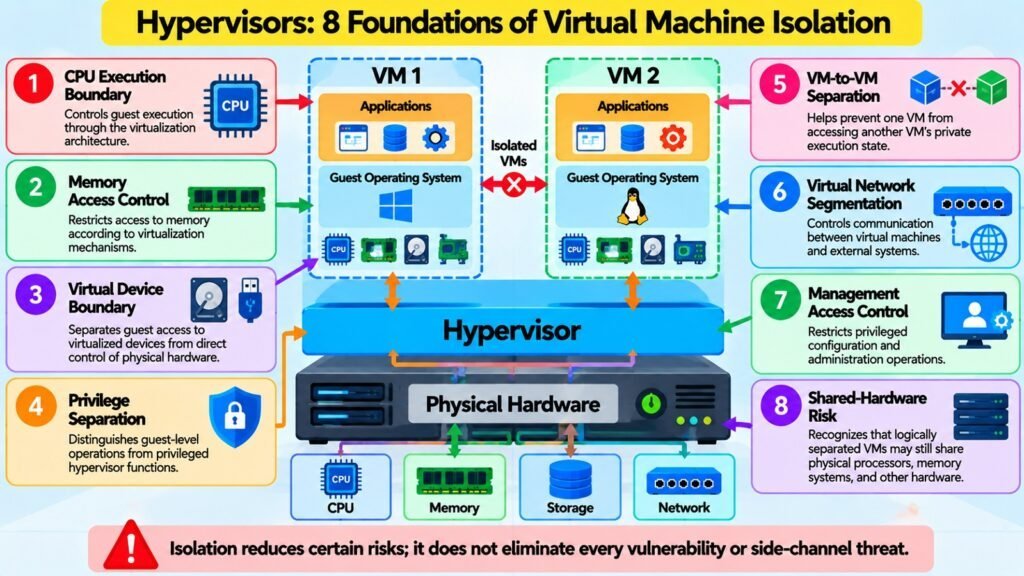
Isolation is the property that lets mutually distrusting workloads share hardware without reading, corrupting, or starving one another. The hypervisor enforces it through logical boundaries around each guest’s virtual processors, memory, devices, storage, and network interfaces. Hardware-assisted virtualization, privilege controls, and second-level address translation ensure that a guest cannot address memory it was not assigned, while IOMMUs constrain devices that perform direct memory access. Memory isolation deserves emphasis because it underpins most other guarantees: under nested paging, each guest’s page tables are interpreted through a hypervisor-controlled second-level structure, so a guest cannot reference machine memory outside its assigned mappings regardless of what its own kernel believes.
Logical isolation is not physical separation: co-resident VMs still share cores, caches, memory controllers, storage devices, and network hardware, and that sharing creates channels through which separation can fail. Ristenpart et al. (2009) showed that an adversary could achieve co-residence with a target instance on a public cloud and exploit a cross-VM side channel, while Spectre (Kocher et al., 2019) and related transient-execution attacks, including Meltdown (Lipp et al., 2018), later demonstrated that microarchitectural state could leak across boundaries software treated as sound. VM escape, in which guest code compromises the hypervisor, is rarer but consequential, and the 2015 VENOM flaw in QEMU’s virtual floppy controller, catalogued as CVE-2015-3456, is a documented example.
These threats are not equally practical everywhere, since many require co-residence, precise timing, or specific hardware, and vendors mitigate them through microcode, scheduling policy, and patches. Isolation therefore depends on secure implementation, correct configuration, timely updates, and tight control of privileged interfaces. It also has limits of purpose: it reduces cross-workload interference and unauthorized access, but it cannot repair vulnerable guest operating systems, insecure applications, stolen credentials, or every form of information leakage. Mitigations carry costs as well, and administrators must weigh performance penalties against the risk profile of their tenants.
Table 7: Isolation Boundaries Enforced by Hypervisors
| Isolation Mechanism or Boundary | Purpose and Limitation |
| Privilege separation | Keeps guests subordinate; hypervisor flaws undermine it |
| Second-level address translation | Confines guests to assigned memory; does not hide cache behavior |
| Virtual CPU contexts | Separates register state; shared cores permit timing channels |
| IOMMU | Limits device DMA; requires correct firmware and configuration |
| Virtual disks | Prevent direct cross-VM access; shared arrays remain a risk |
| Virtual networks | Segment traffic logically; misconfigured switches expose guests |
| Device emulation boundary | Contains guest I/O; emulator bugs enable escape |
| Scheduler fairness | Limits interference; cannot remove all contention |
7. Hypervisor Security: 8 Essential Defenses for Cloud Protection
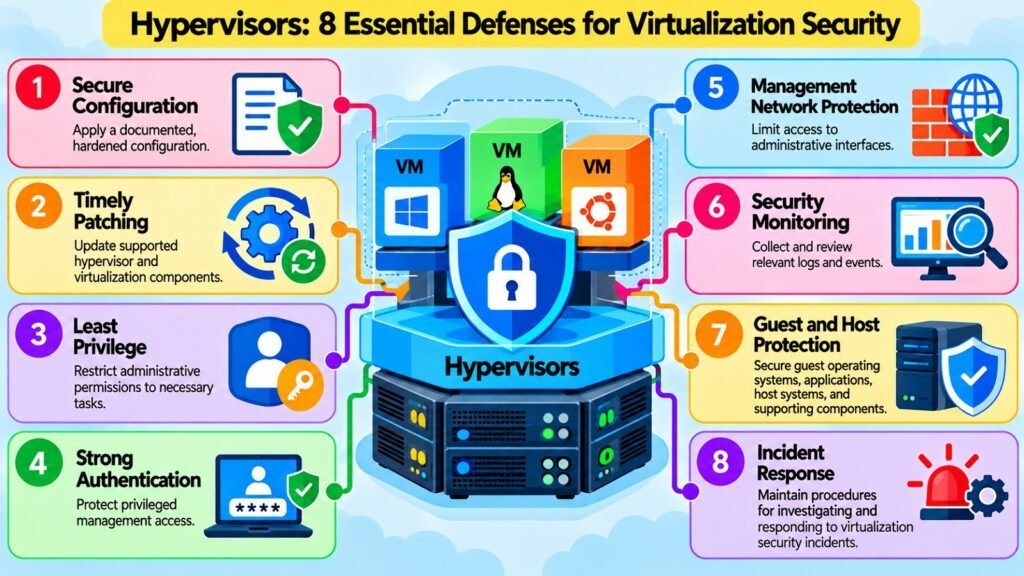
Hypervisor security spans several distinct layers, and conflating them produces weak defenses. The hypervisor itself presents an attack surface in its virtualization components, emulated devices, and hypercall interfaces. Surrounding it are privileged management interfaces, which concentrate authority, together with guest operating systems and applications that may be vulnerable or malicious. Insecure configurations, excessive administrative permissions, compromised management credentials, and firmware or hardware weaknesses add further routes, and a flaw in any layer can be leveraged against the others.
The distinction between threat locations clarifies priorities. Vulnerabilities in the hypervisor or its emulated devices can, in the worst case, break isolation for every tenant on a host. Compromise of a management system is often more consequential in practice, because administrative credentials can create, copy, or delete machines without exploiting any software flaw. Guest-level compromises, by contrast, usually begin as ordinary application or operating-system failures and become hypervisor concerns only when they find a path across the boundary.
Defense accordingly relies on complementary controls. NIST guidance on full virtualization and server-based hypervisor platforms (Scarfone et al., 2011; Chandramouli, 2018) emphasizes securing the hypervisor, isolating management networks, enforcing least-privilege access, and maintaining logs for monitoring and audit. Timely patching reduces known exposure, hardening removes unnecessary services, strong authentication limits credential abuse, trusted firmware supports platform integrity, and incident-response planning limits damage when prevention fails. Supply-chain considerations, such as firmware provenance and signed updates, extend the same logic to components beneath the hypervisor.
No control suffices alone. Patching cannot correct misconfiguration, and strong authentication does not stop exploitation of a vulnerable emulator. Responsibility is also shared: in a self-managed deployment the operator secures everything from firmware upward, whereas a cloud provider typically secures the hypervisor and physical platform while the customer secures guest systems, identities, and data, with the boundary varying by service model. Sound security programs therefore explain the mechanism each control addresses and its limits instead of reciting a checklist.
Table 8: Security Controls for Hypervisors
| Security Control | Threat Addressed or Practical Value |
| Timely patching | Closes known virtualization-component vulnerabilities |
| Least-privilege access | Limits damage from excessive administrative permissions |
| Strong authentication | Resists compromised management credentials |
| Isolated management network | Shields privileged interfaces from guest and external traffic |
| Configuration hardening | Removes unnecessary devices, services, and insecure defaults |
| Logging and monitoring | Enables detection, audit, and forensic reconstruction |
| Trusted firmware | Supports platform integrity below the hypervisor |
| Incident-response planning | Contains compromise and speeds recovery |
8. VM Migration with Hypervisors: 8 Strategies for Cloud Flexibility
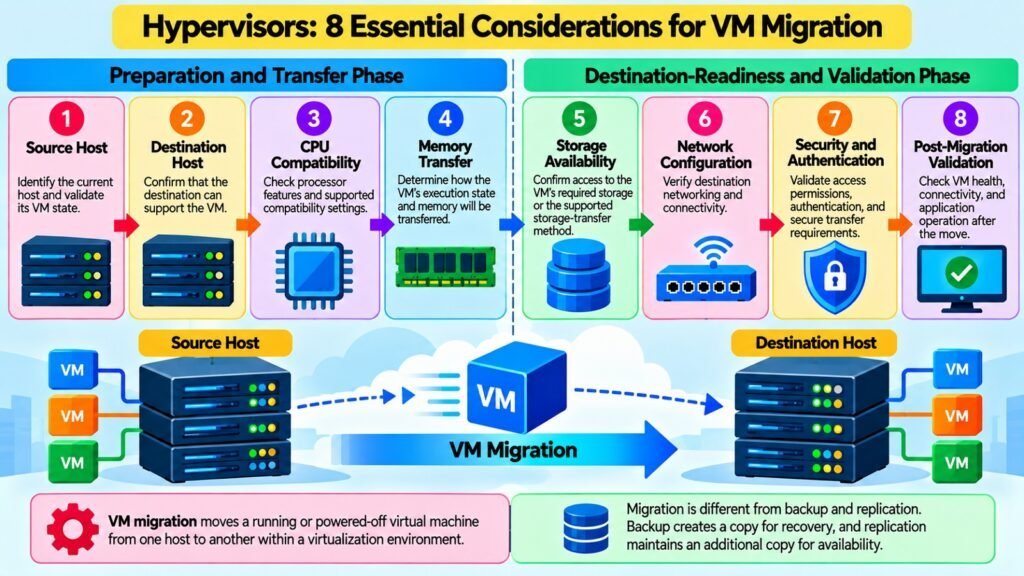
Migration moves a VM between physical hosts or supported environments. Cold migration relocates a powered-off machine, which is simple but entails downtime. Live migration moves a running machine with limited service interruption by transferring execution state, memory contents, and configuration while preserving storage access and network identity, although details differ between hypervisors and platforms. Neither mode is universally preferable.
The classic pre-copy approach, described by Clark et al. (2005), copies memory pages iteratively while the guest continues to run, resends pages dirtied during each round, and finally pauses the machine briefly to transfer the remaining state. Post-copy variants resume execution on the destination first and fetch pages on demand (Hines et al., 2009). Migration time and downtime depend on the guest’s page-dirtying rate, available bandwidth, platform implementation, and configuration, so a write-intensive database may converge far less readily than an idle server. Some platforms can deliberately throttle a busy guest so that the copy converges.
Storage deserves separate treatment, because relocating execution state is cheaper than relocating data. With shared storage, only memory and device state cross the network, whereas storage migration must copy virtual disks as well, which can dominate total duration for large volumes. Network continuity is typically preserved by retaining the machine’s addresses and announcing its new location on the local network, which is simpler within a single Layer 2 domain than across routed sites.
Prerequisites matter: source and destination typically need compatible processor features, reachable storage, sufficient spare resources, adequate network connectivity, and security controls such as encrypted transfer, and migration across different hypervisor platforms is not generally transparent. When these conditions hold, migration supports host maintenance, workload balancing, hardware replacement, and some availability objectives. It is not, however, backup, replication, or disaster recovery, even though it can complement each, so operators should validate workload health, connectivity, data consistency, and application behavior after any move.
Table 9: Migration Considerations for Hypervisors
| Migration Consideration | Technical or Operational Significance |
| Live versus cold migration | Trades downtime against implementation complexity |
| Pre-copy memory transfer | Iteratively resends pages dirtied during transfer |
| Page-dirtying rate | High write activity prolongs convergence and downtime |
| Processor compatibility | Mismatched features can block or restrict migration |
| Storage architecture | Shared storage avoids disk copying; otherwise transfer time grows |
| Network bandwidth | Limits transfer speed and total migration duration |
| Security of transfer | Memory contents require encrypted, authenticated channels |
| Post-migration validation | Confirms health, connectivity, and data consistency |
Conclusion: Hypervisors in Cloud Computing and Their Future
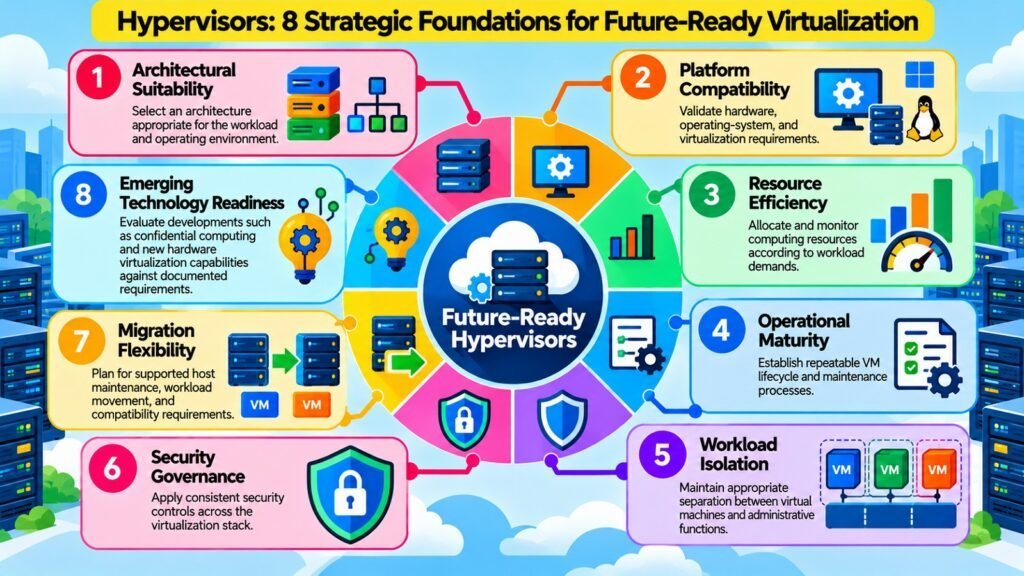
Hypervisors are important aspects of cloud computing because they make shared infrastructure divisible, governable, and portable. Architecture establishes what is technically possible, Type 1 and Type 2 designs distribute control differently between hardware and host software, lifecycle management and resource allocation determine how that capability is operated, isolation and security determine whether it can be trusted, and migration extends it across time and hardware. Read together, these topics describe one system rather than eight separate subjects. Treating the layers independently invites gaps at their boundaries, where responsibilities are most often assumed rather than assigned.
Effective deployment consequently requires more than selecting a product. It depends on architectural suitability, careful resource planning, appropriate workload placement, secure configuration, operational governance, and dependable lifecycle management, and the right combination varies with performance objectives, security requirements, infrastructure constraints, and operating model, so context governs every decision.
Some developments are well grounded in current technical work. Hardware-assisted virtualization continues to mature; confidential computing technologies such as AMD SEV-SNP and Intel TDX aim to shield guest memory even from the hypervisor, and minimal monitors such as Firecracker (Agache et al., 2020) show how lean designs can serve multi-tenant services. Heterogeneous accelerators and adaptive workload placement remain active research areas whose outcomes are unsettled. Understanding hypervisors will stay valuable for researchers, cloud architects, infrastructure engineers, and technology decision-makers.
Table 10: Key Takeaways on Hypervisors
| Aspects | Key Takeaway |
| Hypervisor Architecture | Mediates CPU, memory, and I/O through hardware-assisted mechanisms |
| Type 1 Hypervisors | Strong data-center fit; implementations differ materially |
| Type 2 Hypervisors | Convenient for development; host security is critical |
| VM Management | Lifecycle discipline prevents sprawl and drift |
| Resource Allocation | Utilization must be balanced against predictable performance |
| VM Isolation | Logical separation is valuable but not absolute |
| Hypervisor Security | Layered, complementary controls are necessary |
| VM Migration | Enables flexibility but is not backup or recovery |