Table of Contents
Introduction: Robotics Architecture as the Foundation of Modern Robotics
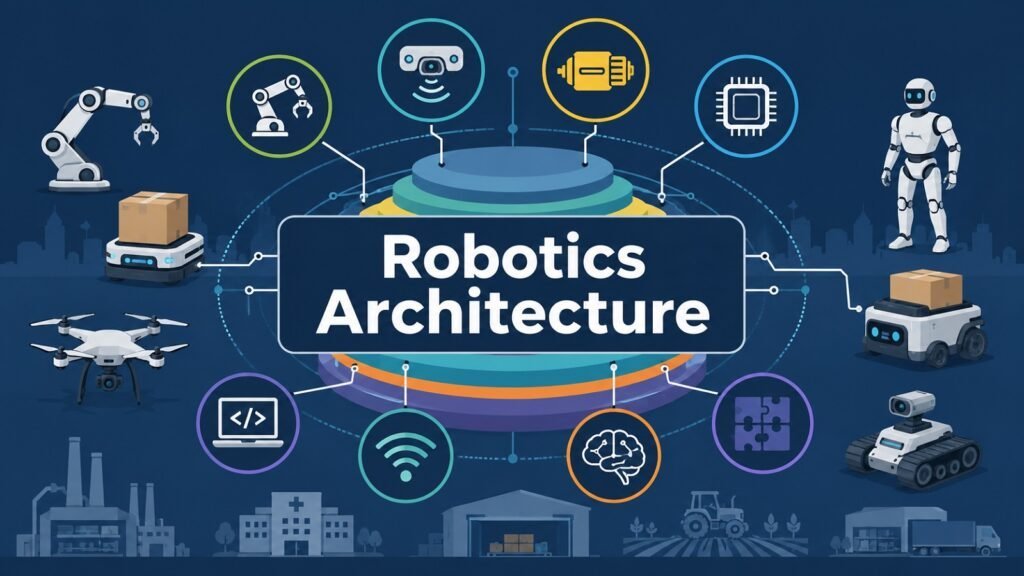
Robotics has come a long way. It started with stiff, simple machines bolted to factory floors. Today, robots can see, think, and move through spaces nobody planned for them. This did not happen by accident. Engineers learned to organize complex systems into clear layers. That organizing plan is what we call Robotics Architecture. It is the blueprint that lets a robot act like one team, not a pile of separate parts. Robotics Architecture is a key aspect of Modern Robotics. It ties hardware, sensing, motion, control, software, communication, and intelligence into one working system.
In simple words, Robotics Architecture is the plan behind how every part of a robot talks to every other part. In more technical terms, it is the layered setup of physical, computing, and network systems that work together to create reliable robot behavior. Factories use it for steady, repeatable output. Hospitals use it for surgical precision. Warehouses use it to keep robots moving without crashing into each other. Farms, defense projects, home devices, and even space missions rely on the same basic idea, just shaped for their own needs.
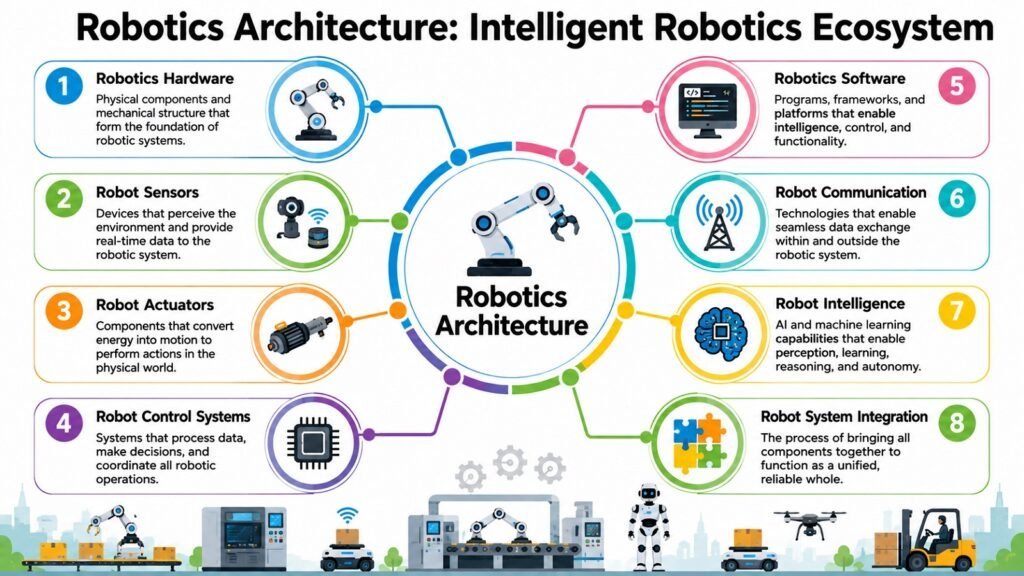
This guide covers that idea in eight parts. We will look at hardware, sensors, actuators, control systems, software, communication, intelligence, and system integration. Each part builds on the one before it. Every section mixes plain explanation with real industry examples, so nothing feels too abstract. By the end, you will not just know what Robotics Architecture means. You will see how it quietly shapes what a robot can and cannot do.
Table 1: Robotics Architecture — Eight Core Aspects at a Glance
| Aspect | Role in Robotics Architecture |
| Hardware | Gives the robot its physical body |
| Sensors | Lets the robot sense its surroundings |
| Actuators | Turns commands into physical motion |
| Control Systems | Links sensing and motion together |
| Software | Acts as the robot’s digital brain |
| Communication | Connects parts, robots, and networks |
| Intelligence | Powers learning and smart decisions |
| System Integration | Ties every layer into one robot |
1. Robotics Hardware: The Physical Foundation of Robotics Architecture
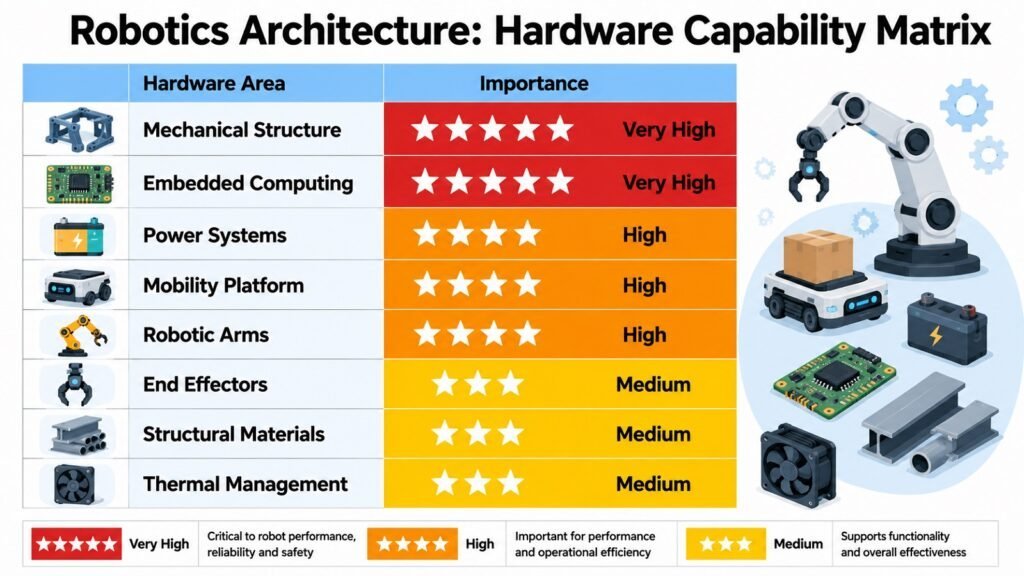
Every robot starts as a physical object. Before it can be smart, it needs a body. That is the job of Robotics Hardware. Frames, robotic arms, wheels, joints, chips, wiring, and batteries make up this body. Robotics Architecture arranges these pieces so they act as one unit, not scattered parts. Without solid hardware, no software can fix a shaky arm or a dead battery.
Basic engineering rules guide most hardware choices. A stiffer frame gives better precision. Better joints give a wider range of motion. A bigger battery gives longer run time. These are not small details. They set limits on everything a robot will later be asked to do. A warehouse robot needs to be light and long-lasting. A welding arm on a car line needs to be strong and steady instead.
Different jobs call for different hardware, and the difference runs deep. Collaborative robots, often called cobots, use light frames and soft joints so they can work safely next to people. Warehouse robots use small wheeled bases built for narrow aisles and long shifts. Medical robots need very fine joints, sometimes accurate to a fraction of a millimeter, since surgery leaves no room for error. Farm robots must survive dust, rain, and rough ground, so their design favors toughness over polish. Humanoid robots add even more challenge, since walking on two legs needs many actuators and sensors packed into a human-like shape.
Engineers rarely get to chase just one goal. Cost, strength, speed, and upkeep all pull against each other. A tougher frame usually weighs more and drains power faster. A cheaper chip may not keep up with live sensor data. Every hardware choice inside Robotics Architecture is really a trade-off, shaped by the exact job the robot must do.
Hardware is not a standalone piece of tech. It is one layer inside a bigger system. Good hardware sets the ceiling for what a robot can become, since sensors, actuators, and software all sit on top of it. A weak frame limits growth long before software ever becomes the problem. Getting the body right lets every other layer of Robotics Architecture do its job properly.
Table 2: Robotics Architecture — Hardware Components and Their Roles
| Hardware Component | Architectural Role |
| Structural Frame | Gives the robot rigidity and support |
| Robotic Arm | Allows reach and handling tasks |
| Mobile Platform | Lets the robot move around |
| Joints | Allow controlled turning or sliding motion |
| Embedded Processors | Handle onboard computing tasks |
| Power Systems | Supply and manage energy |
| Onboard Electronics | Link sensors, motors, and chips |
| Chassis Materials | Balance weight, strength, and cost |
2. Robot Sensors: Enabling Perception in Robotics Architecture
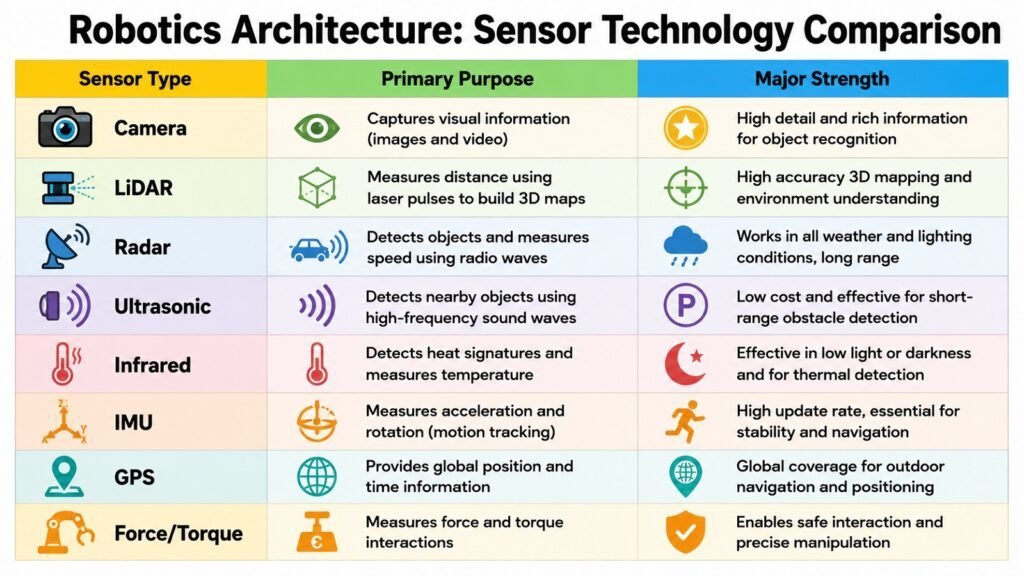
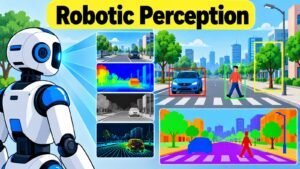
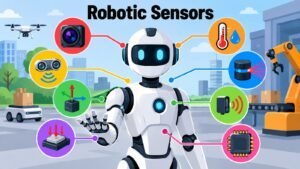
A robot without sensors is nearly blind. It moves through the world by guesswork, not fact. Robot Sensors give a machine the power to see, hear, and feel what is around it. This sensing layer sits close to the heart of Robotics Architecture. Cameras capture visual detail. LiDAR measures distance with laser pulses. Radar spots motion through fog or dust. Ultrasonic sensors handle close-range detection. Motion sensors track tilt and speed. Force sensors, GPS units, and proximity sensors round out the toolkit a robot uses to build a picture of its world.
No single sensor tells the full story. That is why sensor fusion matters so much in Robotics Architecture. Sensor fusion means blending data from several sensor types so the result is more reliable than any one input alone. A camera may struggle in fog, while radar sees through it just fine. LiDAR gives sharp distance readings but costs more and drains more power than ultrasonic sensors. By mixing these signals, Robotics Architecture lets a robot cover the gaps of one sensor with the strength of another.
Self-driving cars show this idea at full scale. They stack cameras, radar, and LiDAR to build a live model of the road. Warehouse robots use simpler pairs, like LiDAR with proximity sensors, to steer through aisles without hitting shelves or people. Drones lean on GPS and motion sensors to hold a steady flight path. Home and hospital robots depend on cameras and ultrasonic sensors to move carefully around surprises. Factory robots often lean on force sensors so an arm can feel resistance and avoid crushing a delicate part.
Every sensor choice involves trade-offs, not one perfect answer. Sharper sensors cost more, so budgets shape which combos are realistic. Long-range sensors often lose fine detail, while precise sensors often lose range. In rough outdoor settings, toughness can matter more than raw accuracy.
Sensing does far more than dodge obstacles. It feeds navigation, mapping, and safety systems across the whole robot. It shapes how well a robot can react to a situation nobody coded for in advance. Strong sensing is often the clearest sign of whether a robot can handle a truly messy environment.
Table 3: Robotics Architecture — Sensor Technologies and Their Functions
| Sensor Technology | Architectural Function |
| Cameras | Capture visual data for navigation |
| LiDAR | Measures precise distance with lasers |
| Radar | Detects motion in poor visibility |
| Ultrasonic Sensors | Handle close-range obstacle checks |
| Motion Sensors | Track tilt, speed, and direction |
| Force Sensors | Sense contact pressure and resistance |
| GPS Modules | Provide outdoor location data |
| Proximity Sensors | Trigger short-range safety stops |
3. Robot Actuators: Delivering Motion Through Robotics Architecture
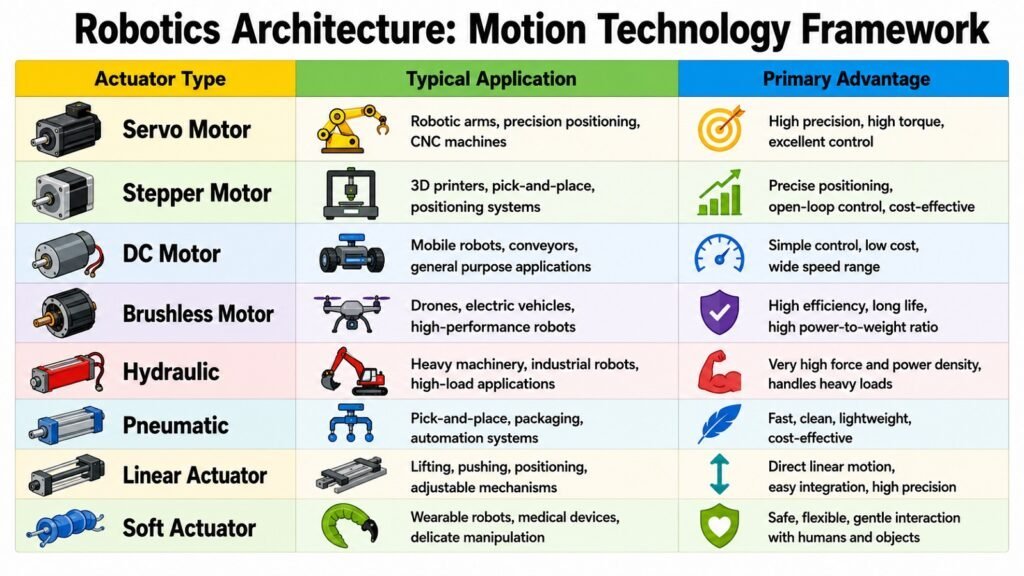
If sensors are a robot’s eyes, actuators are its muscles. Robot Actuators take digital commands and turn them into real motion. That is the entire point of building a robot. Electric motors, servo motors, and stepper motors handle most fine motion tasks. Hydraulic and pneumatic actuators bring raw power for heavy loads. Linear actuators create straight-line push and pull. Compliant actuators allow safe, gentle motion near people, and grippers let a robot pick things up. Robotics Architecture makes sure all these actuators move in step with the sensors and control systems.
Torque, speed, precision, and response time are the numbers engineers really care about. Torque decides how much force an actuator can push out, which matters when lifting heavy loads. Speed decides cycle time, shaping how many tasks a robot finishes each hour. Precision decides how closely a robot repeats the same motion, which counts heavily in surgery and delicate assembly. Power use ties it all together, since faster, stronger actuators tend to drain batteries faster too.
Factory floors lean on servo motors, since they blend speed and accuracy well for repeated tasks. Warehouse robots often use simple electric motors and light grippers, since moving efficiently matters more than lifting heavy things. Healthcare robots often use compliant actuators to keep patients safe during contact. Drones rely on small motors that adjust thrust many times a second to hold steady flight. Humanoid robots need dense clusters of actuators, since walking and balancing demand constant small adjustments across many joints at once.
None of this comes free. Powerful actuators tend to lose fine precision. Very precise actuators often cannot push hard. Faster actuators cost more and burn more power, while slower ones save power but limit output. Engineers weigh these trade-offs against the exact job a robot must do, and Robotics Architecture is the frame that ties those actuator choices back into the rest of the system.
Actuator choice is far from a small detail. It shapes what tasks a robot can physically do, how safely it works near people, and how well it holds up under daily use. Get this layer wrong, and even brilliant software cannot save a robot that moves too slowly, too weakly, or too clumsily for its job.
Table 4: Robotics Architecture — Actuator Types and Applications
| Actuator Type | Primary Application |
| Electric Motors | General precise motion control |
| Servo Motors | High-accuracy repeated positioning |
| Stepper Motors | Motion in fixed, small steps |
| Hydraulic Actuators | Heavy lifting and high force |
| Pneumatic Actuators | Fast, light repeated motion |
| Linear Actuators | Straight push and pull motion |
| Compliant Actuators | Safe motion near people |
| Robotic Grippers | Grasping and holding objects |
4. Robot Control Systems: Coordinating Robotics Architecture
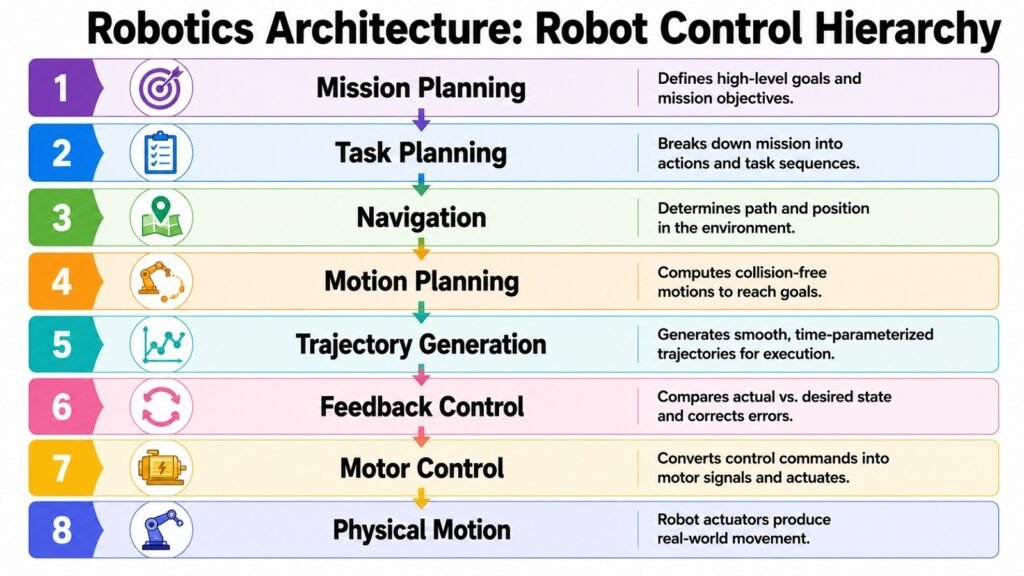
Control systems turn sensing into action. This is one of the busiest spots in Robotics Architecture. Open-loop control just sends commands and does not check the result. It works fine for simple tasks but fails when things change. Closed-loop control checks feedback against a goal and adjusts as it goes. Most robots today use this method. PID control is one common type. It keeps measuring the gap between the goal and the actual result, and smooths out errors along the way.
Beyond these basics, adaptive control lets a system tune its own settings as things shift. This helps robots handle sudden changes in load or terrain. Layered control splits big decisions from small ones, so wide planning does not clash with tiny motor tweaks. Spread-out control shares the work across many chips instead of one computer. This boosts speed and toughness. Motion planning works out the actual path a robot should follow. It weighs speed against safety.
Factories lean on closed-loop and PID control for steady jobs like welding. Robots roaming warehouses or fields use more adaptive control, since their surroundings keep shifting. Surgical robots need very fine closed-loop control, since even a small slip can matter mid-task. Drones blend several methods at once. They tune motor speed many times a second while also planning a wider path. Cobots often use gentle, adaptive control so they can pause the moment they sense contact.
Picking among these options is rarely simple. Uncertain settings call for adaptive or layered control. Steady, known settings can lean on simpler closed-loop methods. Computing power matters too. Sharper control needs more processing, and that competes with other tasks on the same chip. Engineers weigh accuracy against these limits all the time, and the result shapes how sure or shaky a robot feels in motion.
Control systems tie sensing, links, software, and motion into one steady loop. Without this, a robot’s parts would fight each other instead of working together. Control is the backbone of Robotics Architecture. It quietly decides whether a robot moves with confidence or stumbles.
Table 5: Robotics Architecture — Control Approaches and Their Purpose
| Control Approach | Architectural Purpose |
| Open-Loop Control | Runs commands without checking feedback |
| Closed-Loop Control | Adjusts action using sensor feedback |
| PID Control | Shrinks the gap between goal and result |
| Adaptive Control | Tunes settings as conditions shift |
| Hierarchical Control | Separates big and small decisions |
| Distributed Control | Spreads processing across many chips |
| Motion Planning | Maps out safe, efficient paths |
| Trajectory Generation | Sets exact motion steps over time |
5. Robotics Software: The Digital Brain of Robotics Architecture
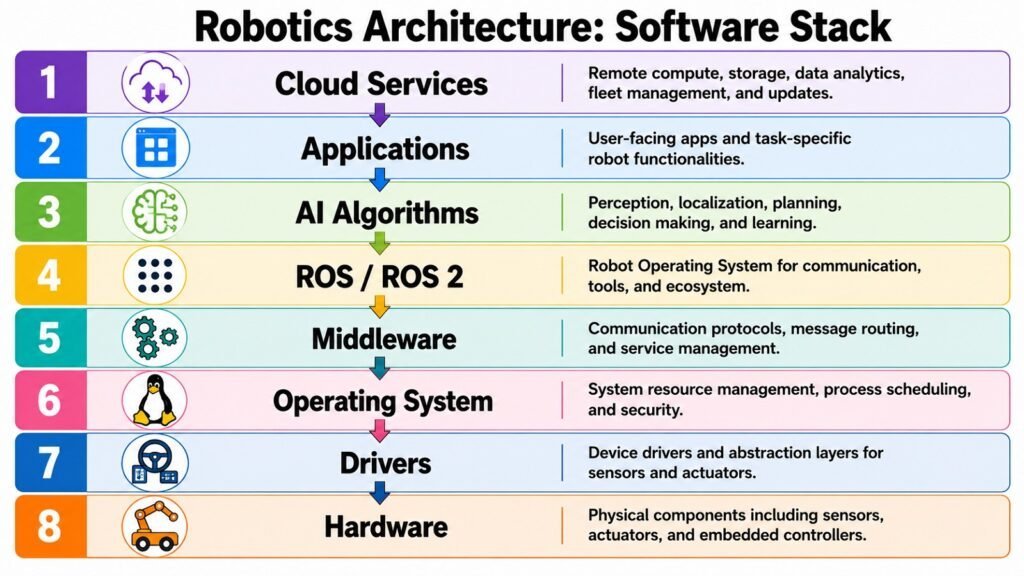
If hardware is the body and control is the reflex, Robotics Software is closer to the mind. Firmware sits closest to the hardware, turning low-level commands into action. Operating systems and middleware sit above that, managing resources and letting programs talk to each other. ROS and its newer version, ROS 2, have become something like a shared language across robotics. They give engineers common tools instead of forcing them to rebuild basics from scratch. APIs let separate software pieces talk cleanly, and simulation tools let engineers test robot behavior safely before it ever touches the real world.
Software shapes far more than daily function. Maintainability decides how easily engineers can fix or update a system years later. Scalability decides whether a plan built for ten robots can grow to a thousand without falling apart. Flexibility decides how easily the same code base can support new hardware or new tasks. Security and portability round out the list, since a networked robot needs protection from intrusion, and code built for one robot should not need a total rewrite to run on another.
Factory robots often favor centralized software for tight, steady control over repeated tasks. Self-driving cars lean toward distributed software, since parts like sensing, planning, and control benefit from running somewhat apart while still talking constantly. Service robots and cobots often build on ROS 2, thanks to its flexible design and strong community support. Warehouse systems increasingly add cloud links into their software, letting fleets of robots share data and coordinate tasks live.
These choices carry real trade-offs. Flexible, modular software is usually harder to build and maintain than a simple, purpose-built system. Centralized designs are easier to reason about but create one point of failure, while spread-out designs resist failure better but are trickier to debug. Portable code takes longer to write but pays off later when a company needs the same code on different robots.
Software is what lets hardware, sensing, intelligence, and control actually talk to each other and to the outside world. As robotics keeps evolving, software increasingly decides how adaptable and future-ready a robot stays, often more than any single piece of hardware ever could.
Table 6: Robotics Architecture — Software Technologies and Their Roles
| Software Technology | Architectural Role |
| Firmware | Runs low-level hardware instructions |
| Operating Systems | Manage computing tasks and resources |
| Middleware | Connects software modules together |
| ROS / ROS 2 | Offers a shared robotics framework |
| APIs | Let software components exchange data |
| Simulation Platforms | Test robot behavior before deployment |
| Cloud Integration | Supports remote data sharing |
| Cybersecurity Layers | Guard systems against intrusion |
6. Robot Communication: Connecting Systems in Robotics Architecture
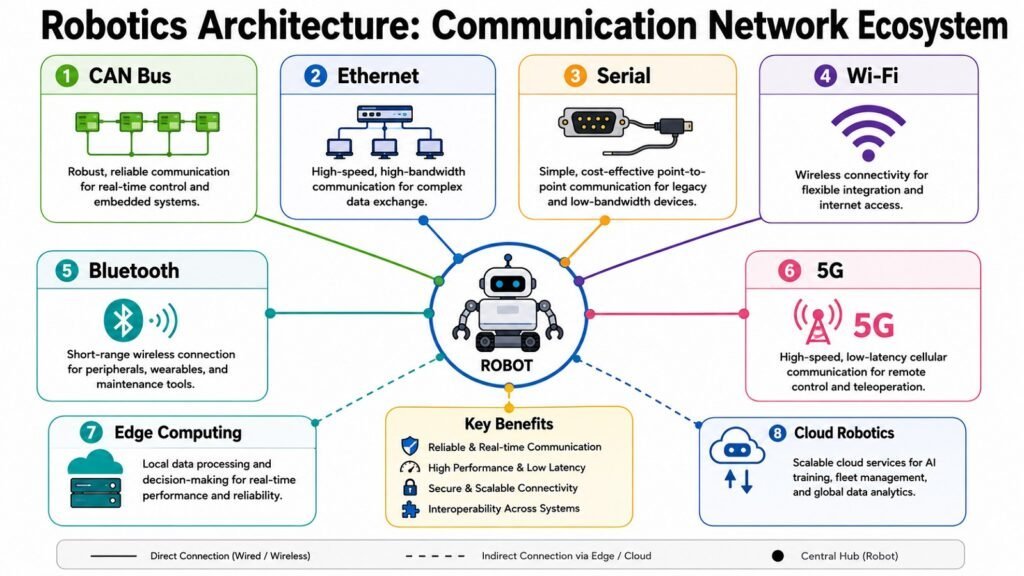
A robot rarely works fully on its own. That is why Robot Communication plays such a big role in Robotics Architecture. CAN bus and serial links move data fast between internal parts like sensors and controllers. Ethernet gives higher-speed links, often used across factory networks. Wi-Fi and Bluetooth reach nearby devices without wires. 5G links mobile robots to wider networks with very little lag. Edge computing crunches data on the spot instead of sending it far away, and cloud robotics lets machines draw on remote power and shared knowledge.
Smart factories use plant networks to keep many machines synced to one shared schedule. Warehouse robots mix Wi-Fi with edge computing so they can react fast to nearby obstacles while still reporting status to a main system. Self-driving cars combine onboard processing with occasional cloud updates, since safety choices cannot wait on network lag. Delivery robots covering large sites often rely on 5G to stay linked across long distances. Cobots increasingly share data between machines, so one robot’s experience can shape another’s next move.
Links inside Robotics Architecture always balance trade-offs. Speed of reply versus size of data is a steady tension, since some tasks need instant replies while others move large loads of data. Wired links tend to be more solid but limit movement. Wireless links offer freedom of motion but risk more interference. One main hub is simple to watch but creates a single weak point. Spread-out links resist failure better but add complexity. Local processing cuts delay, while cloud power helps with tasks that are not urgent.
Solid links allow syncing across many robots, teamwork between different systems, and fast choices even in busy spaces. Links also play a growing role in security, since every connection point is a chance for outside interference. As robotics moves toward linked fleets and shared intelligence, communication has become one of the fastest-changing parts of Robotics Architecture. It often decides how well single robots work as part of a bigger team.
Table 7: Robotics Architecture — Communication Technologies and Functions
| Communication Technology | Architectural Function |
| CAN Bus | Links internal sensors and controllers |
| Ethernet | Supports fast factory networking |
| Wi-Fi | Enables flexible wireless links |
| Bluetooth | Connects nearby short-range devices |
| 5G | Provides low-delay mobile links |
| Edge Computing | Processes data locally to cut delay |
| Cloud Robotics | Shares data and power across robots |
| Industrial Networking | Syncs machines across a facility |
7. Robot Intelligence: Driving Decision-Making in Robotics Architecture
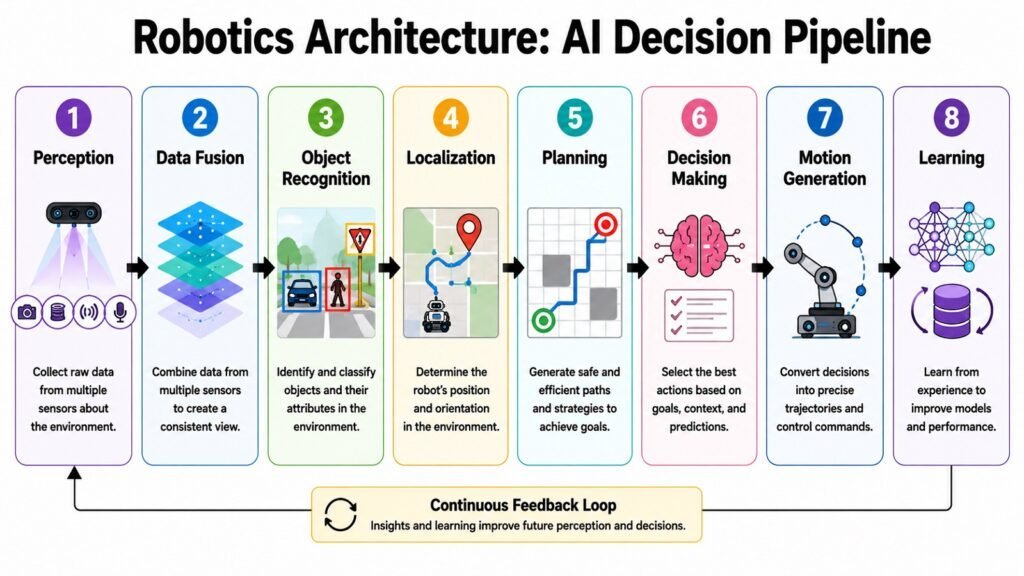
Robot Intelligence is what separates a machine that only follows orders from one that can truly adapt. AI and machine learning let robots improve their behavior based on data, not just fixed rules. Deep learning powers much of modern vision, letting robots spot objects, faces, and scenes with an accuracy that would have seemed unlikely a decade ago. Reinforcement learning lets a robot learn a task through trial and error, sharpening its moves through rewards and penalties. Language processing lets robots grasp spoken or written commands. SLAM lets a robot map an unfamiliar space while tracking its own spot inside it.
Route planning and choice tools tie these pieces together, letting a robot decide not just what it sees but what to do next. Inside Robotics Architecture, intelligence sits above sensing, links, and software. It uses the data those layers gather to make choices nobody coded in by hand.
Self-driving cars pair deep learning with SLAM to read road scenes while tracking their own spot nonstop. Warehouse robots use trial-and-error learning to improve pathfinding after repeat runs through the same building. Medical robots increasingly lean on machine vision to guide surgeons with sharp support during work. Cobots use language tools to accept simple spoken orders from workers on a factory floor. Drones combine SLAM with planning tools to move through indoor spaces where GPS cannot reach.
Every one of these tools brings its own trade-offs. Sharper models usually need more computing power, and that can slow down live response if the hardware cannot keep pace. Complex models can also be harder to explain, and that matters in safety settings where engineers need to know why a robot made a choice. Full automation can be efficient, but many fields still want a human watching, especially where a mistake could cause real harm.
Intelligence turns robots from plain programmed machines into flexible systems able to handle cases their makers never planned for. This shift, from fixed steps to learned behavior, is one of the defining traits of modern robotics. It depends fully on the layers around it in Robotics Architecture to work safely and well.
Table 8: Robotics Architecture — Intelligence Technologies and Contributions
| Intelligence Technology | Architectural Contribution |
| Machine Learning | Improves behavior using past data |
| Deep Learning | Powers advanced visual recognition |
| Computer Vision | Reads images and video live |
| Reinforcement Learning | Refines actions through trial and reward |
| Natural Language Processing | Enables spoken and written interaction |
| SLAM | Builds a map while tracking position |
| Autonomous Navigation | Guides motion through new spaces |
| Planning Algorithms | Decides next actions and task order |
8. Robot System Integration: Unifying Robotics Architecture
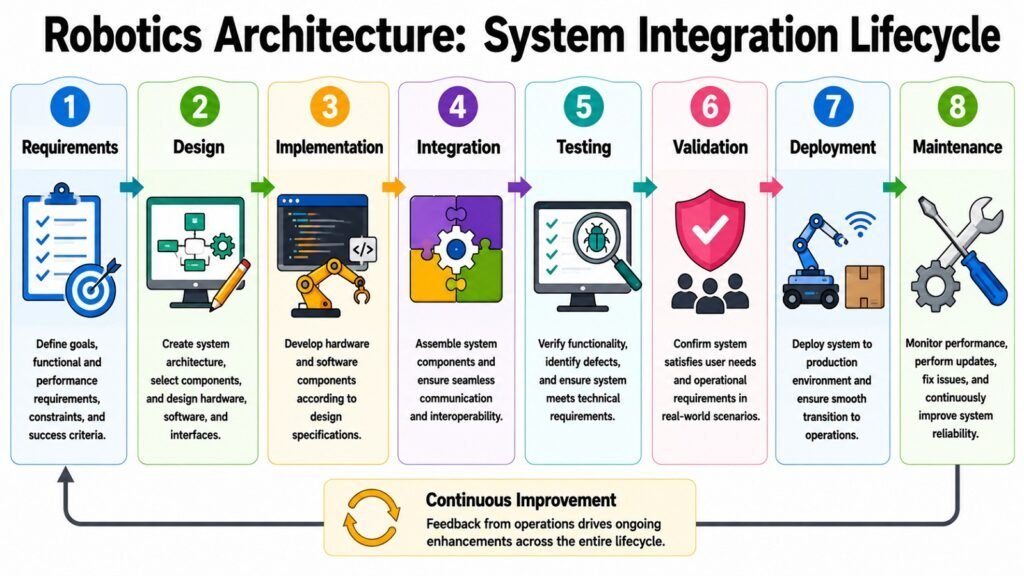
Every layer covered so far – body, sensors, actuators, control, software, links, and intelligence – means little on its own. It needs to work as one system, and that is the job of Robot System Integration. Linking subsystems ties each layer together so data flows right instead of getting stuck in silos. Cross-compatibility makes sure parts from different makers still work inside the same system. Testing confirms a robot acts as expected in normal and odd cases, while sims and digital twins let engineers model a robot’s behavior before spending money on real trials.
Lifecycle tracking follows a robot’s health and upkeep needs from setup through years of use. Reliability work focuses on cutting failure rates and adding backup where safety matters most. Safety rules guide how robots act around people, especially in factories and hospitals. Ongoing tweaks feed real results back into future design choices, closing the loop between use and design.
Factory projects often show how tough this can get, since dozens of machines from different makers must run on one shared schedule without clashing. Self-driving car programs pour huge resources into testing, since even rare edge cases can carry serious weight on public roads. Healthcare robots need extra strict testing, given how much is at stake when a system touches a patient directly. Delivery systems depend on this to keep hundreds of robots moving through shared space without crashes. Cobots rely on it so safety systems respond fast and evenly across every unit on a floor.
Balancing all of this is genuinely hard. More complexity boosts ability but makes systems harder to test fully. Growth needs flexible designs, yet flexibility can clash with tight safety rules. Upkeep matters as much as raw output, since a system that cannot be fixed or upgraded becomes a burden.
Robotics Architecture only works when every layer acts as one system, and this is the craft that makes that happen. It is often called the hardest phase of building a robot, since it exposes every weak link between layers that looked fine on their own. This is what finally turns separate tools into a robot that can solve real problems.
Table 9: Robotics Architecture — System Integration Activities and Purpose
| Integration Activity | Architectural Purpose |
| Subsystem Integration | Links layers into one working system |
| Interoperability Testing | Confirms parts work across makers |
| Simulation and Digital Twins | Models behavior before real deployment |
| Lifecycle Management | Tracks health across a robot’s service life |
| Reliability Engineering | Cuts failure rates and adds backup |
| Functional Safety Validation | Ensures safe operation around people |
| Continuous Improvement | Feeds real data into future designs |
| Field Testing | Confirms performance under real use |
Conclusion: The Future of Robotics Architecture in Intelligent Systems
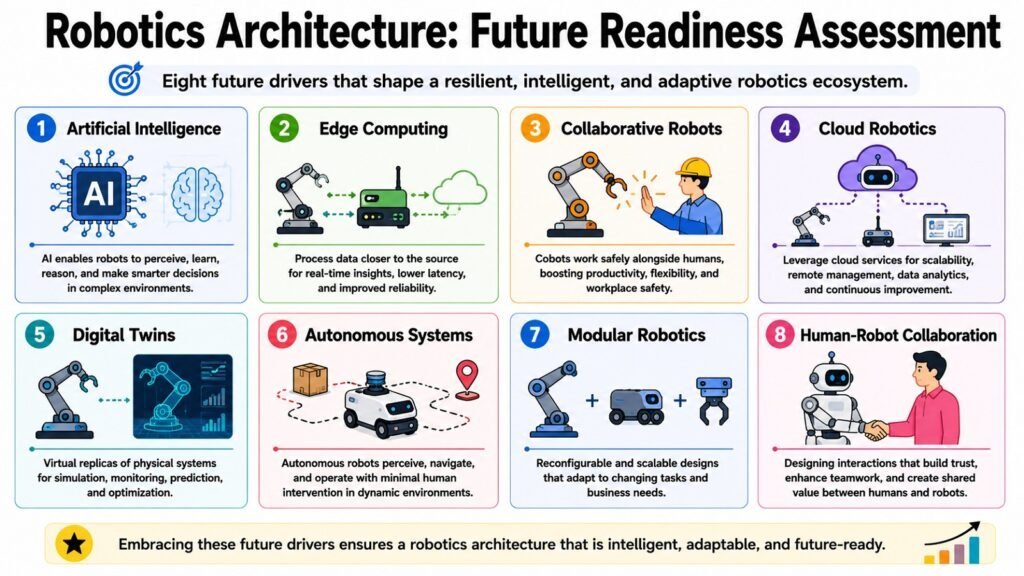
Robotics Architecture is the frame that turns separate technologies into one working robot. Hardware gives the body, sensors give awareness, actuators give motion, and control systems tie sensing and movement together in real time. Software acts as the digital brain, communication links parts and fleets, intelligence drives smart decisions, and system integration binds every layer into one steady whole. None of these eight layers does much alone. Together, they let robots sense, decide, move, and adapt across places that keep growing more complex.
This is exactly why Robotics Architecture counts as a key aspect of Modern Robotics. It makes growth possible, letting a design built for one robot scale into a fleet of thousands. It makes cross-compatibility possible, letting machines from different makers cooperate. It supports toughness when conditions shift, smart choices when steps cannot be fully pre-planned, and safety when robots share space with people.
Looking ahead, a few trends will keep reshaping this frame. AI-native robotics is starting to treat intelligence not as an add-on but as a core design choice from day one. Edge intelligence is pushing more decisions onto the robot itself, cutting reliance on faraway servers. Cloud robotics keeps letting machines share knowledge across whole fleets. Cobots are becoming more common as gentle actuators as safer control systems mature. Modular platforms are making it easier to reshape hardware for new tasks without starting over, and digital twins are giving engineers a virtual test ground long before a physical robot exists.
None of these advances will matter much without steady progress in the underlying frame that supports them. Future leaps in robotics will need more than clever sensors or faster chips. They will need better ways of fitting all these layers together. Understanding Robotics Architecture means understanding the foundation beneath nearly every advance in modern robotics, and that foundation will only grow more important as robots take on roles that are more independent, more connected, and more demanding.
Table 10: Robotics Architecture — Eight Layers and Key Takeaways
| Architectural Layer | Key Takeaway |
| Hardware | Sets the physical ceiling for all ability |
| Sensors | Shapes the quality of awareness |
| Actuators | Defines precision, strength, and speed |
| Control Systems | Syncs sensing with real-time action |
| Software | Enables growth and long-term flexibility |
| Communication | Connects parts, robots, and networks |
| Intelligence | Drives independent, smart decisions |
| System Integration | Unifies every layer into one robot |