Table of Contents
Introduction — Safe Browsing: A Foundation of Digital Safety
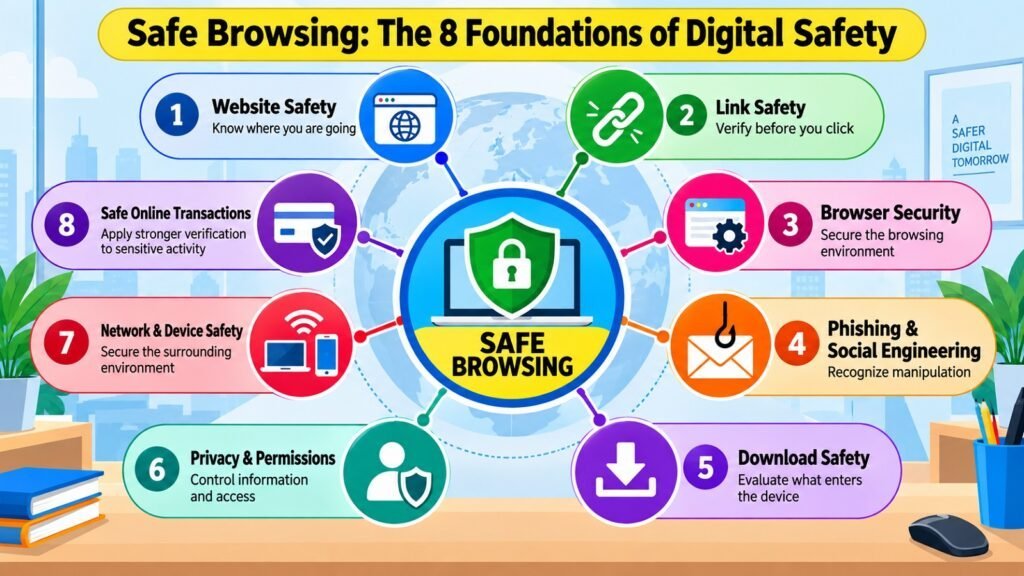
Most people think of safe browsing in narrow terms — avoiding suspicious downloads, not clicking unknown links, or using a reputable browser. These habits matter, but they cover only part of a much broader discipline. Safe browsing is an important aspect of overall Digital Safety. It is a deliberate approach to every decision made while navigating the web: which websites to visit and trust, which links to follow, how the browser is configured, how to recognize psychological manipulation, what files to download, how much personal data to share, what network and device conditions are acceptable, and how carefully to act when sensitive transactions are involved.
The modern web creates risks across multiple dimensions at once. Some threats are technical — malicious code, browser vulnerabilities, intercepted connections. Others are perceptual — convincing counterfeit websites designed to pass casual inspection. Still others are behavioral — social engineering that exploits urgency, authority, or fear to push users into acting before they think. No single tool or habit addresses all of these categories, which is why browsing safely requires a structured framework rather than a scattered collection of tips.
This article presents safe browsing as eight interconnected foundations. Together, they describe the full scope of browsing safely and deliberately, built around a consistent principle: pause, verify, evaluate, protect, proceed carefully, and know how to respond when something goes wrong.
Safe Browsing: Eight Foundations at a Glance
| Foundation | What It Addresses |
| Website Safety | Evaluating whether a website is legitimate and appropriate for the intended activity |
| Link Safety | Assessing the path and destination before following any link, QR code, or redirect |
| Browser Security | Configuring the browser as a secure technical environment for all web activity |
| Phishing & Social Engineering | Recognizing and resisting psychological manipulation designed to override careful judgment |
| Download Safety | Evaluating files and applications before allowing them into the device environment |
| Privacy & Permissions | Limiting data exposure and unnecessary access to device capabilities while browsing |
| Network & Device Safety | Adapting caution to the security context of the network and device in use |
| Safe Online Transactions | Applying heightened verification when browsing involves money, credentials, or sensitive data |
1. Safe Browsing and Website Safety
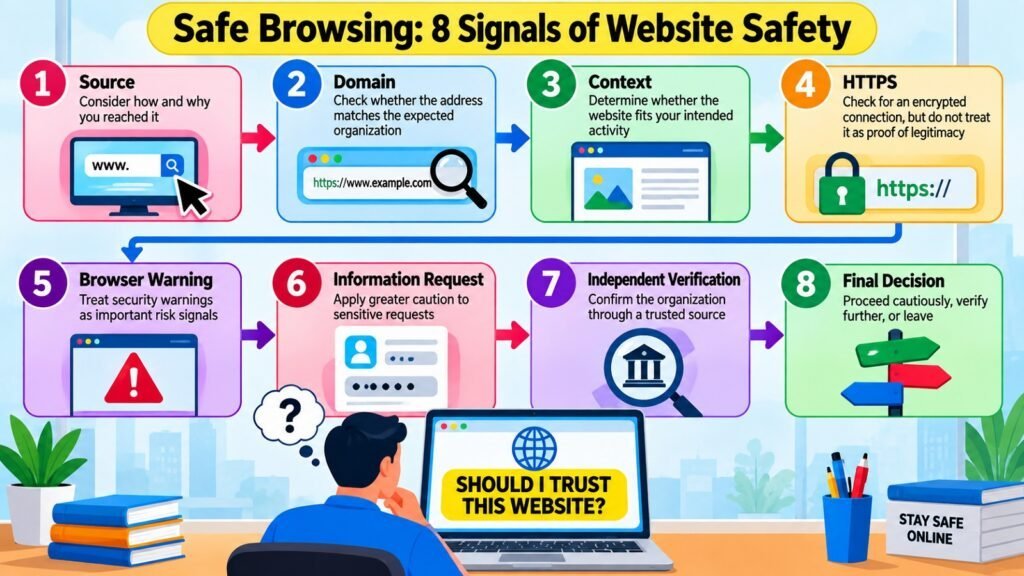
Website safety is the logical starting point for safe browsing because every session begins with a destination. Before a user reads content, fills a form, or makes a purchase, the fundamental question is whether the website is what it claims to be. Legitimate websites, deceptive websites, compromised websites, and malicious websites can all look visually similar at a glance. A phishing site may replicate a bank’s design so faithfully that the difference is invisible without deliberate inspection. A compromised website may once have been entirely trustworthy, while attackers have since injected harmful scripts without changing its appearance.
Several signals help evaluate a website, but no single one is sufficient. Domain names deserve careful attention: lookalike domains that substitute characters, add hyphens, or alter spelling are a common deception technique. HTTPS and the padlock icon confirm that data is encrypted in transit, but the UK National Cyber Security Centre has consistently clarified that this does not confirm the legitimacy of the organization behind the site — attackers routinely obtain valid certificates for fraudulent domains. Suspicious behavior such as excessive pop-ups, unexpected redirects, or prompts to disable browser warnings are also meaningful signals.
Consider a realistic scenario: a user receives an email linking to a professional-looking bank login page with a valid padlock and a domain only slightly different from the real one. Relying on appearance alone, the user proceeds. Applying safe browsing principles, the user instead navigates directly to the bank’s known address through a trusted bookmark, bypassing the email link entirely. This combination of technical signals, contextual judgment, and source verification — rather than any single indicator — is what website safety in practice looks like.
Safe Browsing: Website Safety Signals and Their Meaning
| Signal | What It Means for Safe Browsing |
| HTTPS / padlock icon | Encrypts data in transit; does not confirm the legitimacy of the organization behind the site |
| Lookalike or misspelled domain | Strong indicator of deception; the domain must match the organization’s known address exactly |
| Browser security warning | A detected risk; requires specific justification to proceed, not routine dismissal |
| Unexpected redirect | May indicate a compromised site or a traffic-routing attack |
| Request to disable security settings | A reliable sign the site intends to bypass browser protections |
| Missing contact or registration details | Legitimate sites provide verifiable contact and terms information |
| Artificial urgency on the page | Pressure to act quickly is a common tactic used to prevent verification |
| Unfamiliar payment processor | Sensitive transactions should only use recognized, verifiable payment systems |
2. Safe Browsing and Link Safety
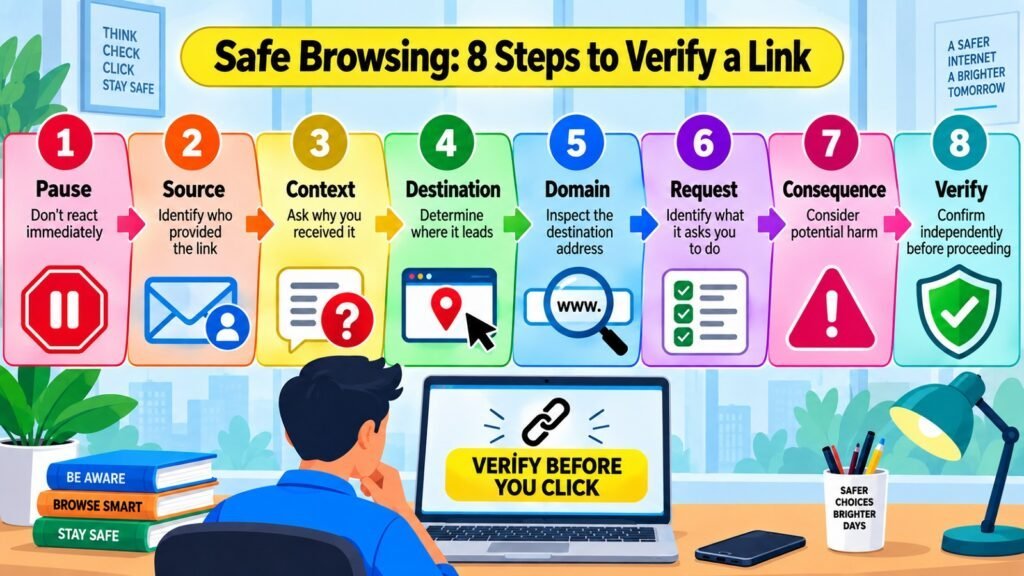
Link safety occupies a distinct place in safe browsing because it governs how a user gets to a destination, not the destination itself. A website can be evaluated on arrival; a link must be evaluated before clicking. This gap is what attackers exploit — a hyperlink can display trusted-looking text while pointing to a completely different and potentially harmful URL.
Links appear in many contexts, each with its own risk profile. Email links are a primary phishing vector, documented extensively by the Anti-Phishing Working Group. Shortened URLs conceal destinations entirely. QR codes bypass visual URL inspection, making it impossible to evaluate the destination before scanning. Links in text messages, social-media posts, and advertisements each add contextual complexity. Social engineering amplifies the risk by crafting messages that create urgency (“Your account will be suspended”), invoke authority (“IT department — reset your credentials now”), or exploit curiosity. Research in behavioral cybersecurity consistently shows that time pressure and emotional arousal reduce deliberate evaluation — precisely the state attackers aim to create.
A safe browsing approach applies a consistent framework before clicking: consider the source, the displayed text versus the actual URL, the destination domain, the context, and the consequences of being wrong. Hovering over a hyperlink on a desktop reveals the actual destination in the status bar. When a link arrives unexpectedly, when its source cannot be verified, or when it directs to a login or payment page, reaching the destination through a trusted independent route is the safer choice.
Safe Browsing: Link Warning Signs and Safer Responses
| Warning Sign | Safer Response |
| Shortened URL concealing the destination | Expand using a preview service or navigate to the site independently |
| QR code from an unverified source | Verify the source and context before scanning |
| Mismatched link text and actual URL | Inspect the full destination URL before clicking |
| Artificial urgency in the message | Slow down deliberately; urgency is a manipulation signal, not a reason to act fast |
| Email link to a login or payment page | Navigate to the known official site through a trusted bookmark or typed address |
| Unexpected link from a known contact | Verify with the contact through a separate channel; accounts can be compromised |
| Link in an online advertisement | Exercise caution; malicious advertising can appear on legitimate sites |
| Multiple redirect chain | Redirects can obscure a harmful final destination; independent navigation is safer |
3. Safe Browsing and Browser Security
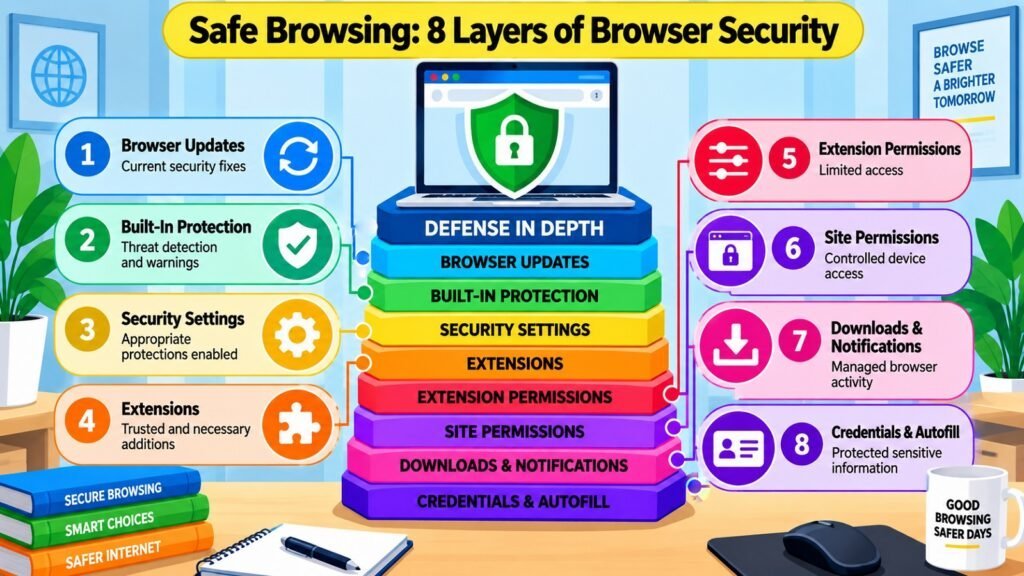
Safe browsing depends not only on what the user decides but also on the security of the environment in which those decisions occur. The browser is that environment, and its configuration directly affects how much protection the user has against threats that operate below the level of conscious decision-making. Some threats are stopped or flagged at the browser level before the user ever encounters them — which is why a cautious user browsing through an outdated, poorly configured browser faces substantially more risk than the same user on a well-maintained one.
Browser updates are among the most consequential security actions an ordinary user can take. Security patches address known vulnerabilities — flaws that attackers can exploit to execute malicious code, access stored data, or bypass protections. Google’s Project Zero and similar research teams regularly identify vulnerabilities in major browsers, and vendors respond with patches that must be applied to take effect. Extensions represent an equally important but underestimated part of the attack surface. An extension with broad permissions can read browsing history, intercept form data, and modify page content; extensions have also been acquired by third parties and repurposed for data collection. Minimizing extensions to only those with a clear purpose, from reputable sources, with minimum required permissions, meaningfully reduces exposure.
Built-in safe browsing features in Chrome, Firefox, Edge, and Safari compare visited URLs against known lists of malicious sites, providing automated protection alongside user judgment. Pop-up blockers, notification permissions, autofill settings, and site permissions for camera, microphone, and location are all browser controls that contribute to the overall security posture. Together, they form a complement to user judgment — catching threats that would otherwise require perfect human detection.
Safe Browsing: Browser Controls and Their Security Purpose
| Browser Control | Security Purpose |
| Automatic updates | Applies security patches promptly, closing known vulnerabilities |
| Built-in safe browsing | Compares URLs against known phishing and malware databases to warn users |
| Extension permissions | Limits what each extension can access, reducing impact if one is compromised |
| Pop-up blocker | Prevents unsolicited windows that may contain deceptive content |
| Notification permissions | Stops sites from sending persistent browser notifications used for phishing |
| HTTPS-only mode | Ensures the browser prefers encrypted connections and warns otherwise |
| Saved credential security | Protects stored passwords; exposure risk rises if the device is compromised |
| Site permissions (camera, mic, location) | Controls device capability access on a per-site basis |
4. Safe Browsing and Phishing & Social Engineering
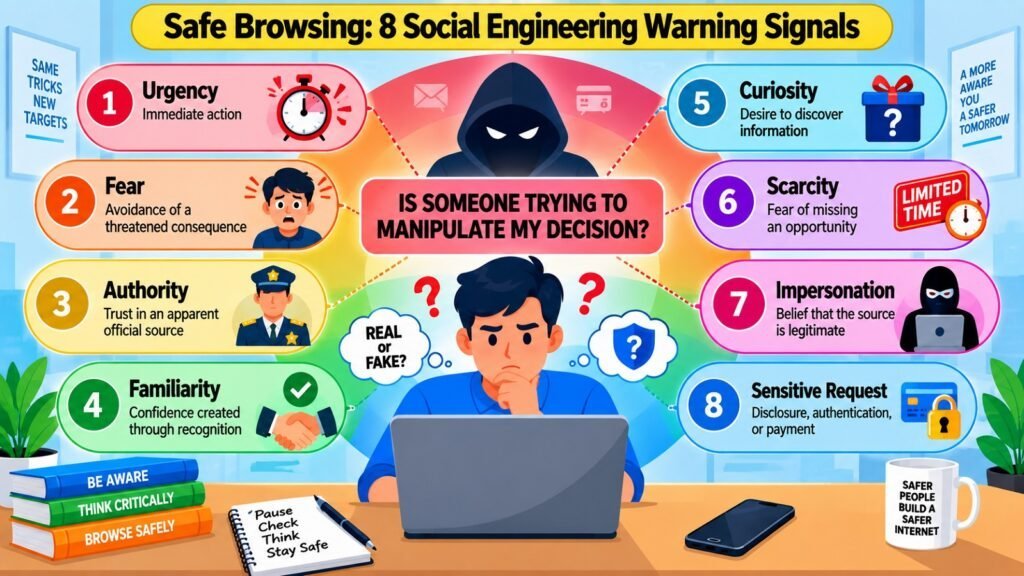
Phishing and social engineering are threats that operate on the user’s psychology rather than on technical vulnerabilities. A well-constructed phishing page may pass every technical inspection — valid HTTPS, a plausible domain, professional design — and still be entirely fraudulent. What makes it dangerous is not a flaw in the technology but a flaw in how the interaction is designed to manipulate judgment. This is why technical tools alone are insufficient: a user who can be emotionally maneuvered into entering credentials on a deceptive page is vulnerable regardless of how well-configured their browser is.
Phishing exploits specific psychological mechanisms: urgency compresses evaluation time; authority triggers compliance; familiarity reduces suspicion; curiosity drives clicks; fear motivates action without deliberate consideration. These triggers are not sophisticated in concept, but they are highly effective because they target how human decision-making works under emotional pressure. Phishing spans multiple channels — email, text message (smishing), voice calls (vishing), and social media — and spear phishing, which uses specific personal information gathered from research, achieves higher success rates than broad impersonal campaigns. CISA identifies phishing as one of the most prevalent initial access techniques across cybersecurity incidents.
Consider this scenario: a user receives an email appearing to be from their cloud storage provider, warning their account will be deactivated unless they verify immediately. The link leads to a convincing login page. A safe browsing mindset interrupts the sequence at the point of the request — the user navigates independently to the provider’s site through a known bookmark. If the alert was genuine, it appears there. If not, the user has avoided entering credentials into a system designed to steal them. The core principle: when a message creates urgency, fear, or authority that pushes toward immediate action — pause and verify independently.
Safe Browsing: Manipulation Techniques and Warning Signals
| Manipulation Technique | Characteristic Warning Signal |
| Urgency and time pressure | Demands immediate action with threats of account loss or legal consequence |
| Authority impersonation | Appears to come from a bank, government agency, or IT department |
| Brand familiarity | Replicates a known brand’s design to lower suspicion |
| Fear of loss or consequence | Warns of unauthorized access or account compromise requiring instant action |
| Curiosity and reward appeals | Notifications about prizes, profile views, or exclusive offers |
| Scarcity and exclusivity | Limited-time offers creating pressure to act before thinking |
| Spoofed sender addresses | Email addresses appearing legitimate but containing slight variations |
| Unusual credential or payment requests | Legitimate services rarely request passwords or payments via unsolicited email |
5. Safe Browsing and Download Safety
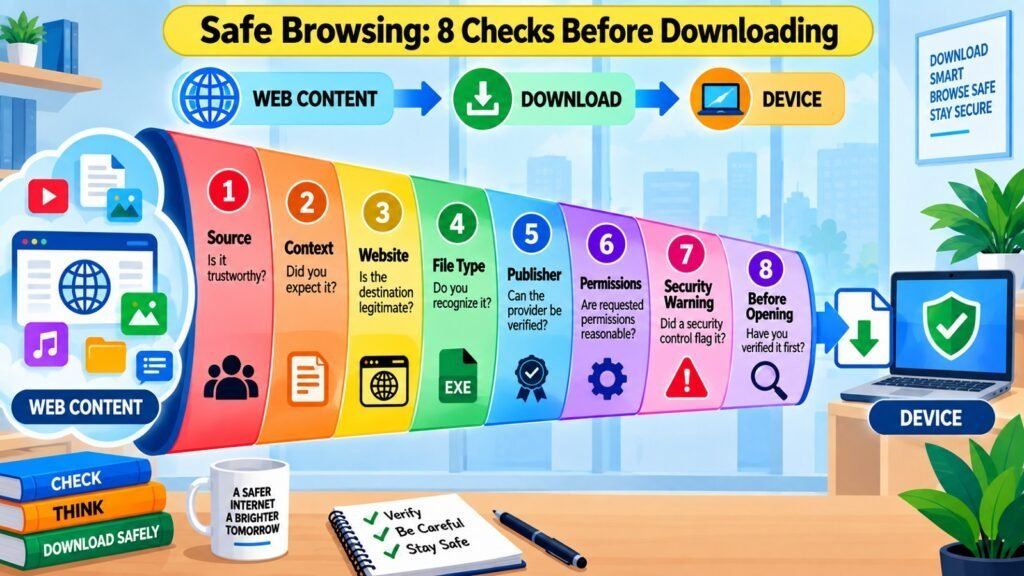
Safe browsing extends naturally to downloads because the moment a file, application, or extension enters a device, the risk profile changes fundamentally. Consuming web content — reading an article, watching a video — is passive. Downloading is active: it introduces external material into the device environment where it may execute code, request permissions, and interact with other software and data. The distinction matters because it marks the point at which a browsing decision becomes a device security decision.
Fake update prompts — browser windows styled to look like official system notifications — are a long-documented technique for distributing malicious software. Unofficial software sources, file-sharing platforms, and torrent sites routinely bundle additional software, modified installers, or outright malware with legitimate-looking applications. CISA, the UK’s NCSC, and the US Federal Trade Commission consistently advise downloading software only from official sources. File type is a meaningful but incomplete signal: executables and macro-enabled documents are capable of running code, but PDF files and image files can also contain exploits targeting vulnerabilities in the software that opens them.
Consider a user who searches for a free version of a paid application and downloads an installer from a professional-looking third-party site. The application works as expected — but a background component is capturing keystrokes and transmitting them externally. Safe browsing interrupts this at source evaluation: is this the official website? Is the software available through a verified channel? If the answers are uncertain, downloading from that source is not the right decision, regardless of how the page looks.
Safe Browsing: Download Risks and Safer Principles
| Download Risk | Safer Principle |
| Fake browser or software update prompts | Apply updates through the software itself or official system settings, not browser pop-ups |
| Software from unofficial third-party sites | Download only from the official developer site or a platform-verified app store |
| Pirated or cracked software | Cracked software frequently contains malware that cannot be detected externally |
| Office documents with macros from unknown senders | Keep macro execution disabled by default; enable only for verified, trusted sources |
| Unexpected or uninitiated downloads | A browser-initiated download without a deliberate user action should be treated as suspicious |
| Extensions from unverified sources | Install only from official browser stores; review permissions before accepting |
| Executable files via email or messaging | Legitimate services rarely send executables; verify with the sender separately |
| Installers bundling additional software | Review installer options carefully and opt out of pre-selected additional programs |
6. Safe Browsing and Privacy & Permissions
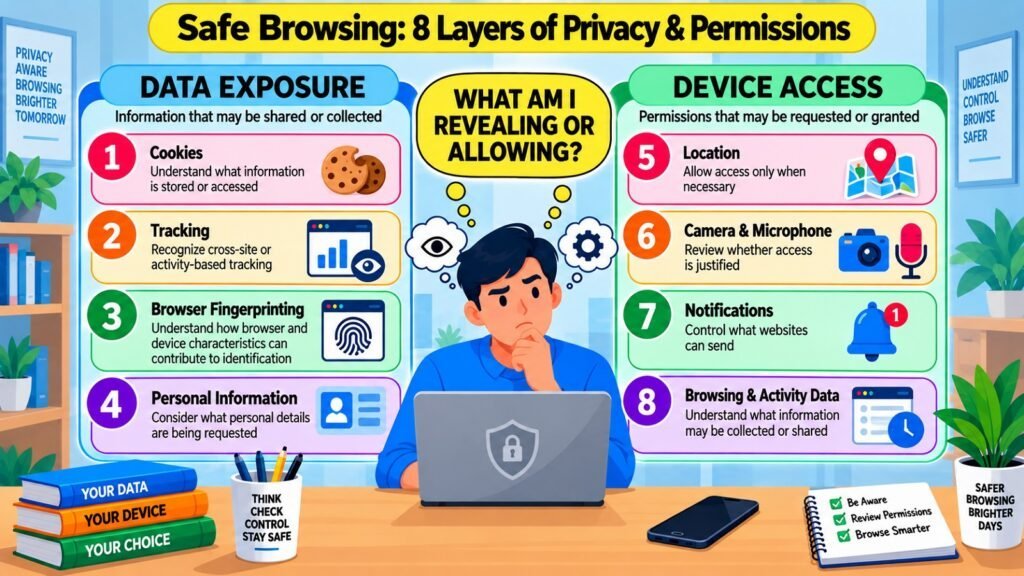
Privacy is a dimension of safe browsing that is sometimes treated separately from security, but the two are deeply intertwined. A website can create meaningful risk without installing a single piece of malicious software — by collecting data, tracking behavior, or requesting access to device capabilities beyond what its function reasonably requires. This form of exposure is often invisible to the user, which makes understanding its mechanisms an important part of browsing deliberately.
Websites collect data through several channels. Cookies track sessions and can persist across visits to build behavioral profiles. Third-party trackers — scripts from advertising networks, analytics services, or social-media platforms — follow users across many different websites. Browser fingerprinting uses technical characteristics such as screen resolution, installed fonts, and time zone to identify a device without relying on cookies at all.
The EU’s General Data Protection Regulation (GDPR) and similar frameworks require user consent for certain categories of data collection precisely because these mechanisms do not require active participation. Permission requests are more visible: a website may ask for location, camera, microphone, or notification access. Some requests are proportionate — a mapping app legitimately needs location. Others are not, and the principle of minimum necessary permissions provides a practical standard: grant only what a service genuinely requires to function.
Safe browsing integrates privacy awareness into website evaluation. Before granting any permission, ask: does this site’s function actually require this access? What happens if I decline — does the core service still work? A site that becomes non-functional after a location permission is denied, when location is clearly irrelevant to its purpose, is exhibiting a disproportionate data collection approach.
Safe Browsing: Website Data Practices and Privacy Considerations
| Website Practice | Privacy Consideration |
| Session cookies | Generally necessary for login; low risk when not used for long-term cross-site tracking |
| Third-party tracking scripts | Can build behavioral profiles across many sites; content blockers reduce this exposure |
| Browser fingerprinting | Identifies devices without cookies; not blocked by standard cookie controls |
| Location permission | Justify before granting; mapping or delivery services may need it, content sites typically do not |
| Camera or microphone permission | Grant only to video conferencing or voice services with a clear functional need |
| Notification permission | Unnecessary for most sites; can be exploited for persistent phishing messages |
| Autofill with personal data | Convenient but can expose name, address, and payment details to deceptive form capture |
| Extensive form data collection | Forms requesting more than the service requires indicate disproportionate data collection |
7. Safe Browsing and Network & Device Safety
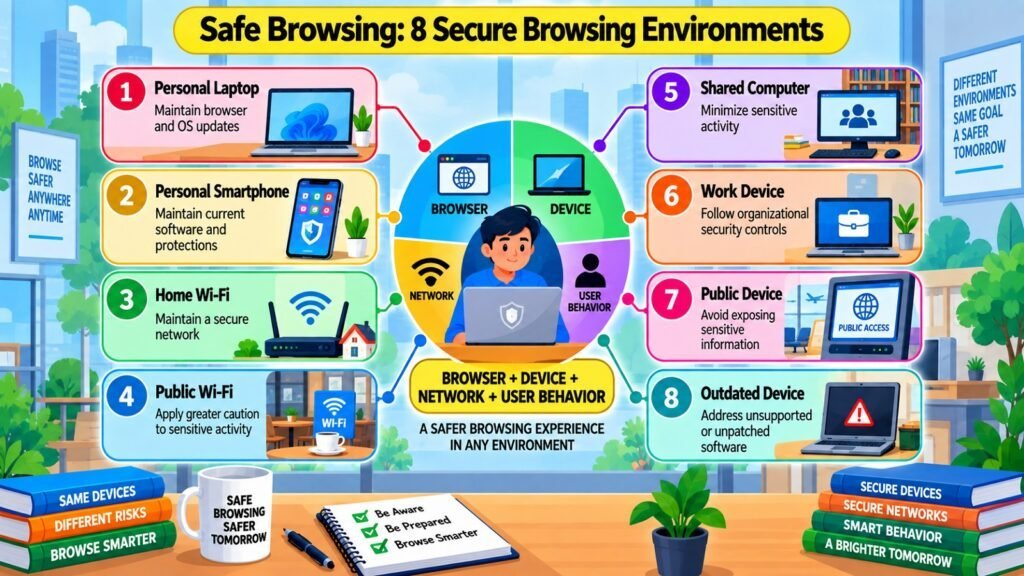
The browser does not operate in isolation — it runs on a device connected through a network. Both introduce conditions that affect the overall security context of a browsing session. Safe browsing cannot be fully separated from these environmental factors because they determine the baseline level of protection available before any individual browsing decision is made.
A home network that is password-protected, regularly updated, and running current firmware provides a reasonably secure connection for everyday browsing. Public Wi-Fi networks — in airports, cafes, and hotels — are shared environments where users do not know who else is connected or how the network has been configured. A network set up to intercept traffic (a so-called “evil twin” access point) is detectable only through technical investigation most users will not perform. Consistent use of HTTPS substantially reduces data exposure even on less trusted networks, because the connection to the server remains encrypted. A VPN adds an additional layer for sensitive activity on untrusted networks, though the VPN provider itself then becomes a trusted party whose practices the user should verify.
Device condition matters equally. Outdated operating systems — those no longer receiving security patches — contain documented vulnerabilities exploitable through browser-based attacks. Shared devices — a family computer, a library terminal — introduce risks from stored credentials, active sessions, and potentially compromised software. The safe browsing principle here is proportionality: caution should match the environment. On a trusted personal device, standard safe browsing habits suffice. On a shared device or public network, avoid sensitive activities, use a private browsing session, and log out completely when finished.
Safe Browsing: Browsing Environments and Key Considerations
| Browsing Environment | Key Safe Browsing Consideration |
| Personal device, home network | Maintain updates and apply standard safe browsing habits for everyday activity |
| Personal device, public Wi-Fi | Avoid sensitive transactions; use HTTPS-only mode; consider a reputable VPN |
| Shared household device | Avoid saving credentials; log out completely; use a private browsing session |
| Workplace or organizational network | Follow organizational security policies; network traffic may be monitored |
| Public computer or library terminal | Avoid logging into sensitive accounts; never save passwords; clear browsing data |
| Outdated operating system | Elevated risk; limit sensitive activity and prioritize upgrading to a supported version |
| Mobile device on cellular data | Generally more trusted than public Wi-Fi; standard safe browsing habits apply |
| Hotel or hospitality Wi-Fi | Treat as untrusted; avoid sensitive transactions or use a VPN as an additional measure |
8. Safe Browsing and Safe Online Transactions
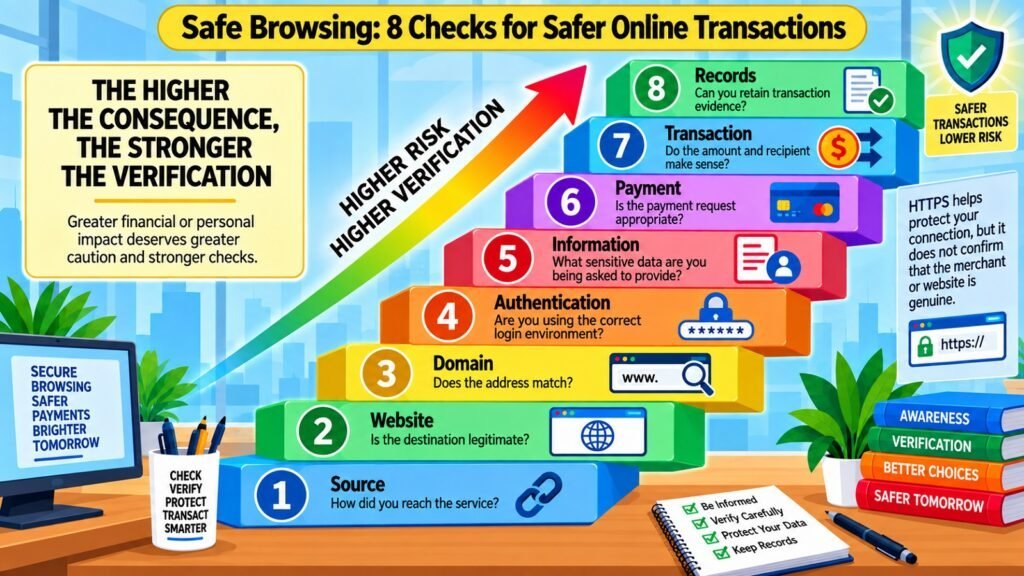
Every safe browsing decision carries some level of risk, but not all risks are equal. When browsing involves money, authentication credentials, identity information, or access to organizational systems, the cost of a wrong decision rises sharply — and so should the standard of verification. This is the principle underlying safe online transactions as a distinct foundation of safe browsing: risk should be evaluated not only by the likelihood of a threat but also by the consequence if the decision is wrong.
Online banking, e-commerce, payment processing, healthcare platforms, government portals, and workplace authentication systems all necessitate information that could lead to significant damage if obtained by an unauthorized individual. A compromised card number can be exploited within moments. Breached credentials for a financial account can provide an attacker with ongoing access that extends well beyond the initial session. The AARP Fraud Watch Network, along with other consumer protection organizations, consistently identifies phishing and impersonation fraud as some of the most expensive types of online fraud, often succeeding when the victim is under the impression that they are engaging with a legitimate service.
Safe browsing in high-consequence contexts requires independent destination verification as a default. Before entering banking credentials, reach the site through a trusted bookmark or a directly typed known address — not through an email link, a search result advertisement, or any unsolicited message. Multi-factor authentication, when offered, provides a meaningful additional barrier even if credentials are captured. Legitimate financial institutions rarely demand immediate action through email, rarely request full credentials through unfamiliar pages, and never ask for payment via gift cards, wire transfers, or cryptocurrency as alternatives to standard methods. Understanding the expected behavior of legitimate services provides the baseline against which suspicious requests can be recognized and rejected.
Safe Browsing: Sensitive Activities and Verification Principles
| Sensitive Online Activity | Key Verification Principle |
| Online banking login | Navigate directly to the bank’s known address; never use login links from emails or messages |
| E-commerce checkout | Verify the retailer’s domain; use a recognized payment processor and a card with fraud protection |
| Account password reset | Initiate resets from the official site; do not follow reset links from unsolicited emails |
| Government services and identity verification | Access only through official government domains verified independently before submitting data |
| Workplace or corporate system login | Use only organization-approved portals; report unexpected authentication requests to IT security |
| Healthcare account access | Verify the portal through the provider’s official website before logging in |
| Subscription or recurring payment setup | Confirm the service’s identity and billing terms before submitting payment details |
| Investment or financial product transactions | Verify the firm’s registration independently; confirm the URL before any transaction |
Conclusion — Safe Browsing: Building Safer Digital Habits
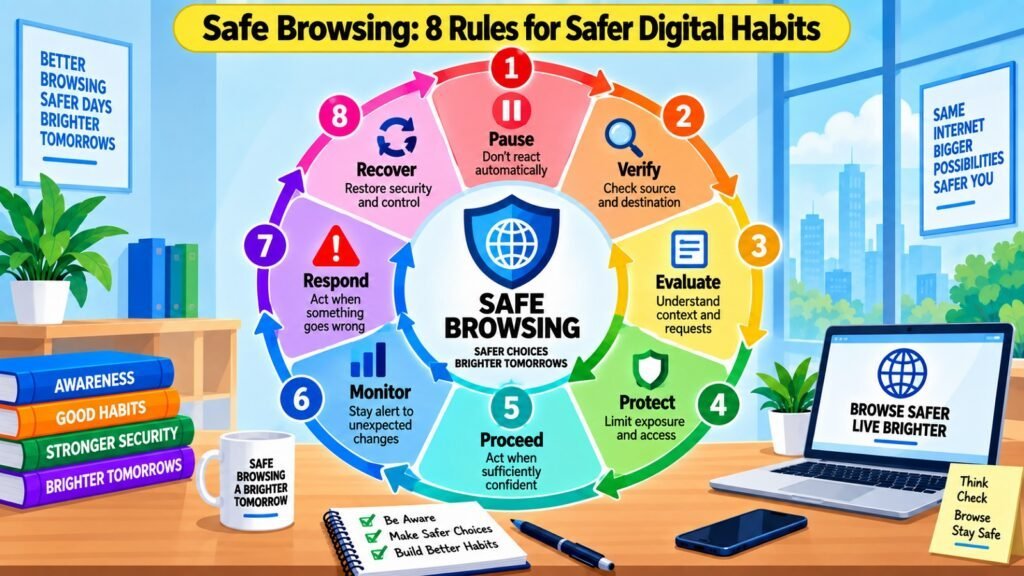
Safe browsing is not a single technique or a checklist — it is a disciplined way of thinking about web activity that adapts to different contexts, evaluates evidence consistently, and applies greater caution when the stakes are higher. The eight foundations explored in this article address different dimensions of the challenge: where you go, how you get there, the environment you use, how you resist manipulation, what you allow onto your device, how much of yourself you expose, what conditions you are operating under, and how carefully you act when something important is at stake.
These foundations reinforce one another. A user who evaluates websites carefully but follows links without thinking has a gap in the framework. A user who maintains a secure browser but ignores download risks is only partially protected. Safe browsing works as a system, and understanding it as a system is what allows the user to apply consistent principles to new situations — unfamiliar websites, novel threat types, and emerging technologies — rather than relying on rules that may not cover every scenario.
The central habit safe browsing cultivates is deliberate evaluation: pausing before acting, verifying through trusted channels, assessing the source and context of every request, limiting what is shared or permitted, and proceeding with appropriate caution. These habits are not burdensome when they become routine. They take a few extra seconds most of the time, and they occasionally prevent consequences that take weeks or months to resolve. That asymmetry — minimal cost when things are fine, meaningful protection when they are not — is the practical argument for building safe browsing into everyday digital behavior. Share these principles with others: the eight foundations described here are teachable, reusable, and applicable across the evolving web.
Safe Browsing: Eight Durable Principles for Quick Reference
| Foundation | Core Durable Principle |
| Website Safety | Verify legitimacy and appropriateness before submitting any information or trusting content |
| Link Safety | Evaluate source, destination, and context before clicking; use trusted independent routes |
| Browser Security | Keep the browser updated, minimize extensions, and configure security settings consistently |
| Phishing & Social Engineering | Treat urgency, authority, and fear as manipulation signals; verify independently before responding |
| Download Safety | Download only from official, verified sources; evaluate file type, context, and purpose first |
| Privacy & Permissions | Grant only the permissions a service genuinely requires; minimize data exposure |
| Network & Device Safety | Match browsing caution to the environment; avoid sensitive activity on untrusted networks |
| Safe Online Transactions | Apply heightened verification for money, credentials, or identity; never act under artificial urgency |