Table of Contents
Introduction — Wi-Fi: The Backbone of Modern Internet Connectivity
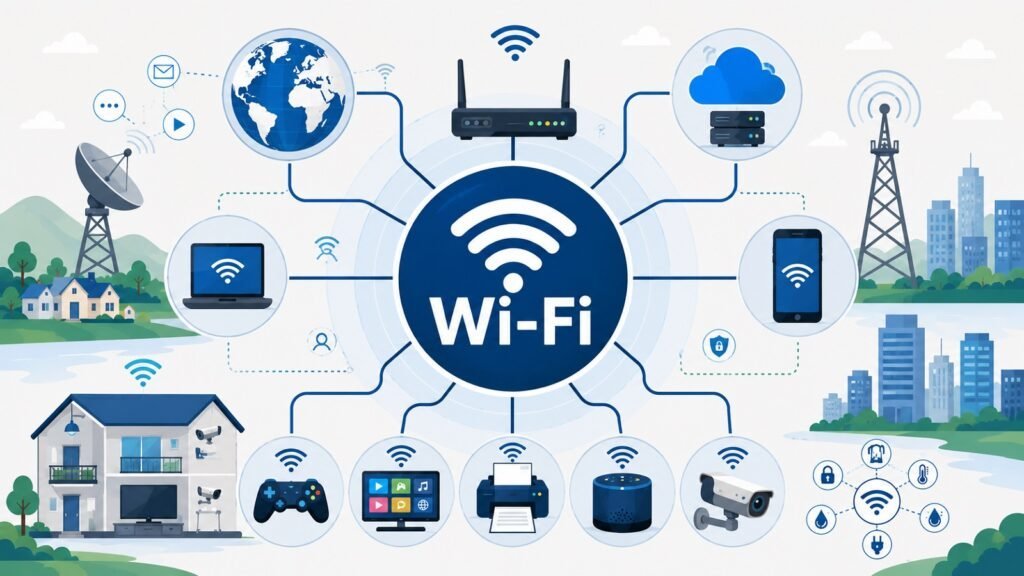
Most people connect to the Internet dozens of times each day without thinking much about how that connection happens. They open a browser, launch a video call, or stream a film, and everything works. The invisible technology making this possible across homes, offices, airports, and coffee shops is Wi-Fi, and it has become the backbone of modern Internet connectivity in a way few other technologies have matched.
Understanding Wi-Fi properly starts with one important distinction: Wi-Fi and the Internet are not the same thing. The Internet is a global network of interconnected networks through which information travels between billions of devices. Wi-Fi is a wireless networking technology that allows devices to connect to a local network and, through it, reach Internet-based services. An Internet service provider delivers a broadband connection to a building. A router receives that connection and manages local traffic. A wireless access point broadcasts the signal as radio waves, which client devices receive and use. Wi-Fi is the wireless access layer within that chain, not the chain itself.
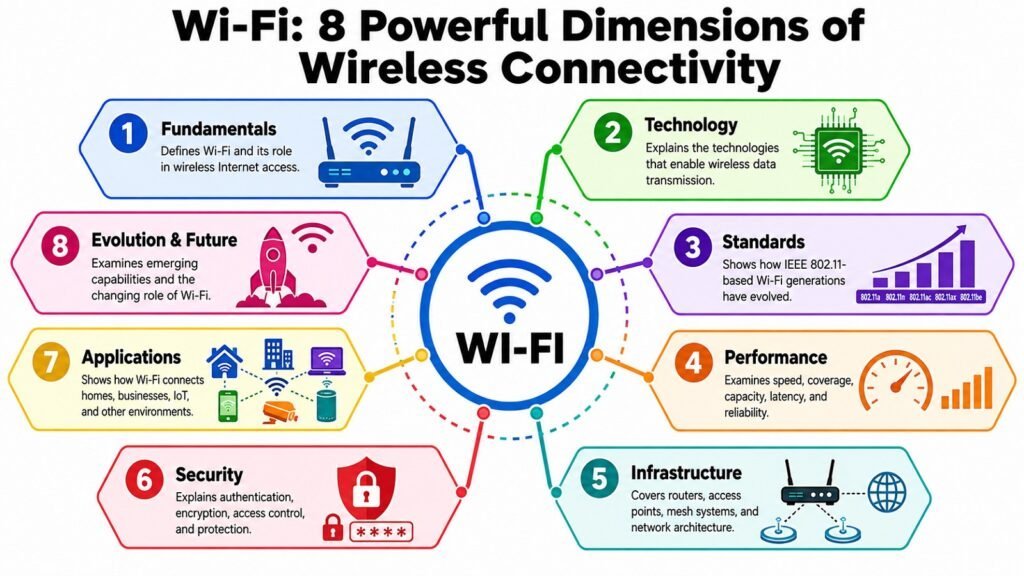
That distinction shapes how Wi-Fi performance, security, and infrastructure are evaluated. A slow Internet connection produces a poor experience regardless of how capable the wireless network is. Equally, a poorly configured Wi-Fi environment can bottleneck an otherwise fast service. Wi-Fi’s importance comes from combining wireless mobility, broad device support, and straightforward deployment. Today it connects billions of devices across every sector of society, yet most people understand it only at the level of signal bars and router reboots. A more complete picture requires examining eight interconnected dimensions: fundamentals, technology, standards, performance, infrastructure, security, applications, and future evolution.
Table: Wi-Fi — Eight Aspects of Wireless Connectivity
| Wifi Aspects | What It Covers |
| Wifi Fundamentals | Establishes what Wifi is and its role within the broader Internet connectivity ecosystem |
| Wifi Technology | Explains the radio and signal-processing mechanisms that enable wireless data transmission |
| Wifi Standards | Traces the evolution of the IEEE 802.11 family and what each generation changed |
| Wifi Performance | Examines speed, coverage, capacity, latency, and reliability as interconnected dimensions |
| Wifi Infrastructure | Describes routers, access points, mesh systems, and how components work together |
| Wifi Security | Covers authentication, encryption, and the principles that protect wireless communications |
| Wifi Applications | Explores how Wifi supports homes, businesses, public spaces, and IoT environments |
| Wifi Evolution & Future | Analyzes emerging trends and the requirements shaping the next era of wireless connectivity |
1. Wi-Fi Fundamentals: Understanding Wireless Connectivity
Wi-Fi refers to a family of wireless networking technologies based on the IEEE 802.11 standards. The term is a brand name created by the Wi-Fi Alliance, the industry body that certifies interoperability among wireless products. It does not stand for any technical phrase, despite the common assumption that it means wireless fidelity. In practice, it describes a method of connecting devices to a local network using radio waves rather than physical cables.
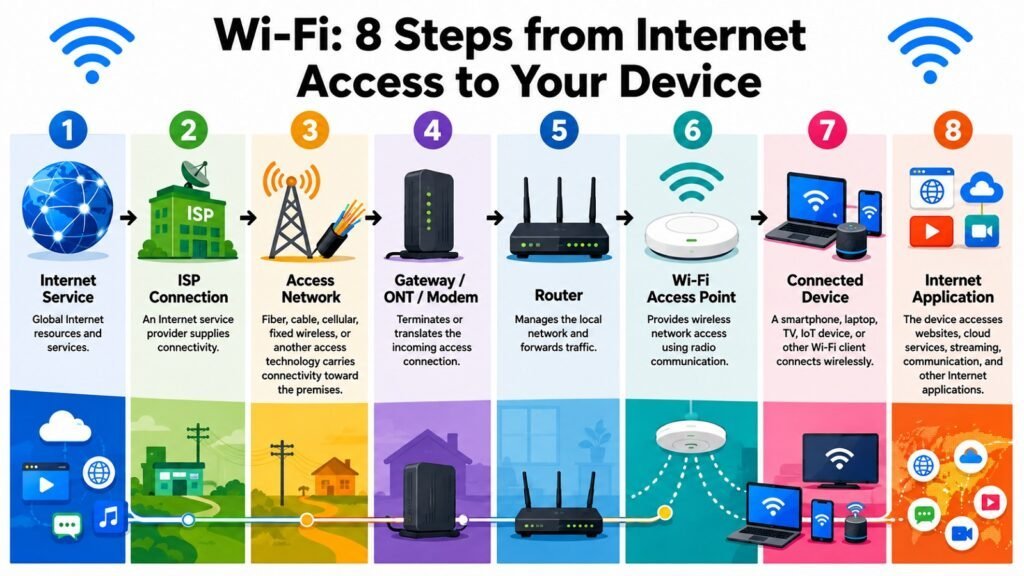
To understand what Wi-Fi does, it helps to trace a simple connectivity path. An Internet service provider delivers a broadband signal through a physical medium — fiber, coaxial cable, or telephone line. A router receives that signal, manages network traffic, and distributes data across the local network. A wireless access point, often integrated into the router in home environments, converts that data into radio frequency transmissions. A client device with a wireless adapter receives those transmissions and exchanges data through the same radio channel. Wi-Fi is specifically that radio link between an access point and client.
Several concepts recur throughout any discussion of Wi-Fi. An SSID is the name that identifies a wireless network. An access point broadcasts the signal. Client devices — phones, laptops, smart speakers — use Wi-Fi to reach the network and, through it, the Internet. One of the most persistent misconceptions is treating Wi-Fi and the Internet as equivalent. If the Wi-Fi network is working but the Internet service is disrupted, no wireless adjustment will restore online access. Keeping these two layers distinct is essential for accurate evaluation and troubleshooting.
Table: Wi-Fi Fundamentals — Key Concepts in Wireless Connectivity
| Concepts | Role in Wifi Connectivity |
| SSID | The name that identifies a Wifi network and allows devices to locate and join it |
| Access Point | Hardware that transmits and receives radio signals to connect client devices to a network |
| Client Device | Any device — phone, laptop, tablet — that connects to a network via Wi-Fi |
| Router | Manages traffic between the local network and the Internet service provider connection |
| Local Network | The shared internal network that connected devices use to communicate and share resources |
| Frequency Band | The radio spectrum range — typically 2.4 GHz or 5 GHz — over which Wi-Fi operates |
| Wireless Adapter | The hardware inside a client device that enables Wifi communication |
| Authentication | The process by which a device proves it is authorized to join a particular Wifi network |
2. Wi-Fi Technology: How Wireless Connectivity Works
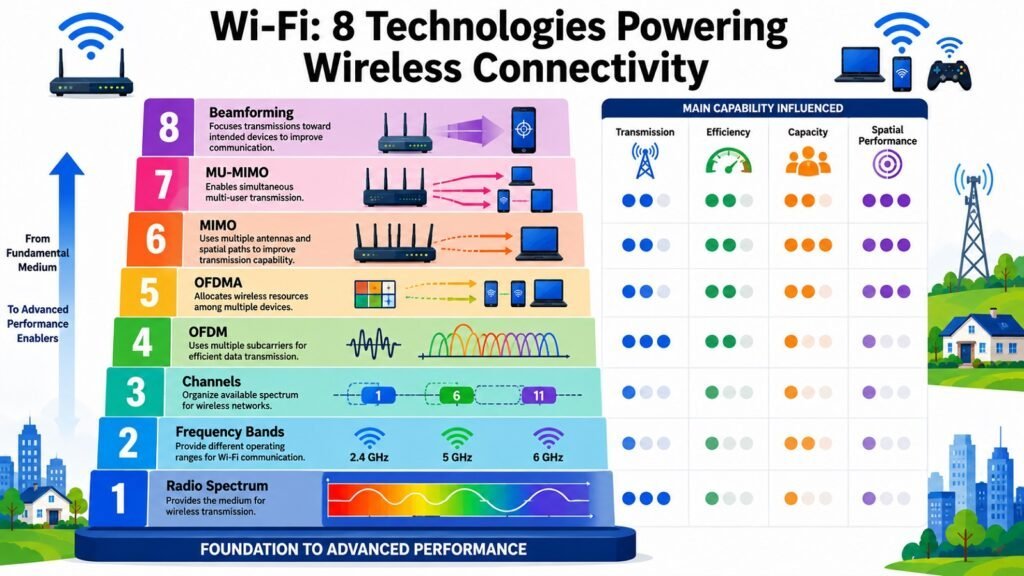
Wi-Fi transmits data using radio waves, a form of electromagnetic radiation that travels through the air and many building materials. Wi-Fi uses specific frequency bands allocated for this purpose.
The 2.4 GHz band travels farther and penetrates obstacles more easily, but offers fewer non-overlapping channels and is more prone to interference. The 5 GHz band delivers higher data rates and less congestion but covers shorter distances. The 6 GHz band, added for Wi-Fi 6E and Wi-Fi 7, is cleaner still, supporting higher throughput and lower latency. Within each band, available spectrum is divided into channels, and channel width — typically 20, 40, 80, or 160 MHz — determines how much spectrum a connection occupies, with wider channels enabling faster speeds at the cost of greater spectrum use.
The way Wi-Fi encodes data onto radio waves has evolved considerably. Orthogonal frequency-division multiplexing, or OFDM, divides a channel into many narrow subcarrier frequencies that transmit data in parallel, making transmissions more resilient to interference and multipath effects. Wi-Fi 6 introduced OFDMA, which allows a single transmission to carry data for multiple clients simultaneously, reducing latency and improving efficiency in dense environments.
Multiple-input multiple-output technology, MIMO, uses multiple antennas at both transmitter and receiver to send several data streams through the same channel simultaneously, increasing throughput without additional spectrum. MU-MIMO extends this by allowing an access point to serve several clients at once rather than sequentially. Beamforming directs the transmitted signal toward specific devices rather than broadcasting in all directions, improving strength and reliability. Together, these technologies explain why modern Wi-Fi behaves very differently from the simple single-antenna systems of the early 2000s.
Table: Wi-Fi Technology — Key Mechanisms and Their Connectivity Functions
| Technology / Mechanism | Connectivity Function |
| Radio Frequency Bands | Different bands balance range, speed, and interference for wireless transmission |
| Channels | Non-overlapping channel segments allow nearby networks to coexist without interference |
| OFDM | Splits a channel into subcarriers for efficient, interference-resistant parallel transmission |
| OFDMA | One transmission serves multiple clients simultaneously, reducing latency in dense networks |
| MIMO | Multiple antennas send parallel data streams, increasing throughput on a single link |
| MU-MIMO | An access point communicates with several devices at the same time rather than in sequence |
| Beamforming | Focuses the transmitted signal toward specific devices, improving strength and reliability |
| Channel Width | Wider channels enable higher peak speeds; narrower channels reduce interference in crowds |
3. Wi-Fi Standards: The Evolution of Wireless Connectivity
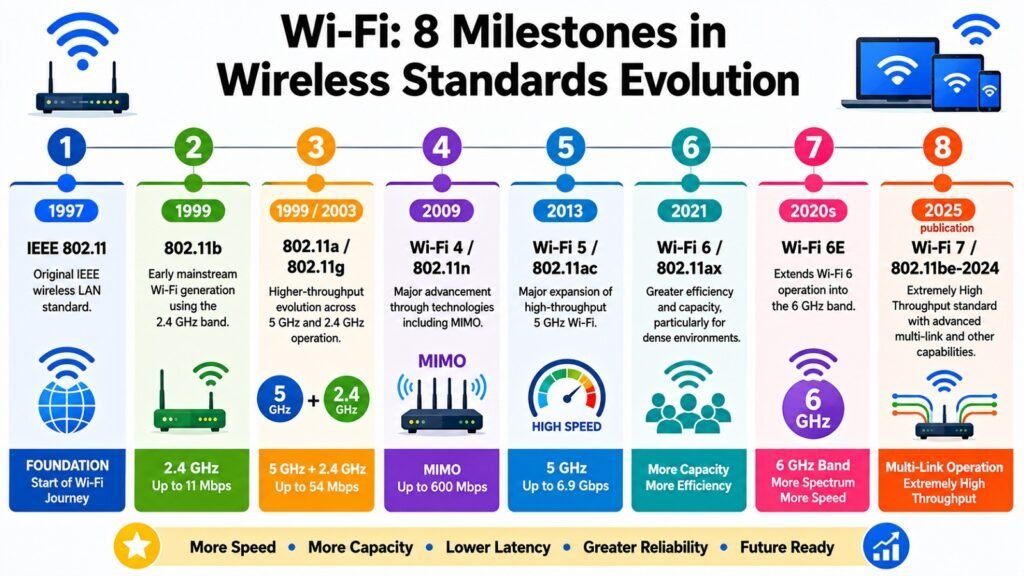
Wi-Fi standards are defined by the IEEE under the 802.11 umbrella, with the Wi-Fi Alliance assigning consumer-friendly generation names — Wi-Fi 4, Wi-Fi 5, Wi-Fi 6 — to the most significant releases. The earliest versions from the late 1990s, 802.11b and 802.11a, delivered up to 11 Mbps and 54 Mbps, respectively. The 802.11g standard unified the market by bringing 54 Mbps to the more accessible 2.4 GHz band. These early generations established Wi-Fi as a viable cable alternative, though they struggled with interference and capacity in dense environments.
Wi-Fi 4 (802.11n) introduced MIMO and dual-band support, reaching theoretical rates of 600 Mbps. Wi-Fi 5 (802.11ac) expanded into the 5 GHz band, added downlink MU-MIMO, and reached multi-gigabit theoretical rates for the first time. Wi-Fi 6 (802.11ax) shifted focus from peak speed to efficiency, introducing OFDMA, uplink MU-MIMO, and target wake time to improve battery life in connected devices. Wi-Fi 6E extended those capabilities into the 6 GHz band, providing substantially more clean spectrum. Wi-Fi 7 (802.11be) adds multi-link operation, 320 MHz channels, and 4096-QAM modulation, targeting both higher throughput and lower latency.
One point deserves emphasis: a newer Wi-Fi generation does not automatically improve a user’s Internet experience. A Wi-Fi 7 router connected to a 50 Mbps Internet service will not deliver Internet speeds beyond what that service provides. Standards evolution matters most when the wireless link itself is the bottleneck — typically in dense, device-rich environments with high-speed Internet connections.
Table: Wi-Fi Standards — Evolution of Wireless Connectivity Generations
| Standard / Generation | Key Contribution |
| 802.11b (1999) | Early consumer Wi-Fi at up to 11 Mbps in the 2.4 GHz band |
| 802.11a (1999) | 5 GHz operation at up to 54 Mbps, reducing 2.4 GHz congestion |
| 802.11g (2003) | 54 Mbps in 2.4 GHz, unifying the consumer market on a single band |
| Wifi 4 / 802.11n (2009) | MIMO and dual-band support; theoretical speeds up to 600 Mbps |
| Wifi 5 / 802.11ac (2013) | 5 GHz focus, downlink MU-MIMO, and multi-gigabit theoretical rates |
| Wifi 6 / 802.11ax (2019) | OFDMA and improved efficiency in dense, multi-device environments |
| Wifi 6E (2021) | Wifi 6 capabilities extended into the 6 GHz band for more clean spectrum |
| Wifi 7 / 802.11be (2024) | Multi-link operation, 320 MHz channels, and 4096-QAM modulation |
4. Wi-Fi Performance: Speed, Coverage, Capacity, and Reliability
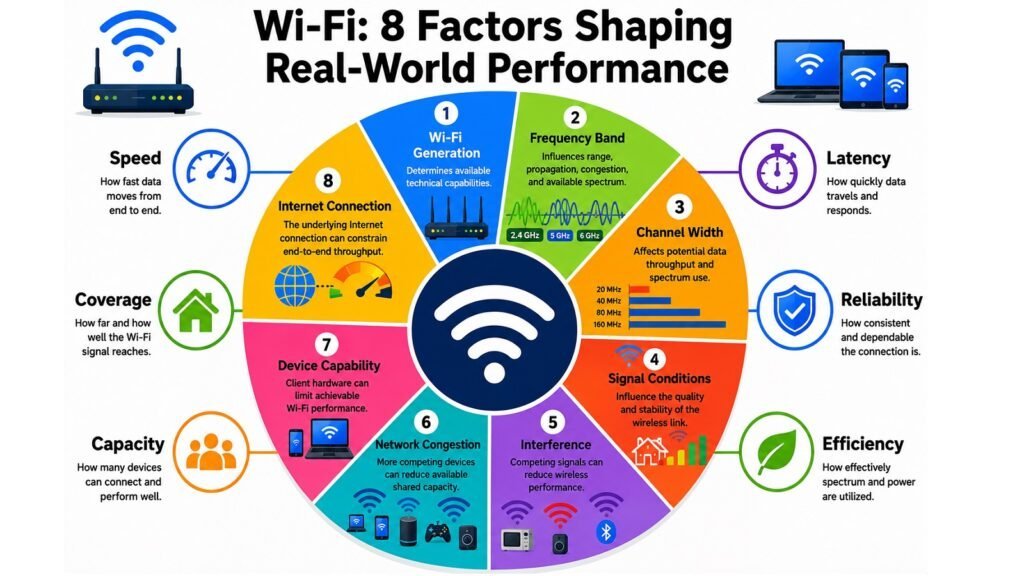
Wi-Fi performance is multidimensional, yet people tend to equate it with a single download speed figure. Speed, coverage, capacity, latency, and reliability are distinct qualities that can pull in different directions, and evaluating Wi-Fi properly means considering all of them. Theoretical maximum link rates, which manufacturers advertise, represent ideal conditions. Actual throughput is consistently lower due to protocol overhead, environmental factors, distance, and client device capabilities. Internet bandwidth adds another layer: the user’s experience online is bounded by whichever element in the chain has the lowest capacity.
Coverage is the physical area over which a Wi-Fi network provides a usable signal. The 2.4 GHz band penetrates walls more effectively but delivers lower throughput. The 5 GHz band offers higher speeds at closer range. A device at the network’s edge may receive an adequate signal but experience slower speeds and higher latency than a device near the access point. Capacity refers to how well the network performs under load. The radio medium is shared, so bandwidth is divided among active clients. Congestion from neighboring networks on overlapping channels further reduces effective capacity.
Latency — the round-trip time for a data packet — matters more than raw throughput for real-time applications such as video conferencing, gaming, and voice calls. A network with strong coverage can still feel sluggish if latency is elevated due to congestion or suboptimal channel selection. Reliability ties everything together: a fast connection that drops frequently is not genuinely useful. Thinking across all five dimensions gives a far more accurate picture of Wi-Fi quality than any single metric can.
Table: Wi-Fi Performance — Key Factors and Their Practical Effects on Wireless Connectivity
| Performance Factor | Practical Effect |
| Signal Strength | Determines radio link quality; weakens with distance, walls, and interference |
| Frequency Band | 2.4 GHz covers more area; 5 GHz and 6 GHz deliver higher speed at shorter range |
| Channel Congestion | Overlapping networks on shared channels reduce throughput for all users |
| Number of Devices | More active clients share the radio medium, reducing per-device bandwidth |
| Channel Width | Wider channels raise peak speed but increase interference risk in dense environments |
| Client Capabilities | Older devices without newer Wifi features limit their own performance |
| Internet Bandwidth | The upstream service caps user speed regardless of Wifi link quality |
| Latency | Packet delays affect real-time applications more than raw throughput numbers |
5. Wi-Fi Infrastructure: Routers, Access Points, Mesh, and Networks
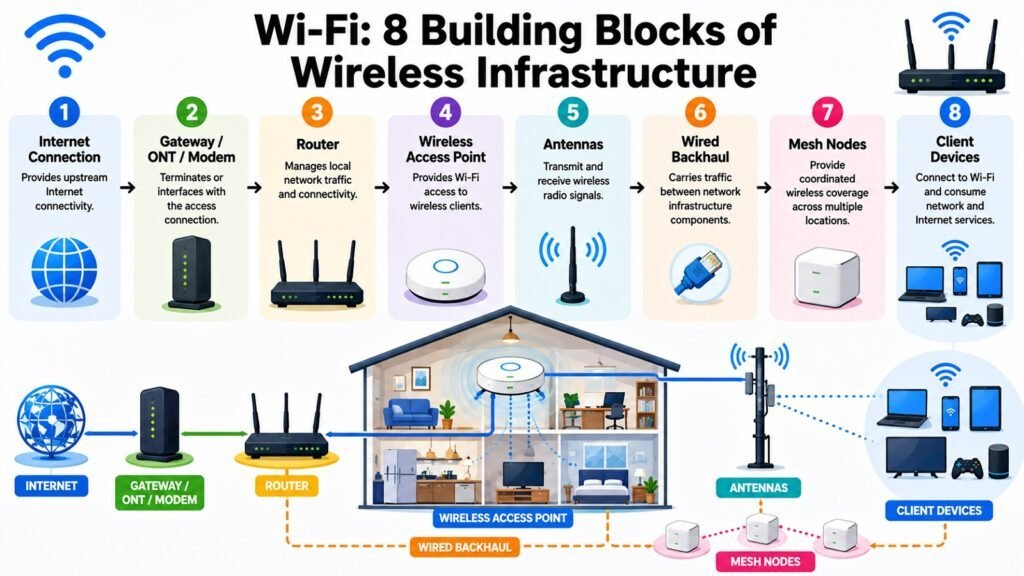
Wi-Fi is the wireless component of a broader infrastructure that connects devices to each other and to the Internet. A router manages traffic between the local network and the Internet service. In home environments, it typically receives the connection from a modem or gateway, assigns local IP addresses, and handles traffic. Many consumer routers include a wireless access point as an integrated component — which is why the whole unit is often called a Wi-Fi router — though routing and wireless access are logically distinct functions.
In larger environments, routers and access points are often separate. An office or school deploys a business-grade router connected to a wired backbone, with multiple access points distributed throughout the building. Each access point connects to the wired network via Ethernet, providing a stable, high-bandwidth backhaul for the wireless traffic it handles. This wired backhaul is an important design principle: wireless backhaul — where access points relay data to each other through radio — is possible but typically less efficient and introduces added latency.
Mesh networking systems address coverage in larger spaces without extensive wiring. Multiple nodes communicate dynamically, routing traffic along the most efficient path. Devices roaming between nodes maintain their connection without the abrupt drops associated with older range extenders, which receive and rebroadcast the existing signal, halving available bandwidth in the process. Mesh works best when at least some nodes have wired backhaul. Infrastructure choices profoundly shape what any Wi-Fi network can deliver: well-chosen, correctly placed hardware consistently outperforms more advanced equipment that is poorly deployed.
Table: Wifi Infrastructure — Key Components and Their Roles in Wireless Connectivity
| Infrastructure Component | Connectivity Role |
| Router | Manages traffic between the local network and the Internet service provider connection |
| Modem / Gateway | Converts the ISP signal for local network use; often integrated with the router |
| Wireless Access Point | Broadcasts and receives Wifi signals, connecting client devices to the local network |
| Ethernet Backhaul | Wired links between infrastructure components for stable, high-bandwidth connectivity |
| Mesh Node | Extends coverage and relays traffic dynamically between nodes in a mesh system |
| Range Extender | Rebroadcasts an existing Wifi signal; introduces latency and halves bandwidth |
| Antenna | Radiates and receives radio signals; design and orientation shape coverage pattern |
| Network Switch | Connects multiple wired devices or access points within the local network |
6. Wi-Fi Security: Protecting Wireless Connectivity
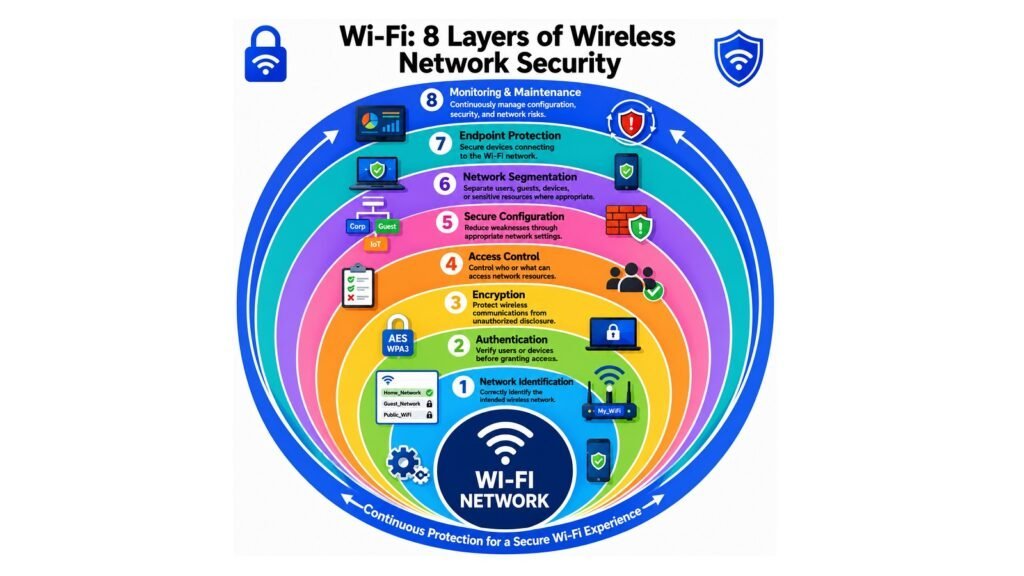
Wireless communication creates security challenges that wired networks largely avoid. When data travels through a cable, accessing it requires physical contact. When it travels through the air, it is theoretically accessible to anyone within range with appropriate hardware. Wifi security protocols address this through two complementary mechanisms: authentication, which determines which devices may join a network, and encryption, which protects the content of communications even if the signal is intercepted.
Early Wi-Fi used Wired Equivalent Privacy, or WEP, for both functions. WEP had serious cryptographic flaws and was replaced by the Wifi Protected Access family. WPA2, based on IEEE 802.11i, uses AES encryption and supports two modes. WPA2-Personal uses a pre-shared key shared by all devices on the network. WPA2-Enterprise integrates with authentication servers that issue individual credentials, providing stronger access control for organizational environments. WPA3, introduced in 2018, replaced the pre-shared key handshake with Simultaneous Authentication of Equals, protecting against offline dictionary attacks. It also introduced forward secrecy, so captured past traffic cannot be decrypted even if the password is later compromised.
Public Wi-Fi presents a distinct challenge. Open networks transmit data without encryption at the Wifi layer, making traffic visible to others on the same network unless application-layer protection — HTTPS or a VPN — is in use. Effective security also involves keeping firmware updated, segmenting guest and IoT devices from the main network, and monitoring for unauthorized connections. Security is most effective when treated as a foundational design element rather than an afterthought.
Table: Wi-Fi Security — Key Concepts and Their Protective Functions in Wireless Connectivity
| Security Concept / Mechanism | Protective Function |
| WEP | Early encryption protocol, now obsolete due to fundamental cryptographic weaknesses |
| WPA2-Personal | Pre-shared key with AES encryption for secure home network authentication |
| WPA2-Enterprise | Authentication server integration for individual credentials in organizational environments |
| WPA3 | SAE-based authentication and forward secrecy for stronger wireless protection |
| AES Encryption | The cryptographic standard that protects Wi-Fi data in transit under WPA2 and WPA3 |
| Network Segmentation | Isolates guest or IoT devices from the main network to limit unauthorized access |
| Firmware Updates | Patches security vulnerabilities in routers and access points as they are discovered |
| Open Networks | Unencrypted networks; HTTPS or VPN is needed for any sensitive activity on them |
7. Wi-Fi Applications: Connecting Homes, Businesses, and Devices
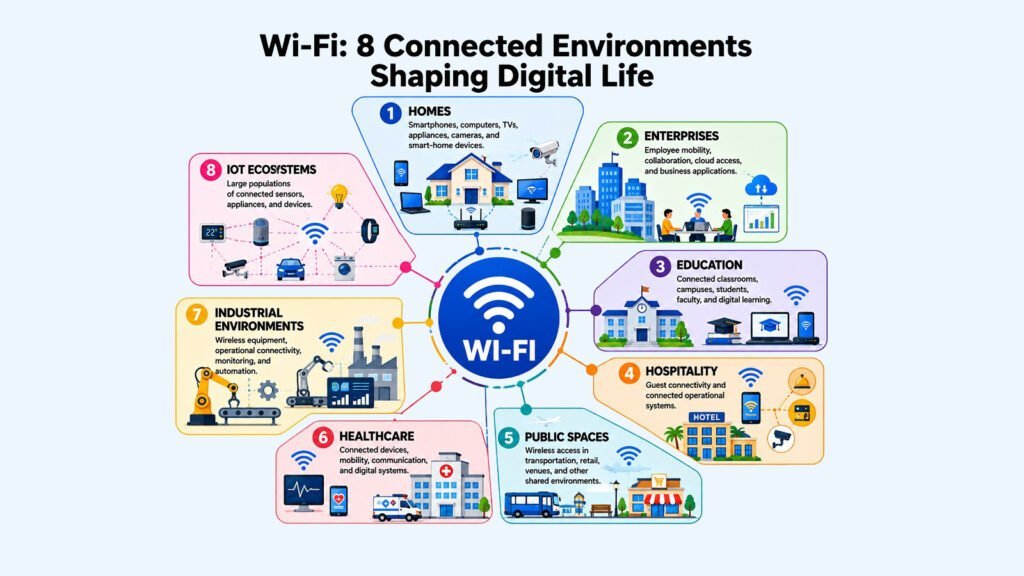
Wi-Fi began as a way to untether personal computers from Ethernet cables. Today it serves as the connectivity layer for environments and applications that were barely conceivable when the technology appeared. In homes, it connects televisions, gaming consoles, laptops, smartphones, smart speakers, security cameras, and thermostats — potentially dozens of devices, each with different bandwidth, latency, and reliability requirements. Streaming demands consistent throughput. Video conferencing needs low latency. Smart-home sensors require only modest data transfers but benefit from reliable, low-power connectivity. Wifi has had to become far more efficient to serve this mixture.
Enterprise environments are more demanding still. Businesses need Wi-Fi that supports many simultaneous users across open-plan offices and conference rooms, maintains performance across voice, video, and cloud applications, and enforces security policies differentiating between user groups and device types. These networks are typically managed through centralized controllers or cloud platforms that monitor performance and automate configuration. Education and hospitality present similar challenges at scale: a university campus or stadium must serve thousands of simultaneous users across a large physical area, which requires careful planning of access-point placement, channel assignment, and backhaul capacity.
Public Wi-Fi in airports, transit systems, and retail environments provides basic connectivity to large, constantly changing device populations. The IoT sector extends Wi-Fi’s reach further, connecting sensors, meters, and industrial equipment, though some IoT applications use lower-power alternatives where requirements allow. The common thread across all these environments is that Wi-Fi’s value comes not from the technology itself in isolation, but from the applications and devices it enables.
Table: Wi-Fi Applications — Environments and Their Principal Wireless Connectivity Requirements
| Application Environment | Wireless Connectivity Requirements |
| Home Networks | Supports diverse devices and mixed workloads including streaming, gaming, and smart-home control |
| Enterprise Offices | High density, policy enforcement, centralized management, and consistent application performance |
| Education Campuses | Large-scale simultaneous user support across varied indoor and outdoor environments |
| Hospitality | Reliable guest connectivity across rooms, lobbies, and event spaces |
| Healthcare | Mobile clinical devices, patient monitoring, and secure communications |
| Public Spaces | Basic connectivity for transient user populations in airports, transit, and retail |
| Smart Homes / IoT | Low-power sensors and automation devices with varying bandwidth and latency needs |
| Industrial Environments | Machine communication, asset tracking, and automation in manufacturing and logistics |
8. Wi-Fi Evolution & Future: The Next Era of Wireless Connectivity
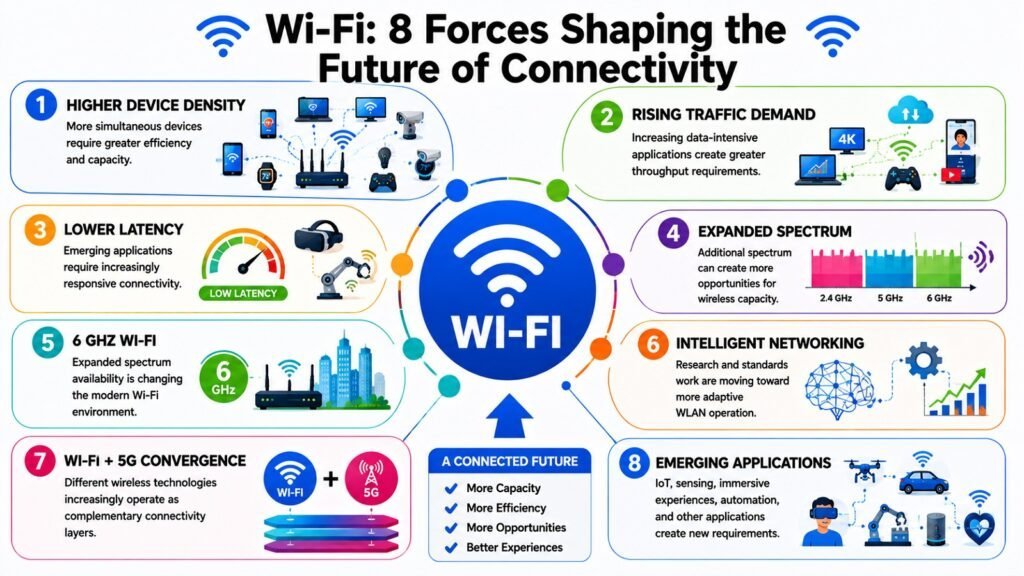
The standards discussion earlier described how successive generations addressed specific technical problems. This section takes a broader view, examining the forces reshaping what Wi-Fi must become. Device density is the most significant of those forces. The number of Wi-Fi-connected devices per household and workplace has grown sharply and shows no sign of reversing. IoT deployments — smart buildings, connected factories, intelligent transportation systems — add further pressure. Supporting far more devices with far more varied requirements is precisely why Wifi 6 emphasized efficiency over peak speed, and why Wifi 7 continues in that direction.
Application requirements are also shifting. Cloud computing, remote work, and real-time collaboration tools have made reliable, low-latency wireless connectivity essential for everyday productivity. Augmented and virtual reality demand low latency and high throughput simultaneously. These pressures are driving developments such as multi-link operation in Wifi 7, which allows a device to transmit and receive across multiple bands simultaneously, reducing latency and improving reliability. AI-driven network management — where access points adapt channel selection, transmit power, and device association in real time — represents a meaningful shift from the largely static configuration of earlier generations.
The relationship between Wi-Fi and technologies such as 5G is best understood as complementarity rather than competition. Wi-Fi performs best in indoor, fixed environments using unlicensed spectrum at no per-connection cost. Cellular networks excel at wide-area mobility. Most connected devices already use both. Future connectivity ecosystems will integrate Wi-Fi, 5G, and wired connections more tightly, with intelligent management selecting the best path for each application. Wi-Fi’s future role is not simply to be faster, but to be more adaptive, more efficient, and more deeply integrated with the digital infrastructure on which modern life depends.
Table: Wi-Fi Evolution — Key Trends Shaping the Future of Wireless Connectivity
| Future Force / Trend | Implication for Wifi |
| Device Density Growth | Rising device counts demand more efficient spectrum sharing and network management |
| Wifi 7 Multi-Link Operation | Simultaneous multi-band transmission reduces latency and improves reliability |
| 6 GHz Spectrum Expansion | Additional clean spectrum in Wifi 6E and Wifi 7 supports higher throughput |
| AI-Driven Network Management | Automated optimization of channels, power, and load improves performance dynamically |
| IoT Integration | Diverse low-power device profiles require Wifi to support more varied connection types |
| Immersive Application Demands | AR and VR require simultaneously high throughput and very low latency |
| Wifi and 5G Convergence | Tighter integration enables seamless, context-aware connectivity across access types |
| Enhanced Security Protocols | WPA3 adoption and future improvements address evolving threats in wireless environments |
Conclusion — Wi-Fi: The Future of Wireless Connectivity
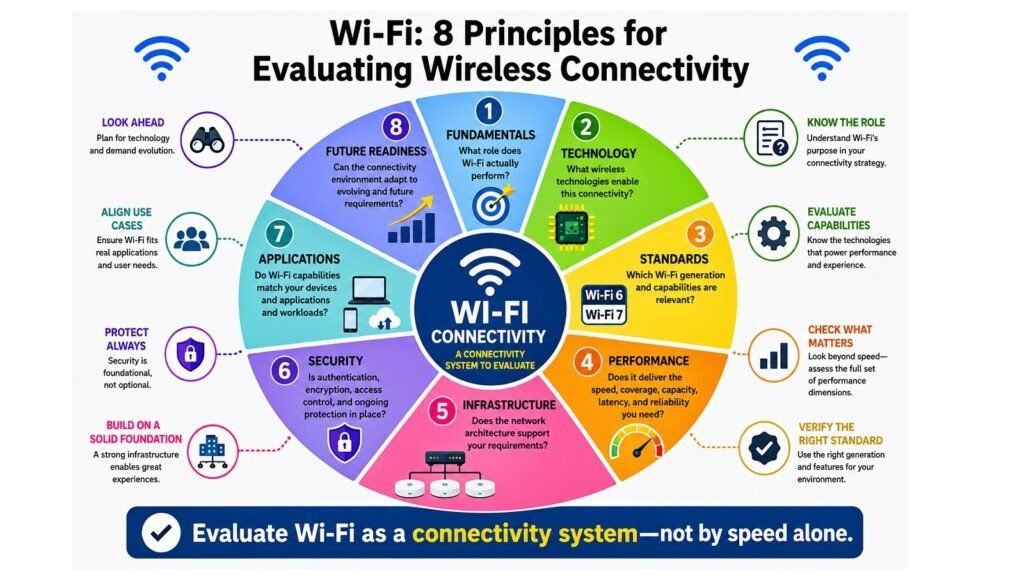
Wi-Fi’s significance in modern life is not incidental. It emerged because it addressed a genuine need — wireless mobility for a growing range of devices — and it has persisted because it has continued to adapt. Understanding it properly means seeing it as a layered system whose performance reflects the interaction of technology, standards, infrastructure, spectrum, devices, environment, security, and the applications running above it all.
The most important analytical lesson from this examination is that Wi-Fi performance can not be reduced to a speed number. The quality of a wireless connection depends on many variables, and the bottleneck can appear in any layer: the Internet service, the wireless link, the access point, the client device, or the RF environment. Effective evaluation and improvement require thinking across the whole system rather than assuming a hardware upgrade solves every problem.
The distinction between Wi-Fi and the Internet remains worth reinforcing. Wi-Fi is the wireless access layer that connects devices to local networks and, through them, to Internet-based services. It is a critical component of modern connectivity, but it is not the Internet itself. Looking forward, the trajectory of Wi-Fi points toward greater efficiency, higher capacity, lower latency, and closer integration with other connectivity technologies. The challenges ahead — denser device ecosystems, more demanding applications, more complex security environments — are significant, but they mirror the challenges Wi-Fi has addressed before. That sustained capacity for adaptation is the strongest argument for its continuing relevance.
Table: Wi-Fi — Eight Aspects and Their Principal Takeaways for Wireless Connectivity
| Aspect | Principal Takeaway |
| Fundamentals | Wi-Fi is the wireless access layer within a connectivity chain extending from ISP to user device |
| Technology | OFDMA, MIMO, and beamforming enable efficient, multi-device wireless communication |
| Standards | Each generation addressed specific limitations; newer does not automatically mean faster |
| Performance | Speed, coverage, capacity, latency, and reliability are distinct and interdependent dimensions |
| Infrastructure | Routers, access points, backhaul, and mesh systems together determine network quality |
| Security | WPA3, network segmentation, and firmware updates are essential for wireless protection |
| Applications | Wifi supports homes, enterprises, public spaces, and IoT with different connectivity needs |
| Future Evolution | Denser networks, AI management, multi-link operation, and 5G convergence shape what comes next |