Table of Contents
Introduction: Samsung Galaxy S26 Ultra – What Makes This Flagship Stand Out
Credit: iken3
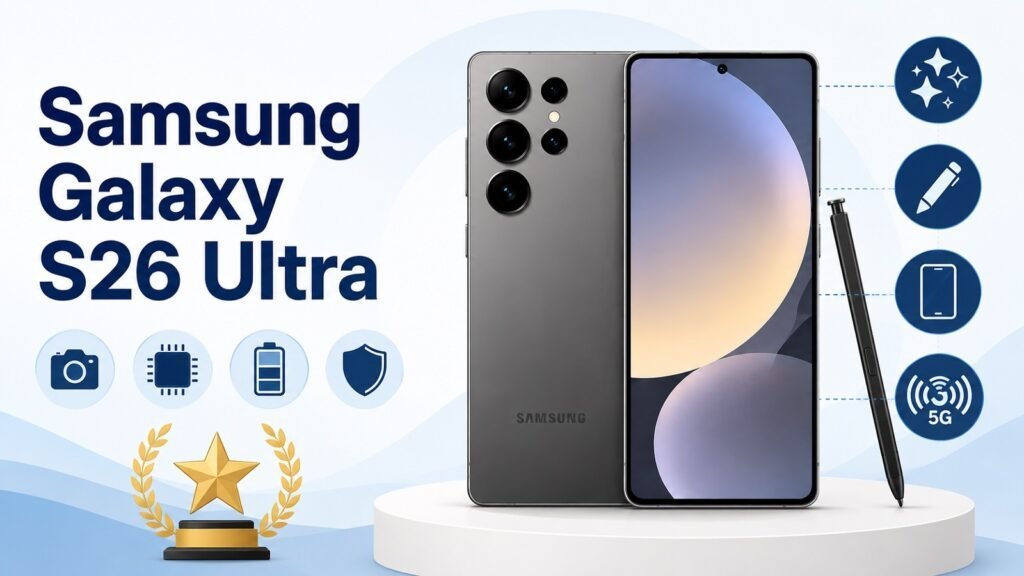
The Samsung Galaxy S26 Ultra is one of the Best Samsung Smartphones ever made, arriving in early 2026 as the peak of the Galaxy S26 lineup. Announced on February 25 and available globally from March 11, it sits above the S26 and S26+ for buyers who want Samsung’s most capable Android phone.
It is built for users who refuse to compromise. Power users, mobile photographers, business professionals, and content creators fall squarely within its target audience. The S Pen stylus, unique to the Ultra, remains a genuine differentiator for precise input, note-taking, and on-screen annotation that no direct rival matches.
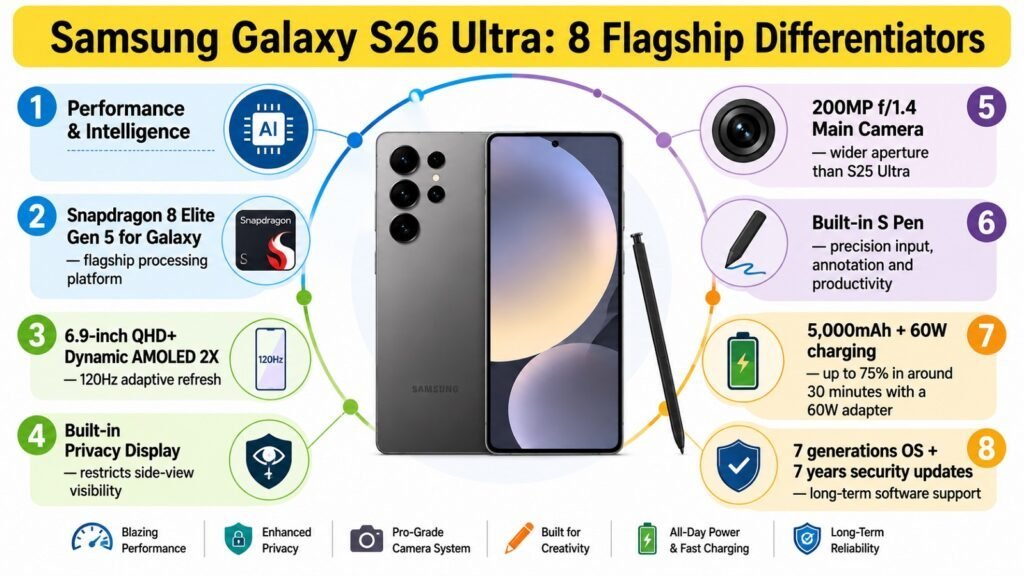
Several features stand out. The Snapdragon 8 Elite Gen 5 for Galaxy chip delivers class-leading processing power, the new Privacy Display prevents shoulder-surfing, and a redesigned vapor chamber improves thermal management by 21 percent over the previous generation. The cameras also gained a wider f/1.4 aperture on the main sensor alongside an improved Nightography system.
The S26 Ultra starts at a price of $1,299.99 for the 12GB/256GB configuration, increasing to $1,499.99 for the 512GB option and $1,799.99 for the 16GB/1TB model. Samsung supports this device with seven years of operating system and security updates. Its main competitors include the Apple iPhone 17 Pro Max and the Google Pixel 10 Pro XL.
Before buying, know that no charger is included, storage is not expandable, and the frame uses Armor Aluminum rather than the titanium found on the S25 Ultra. At 214 grams, this is also a large, heavy device that demands two-handed use in most situations.
1. Samsung Galaxy S26 Ultra: Major Specifications, User Recommendations, and Pros & Cons
Credit: iken3
Samsung Galaxy S26 Ultra – Major Specifications
| Specification | Details |
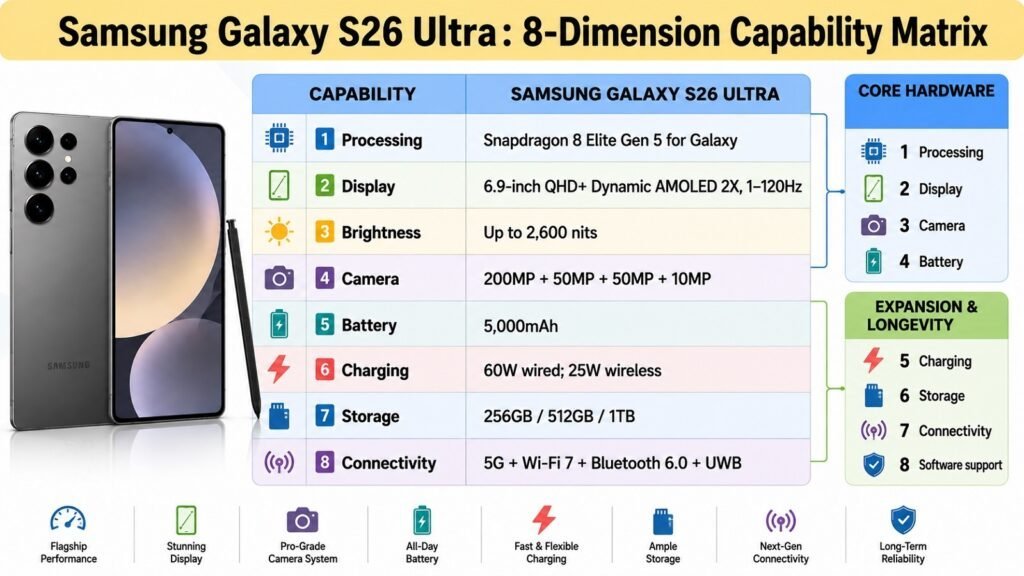
| ⚙️ Chipset (Processor + GPU) | Qualcomm Snapdragon 8 Elite Gen 5 for Galaxy (3nm); Oryon CPU cores with overclocked configuration; Adreno 840 GPU; dedicated NPU with 39% uplift over previous generation |
| 🖥️ Operating System | Android 16 with One UI 8.5; seven years of OS upgrades and security patches guaranteed; regular monthly security updates confirmed through July 2026 |
| 💾 RAM & Storage | 12GB LPDDR5X (256GB/512GB models) or 16GB LPDDR5X (1TB model); UFS storage; no microSD expansion slot |
| 📱 Display | 6.9-inch Dynamic LTPO AMOLED 2X; 3120 x 1440 resolution (~505 ppi); flat panel; peak brightness 2600 nits; HDR10+ support; Corning Gorilla Armor 2 protection |
| 🔄 Refresh Rate & Touch Response | Adaptive 1–120Hz LTPO refresh rate; high touch sampling rate optimized for gaming and stylus input; smooth adaptive transitions based on content |
| 📷 Camera System | Rear: 200MP main (f/1.4, 1/1.3-inch, OIS, PDAF); 50MP ultrawide (f/1.9, 120° FoV, Dual Pixel PDAF); 10MP 3x telephoto (f/2.4, OIS); 50MP 5x periscope telephoto (f/2.9, OIS). Front: 12MP (f/2.2, Dual Pixel PDAF, dedicated ISP). 8K video recording supported |
| 🔋 Battery & Charging | 5,000mAh battery; 60W wired charging; 25W wireless charging; reverse wireless charging supported; charger not included in box |
| 📡 Connectivity | 5G (Sub-6 and mmWave); Wi-Fi 7 (802.11a/b/g/n/ac/ax); Bluetooth 6.0; NFC; UWB; GPS/A-GPS/Glonass/Galileo/BeiDou; eSIM + Nano-SIM (dual SIM) |
| 🛡️ Build, Dimensions & Weight | 163.6 x 78.1 x 7.9mm; 214g; Corning Gorilla Armor 2 front glass; Gorilla Glass Victus 2 rear; Armor Aluminum frame; IP68 water and dust resistance; colors: Black, Cobalt Violet, Sky Blue, White |
| 🔊 Audio, Ports & Biometrics | Stereo speakers (earpiece + bottom-firing); Dolby Atmos support; no 3.5mm headphone jack; USB Type-C 3.2; ultrasonic in-display fingerprint sensor; face unlock |
Samsung Galaxy S26 Ultra: User Recommendations: Who Should Buy This Smartphone?
| 👤 User Type & Fit | 💡 Why? |
| 🎓 Students ✅ | Excellent for higher education and research; S Pen enables precise note-taking and PDF annotation; large display suits e-books and long reading sessions; powerful chipset handles multitasking; camera covers presentations and fieldwork. Can be expensive for budget-conscious students. |
| 👤 Casual Users ⚠️ | Outstanding hardware for simple tasks; social media, messaging, streaming, and browsing all run superbly. The premium price and physical size may be overkill for users who primarily want a reliable everyday phone. |
| 💼 Business Professionals ✅ | Excellent productivity device; S Pen enables note-taking in meetings; Privacy Display protects sensitive on-screen data; DeX desktop mode expands usability; strong security with Knox and monthly patches; 5G and Wi-Fi 7 keep connectivity fast. |
| 🎮 Mobile Gamers ✅ | Snapdragon 8 Elite Gen 5 delivers top-tier gaming performance; Adreno 840 GPU handles demanding titles; 120Hz display and high touch response improve precision; redesigned vapor chamber manages heat well during extended sessions. |
| 📸 Mobile Photographers ✅ | Best-in-class camera system; 200MP main sensor with f/1.4 aperture captures exceptional detail; improved Nightography and Horizontal Lock stabilization enhance low-light shooting; 5x periscope telephoto adds versatile reach; dedicated ISP on selfie camera improves portrait quality. |
| 🎥 Content Creators ✅ | 8K video recording, strong stabilization, and a versatile four-camera system make this a capable mobile production tool; 2600-nit display aids outdoor monitoring; large storage options prevent running out of space; USB 3.2 speeds up file transfers. |
| 📱 Social Media & Communication Users ⚠️ | Superb display and cameras enhance social content creation and video calls; however, the large size and premium price exceed what most social-first users require. A fine choice if social media is just one of many uses. |
| ✈️ Travelers & Frequent Commuters ✅ | IP68 rating handles rain and humidity; eSIM support simplifies international travel; 5G and Wi-Fi 7 ensure fast connectivity; excellent GPS accuracy; 5,000mAh battery and 60W fast charging provide endurance and quick top-ups on the go. |
| ⚡ Tech-Savvy Power Users ✅ | Snapdragon 8 Elite Gen 5 with up to 16GB LPDDR5X RAM handles the most demanding workloads; 1TB storage eliminates capacity concerns; USB 3.2 enables fast external device connectivity; One UI 8.5 offers deep customization and advanced Galaxy AI features. |
| 👴 Older Adults & Accessibility-Focused Users ⚠️ | Large, bright 6.9-inch display aids readability; stereo speakers are clear and loud; One UI accessibility tools are well-developed; ultrasonic fingerprint sensor is reliable. However, the large dimensions and weight may be challenging for smaller hands. |
Samsung Galaxy S26 Ultra: Pros & Cons
| Pros | Cons |
| ✅ Snapdragon 8 Elite Gen 5 delivers class-leading performance and a 39% NPU uplift | ❌ Charger is not included in the box, which is frustrating at this price point |
| ✅ Versatile four-camera system with 200MP main (f/1.4), 5x periscope, and improved Nightography | ❌ No expandable storage; choose the right configuration at purchase time |
| ✅ Privacy Display feature actively blocks shoulder-surfing, a genuinely useful security innovation | ❌ Armor Aluminum frame is a step down from the titanium used on the Galaxy S25 Ultra |
| ✅ Seven years of OS upgrades and security patches provide exceptional long-term software value | ❌ At 214g and 163.6mm tall, one-handed use is genuinely challenging for most people |
| ✅ 60W wired and 25W wireless charging are meaningful upgrades over the previous generation | ❌ Starting price of $1,299.99 makes this one of the most expensive smartphones in the market |
| ✅ Wi-Fi 7, Bluetooth 6.0, UWB, and mmWave 5G represent a comprehensive modern connectivity package | ❌ Battery capacity remains at 5,000mAh; competitors are beginning to push higher in this segment |
2. Samsung Galaxy S26 Ultra: Usability, Everyday Experience, and Software Experience
Credit: iken3
Samsung Galaxy S26 Ultra – Usability and Software Experience
| 📱 Experience Area & ⭐ Assessment | 📝 Notes / Key Observations |
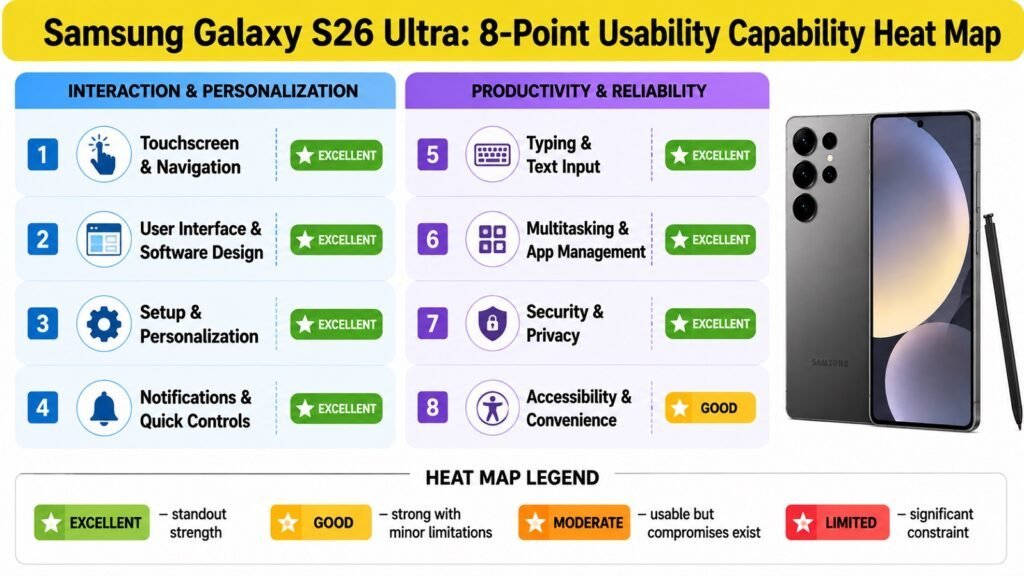
| 👆 Touchscreen & Navigation Excellent | The 120Hz LTPO panel and high touch sampling rate make scrolling and gesture navigation feel immediate and precise. Accidental edge touches are rare on the flat display design, which represents a deliberate improvement over curved predecessors. |
| 🧭 User Interface & Software Design Excellent | One UI 8.5 is the most polished version Samsung has released. Menus are logically organized, animations are smooth, and the redesigned quick settings panel introduced in the One UI 8.5 update adds meaningful customization depth. |
| ⚙️ Setup & Personalization Excellent | Smart Switch handles data migration from Android and iOS efficiently. Samsung accounts, Google accounts, and biometrics are configured during a guided setup. Galaxy AI features activate automatically once the device is configured. |
| 🔔 Notifications & Quick Controls Excellent | Notification management is comprehensive; priority modes and per-app controls are accessible without hunting through settings. The redesigned quick settings panel offers more layout flexibility than before. |
| ⌨️ Typing & Text Input Excellent | Samsung Keyboard on this display size is comfortable in landscape and usable in portrait. The S Pen adds handwriting input as a practical alternative. Voice typing via Google and Samsung is reliable and accurate. |
| 🔄 Multitasking & App Management Excellent | Up to 16GB of LPDDR5X RAM means apps stay loaded in memory and resume instantly. Split-screen and floating window modes work well; the taskbar makes switching between active apps fast and intuitive. |
| 📱 Everyday Apps & Reliability Excellent | The Snapdragon 8 Elite Gen 5 handles every app without hesitation. No crashes were noted in regular use; app compatibility across Play Store titles is complete. The phone remains stable even after months of updates. |
| 🔐 Security & Privacy Experience Excellent | Ultrasonic fingerprint sensor is fast and accurate; face unlock is smooth. Samsung Knox runs at the firmware level, and the Privacy Display adds a hardware-level privacy layer. Monthly security patches have been consistent through July 2026. |
| 🛠️ Software Updates & Support Excellent | Samsung has committed to seven years of updates. Five months post-launch, the device has received OS, security, and major feature updates on a regular cadence. The One UI 8.5 update arrived by May 2026. |
| ♿ Accessibility & Convenience Features Good | One-handed mode shrinks the usable display area. Text scaling, magnification, TalkBack, and switch access are all available. The large display and clear speakers help accessibility-focused users, though the phone’s physical size can itself be a barrier. |
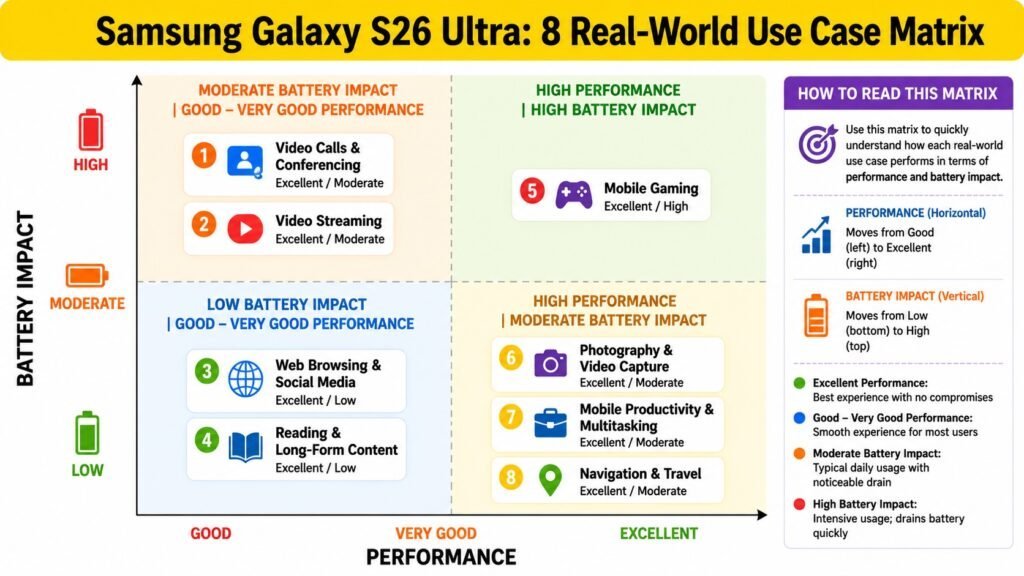
3. Samsung Galaxy S26 Ultra: Real-World Use Case Performance
Credit: iken3
Samsung Galaxy S26 Ultra – Real-World Use Case Performance
| 📊 Use Case & ⭐ Performance / 🔋 Battery Impact | 📝 Notes / Key Observations |
| 📞 Video Calls & Conferencing ⭐ Excellent 🔋 Moderate | The 12MP selfie camera with its dedicated ISP delivers noticeably sharper video call quality than previous Samsung Ultra models. Microphone clarity is strong, and the large display makes monitoring a call easy. Sustained calls generate mild warmth but nothing disruptive. |
| 🎬 Video Streaming ⭐ Excellent 🔋 Moderate | The 6.9-inch, 2600-nit display with HDR10+ support is one of the best streaming screens available on any smartphone. Netflix, YouTube, and Disney+ content looks vivid and detailed. Stereo speakers with Dolby Atmos deliver rich, immersive audio. |
| 🌐 Web Browsing & Social Media ⭐ Excellent 🔋 Low | Pages load instantly on Wi-Fi 7 or 5G. Scrolling through social feeds is fluid at 120Hz. The flat display removes distortion at edges that curved panels introduce. Battery drain during casual browsing and social media use is minimal. |
| 📚 Reading & Long-Form Content ⭐ Excellent 🔋 Low | Text is sharp and well-rendered at 505 ppi. Adaptive brightness keeps the display comfortable in varying light. The S Pen adds the ability to annotate documents and highlight text, useful for readers and researchers alike. |
| 🎮 Mobile Gaming ⭐ Excellent 🔋 High | Adreno 840 GPU handles graphically demanding games at high settings without dropped frames. The redesigned vapor chamber maintains performance under sustained load better than previous Ultra generations. Gaming sessions do warm the device noticeably. |
| 📸 Photography & Video Capture ⭐ Excellent 🔋 Moderate | Camera app launches quickly and focuses with confidence. The 200MP main sensor resolves extraordinary detail; the 5x periscope telephoto reaches subjects that most phones cannot. 8K recording at high quality settings drains the battery more rapidly and generates heat after extended clips. |
| 💼 Mobile Productivity & Multitasking ⭐ Excellent 🔋 Moderate | Samsung DeX, split-screen multitasking, and 16GB RAM combine to make the S26 Ultra one of the most capable mobile productivity platforms available. Document editing, email, and multi-app workflows run without hesitation. DeX via USB-C adds a desktop-like environment when connected to a display. |
| 🗺️ Navigation & Travel ⭐ Excellent 🔋 Moderate | GPS lock is fast and accurate with multi-constellation support. The bright 2600-nit display remains clearly visible in direct sunlight. Extended navigation sessions draw moderately on the battery, but 60W charging speed means a quick top-up restores meaningful range quickly. |
4. Samsung Galaxy S26 Ultra: One-Handed Use, Ergonomics, and Screen Comfort
Credit: iken3
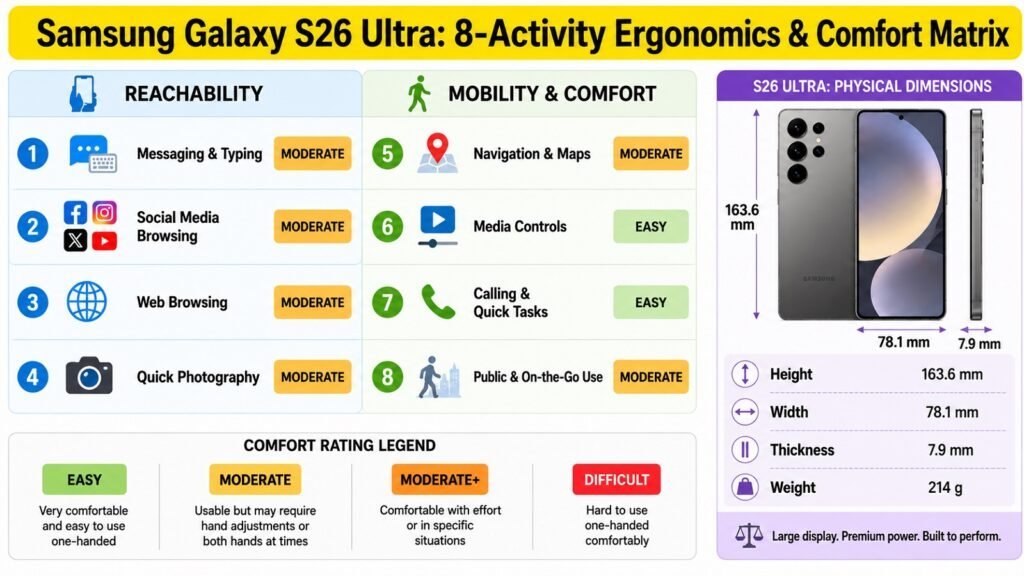
Samsung Galaxy S26 Ultra – One-Handed Use and Screen Comfort
| 📱 Activity & 👆 Usability / Screen Comfort | 📝 Notes / Key Observations |
| 💬 Messaging & Typing ⚠️ Moderate | One-handed typing on a 6.9-inch display is a genuine stretch for most users. One-handed mode helps by shifting the display into a reachable zone, but reduces visible screen area. The S Pen is an alternative for composing longer messages. Haptic feedback during typing is well-tuned. |
| 📱 Social Media Browsing ⚠️ Moderate | Swipe gestures and scrolling work naturally, but reaching notification icons or the address bar with one thumb requires repositioning. The flat display avoids accidental edge swipes. Brightness is excellent for outdoor browsing. |
| 🌐 Web Browsing ⚠️ Moderate | Address bar reach is the main limitation. Many users will unconsciously shift the phone between hands. Content itself looks outstanding at this resolution and brightness. Long reading sessions are comfortable thanks to the flat, high-resolution panel. |
| 📸 Quick Photography ⚠️ Moderate | The weight of 214g and the tall body make single-handed shooting feel unstable without a grip-improving case. Volume buttons double as a camera shutter, which helps. Outdoor display visibility is excellent, making framing easy in bright conditions. |
| 🗺️ Navigation & Maps ⚠️ Moderate | Map controls, pinch-to-zoom, and route interaction generally work fine in two hands. The sunlight-visible display is a real asset for outdoor navigation. Sustained map use with one hand while walking is fatiguing given the phone’s weight. |
| 🎵 Media Controls ✅ Easy | Lock-screen media controls, volume adjustment, and playback interaction are all conveniently placed and easy to access with minimal repositioning. Display quality makes media browsing visually rewarding even in quick interactions. |
| 📞 Calling & Quick Tasks ✅ Easy | Answering and managing calls is straightforward. The ultrasonic fingerprint sensor unlocks quickly, and face unlock operates without requiring repositioning. Notification management from the lock screen is accessible with a thumb. |
| 🚶 Public & On-the-Go Use ⚠️ Moderate | At 214g, sustained one-handed carrying creates mild fatigue on longer journeys. A case with a grip or kickstand significantly improves the holding experience. The IP68 rating provides confidence in light rain or dusty environments. |
5. Samsung Galaxy S26 Ultra: Ecosystem, Accessories, and Compatibility
Credit: iken3
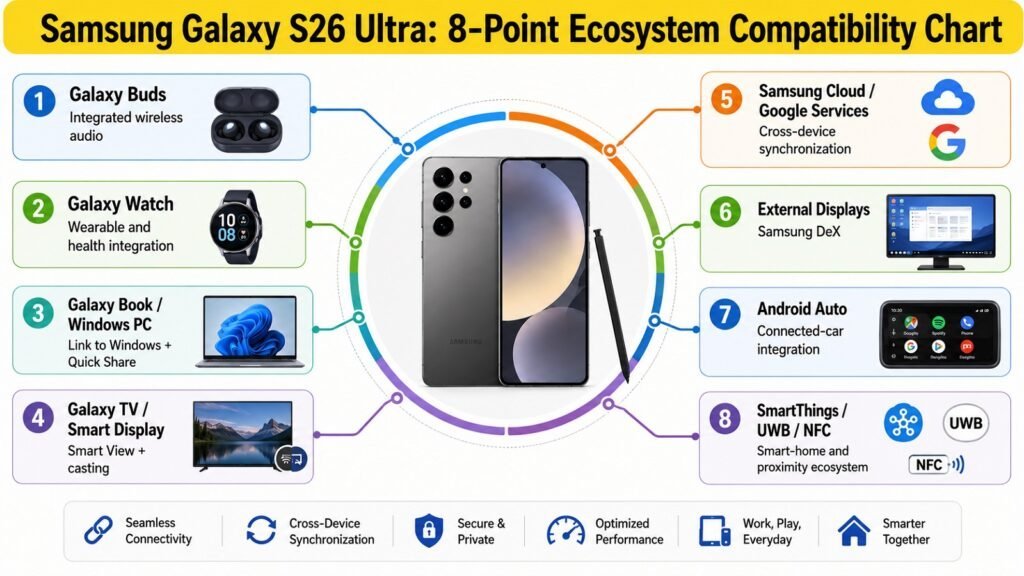
Samsung Galaxy S26 Ultra – Ecosystem and Compatibility
| 🔗 Accessory / Integration & Assessment | 📝 Performance / Notes & Brand-Specific Advantage |
| 🎧 Wireless Earbuds & Headphones ✅ Yes | Bluetooth 6.0 enables fast pairing and stable connections with Galaxy Buds 4 and Buds 4 Pro, which receive enhanced audio processing when paired with Galaxy phones. Third-party earbuds and headphones connect reliably. The absence of a 3.5mm jack means wired listening requires a USB-C adapter. |
| ⌚ Smartwatch & Fitness Tracker ✅ Yes | Galaxy Watch 8 integration is seamless; health data, notifications, calls, and app control sync in real time via the Galaxy Wearable app. Third-party watches using Wear OS pair without issues. Samsung Health data consolidation across watch and phone is a practical advantage for fitness-focused users. |
| 💻 Laptop & PC Integration ✅ Yes | Link to Windows allows phone screen mirroring, clipboard sharing, notifications, and file transfer on Windows PCs without a cable. Quick Share extends file sharing to Samsung Galaxy Books and other Android devices. DeX provides a desktop interface when connected via USB-C or wirelessly to a compatible display. |
| 📺 TV & Smart Display Integration ✅ Yes | Samsung Smart View enables wireless screen mirroring to Samsung Smart TVs. Google Cast is supported for streaming to Chromecast-enabled displays. Connectivity is stable and latency is low for streaming media from the phone to a television. |
| ☁️ Cloud Sync & Cross-Device Services ✅ Yes | Samsung Cloud syncs contacts, photos, notes, and app data across Galaxy devices. Google One and Google Photos handle cross-platform backup. Microsoft OneDrive integration is also available. All three services can operate simultaneously without conflict. |
| 📁 File Transfer & Device Sharing ✅ Yes | Quick Share now supports AirDrop cross-compatibility with iPhone users running One UI 8.5, a practical new feature for mixed-platform households. USB 3.2 delivers fast wired transfers. OTG is supported for connecting USB drives directly. |
| 🖥️ External Display & Desktop Mode ✅ Yes | Samsung DeX activates when the phone is connected to a monitor via USB-C or a wireless DeX-capable display. The interface resembles a desktop OS with a taskbar, windowed apps, and mouse support. Resolution support up to 4K via wired connection. |
| 🚗 Car & Connected Accessories ✅ Yes | Android Auto support is present for compatible vehicles. Bluetooth connects to car infotainment systems for calls, music, and navigation. UWB enables precise spatial awareness for compatible accessories. NFC supports contactless payments and quick device pairing. |
6. Samsung Galaxy S26 Ultra: Battery Life and Charging Performance
Credit: iken3
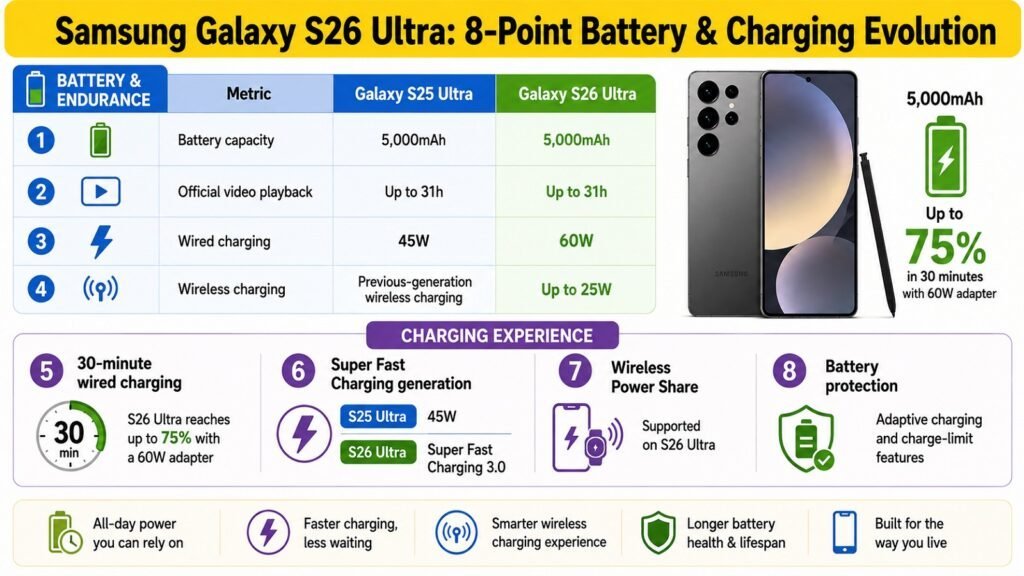
Samsung Galaxy S26 Ultra – Battery and Charging Performance
| 🔋 Battery & Charging Area | 📝 Assessment / Key Observations |
| 🔋 Battery Capacity | 5,000 mAh; a capacity consistent across several Ultra generations. Competitive for the class, though some Android competitors are pushing larger cells. The efficiency of the Snapdragon 8 Elite Gen 5 and LTPO display help maximize endurance from this capacity. |
| ⏱️ Everyday Battery Life | Under mixed use covering messaging, browsing, social media, streaming, occasional photography, and calls, the S26 Ultra reliably delivers a full day on a single charge and frequently carries into a second day for moderate users. Adaptive refresh rate management contributes meaningfully to endurance. |
| 📱 Screen-On Time | Typical screen-on time falls in the 6–8 hour range under mixed everyday conditions with 5G connectivity and automatic brightness. Lighter use with Wi-Fi only and reduced brightness can extend this further. Heavy display tasks reduce it. |
| 🎮 Heavy-Use Battery Performance | Gaming, 8K video recording, and GPS navigation represent the most demanding use cases. Extended gaming sessions with the display at full brightness deplete the battery faster, roughly 20–25 percent per hour depending on the title. 8K recording similarly draws heavily. |
| 🌙 Standby & Idle Drain | Standby drain is efficient thanks to the LTPO display dropping to a very low refresh rate at idle and optimized Android 16 background management. Overnight drain in a typical Wi-Fi environment is minimal, in the range of 1–3 percent. |
| ⚡ Wired Charging Speed | 60W wired charging is a meaningful upgrade from the 45W on the Galaxy S25 Ultra. The phone charges from zero to roughly 50 percent in approximately 30 minutes and reaches a full charge in around 65–70 minutes. A charger must be purchased separately. |
| 🔌 Wireless & Reverse Charging | 25W wireless charging is a substantial upgrade over the 15W supported by the previous generation, making wireless charging a practical daily option. Reverse wireless charging allows the phone to charge accessories such as Galaxy Buds or a Galaxy Watch. |
| 🌡️ Charging Heat & Efficiency | The Armor Aluminum frame dissipates charging heat more effectively than titanium, contributing to stable temperature during charging sessions. The phone warms during rapid 60W wired charging but stays within comfortable limits and does not throttle performance noticeably. |
| 🛡️ Battery Health & Longevity | Samsung’s adaptive charging learns daily patterns and slows charging to preserve long-term capacity. A battery protection mode limits the maximum charge to 85 percent to reduce degradation. Users who enable this feature should see slower capacity decline over the device’s lifespan. |
| 🔋 Overall Battery Verdict | The S26 Ultra offers a strong all-day battery experience with faster charging than its predecessor. The combination of 60W wired and 25W wireless is competitive at this price tier. The omission of the charger is a legitimate frustration, but the underlying battery and charging performance are genuinely improved. |
7. Samsung Galaxy S26 Ultra: Camera and Media Experience
Credit: iken3
Samsung Galaxy S26 Ultra – Camera and Media Experience
| 📸 Camera & Media Area | 📝 Assessment / Key Observations |
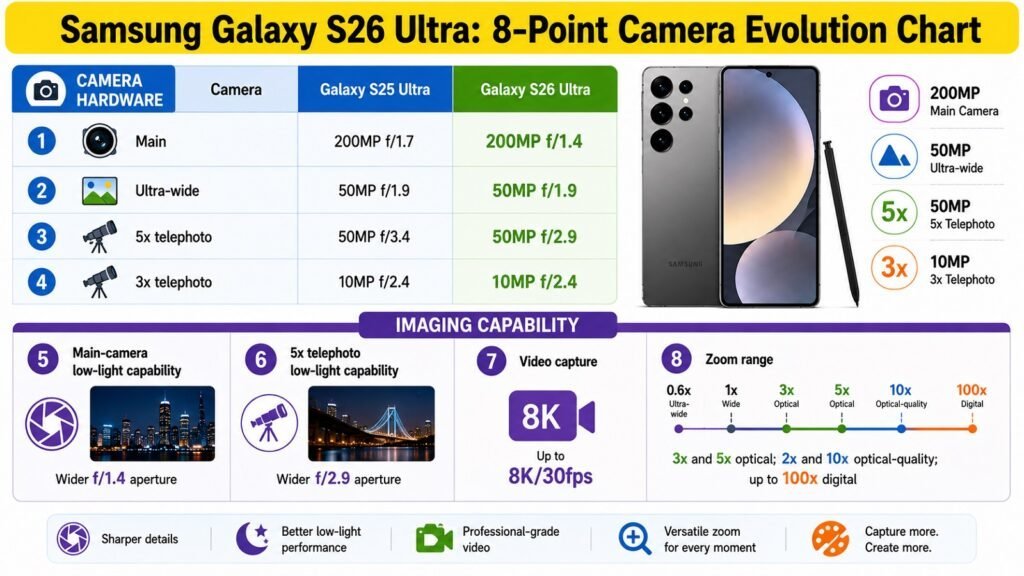
| 📷 Main Camera | The 200MP sensor with its f/1.4 aperture is a step forward in low-light capability compared to the f/1.7 lens on the S25 Ultra. Detail resolution is extraordinary at full resolution; the default pixel-binned output produces sharp, well-exposed images across a wide range of lighting conditions. Dynamic range handling is among the best in its class. |
| 🌄 Ultrawide & Secondary Cameras | The 50MP ultrawide maintains good consistency with the main sensor in terms of color science. The 3x telephoto adds a useful intermediate zoom range, and the 5x periscope telephoto at 50MP delivers remarkably detailed long-range shots. Switching between cameras mid-scene is seamless, and exposure matching is well-handled. |
| 🌙 Low-Light & Night Photography | Nightography improvements are real and measurable. The wider main aperture captures more light natively, while Samsung’s multi-frame noise reduction produces clean results in challenging conditions. The Horizontal Lock stabilization feature reduces camera shake during night shooting. All four rear cameras produce usable night images. |
| 🤳 Selfie & Portrait Photography | The dedicated ISP on the 12MP front camera makes a visible difference; selfie detail and skin tone rendering are noticeably improved over the S25 Ultra. Portrait separation is natural and consistent. Front-camera video at 4K 60fps is smooth and well-stabilized for video calls and content creation. |
| 🎥 Video Recording | 8K video recording at up to 30fps is available for maximum detail capture. 4K at 120fps enables smooth slow-motion. Optical image stabilization across multiple lenses and the Horizontal Lock feature result in steady footage. Audio capture from the microphone array is clear and directional in calm environments. |
| 🎬 Video & Streaming Experience | The 6.9-inch Dynamic LTPO AMOLED 2X display with 2600-nit peak brightness and HDR10+ certification makes streaming visually exceptional. Wide color gamut and deep black levels suit HDR content from Netflix and YouTube. The flat panel avoids color distortion at viewing angles that curved displays introduce. |
| 🔊 Speakers & Audio Quality | The stereo speaker configuration produces clear, well-balanced sound with decent spatial separation. Dolby Atmos processing adds width and depth to compatible content. Loudness is strong and suits outdoor use without noticeable distortion at high volumes. |
| 🎧 Headphones & Wireless Audio | No 3.5mm headphone jack; USB-C audio output works with compatible wired headphones using an adapter. Bluetooth 6.0 supports aptX, LDAC, and other high-quality audio codecs. Latency is low and connection stability is excellent, particularly with Samsung Galaxy Buds. |
| 🎮 Gaming & Media Immersion | The 120Hz display, precise touch response, and Adreno 840 GPU create an immersive gaming experience. Haptic feedback quality has been refined in One UI 8.5. The vapor chamber manages heat effectively during long sessions, sustaining performance without the throttling that affected some earlier flagship chipsets. |
| ⭐ Overall Camera & Media Verdict | The S26 Ultra delivers one of the strongest camera systems available on any smartphone in 2026. The combination of a wide-aperture main sensor, versatile telephoto options, and improved night shooting capability serves both casual and professional use cases well. The display and speaker system make it an exceptional media consumption device alongside its photographic strengths. |
8. Samsung Galaxy S26 Ultra: Prospective Ownership: Strengths, Limitations, and Value
Credit: iken3
Samsung Galaxy S26 Ultra – Long-Term Ownership Assessment
| 📌 Ownership Factor | 📝 Long-Term Assessment |
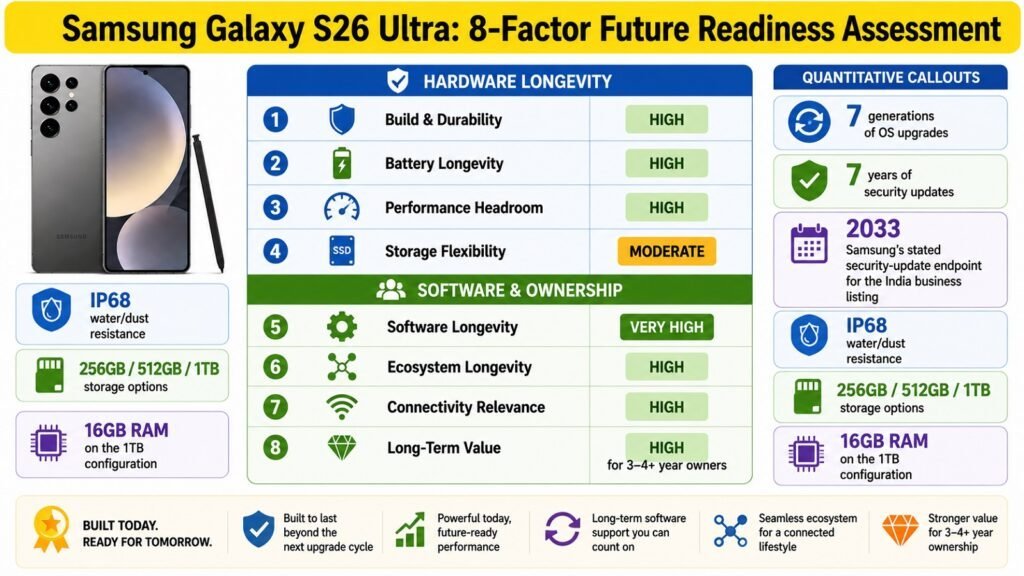
| 🛡️ Build Quality & Durability | IP68 water and dust resistance provides genuine protection for daily use in rain or near water. Gorilla Armor 2 on the front glass and Gorilla Glass Victus 2 on the rear offer meaningful drop resistance. The Armor Aluminum frame is durable in everyday conditions, though less prestigious than titanium. Build quality overall is excellent. |
| 🔄 Software Longevity | Seven years of guaranteed OS and security updates is the best software commitment in the Android market. The S26 Ultra will receive OS upgrades through approximately 2033. It ensures competitive features and security long after most Android rivals have been abandoned. Monthly patches have been consistent since launch. |
| 🔋 Battery Longevity | Adaptive charging and the optional 85% charge limit protect battery health over the long term. Li-ion cells still degrade over charge cycles regardless of protection features, but Samsung’s implementation is among the most thoughtful available. Users who avoid overnight charging to 100% should see better capacity retention after two or three years. |
| 💾 Storage & Future Needs | 256GB will suit most users in the short term, but app sizes and media libraries grow over time. The 512GB option provides comfortable headroom. The 1TB configuration with 16GB RAM is the clear choice for content creators and power users who cannot rely on cloud storage. No expandable storage makes the initial choice permanent. |
| ⚙️ Performance Longevity | The Snapdragon 8 Elite Gen 5 is more than powerful enough for any current workload, and its headroom suggests it will remain fast and capable for at least four to five years. The 12GB RAM in base configurations is adequate for current Android, though the 16GB variant provides better future-proofing. Thermal management improvements reduce performance throttling under sustained load. |
| 🔗 Ecosystem & Accessory Longevity | Samsung’s Galaxy ecosystem continues to expand with new wearables, laptops, and smart home products. USB-C is the universal standard and ensures long-term accessory compatibility. One UI remains actively developed, and Samsung’s cross-device integration with Windows and Google services strengthens over time. |
| 💰 Value & Price Competitiveness | At $1,299.99 starting, the S26 Ultra commands a premium that requires justification. The seven-year update commitment, best-in-class chipset, versatile camera system, and Privacy Display feature collectively provide a compelling argument. Buyers who keep phones for three or more years will find the per-year cost increasingly reasonable compared to annual upgrades. |
| ⭐ Long-Term Ownership Verdict | The Samsung Galaxy S26 Ultra is an excellent long-term investment for users who will genuinely use its capabilities. The combination of cutting-edge hardware, a seven-year update commitment, and a growing ecosystem makes it one of the strongest choices for four-year ownership in 2026. Users who upgrade annually may not extract full value. |
Conclusion: Samsung Galaxy S26 Ultra – Is This Ultimate Flagship Worth It?
Credit: iken3
The Samsung Galaxy S26 Ultra delivers at the highest level across performance, display, camera, battery, and software. The Snapdragon 8 Elite Gen 5, a 6.9-inch 2600-nit AMOLED panel, a wide-aperture four-camera system, faster 60W wired charging, and a seven-year update commitment combine to make a compelling case for the asking price. No single weakness undermines the overall experience.
Mobile photographers, content creators, business professionals, and power users will extract the greatest value from this phone. The S Pen remains a genuine differentiator. Casual users who primarily browse, stream, and message will find the hardware exceeds their needs, and the price hard to justify against more affordable alternatives.
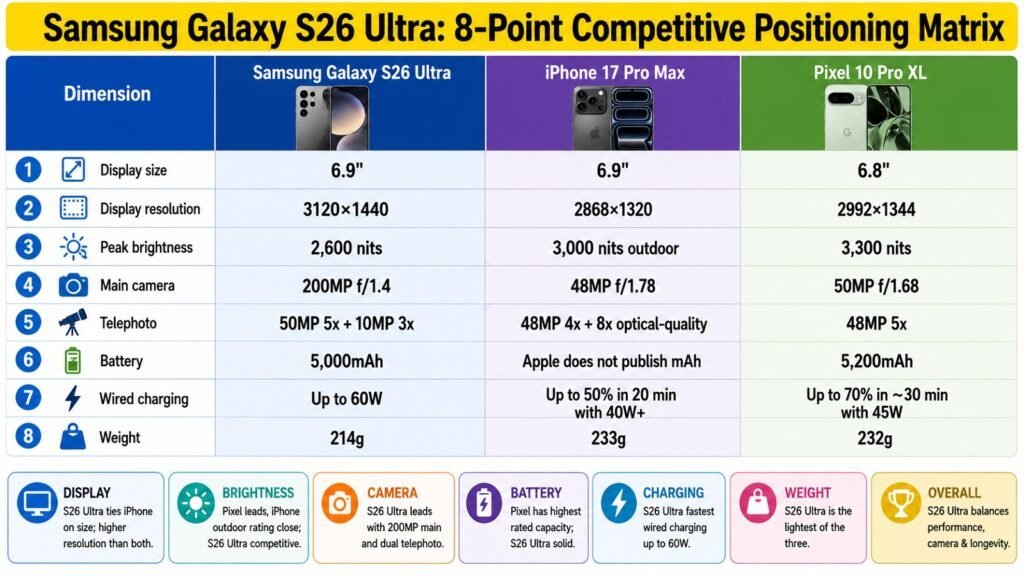
Should you buy the Samsung Galaxy S26 Ultra? If you are upgrading from anything older than the Galaxy S25 Ultra, the answer is yes. The hardware gains, charging improvements, and camera upgrades are substantial. If you own an S25 Ultra, the upgrade case is narrower. The missing charger and Armor Aluminum frame are trade-offs worth acknowledging. Against the iPhone 17 Pro Max and Pixel 10 Pro XL, the S26 Ultra competes strongly. For the right buyer, it is the best Android smartphone available in 2026.