Table of Contents
Introduction — Virtualization in Cloud Computing
Physical computing resources have always imposed a fundamental constraint: every server, storage system, or network device is a fixed unit of capacity that can only be fully leveraged if it is continuously and efficiently used. In practice, that rarely happened. Organizations dedicated individual physical servers to specific applications or workloads, and those servers frequently sat underutilized while demand fluctuated. The result was wasted infrastructure, inflexible provisioning, and a direct tie between every service and the physical hardware supporting it. Virtualization emerged as a systematic answer to this structural problem.
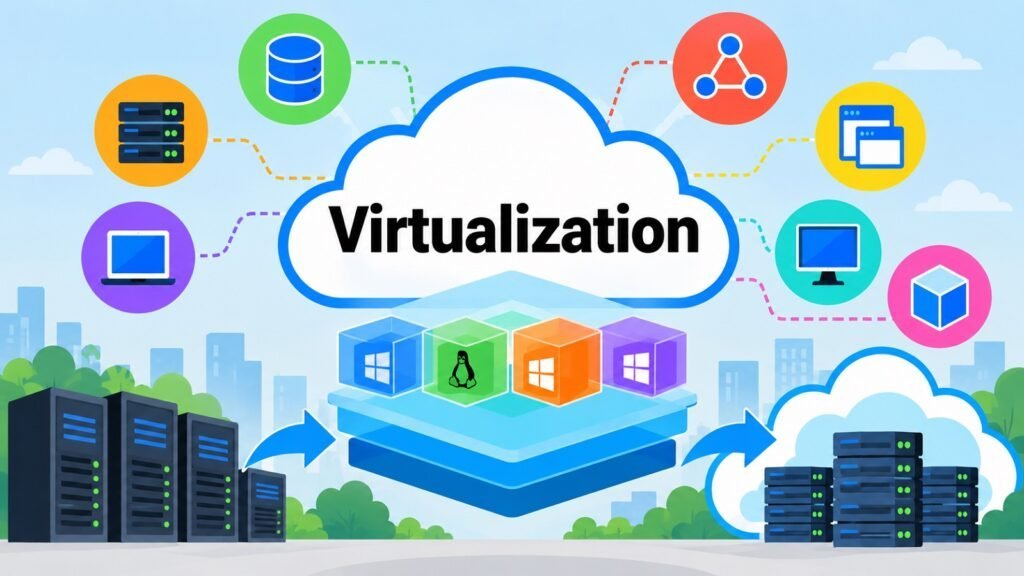
At its core, Virtualization creates an abstraction layer between physical computing infrastructure and the logical resources that applications, operating systems, and users actually consume. Instead of exposing raw hardware directly, it presents virtual resources that are decoupled from the physical layer underneath. This separation makes it possible to share, partition, isolate, and reallocate physical resources far more flexibly, without requiring each workload to own dedicated hardware. The result is better utilization, simplified management, and the ability to create multiple independent logical environments on top of shared physical infrastructure.
Virtualization and Cloud Computing are related but distinct. Cloud Computing is a model for delivering computing services, and it relies on multiple underlying technologies, of which Virtualization is one of the most important. Without it, the resource pooling, multi-tenancy, rapid provisioning, and infrastructure flexibility that define cloud environments would be far more difficult to achieve at scale. Understanding this is therefore essential to understanding how modern cloud infrastructure actually functions beneath the service layers that users interact with.
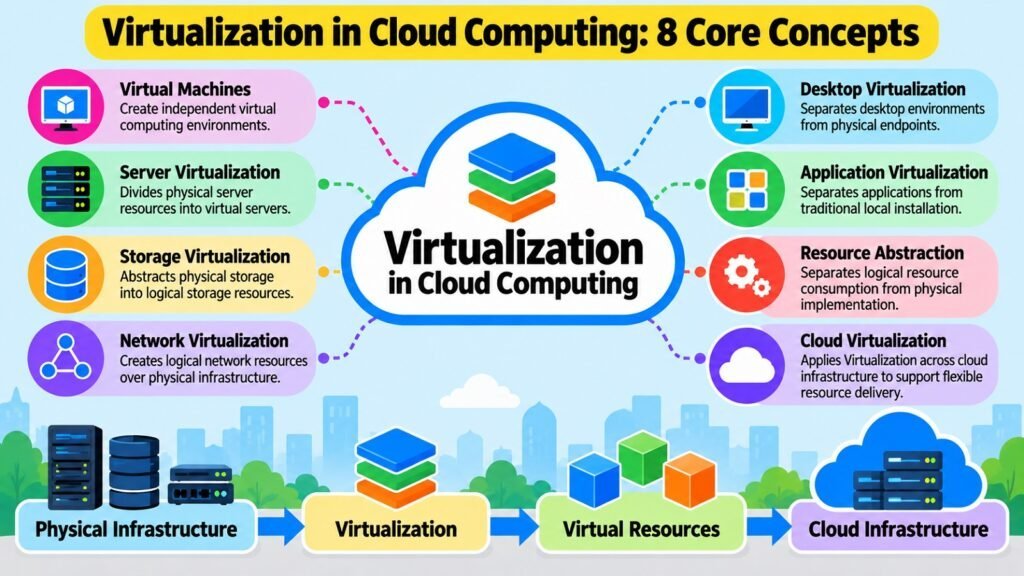
This article examines eight core Virtualization concepts that are central to Cloud Computing. Each section addresses a distinct dimension of the subject, and together they build a comprehensive picture of how it works, why it matters, and how it supports the cloud environments that organizations depend on today.
Table 1: Roadmap of Eight Core Concepts
| Concept | Core Contribution |
| Virtual Machines | Create isolated logical computing environments on shared physical hardware |
| Server Virtualization | Partition physical servers into multiple independent virtual server instances |
| Storage Virtualization | Abstract physical storage into logical pools for flexible allocation |
| Network Virtualization | Separate logical network configurations from physical networking hardware |
| Desktop Virtualization | Centrally manage and deliver desktop environments to remote client devices |
| Application Virtualization | Deliver and isolate applications without full local installation |
| Resource Abstraction | Unify the conceptual foundation connecting all forms of Virtualization |
| Cloud Virtualization | Integrate abstract capabilities across cloud infrastructure layers |
1. Virtualization and Virtual Machines
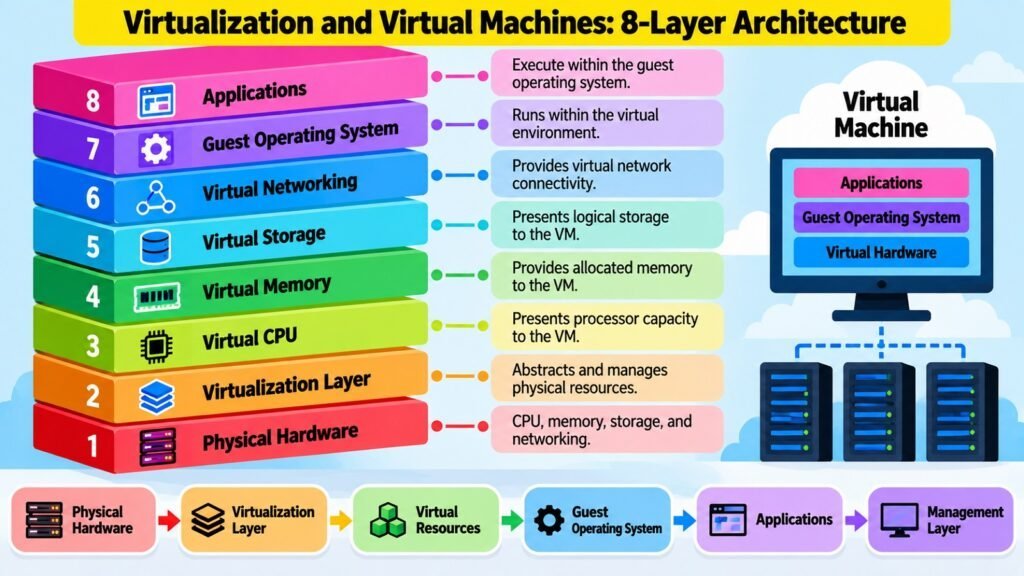
A virtual machine, commonly called a VM, is one of the most visible and widely used expressions of Virtualization in Cloud Computing. To understand what a VM is and why it matters, it helps to start with the problem it addresses. Traditional computing tied every workload directly to physical hardware. Each server ran one operating system, and that operating system owned the hardware completely. If the workload was light, the hardware sat idle. If the workload changed, the hardware had to change too. This model was rigid, costly, and difficult to scale efficiently.
Virtualization breaks this rigid relationship. Instead of each operating system owning the physical hardware, it introduces an abstraction layer that manages the hardware on behalf of multiple independent computing environments. Each of those environments is a VM. A VM behaves like a complete, self-contained computer. It has a virtual CPU, virtual memory, virtual storage, and virtual network interfaces, all of which are presented to the guest operating system running inside the VM as if they were real, physical resources. From the guest OS perspective, it has its own dedicated machine. From the physical server perspective, it is sharing hardware with other VMs.
This architecture creates several important properties. Isolation means one VM cannot directly access the memory or processes of another VM on the same host, which is essential for security and stability. Portability means a VM can often be moved between physical hosts, since its computing environment is defined in software rather than hardwired to specific hardware components.
Workload consolidation means multiple independent systems can run on a single physical machine, improving hardware utilization. Provisioning becomes faster because a new computing environment can be created by deploying a VM rather than acquiring and configuring new hardware. A hypervisor, which is the software layer responsible for creating and managing VMs, is the enabling component, though its detailed architecture belongs in a dedicated discussion.
Cloud providers depend heavily on VMs precisely because they enable infrastructure to be offered as a flexible, on-demand service. When a customer requests compute capacity, the provider delivers a VM rather than a physical server, which allows the same physical infrastructure to serve many customers simultaneously. Resource contention is a genuine trade-off: when physical hosts run many VMs, competition for CPU cycles, memory bandwidth, and I/O can affect performance. Management complexity also grows with scale. A large VM environment requires careful planning around resource allocation, live migration, high availability, and lifecycle management. Virtualization does not eliminate physical infrastructure; it changes how that infrastructure is accessed, shared, and managed.
Table 2: Virtual Machines — Key Characteristics
| Characteristic | Description |
| Guest OS isolation | Each VM runs its own OS independently of other VMs on the same host |
| Virtual CPU (vCPU) | Logical processor assigned to a VM, mapped to physical CPU cores by the hypervisor |
| Virtual memory | Memory space allocated to a VM, isolated from memory spaces of co-hosted VMs |
| Virtual storage | Storage presented to a VM as a local disk, typically backed by physical or networked storage |
| Portability | VMs can be migrated between physical hosts without reconfiguring the guest environment |
| Workload consolidation | Multiple VMs share one physical host, improving hardware utilization |
| Resource contention | Competing VMs on the same host may compete for CPU, memory, or I/O bandwidth |
| Provisioning speed | New VMs can be created in minutes, far faster than deploying physical servers |
2. Server Virtualization
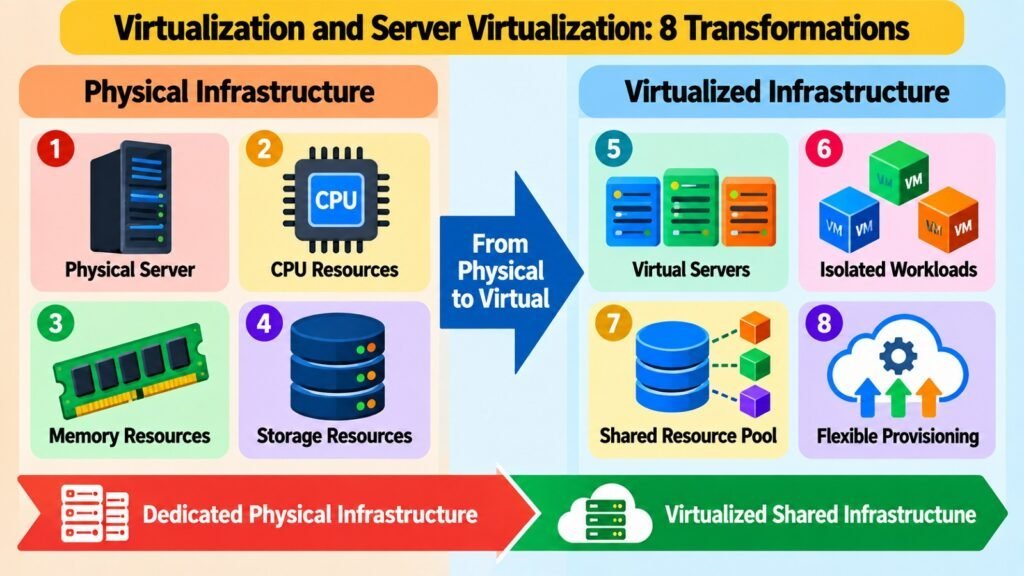
Server Virtualization is the application of principles specifically to physical server infrastructure. To appreciate its significance, consider how organizations managed compute workloads before abstraction became widespread. A typical data center contained dozens or hundreds of physical servers, each dedicated to a specific application or service. Servers running databases, web applications, email systems, and directory services each had their own hardware. Utilization rates for those servers were frequently low, often ranging from 5% to 15% of available capacity, because workloads were sized to handle peak demand rather than average load. The economics were poor, and the physical footprint was large.
Server Virtualization changes this model fundamentally. Instead of dedicating a physical server to a single workload, Virtualization allows a single physical server to host multiple virtual server environments simultaneously. Each virtual server operates independently, with its own operating system, applications, network identity, and allocated resources. The physical host provides the underlying CPU, memory, storage, and network connectivity, and the abstraction layer manages how those resources are distributed across the virtual servers running on top of it.
The key distinction from simply running multiple applications on one operating system is architectural independence. When multiple applications share a single OS, they also share system libraries, kernel resources, and failure domains. If the OS fails or is compromised, every application is affected. Virtual server environments, by contrast, are isolated at the operating system level. Each has its own kernel, its own process space, and its own configuration, so faults and changes in one virtual server do not propagate directly to others on the same host.
Server Virtualization directly enables Cloud Computing resource pooling. Rather than assigning customers dedicated physical hardware, cloud providers run pools of physical servers and allocate virtual server capacity dynamically based on demand. This allows the same physical infrastructure to serve many customers efficiently, with resources reassigned as workloads grow or shrink. Trade-offs include virtualization overhead, resource contention between co-located virtual servers, and the challenge of managing large numbers of virtual environments. When a physical host fails, all VMs running on it are affected, which makes high-availability planning an important operational concern in virtualized server environments.
Table 3: Server Virtualization — Key Characteristics
| Characteristic | Description |
| Physical host | The underlying server hardware providing CPU, memory, storage, and networking |
| Virtual server | An isolated server environment running its own OS on top of the physical host |
| OS-level isolation | Each virtual server has its own kernel and process space, independent of co-hosted VMs |
| Resource allocation | CPU, memory, and I/O are divided among virtual servers by the Virtualization layer |
| Workload consolidation | Multiple server workloads share one physical host, improving infrastructure utilization |
| Failure domain | A physical host failure affects all virtual servers running on it simultaneously |
| Provisioning flexibility | Virtual servers can be created, resized, or decommissioned without touching physical hardware |
| Resource contention | Co-located virtual servers can compete for shared physical resources under load |
3. Storage Virtualization
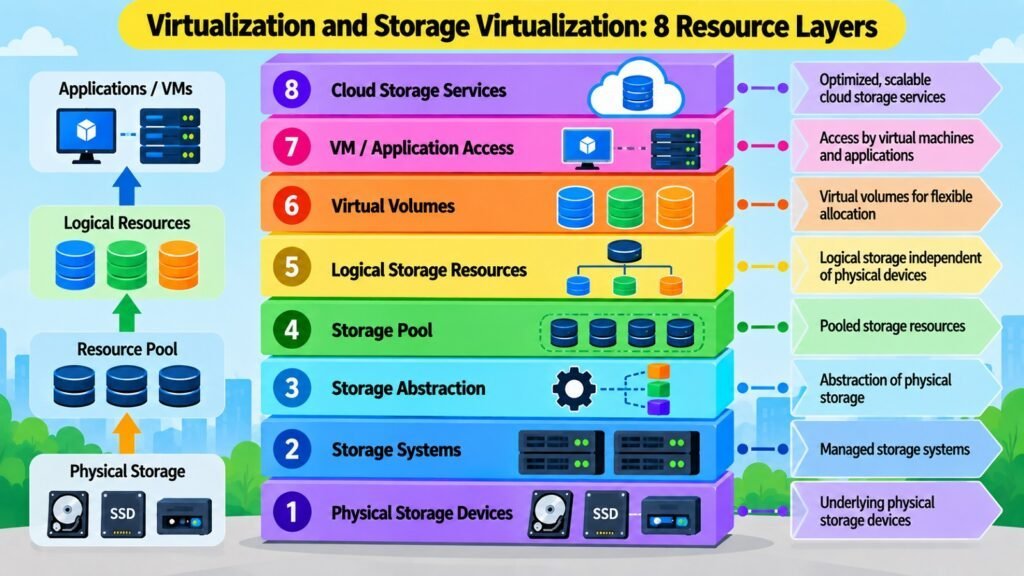
Storage Virtualization applies the same abstraction logic that Virtualization brings to computing and servers to physical storage infrastructure. Physical storage devices — hard drives, solid-state drives, storage arrays — have definite physical boundaries. Each device has a fixed capacity, specific performance characteristics, and its own management interface. When applications and servers interact with storage directly at the physical level, they become dependent on the specific characteristics and location of each physical device. Moving data, expanding capacity, or balancing load across devices requires careful coordination and can be operationally complex.
Storage Virtualization creates a layer of abstraction between physical storage devices and the servers or applications that consume storage capacity. Instead of presenting the physical characteristics of individual drives or arrays, the abstraction layer presents logical storage volumes or pools. An application sees a logical storage unit of a certain size and requests read and write operations against it. The abstraction layer determines which physical storage devices actually fulfill those operations. From the application perspective, the physical storage topology is hidden.
This abstraction enables storage pooling, where capacity from multiple different physical storage devices or systems is aggregated into a common pool that can be allocated logically. An organization might draw capacity from several storage arrays from different vendors, present them as a single pool, and allocate logical volumes to different servers or applications without each consumer needing to know the underlying physical source. Centralized management becomes more practical because administrators can manage storage policy, capacity, and allocation at the logical level rather than managing each physical device individually.
In Cloud Computing, Storage Virtualization is important because it allows storage to be offered as a scalable, flexible resource rather than as fixed physical units. Cloud storage services abstract the physical details of disk systems completely, presenting capacity on demand through consistent interfaces. The trade-offs are real. Adding an abstraction layer introduces additional complexity and can create performance overhead depending on how the abstraction is implemented. Availability of logical storage volumes depends not just on the health of the underlying devices but also on the health of the abstraction layer itself, creating an additional dependency that must be designed for carefully in production environments.
Table 4: Storage Virtualization — Key Characteristics
| Characteristic | Description |
| Storage abstraction | Physical storage devices are hidden behind a logical storage layer |
| Storage pooling | Capacity from multiple physical devices is aggregated into a shared logical pool |
| Logical volume | A storage unit presented to a server or application, decoupled from physical device boundaries |
| Centralized management | Storage allocation, policy, and capacity are managed at the logical rather than device level |
| Multi-device support | Virtualization can span storage from different vendors or device types in one logical pool |
| Performance layer | The Virtualization layer can introduce overhead that affects read/write latency |
| Scalability | Logical storage capacity can be expanded by adding physical devices to the pool without reconfiguring consumers |
| Availability dependency | Logical storage depends on both physical device health and the health of the Virtualization layer |
4. Network Virtualization
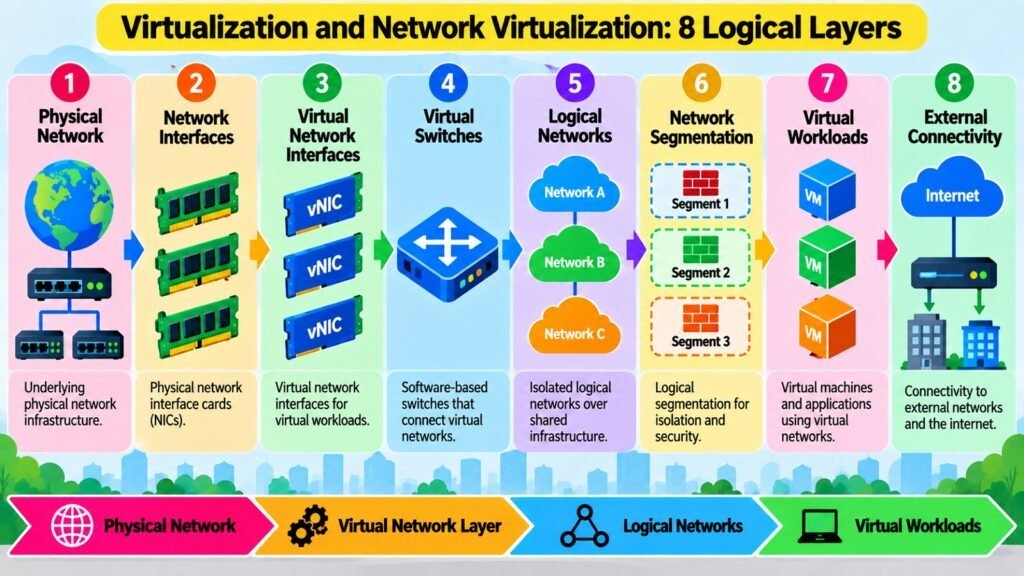
Network Virtualization extends the abstraction principle of Virtualization to networking infrastructure. A physical network is a collection of hardware — switches, routers, cables, and network interface cards — each with fixed physical connections and configurations. In traditional environments, network configuration was tied closely to this physical hardware. Changing network topology, creating new segments, or adjusting routing policies often required physical reconfiguration or careful coordination across hardware devices. As infrastructure moved toward virtualized computing environments, this rigidity created a mismatch: virtual machines could be created in minutes, but the network environments they depended on remained tied to physical hardware configuration timescales.
Network Virtualization addresses this by decoupling logical network configurations from the physical hardware that carries the traffic. A logical network — with its own addressing, routing, segmentation, and policies — can be created, modified, and removed through software without physically reconfiguring the underlying network hardware. Multiple logical networks can operate over the same physical infrastructure simultaneously, each maintaining its own configuration and isolation properties. Virtual network interfaces, virtual switches, and logical network segments are central components of this architecture.
In Cloud Computing, Network Virtualization is what makes multi-tenancy practical at the network level. Different customers can maintain logically isolated network environments on the same physical cloud infrastructure. Their traffic is separated, their addressing is independent, and their network policies are enforced at the logical level, even though the underlying physical hardware is shared. This isolation is essential for both security and operational independence between tenants. Software-Defined Networking, or SDN, is a related approach that programmatically controls network configuration, and it shares conceptual ground with Network Virtualization, though the two are not identical: SDN is a broader architectural model, while Network Virtualization focuses specifically on abstraction and the creation of logical network environments.
The practical benefits of Network Virtualization include the ability to provision network environments rapidly, reconfigure them through software, and manage complex multi-tenant environments more consistently. The trade-offs involve complexity in the Virtualization layer itself. Troubleshooting a problem that spans logical and physical layers can be more challenging than troubleshooting a purely physical network. Security boundaries that exist logically must be implemented correctly, because a misconfiguration at the Virtualization layer can undermine the isolation that tenants depend on.
Table 5: Network Virtualization — Key Concepts
| Concept | Description |
| Logical network | A software-defined network environment decoupled from physical network hardware |
| Virtual network interface | A software-represented network adapter assigned to a VM or logical environment |
| Virtual switch | Software-based switching component managing traffic between VMs or logical network segments |
| Network segmentation | Logical separation of network traffic between tenants or environments on shared hardware |
| Multi-tenancy | Multiple customers operating independent logical networks on shared physical infrastructure |
| SDN relationship | SDN is a broader programmatic control model; Network Virtualization focuses on logical abstraction |
| Provisioning speed | Logical networks can be created or modified through software in minutes |
| Isolation dependency | Logical isolation relies on correct implementation at the Virtualization layer; misconfiguration is a risk |
5. Desktop Virtualization
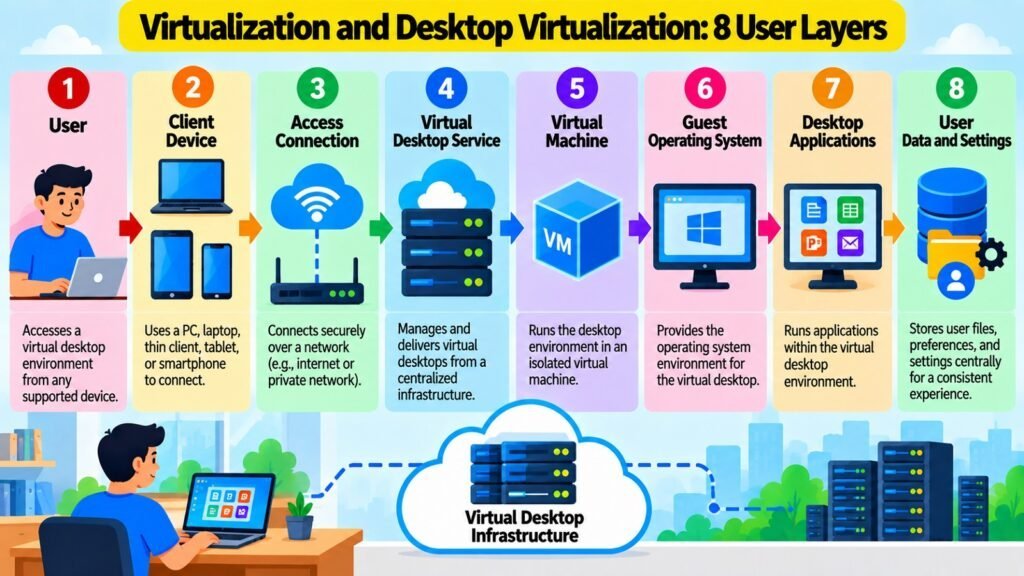
Desktop Virtualization applies Virtualization to user computing environments by separating the desktop environment itself from the physical device used to access it. In a traditional computing arrangement, a user has a desktop or laptop computer that runs an operating system, stores files locally, and hosts the applications the user needs. Everything is tightly coupled to the physical endpoint. If the device fails, the user loses access to their environment until the device is repaired or replaced. Maintaining hundreds or thousands of such endpoints requires significant administrative overhead, particularly for software updates, security patching, and configuration management.
Desktop Virtualization moves the desktop environment — the operating system, applications, user data, and settings — off the endpoint and onto centrally managed computing infrastructure. The user accesses this virtual desktop through a client device, which may be a thin client, a standard computer, or another supported endpoint, using a remote display protocol that transmits the visual output of the desktop session to the user. The actual computing happens on the centralized infrastructure rather than on the endpoint itself.
This separation creates meaningful administrative advantages. Instead of managing hundreds of individual endpoint configurations, administrators manage a smaller number of centralized desktop images or templates and push changes to all users simultaneously. Provisioning a new user environment is a matter of creating a new virtual desktop instance rather than configuring a new physical machine. The endpoint itself becomes a simpler device whose primary job is to establish a connection to the centralized environment, which reduces the hardware and software requirements at the edge.
Desktop Virtualization differs from traditional Remote Desktop access, which typically provides access to a shared server environment rather than a dedicated, personalized desktop. Cloud-hosted desktop environments extend this model further by running the virtual desktop infrastructure on cloud rather than on-premises servers. The trade-offs are significant, however. User experience quality depends heavily on network latency and bandwidth, because the visual output of every user interaction must be transmitted in real time. Applications with high graphic demands may perform poorly through remote display protocols. Licensing, infrastructure costs, and management complexity can also be substantial considerations when deploying Desktop Virtualization at scale.
Table 6: Desktop Virtualization — Key Characteristics
| Characteristic | Description |
| Virtual desktop | A desktop environment (OS, apps, settings) hosted on central infrastructure, not on the endpoint |
| Remote display protocol | Technology transmitting the desktop visual output to the client device over a network |
| Endpoint simplification | Client devices need only support the remote connection, reducing local hardware requirements |
| Centralized management | Desktop images and updates are managed on central infrastructure rather than on each device |
| Provisioning flexibility | New virtual desktops can be created quickly without configuring physical endpoint hardware |
| Network dependency | User experience quality depends directly on the latency and bandwidth of the network connection |
| Cloud-hosted desktops | Virtual desktop infrastructure can run on cloud platforms rather than on-premises servers |
| Difference from RDS | Desktop Virtualization provides dedicated personal environments; Remote Desktop shares server sessions |
6. Application Virtualization
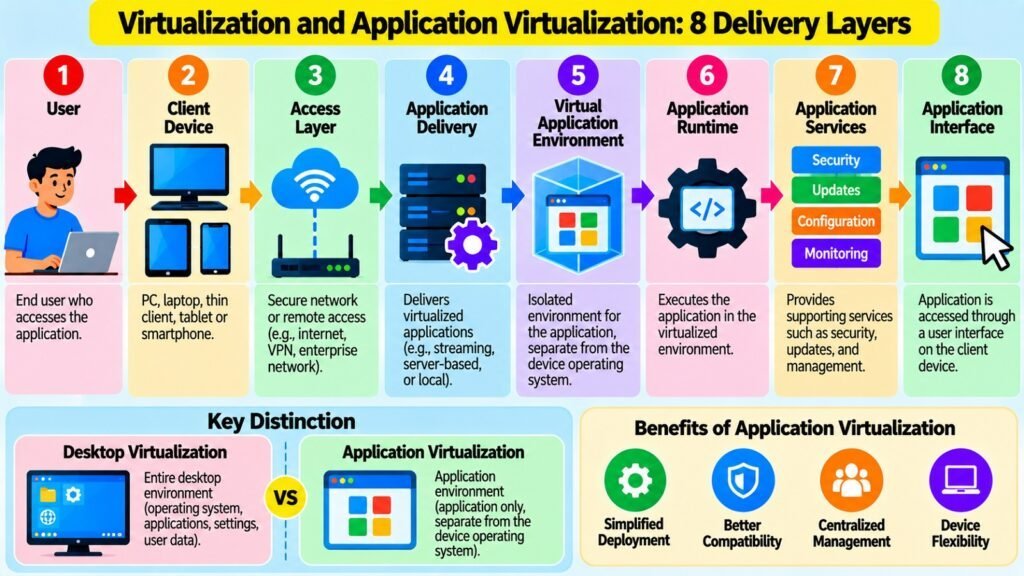
Application Virtualization is a form of Virtualization that separates an application from the requirement to be fully installed and integrated with the local operating system of the device running it. When an application is installed traditionally, it writes files to the local file system, registers entries in the OS configuration, and may install system libraries or drivers that other applications share. This tight integration between application and local OS creates dependency chains that can cause conflicts, make uninstallation incomplete, and complicate the deployment of multiple application versions on the same system.
Application Virtualization changes this by encapsulating an application and its dependencies into a self-contained package that can be executed without placing all of its components directly into the local OS environment. The application runs within a managed execution layer that intercepts its calls to the file system, registry, or OS services and redirects them to its own isolated environment. From the application perspective, it sees the resources it expects. From the local OS perspective, the application has a much lighter presence, with fewer permanent changes to the system state.
This architecture has practical consequences. Applications that would normally conflict when installed on the same machine simultaneously can be run side by side because each operates in its own isolated execution environment. Deploying a new application version does not require uninstalling the previous one if isolation is maintained properly. For centralized IT environments, the ability to deliver a packaged application to a user session on demand, without requiring a per-device installation, simplifies management significantly. Application Virtualization also reduces the risk of an application leaving behind unwanted residue after it is no longer needed.
In Cloud Computing, Application Virtualization connects to the broader model of delivering computing capabilities as a service rather than as locally installed software. Applications can be packaged, managed centrally, and delivered to user sessions running on cloud infrastructure. The limitations are real. Not all applications respond well to virtualized execution environments, particularly those that interact deeply with hardware, require kernel-level access, or depend on services that the execution layer cannot intercept reliably. Performance overhead from the isolation layer can affect latency-sensitive applications, and managing large libraries of virtualized applications requires mature tooling and operational processes.
Table 7: Application Virtualization — Key Distinctions
| Aspect | Description |
| Traditional installation | Application integrates fully with the local OS, writing files, registry entries, and shared libraries |
| Virtualized application | Application runs in an isolated execution layer with intercepted OS calls, minimal local footprint |
| Dependency isolation | Each virtualized application manages its own dependencies, reducing conflicts between applications |
| Side-by-side versions | Multiple versions of the same application can run simultaneously in separate isolated environments |
| Centralized delivery | Applications are packaged and delivered on demand without per-device installation |
| Compatibility limits | Applications requiring kernel-level access or hardware interaction may not virtualize reliably |
| Performance overhead | The execution isolation layer adds a processing overhead that can affect latency-sensitive applications |
| Cloud integration | Virtualized applications can be delivered through cloud-based infrastructure rather than local endpoints |
7. Resource Abstraction
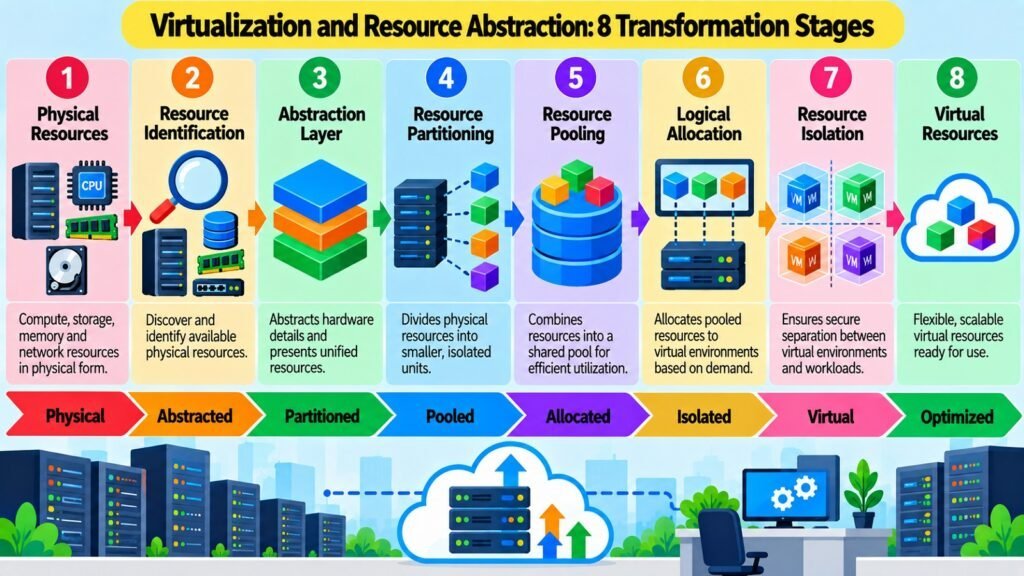
Every form of Virtualization discussed in this article shares a common conceptual mechanism: it separates the logical representation of a resource from its physical implementation. This mechanism is Resource Abstraction, and understanding it as a unifying principle helps make sense of why Virtualization takes so many different forms. Resource Abstraction is not simply a technique for hiding complexity. It is a deliberate engineering approach for controlling how resources are represented, allocated, shared, and consumed, independent of the physical topology that ultimately provides them.
At the infrastructure level, Resource Abstraction works across every major computing dimension. CPU resources can be partitioned and presented as virtual processors without each consumer needing direct knowledge of the physical processor architecture. Memory can be allocated and isolated in virtual address spaces that appear complete and private to their consumers. Storage capacity can be drawn from pooled physical devices and presented as logical volumes that are sized and managed independently of any specific physical medium. Network connectivity can be configured as logical segments that operate over shared physical hardware with defined isolation and addressing properties.
The relationship between abstraction and the other core properties of Virtualization is important. Abstraction enables isolation because the logical boundary created by the abstraction layer prevents consumers from directly interacting with each other at the physical level. Abstraction enables sharing because the same physical resources can serve multiple logical consumers simultaneously. Abstraction enables portability because a logical resource definition is not bound to a particular physical location. Abstraction enables dynamic allocation because logical resources can be resized, moved, or reassigned without modifying the physical infrastructure.
Cloud Computing depends on Resource Abstraction at every layer. The infrastructure-as-a-service model works because compute, storage, and network resources can be presented to cloud customers as logical units that are provisioned on demand, without exposing the physical data center topology behind them. The National Institute of Standards and Technology definition of Cloud Computing identifies resource pooling as one of its essential characteristics, and resource pooling is fundamentally a consequence of effective Resource Abstraction. Without abstraction, the cloud could not deliver infrastructure as a shared, flexible, on-demand service at scale.
Table 8: Resource Abstraction — Key Dimensions
| Dimension | Description |
| Physical-logical separation | Logical resource representations are decoupled from the physical resources that implement them |
| Resource pooling | Physical resources from multiple devices or systems are aggregated and allocated as logical units |
| Isolation | Abstraction boundaries prevent consumers from directly accessing each other at the physical layer |
| Sharing | Multiple logical consumers can draw from the same physical resources simultaneously |
| Portability | Logical resource definitions are not tied to specific physical locations or hardware instances |
| Dynamic allocation | Logical resources can be resized or reassigned without modifying physical infrastructure |
| Consumer transparency | Cloud customers interact with logical resources without visibility into the physical layer |
| Cloud foundation | Resource Abstraction underpins the on-demand, pooled infrastructure delivery model of Cloud Computing |
8. Cloud Virtualization
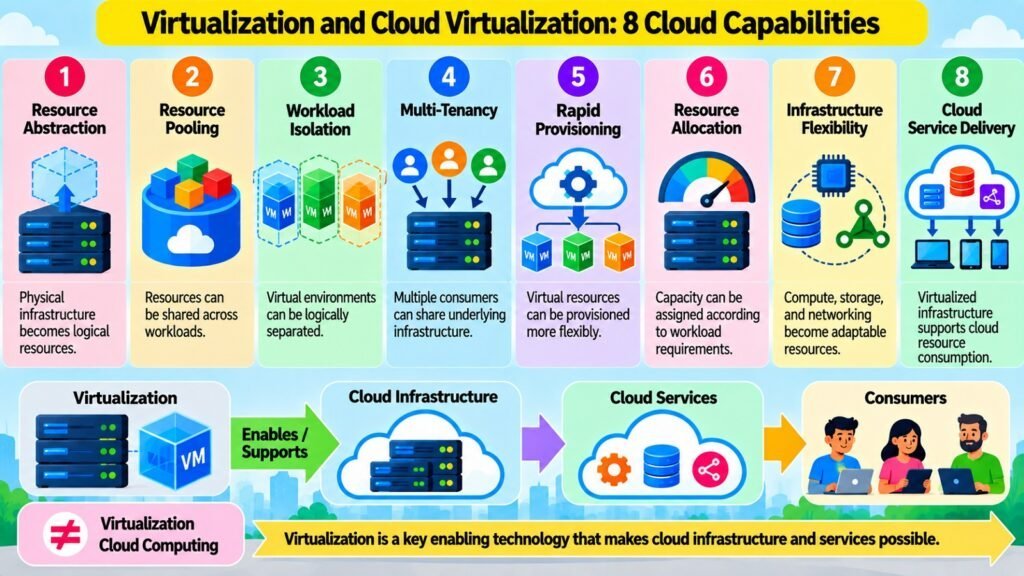
Cloud Virtualization is not a separate technology but rather the integration and application of the Virtualization capabilities examined throughout this article within Cloud Computing infrastructure. When a cloud provider delivers compute, storage, or network resources, those resources are almost universally delivered through virtualized environments rather than through direct physical hardware. Virtual machines provide flexible compute capacity. Server Virtualization allows physical hosts to support many isolated workloads. Storage Virtualization presents pooled logical volumes on demand. Network Virtualization supports isolated multi-tenant environments. Desktop and Application Virtualization extend these capabilities to user-facing services. Together, these layers of Virtualization create the abstracted, flexible infrastructure that Cloud Computing services are built on.
Cloud Virtualization directly supports the core characteristics that define Cloud Computing according to established frameworks such as the NIST cloud definition. Resource pooling is achieved through Virtualization of compute, storage, and network resources. Rapid elasticity — the ability to provision and release resources quickly as demand changes — is possible because virtual resources can be created or destroyed in software without physical hardware changes. Broad network access is supported partly through Network Virtualization, which makes logical connectivity manageable across large, distributed environments. Multi-tenancy, which allows many independent customers to share the same physical infrastructure securely, depends on the isolation properties that Virtualization provides at every layer.
It is important to maintain a clear distinction between Virtualization and Cloud Computing. Virtualization is a technology set, and Cloud Computing is a service delivery model. Cloud Computing involves not just Virtualization but also automation, orchestration, management platforms, APIs, service models (infrastructure, platform, software), metered service delivery, and operational processes. A private data center that uses Virtualization extensively is not automatically a cloud environment. Cloud Computing uses Virtualization as a foundational enabling technology but adds orchestration, self-service interfaces, and economic models that transform virtualized infrastructure into a cloud service.
Virtualization also introduces trade-offs that cloud architects must manage. Shared physical infrastructure means that workloads compete for resources, and poor isolation or over-allocation can cause unpredictable performance. Security in virtualized cloud environments requires careful design, because vulnerabilities in the Virtualization layer can affect multiple tenants simultaneously. Operational complexity increases as the number of virtual environments grows. Despite these challenges, Virtualization remains the practical foundation on which large-scale cloud infrastructure is built, because the alternative — managing physical infrastructure at the same scale and flexibility — would be economically and operationally impractical.
Table 9: Cloud Computing — Eight Enabling Contributions
| Cloud Capability | Contribution |
| Resource pooling | Physical compute, storage, and network are aggregated into shared virtual resource pools |
| Rapid provisioning | Virtual resources are created in software within minutes, without physical hardware changes |
| Multi-tenancy | Isolation at VM, network, and storage layers allows multiple customers to share physical infrastructure |
| Workload flexibility | VMs and virtual resources can be resized, migrated, or decommissioned dynamically |
| Infrastructure abstraction | Cloud customers interact with logical resources without visibility into physical data center topology |
| Elastic scalability | Virtual resource pools can be expanded or contracted as demand changes across customers |
| Service delivery models | Virtualization underpins IaaS by enabling flexible, on-demand compute, storage, and network services |
| Hybrid environments | Consistent Virtualization across on-premises and cloud infrastructure supports workload portability |
Conclusion — Virtualization in Cloud Computing: Key Takeaways
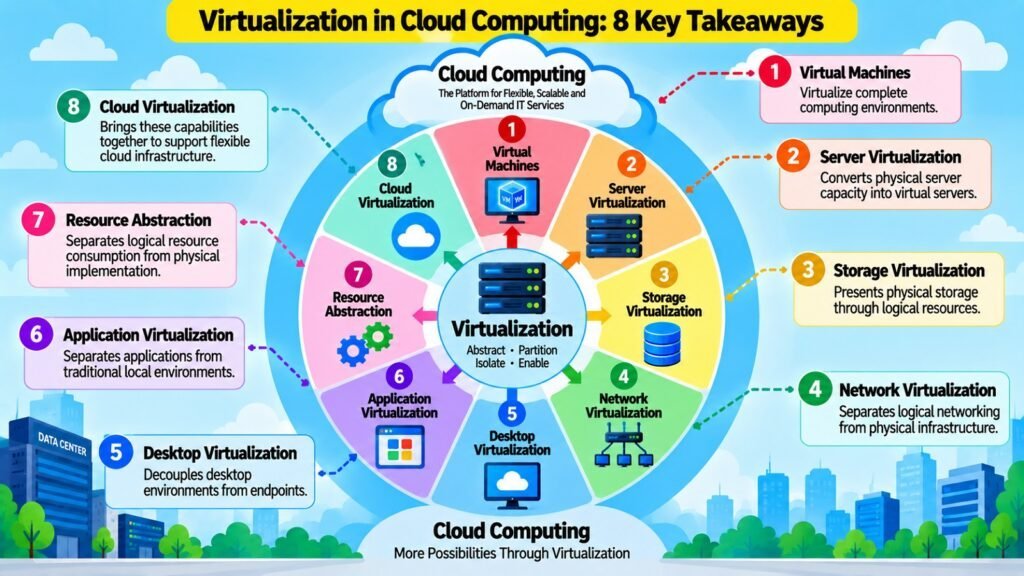
This article has examined Virtualization as one of the most consequential technologies in modern computing infrastructure. The central concept underlying every form of Virtualization discussed here is the same: abstraction separates the logical representation and consumption of computing resources from their physical implementation. This separation makes it possible to share, partition, isolate, pool, and manage resources with a degree of flexibility that direct physical infrastructure cannot match.
Each of the eight concepts contributes a distinct dimension to this picture. Virtual machines create isolated logical computing environments on shared hardware. Server Virtualization transforms how physical server capacity is allocated and consumed. Storage Virtualization abstracts physical storage into manageable logical pools. Network Virtualization enables isolated logical network environments over shared physical infrastructure. Desktop Virtualization centralizes user computing environments away from physical endpoints. Application Virtualization isolates application execution from the local OS. Resource Abstraction provides the unifying theoretical foundation that explains why these different forms of Virtualization are all expressions of the same underlying principle. Cloud Virtualization shows how these capabilities integrate to create the abstracted infrastructure that cloud services depend on.
The distinction between Virtualization and Cloud Computing deserves continued emphasis. Virtualization is a foundational enabling technology, not a synonym for cloud infrastructure. Cloud Computing adds service models, automation, orchestration, APIs, self-service interfaces, and economic structures that transform virtualized resources into on-demand services. Virtualization creates the technical foundation; Cloud Computing builds a service delivery model on top of it.
For practitioners, architects, and students of cloud technology, understanding Virtualization is essential to evaluating infrastructure architecture intelligently. Decisions about workload placement, resource utilization, isolation requirements, scalability, and cost efficiency all rest on a clear understanding of how physical resources are abstracted and shared. This article is designed to serve as both a learning resource and a practical reference for that understanding.
Table 10: Virtualization in Cloud Computing — Quick-Reference Summary
| Concept | Key Contribution to Cloud Infrastructure |
| Virtual Machines | Provide isolated, portable compute environments on shared physical hardware |
| Server Virtualization | Enable multiple independent server workloads to run on a single physical host |
| Storage Virtualization | Abstract physical storage into logical pools for scalable, flexible allocation |
| Network Virtualization | Create isolated logical networks over shared physical networking infrastructure |
| Desktop Virtualization | Centralize and deliver user desktop environments through cloud-hosted infrastructure |
| Application Virtualization | Package and deliver applications without requiring full local OS installation |
| Resource Abstraction | Unify the abstraction mechanism that underpins all forms of Virtualization |
| Cloud Virtualization | Integrate all Virtualization layers to support flexible, multi-tenant cloud services |